
Welcome to Quixotic

What is Quixotic?
Quixotic is a Python library for simple-to-use, low-code quantum computing.
Features
- Easy-to-apply quantum algorithms for a number of combinatorial optimization problems using Quantum Annealing and QAOA.
- Includes out-of-the-box support for various optimization problems like maximum clique and minimum vertex cover.
- Supports custom problem formulations as QUBOs.
- Simple-to-use execution of algorithms using both local simulation on your laptop and managed quantum computers on Amazon Braket or the D-Wave LEAP service.
- Quantum is Optional: serves as a general-purpose optimization library allowing you to solve problems on your laptop using simulated annealing and exact solvers
Install
pip install -U pippip install quixotic
NOTE: Python version >= 3.7 is required.
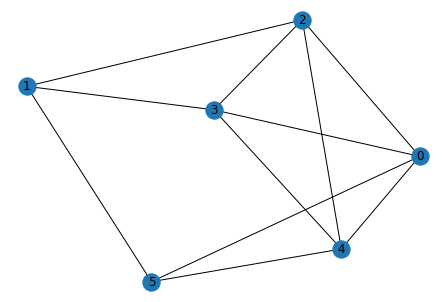
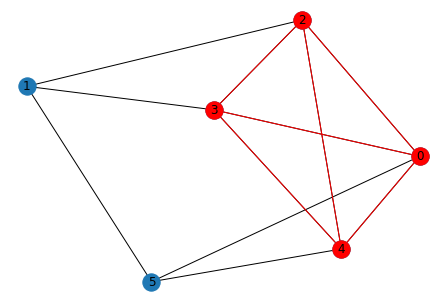
Usage Example: Find Maximum Clique in a Graph
# construct or load your input graph
import networkx as nx
seed = 1967
g = nx.erdos_renyi_graph(6, p=0.5, seed=seed)
positions = nx.spring_layout(g, seed=seed)
nx.draw(g, with_labels=True, pos=positions)
# approximate a solution using QuantumAnnealer and extract results
from quixotic.core import QuantumAnnealer
qo = QuantumAnnealer(g, task='maximum_clique').execute()
nodes = qo.results()
Executing locally.
# plot nodes comprising the solution
sub = g.subgraph(nodes)
nx.draw(g, pos=positions, with_labels=True)
nx.draw(sub, pos=positions, node_color="r", edge_color="r")
How to Execute on a Quantum Computer:
By default, Quixotic uses a local solver or simulator (e.g., quantum simulator, simulated annealing), which allows you to easily run and test on your CPU-based laptop. To run on an actual managed quantum computer hosted on Amazon Braket, simply set the backend to aws and supply the device_arn and s3_folder parameters. Here is an example of using the QuantumAnnealer on a quantum computer managed by Amazon Braket:
from quixotic.core import QuantumAnnealer
qo = QuantumAnnealer(g, task='maximum_clique',
                     backend='aws',                                               # Amazon AWS as backend
                     device_arn='arn:aws:braket:::device/qpu/d-wave/DW_2000Q_6',  # D-Wave QPU
                     s3_folder = ("amazon-braket-Your-Bucket-Name", "Your-Folder-Name"))
qo.execute()  # executes algorithm on quantum hardware managed by Amazon Braket
solution_nodes = qo.results()
For the QuantumAnnealer, you can alternatively use D-Wave LEAP as a backend by specifying backend='dwave'. However, to use a managed quantum computer, you'll need to first create an account with one of the backend providers using the instructions below:
Setting up an Amazon Braket Account
- Create an AWS account and activate Amazon Braket.
- During the onboarding process in the previous step, you will generate an Amazon Braket bucket of the form
amazon-braket-XXXXXX. Make note of this. - If running Quixotic on your laptop and using a remote quantum device, you'll have to configure and store your AWS credentials locally. If using a managed notebook within Amazon Braket itself, you can skip this step.
- Set
backend='aws'in addition to thedevice_arnands3_folderparameters when executing either theQuantumAnnealeror theQAOAalgorithm, as shown above.
Setting up a D-Wave LEAP Account
The QuantumAnnealer can also use D-Wave LEAP as a backend instead of Amazon Braket, if following the steps below. (LEAP is D-Wave's cloud-based quantum service.)
- Create a LEAP account and make note of the API Token assigned to you.
- After Quixotic is installed, run the command:
dwave config create. Copy and paste your API token when prompted and select defaults for everything else. - When using
QuantumAnnealerin Quixotic, setbackend='dwave'and run the code below to use the default solver:
# Executing on D-Wave quantum backend
from quixotic.core import QuantumAnnealer
solution_nodes = QuantumAnnealer(g, task='maximum_clique', backend='dwave').execute().results()
1 maintainer

Metadata
1 maintainer
Release files for quixotic 0.0.6
For a detailed explanation of source distributions (sdists) and built distributions (wheels), please see the package formats documentation.
Source distribution (sdist)
| File | Size | Uploaded | |
|---|---|---|---|
| quixotic-0.0.6.tar.gz | 18.8 kB | Details |
Release files / quixotic-0.0.6.tar.gz
| Download URL | quixotic-0.0.6.tar.gz |
|---|---|
| Size | 18.8 kB |
| Tags | Source |
|
SHA-256 checksum How to use checksums |
20413c203a656fe635533e2caf3d6d2c8f9f2893a4a43c6ca79467ea7abd6bf3
|
|
BLAKE2b-256 checksum How to use checksums |
bd2f91c6629083edf9e4cad101b36ea20dc3954ce8890b70aea27032da16839f
|
| Upload date | |
|
Uploaded using Trusted Publishing? What is trusted publishing? |
No |
| Uploaded via |
twine/3.1.1 pkginfo/1.4.2 requests/2.22.0 setuptools/45.2.0 requests-toolbelt/0.8.0 tqdm/4.30.0 CPython/3.8.10
|














