



GROW R503 Fingerprint
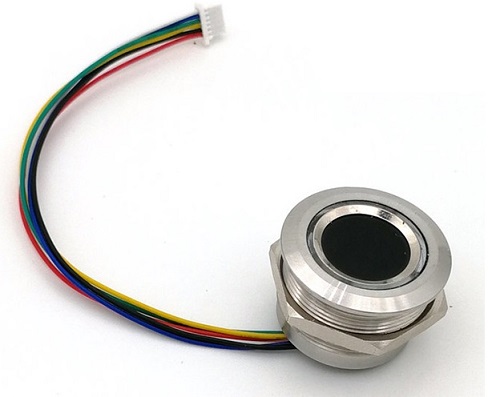
Features
- Written in pure python.
- Provides all the manufacturer specified operations of the module.
- Can be connected with a computer directly with a USB to TTL converter. (Do not need a microcontroller)
- Can be used for testing the functionality of the module or creating direct applications without involving a microcontroller.
Interfacing
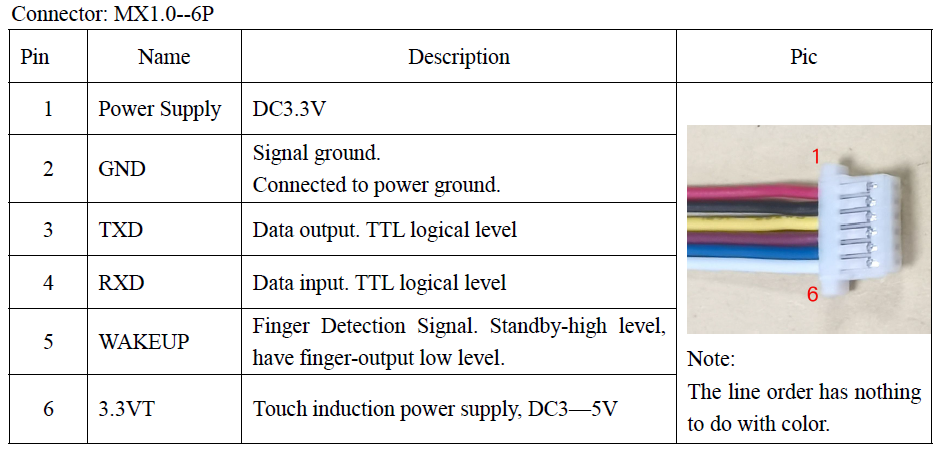
Wiring connections:
| Sensor Side | RS232 Converter |
|---|---|
| Red (power) | 3.3v Power |
| White (touch induction power) | 3.3v power |
| Black (Ground) | Ground (0v) |
| Maroon or Green or Brown (Rx) | Tx |
| Yellow (Tx) | Rx |
| Blue (Wakeup) | Not connected |
-
Make sure to use 3.3v power supply unless you have the 5v version of the sensor.
-
If you use a separate 3.3v power supply other than the RS232 converters power then make sure to connect grounds together (common ground).
-
The line order is according to the colors, even though the note says it's not.
Usb to TTL
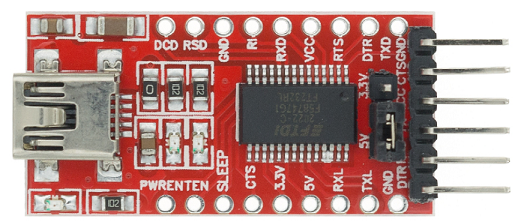
- This module can be used to interface with the module since it provides 5v to 3.3v conversion for both logic level and power.
- However, make sure to switch jumper position to the 3.3v and connect 3.3v power pin of the converter.
Installation
pip install r503on terminal.
or
-
Run
pip install pyserialon terminal. -
Download r503.py file.
Basic usage overview
Registering a fingerprint
from r503 import R503

fp = R503(port=5)
fp.manual_enroll(location=8)
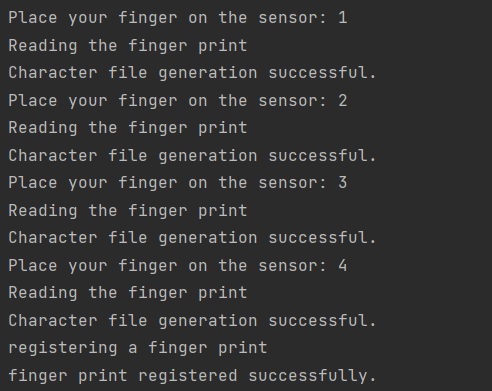
- you have to place the finger 4 (changeable) times on the sensor during the process
Terminal output:
Search a Fingerprint from the stored data
from r503 import R503
from time import sleep

fp = R503(port=5)

print('Place your finger on the sensor..')
sleep(3) # Not required to add this line
print(fp.search())
Terminal output:

- first value = success if 0
- second value = stored location of the memory
- third value = match score
Number of fingerprints in the memory
from r503 import R503

fp = R503(port=5)
print('Num of templates: ', fp.read_valid_template_num())
Terminal output:

Read fingerprint stored locations
from r503 import R503

fp = R503(port=5)
print(fp.read_index_table())
Terminal output:

Aura LED Control
from r503 import R503

fp = R503(port=5)
fp.led_control(ctrl=3, color=5)
Output: LED keeps on with a specific color according to the number
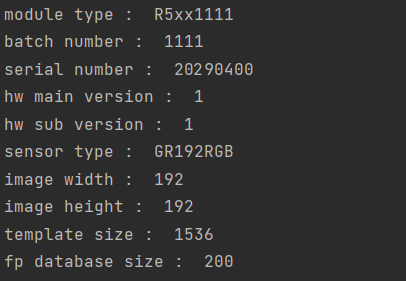
Read Product Information
from r503 import R503

fp = R503(port=5)

for k, v in fp.read_prod_info_decode().items():
    print(k, ': ', v)
Terminal output:
For Linux users: if a permission error occurs while opening the serial port, run the following command:
sudo chmod a+rw /dev/ttyUSB{your device port number}
Etc:
sudo chmod a+rw /dev/ttyUSB0
1 maintainer

Download files
Download the file for your platform. If you're not sure which to choose, learn more about installing packages.
Source Distribution
File details
Details for the file r503-0.0.4.tar.gz.
File metadata
- Download URL: r503-0.0.4.tar.gz
- Upload date:
- Size: 12.7 kB
- Tags: Source
- Uploaded using Trusted Publishing? No
- Uploaded via:
twine/4.0.2 CPython/3.9.7
File hashes
| Algorithm | Hash digest | |
|---|---|---|
| SHA256 |
f3b73b72dfcb52a680afac79d915d9da7b47435cab834d51c6e7f731f081cc8c
|
|
| MD5 |
d3d0d4614cb38b20d2bcebf3abbf2ff1
|
|
| BLAKE2b-256 |
88af038cd5cd9abce6a64019f7f00f920426b28c95ababc2dd5ef8f6ce7bed27
|














