
Radon





Radon is a Python tool that computes various metrics from the source code. Radon can compute:
McCabe’s complexity, i.e. cyclomatic complexity
raw metrics (these include SLOC, comment lines, blank lines, &c.)
Halstead metrics (all of them)
Maintainability Index (the one used in Visual Studio)
Requirements
Radon will run from Python 2.7 to Python 3.8 (except Python versions from 3.0 to 3.3) with a single code base and without the need of tools like 2to3 or six. It can also run on PyPy without any problems (currently PyPy 3.5 v7.3.1 is used in tests).
Radon depends on as few packages as possible. Currently only mando is strictly required (for the CLI interface). colorama is also listed as a dependency but if Radon cannot import it, the output simply will not be colored.
Note: Python 2.6 was supported until version 1.5.0. Starting from version 2.0, it is not supported anymore.
Installation
With Pip:
$ pip install radonIf you want to configure Radon from pyproject.toml and you run Python <3.11, you’ll need the extra toml dependency:
$ pip install radon[toml]Or download the source and run the setup file:
$ python setup.py installUsage
Radon can be used either from the command line or programmatically. Documentation is at https://radon.readthedocs.org/.
Cyclomatic Complexity Example
Quick example:
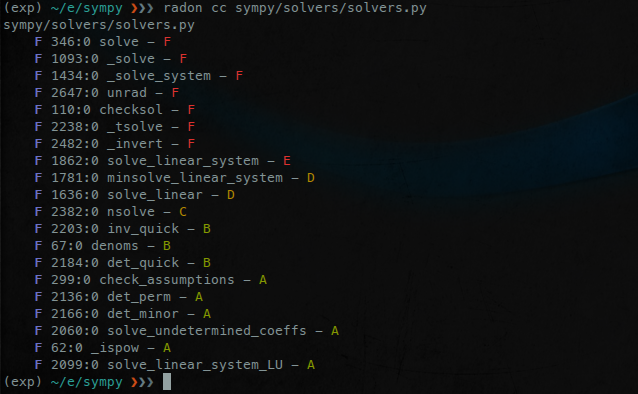
$ radon cc sympy/solvers/solvers.py -a -nc
sympy/solvers/solvers.py
    F 346:0 solve - F
    F 1093:0 _solve - F
    F 1434:0 _solve_system - F
    F 2647:0 unrad - F
    F 110:0 checksol - F
    F 2238:0 _tsolve - F
    F 2482:0 _invert - F
    F 1862:0 solve_linear_system - E
    F 1781:0 minsolve_linear_system - D
    F 1636:0 solve_linear - D
    F 2382:0 nsolve - C

11 blocks (classes, functions, methods) analyzed.
Average complexity: F (61.0)
Explanation:
cc is the radon command to compute Cyclomatic Complexity
-a tells radon to calculate the average complexity at the end. Note that the average is computed among the shown blocks. If you want the total average, among all the blocks, regardless of what is being shown, you should use --total-average.
-nc tells radon to print only results with a complexity rank of C or worse. Other examples: -na (from A to F), or -nd (from D to F).
The letter in front of the line numbers represents the type of the block (F means function, M method and C class).
Actually it’s even better: it’s got colors!
Note about file encoding
On some systems, such as Windows, the default encoding is not UTF-8. If you are using Unicode characters in your Python file and want to analyze it with Radon, you’ll have to set the RADONFILESENCODING environment variable to UTF-8.
On a Continuous Integration server
If you are looking to use radon on a CI server you may be better off with xenon. Although still experimental, it will fail (that means exiting with a non-zero exit code) when various thresholds are surpassed. radon is more of a reporting tool, while xenon is a monitoring one.
If you are looking for more complete solutions, read the following sections.
Codacy
Codacy uses Radon by default to calculate metrics from the source code.
Code Climate
Radon is available as a Code Climate Engine. To understand how to add Radon’s checks to your Code Climate Platform, head over to their documentation: https://docs.codeclimate.com/v1.0/docs/radon
coala Analyzer
Radon is also supported in coala. To add Radon’s checks to coala, simply add the RadonBear to one of the sections in your .coafile.
CodeFactor
CodeFactor uses Radon out-of-the-box to calculate Cyclomatic Complexity.
Usage with Jupyter Notebooks
Radon can be used with .ipynb files to inspect code metrics for Python cells. Any % macros will be ignored in the metrics.
To enable scanning of Jupyter notebooks, add the --include-ipynb flag.
To enable reporting of individual cells, add the --ipynb-cells flag.
Quick example:
$ radon raw --include-ipynb --ipynb-cells .
example.ipynb
    LOC: 63
    LLOC: 37
    SLOC: 37
    Comments: 3
    Single comments: 2
    Multi: 10
    Blank: 14
    - Comment Stats
        (C % L): 5%
        (C % S): 8%
        (C + M % L): 21%
example.ipynb:[0]
    LOC: 0
    LLOC: 0
    SLOC: 0
    Comments: 0
    Single comments: 0
    Multi: 0
    Blank: 0
    - Comment Stats
        (C % L): 0%
        (C % S): 0%
        (C + M % L): 0%
example.ipynb:[1]
    LOC: 2
    LLOC: 2
    SLOC: 2
    Comments: 0
    Single comments: 0
    Multi: 0
    Blank: 0
    - Comment Stats
        (C % L): 0%
        (C % S): 0%
        (C + M % L): 0%
Links
Documentation: https://radon.readthedocs.org
Issue Tracker: https://github.com/rubik/radon/issues
1 maintainer

Metadata
1 maintainer
Release files for radon 6.0.1
For a detailed explanation of source distributions (sdists) and built distributions (wheels), please see the package formats documentation.
Source distribution (sdist)
| File | Size | Uploaded | Provenance | Actions |
|---|---|---|---|---|
| radon-6.0.1.tar.gz | 1.9 MB | Without provenance | Details for radon-6.0.1.tar.gz |
Built distribution (wheel)
| File | Interpreter | ABI | Platform | Actions Reset |
|---|---|---|---|---|
| radon-6.0.1-py2.py3-none-any.whl | Python 3, Python 2 | none | any | Details for radon-6.0.1-py2.py3-none-any.whl |
Total release size: 1.9 MB
Release files / radon-6.0.1.tar.gz
| Download URL | radon-6.0.1.tar.gz |
|---|---|
| Size | 1.9 MB |
| Tags | Source |
|
SHA-256 checksum How to use checksums |
d1ac0053943a893878940fedc8b19ace70386fc9c9bf0a09229a44125ebf45b5
|
|
BLAKE2b-256 checksum How to use checksums |
b16d98e61600febf6bd929cf04154537c39dc577ce414bafbfc24a286c4fa76d
|
| Upload date | |
|
Uploaded using Trusted Publishing? What is trusted publishing? |
No |
| Uploaded via |
twine/4.0.2 CPython/3.10.10
|
Release files / radon-6.0.1-py2.py3-none-any.whl
| Download URL | radon-6.0.1-py2.py3-none-any.whl |
|---|---|
| Size | 52.8 kB |
| Tags | Python 2 Python 3 |
|
SHA-256 checksum How to use checksums |
632cc032364a6f8bb1010a2f6a12d0f14bc7e5ede76585ef29dc0cecf4cd8859
|
|
BLAKE2b-256 checksum How to use checksums |
93f7d00d9b4a0313a6be3a3e0818e6375e15da6d7076f4ae47d1324e7ca986a1
|
| Upload date | |
|
Uploaded using Trusted Publishing? What is trusted publishing? |
No |
| Uploaded via |
twine/4.0.2 CPython/3.10.10
|
Security for radon 6.0.1
Provenance
Provenance describes where a file came from. On PyPI, provenance is shared via attestations, which provide a verifiable record of the build or publishing details. View details, limitations and caveats.
No provenance found
None of the files in this release were uploaded with provenance metadata.
A note on package security
PyPI is a repository for distributing packages, not a service for auditing them. While third-party security researchers and our staff do their best to detect and remove malicious packages, PyPI cannot guarantee the quality, security or suitability of any given package.
To learn more about protecting yourself from malicious actors, visit our package security documentation.














