
Railroad-Diagram Generator, Python Version
This is a small library for generating railroad diagrams (like what JSON.org uses) using SVG, with both JS and Python ports. Here's an online dingus for you to play with and get SVG code from!
(This is the README for the Python port; see the main README for other ports, and for more non-Python-specific information.)
Diagrams
Constructing a diagram is a set of nested calls:
from railroad import Diagram, Choice
d = Diagram("foo", Choice(0, "bar", "baz"))
d.writeSvg(sys.stdout.write)
A railroad diagram must be started as a Diagram object,
which takes a list of diagram items,
defined below.
The Diagram() constructor also optionally takes some keyword arguments:
-
css: If passed, is the CSS you would like the diagram to include. If you don't pass anything, it defaults to includingrailroad.DEFAULT_STYLE. If you don't want it to include any css at all in the diagram (perhaps because you're including therailroad.cssfile manually in your page, and don't need each diagram to duplicate the CSS in itself), passcss=None. -
type: JSON.org, the inspiration for these diagram's styling, technically has two varieties of Diagrams: a "simple" kind it uses for "leaf" types like numbers, and a "complex" kind which is used for container types like arrays. The only difference is the shape of the start/end indicators of the diagram.Diagrams default to being "simple", but you can manually choose by passing
type="simple"ortype="complex".
After constructing a Diagram, you can call .format(...padding) on it, specifying 0-4 padding values (just like CSS) for some additional "breathing space" around the diagram (the paddings default to 20px).
To output the diagram, call .writeSvg(cb) on it, passing a function that'll get called repeatedly to produce the SVG markup. sys.stdout.write (or the .write property of any file object) is a great value to pass if you're directly outputting it; if you need it as a plain string, a StringIO can be used.
This method produces an SVG fragment appropriate to include directly in HTML.
Alternately, you can call .writeStandalone(cb, css?),
which'll format the SVG as a standalone document
rather than as an HTML fragment.
If you don't pass any css,
it'll automatically include the DEFAULT_STYLE;
you can include your own CSS instead by passing it as a string
(or an empty string to include no CSS at all).
If you need to walk the component tree of a diagram for some reason, Diagram has a .walk(cb) method as well, which will call your callback on every node in the diagram, in a "pre-order depth-first traversal" (the node first, then each child).
Components
Components are either leaves (containing only text or similar) or containers (containing other components).
The leaves:
-
Terminal(text, href?, title?, cls?) or a bare string - represents literal text.
All arguments past the first are optional:
- 'href' makes the text a hyperlink with the given URL
- 'title' adds an SVG
<title>element to the element, giving it "hover text" and a description for screen-readers and other assistive tech - 'cls' is additional classes to apply to the element,
beyond the default
'terminal'
-
NonTerminal(text, href) - represents an instruction or another production.
The optional arguments have the same meaning as for Terminal, except that the default class is
'non-terminal'. -
Comment(text, href) - a comment.
The optional arguments have the same meaning as for Terminal, except that the default class is
'non-terminal'. -
Skip() - an empty line
-
Start(type, label) and End(type) - the start/end shapes. These are supplied by default, but if you want to supply a label to the diagram, you can create a Start() explicitly (as the first child of the Diagram!). The "type" attribute takes either "simple" (the default) or "complex", a la Diagram() and ComplexDiagram(). All arguments are optional.
The containers:
-
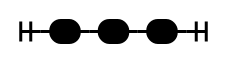
Sequence(...children) - like simple concatenation in a regex.
-
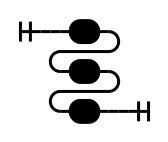
Stack(...children) - identical to a Sequence, but the items are stacked vertically rather than horizontally. Best used when a simple Sequence would be too wide; instead, you can break the items up into a Stack of Sequences of an appropriate width.
-
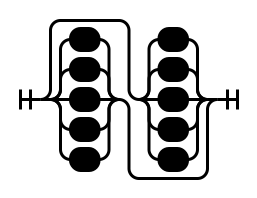
OptionalSequence(...children) - a Sequence where every item is individually optional, but at least one item must be chosen
-
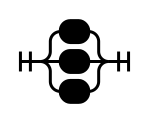
Choice(index, ...children) - like
|in a regex. The index argument specifies which child is the "normal" choice and should go in the middle (starting from 0 for the first child). -
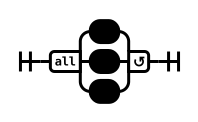
MultipleChoice(index, type, ...children) - like
||or&&in a CSS grammar; it's similar to a Choice, but more than one branch can be taken. The index argument specifies which child is the "normal" choice and should go in the middle, while the type argument must be either "any" (1+ branches can be taken) or "all" (all branches must be taken). -
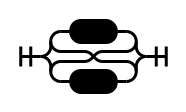
HorizontalChoice(...children) - Identical to Choice, but the items are stacked horizontally rather than vertically. There's no "straight-line" choice, so it just takes a list of children. Best used when a simple Choice would be too tall; instead, you can break up the items into a HorizontalChoice of Choices of an appropriate height.
-
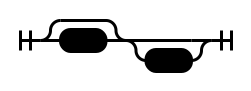
Optional(child, skip?) - like
?in a regex. A shorthand forChoice(1, Skip(), child). If the optionalskipparameter isTrue, it instead puts the Skip() in the straight-line path, for when the "normal" behavior is to omit the item. -
OneOrMore(child, repeat?) - like
+in a regex. The 'repeat' argument is optional, and specifies something that must go between the repetitions (usually aComment(), but sometimes things like",", etc.) -
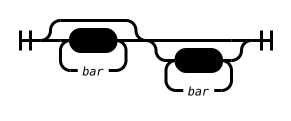
AlternatingSequence(option1, option2) - similar to a OneOrMore, where you must alternate between the two choices, but allows you to start and end with either element. (OneOrMore requires you to start and end with the "child" node.)
-
ZeroOrMore(child, repeat?, skip?) - like
*in a regex. A shorthand forOptional(OneOrMore(child, repeat), skip). Bothrepeat(same as inOneOrMore()) andskip(same as inOptional()) are optional. -
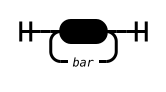
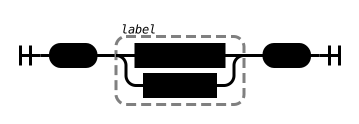
Group(child, label?) - highlights its child with a dashed outline, and optionally labels it. Passing a string as the label constructs a Comment, or you can build one yourself (to give an href or title).

Options
There are a few options you can tweak, living as UPPERCASE_CONSTANTS at the top of the module; these can be adjusted via railroad.OPTION_NAME_HERE = "whatever".
Note that if you change the text sizes in the CSS,
you'll have to adjust the text metrics here as well.
- VS - sets the minimum amount of vertical separation between two items, in CSS px. Note that the stroke width isn't counted when computing the separation; this shouldn't be relevant unless you have a very small separation or very large stroke width. Defaults to
8. - AR - the radius of the arcs, in CSS px, used in the branching containers like Choice. This has a relatively large effect on the size of non-trivial diagrams. Both tight and loose values look good, depending on what you're going for. Defaults to
10. - DIAGRAM_CLASS - the class set on the root
<svg>element of each diagram, for use in the CSS stylesheet. Defaults to"railroad-diagram". - STROKE_ODD_PIXEL_LENGTH - the default stylesheet uses odd pixel lengths for 'stroke'. Due to rasterization artifacts, they look best when the item has been translated half a pixel in both directions. If you change the styling to use a stroke with even pixel lengths, you'll want to set this variable to
False. - INTERNAL_ALIGNMENT - when some branches of a container are narrower than others, this determines how they're aligned in the extra space. Defaults to
"center", but can be set to"left"or"right". - CHAR_WIDTH - the approximate width, in CSS px, of characters in normal text (
TerminalandNonTerminal). Defaults to8.5. - COMMENT_CHAR_WIDTH - the approximate width, in CSS px, of character in
Commenttext, which by default is smaller than the other textual items. Defaults to7. - DEBUG - if
True, writes some additional "debug information" into the attributes of elements in the output, to help debug sizing issues. Defaults toFalse.
1 maintainer

Metadata
1 maintainer
Release files for railroad-diagrams 3.0.1
For a detailed explanation of source distributions (sdists) and built distributions (wheels), please see the package formats documentation.
Source distribution (sdist)
| File | Size | Uploaded | |
|---|---|---|---|
| railroad-diagrams-3.0.1.tar.gz | 22.1 kB | Details |
Built distribution (wheel)
| File | Interpreter | ABI | Platform | Reset |
|---|---|---|---|---|
| railroad_diagrams-3.0.1-py3-none-any.whl | Python 3 | none | any | Details |
Total release size: 37.1 kB
Release files / railroad-diagrams-3.0.1.tar.gz
| Download URL | railroad-diagrams-3.0.1.tar.gz |
|---|---|
| Size | 22.1 kB |
| Tags | Source |
|
SHA-256 checksum How to use checksums |
a91332bac900cb3c367331fa9b699f0897bcf86b7264f65458675df430d04ce3
|
|
BLAKE2b-256 checksum How to use checksums |
3a0825c49a573ff9c482cc7bc48574440170a6a9ad5562de5c50db8887ecfece
|
| Upload date | |
|
Uploaded using Trusted Publishing? What is trusted publishing? |
No |
| Uploaded via |
twine/4.0.1 CPython/3.10.0
|
Release files / railroad_diagrams-3.0.1-py3-none-any.whl
| Download URL | railroad_diagrams-3.0.1-py3-none-any.whl |
|---|---|
| Size | 15.0 kB |
| Tags | Python 3 |
|
SHA-256 checksum How to use checksums |
d414ff2439ed53345950e197938097548721b5d097926fafeaabc2bb069b44f9
|
|
BLAKE2b-256 checksum How to use checksums |
ca43fcf01f1ab9f744c545384bacea51016a267162de0b9e7c6fcd4996c84231
|
| Upload date | |
|
Uploaded using Trusted Publishing? What is trusted publishing? |
No |
| Uploaded via |
twine/4.0.1 CPython/3.10.0
|














