
RainbowPrint

Install via pip:
pip install RainbowPrint
Update
remove rich_mode in print_table
Tutorial on how to use the RainbowPrint API
All supported colors are below:
1. red
2. black
3. green
4. yellow
5. blue
6. magenta
7. cyan
8. white
Pure color pattern
from RainbowPrint import RainbowPrint as rp
print(rp.red('Hello World'))
print(rp.red('Hello World'),rp.green('Hello Rainbow Print'))
You can also pass in multiple strings
from RainbowPrint import RainbowPrint as rp
print(rp.red('Hello World','Hello RainbowPrint'))

Background color + Text clolor pattern
There are three default color schemes:
from RainbowPrint import RainbowPrint as rp
rp.info("Hello World")
rp.debug("Hello World")
rp.error("hello World")
You can also customize color schemes using the rainbow_print method
from RainbowPrint import RainbowPrint as rp
rp.rainbow_print("RainbowPrint",text_color=rp.TextColor.GREEN,background=rp.BackgroundColor.BLUE)
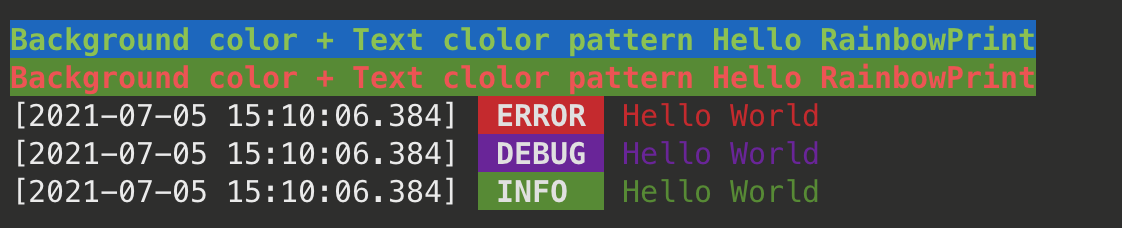
The rainbow_print method takes 4 arguments:
data,display_mode, default value isDisplayMode.TERMINAL_DEFAULT_SETTINGStext_color, default value isTextColor.WHITEbackground, default value isBackgroundColor.RED
Customize
...
Table
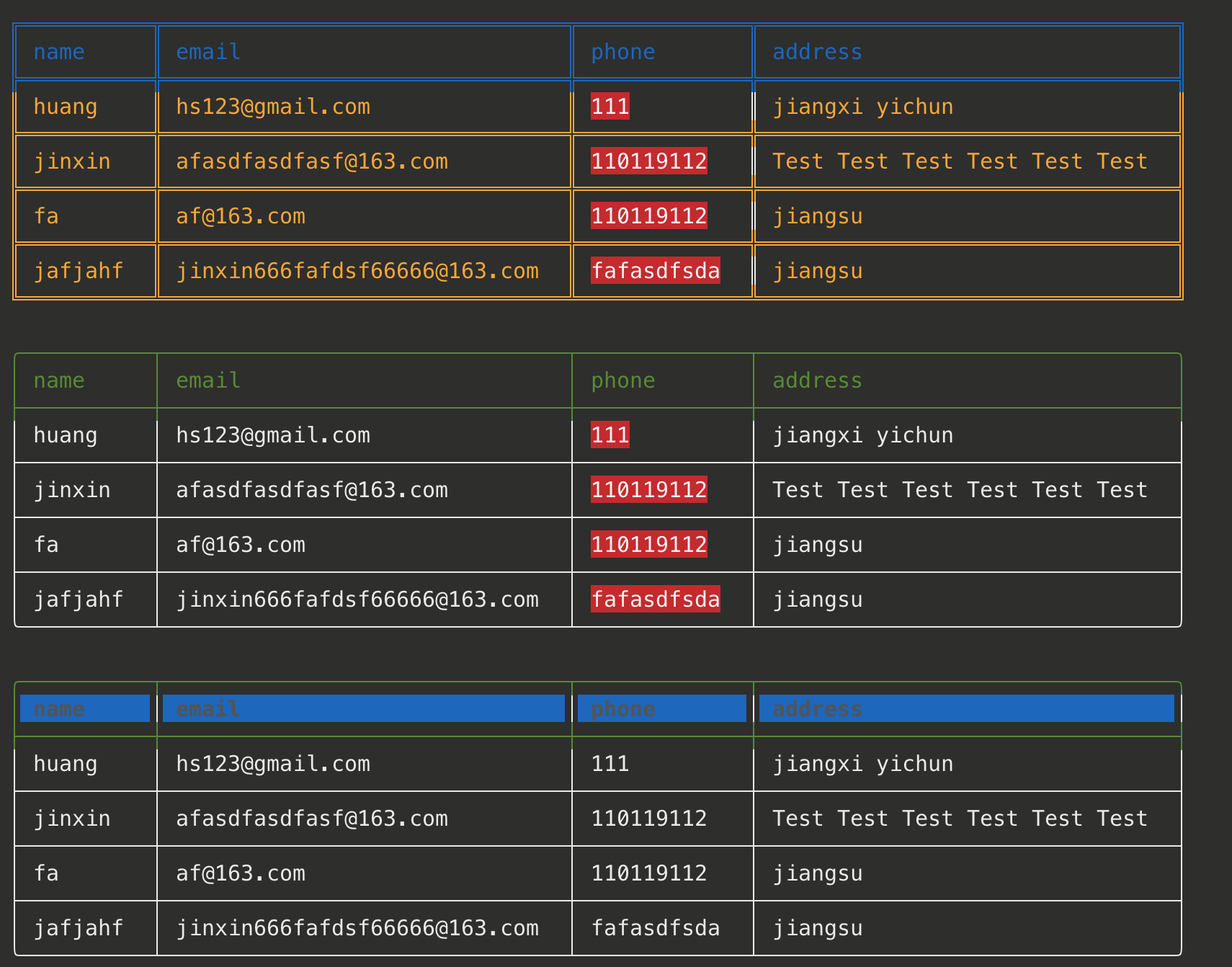
Beautify table print is supported starting with version 2.0 ^_^
    table = []
    title = ['name','email','phone','address']
    row1 = ['huang','hs123@gmail.com',111,'jiangxi yichun']
    row2 = ['jinxin','jinxin666@163.com','110119112','jiangsu jiangyin']
    row3 = ['jinxin','jinxin666@163.com','110119112','jiangsu jiangyin']
    row4 = ['jinxin','jinxin666@163.com','110119112','jiangsu jiangyin']
    table.append(title)
    table.append(row1)
    table.append(row2)
    table.append(row3)
    table.append(row4)
    rp.print_table(table, title, theme=rp.Table_Theme.BLUE_YELLOW,hilight=[2])
    rp.print_table(table,title,border_style=rp.BorderStyle.SINGLE_LINE.value,hilight=[2])
    rp.print_table(table, title, border_style=rp.BorderStyle.ROUND.value,hilight=[2])
The print_table method takes 5 arguments:
table, Two-dimensional tabletitle, Table tiletheme, Default value is Table_Theme.GREEN,border_style, Default value is BorderStyle.DEFAULT.value. There are three options:ROUND,SINGLE_LINE,DEFAULThilight, Default value is[]. Specifies the columns that need to be highlighted, such ashilight=[2]
1 maintainer

Metadata
1 maintainer
Release files for RainbowPrint 2.0.5
For a detailed explanation of source distributions (sdists) and built distributions (wheels), please see the package formats documentation.
Source distribution (sdist)
| File | Size | Uploaded | |
|---|---|---|---|
| RainbowPrint-2.0.5.tar.gz | 4.6 kB | Details |
Release files / RainbowPrint-2.0.5.tar.gz
| Download URL | RainbowPrint-2.0.5.tar.gz |
|---|---|
| Size | 4.6 kB |
| Tags | Source |
|
SHA-256 checksum How to use checksums |
2a3c26299716312d2eefe987fdf984b8be0f33ed1812b12ebbc661e618c8df99
|
|
BLAKE2b-256 checksum How to use checksums |
2f01f1a8803bcdabc59668ab97e4663589bb2033a75daf33ea126e5381a0ff0d
|
| Upload date | |
|
Uploaded using Trusted Publishing? What is trusted publishing? |
No |
| Uploaded via |
twine/3.4.1 importlib_metadata/3.10.0 pkginfo/1.4.2 requests/2.25.1 requests-toolbelt/0.9.1 tqdm/4.26.0 CPython/3.7.0
|














