
在终端中输出彩色文本

Project description
RainbowPrint

Install via pip:
pip install RainbowPrint
Update
remove rich_mode in print_table
Tutorial on how to use the RainbowPrint API
All supported colors are below:
1. red
2. black
3. green
4. yellow
5. blue
6. magenta
7. cyan
8. white
Pure color pattern
from RainbowPrint import RainbowPrint as rp
print(rp.red('Hello World'))
print(rp.red('Hello World'),rp.green('Hello Rainbow Print'))
You can also pass in multiple strings
from RainbowPrint import RainbowPrint as rp
print(rp.red('Hello World','Hello RainbowPrint'))

Background color + Text clolor pattern
There are three default color schemes:
from RainbowPrint import RainbowPrint as rp
rp.info("Hello World")
rp.debug("Hello World")
rp.error("hello World")
You can also customize color schemes using the rainbow_print method
from RainbowPrint import RainbowPrint as rp
rp.rainbow_print("RainbowPrint",text_color=rp.TextColor.GREEN,background=rp.BackgroundColor.BLUE)
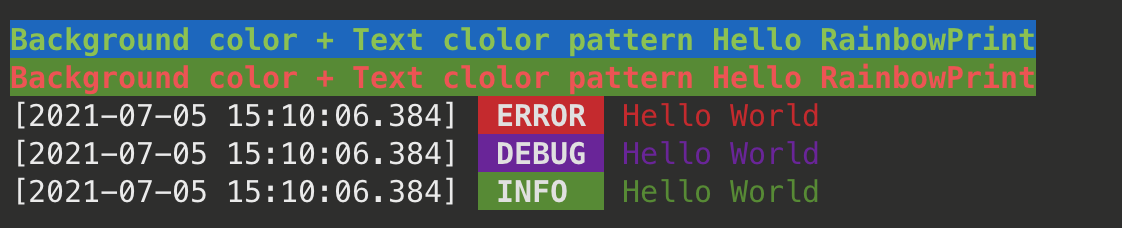
The rainbow_print method takes 4 arguments:
data,display_mode, default value isDisplayMode.TERMINAL_DEFAULT_SETTINGStext_color, default value isTextColor.WHITEbackground, default value isBackgroundColor.RED
Customize
...
Table
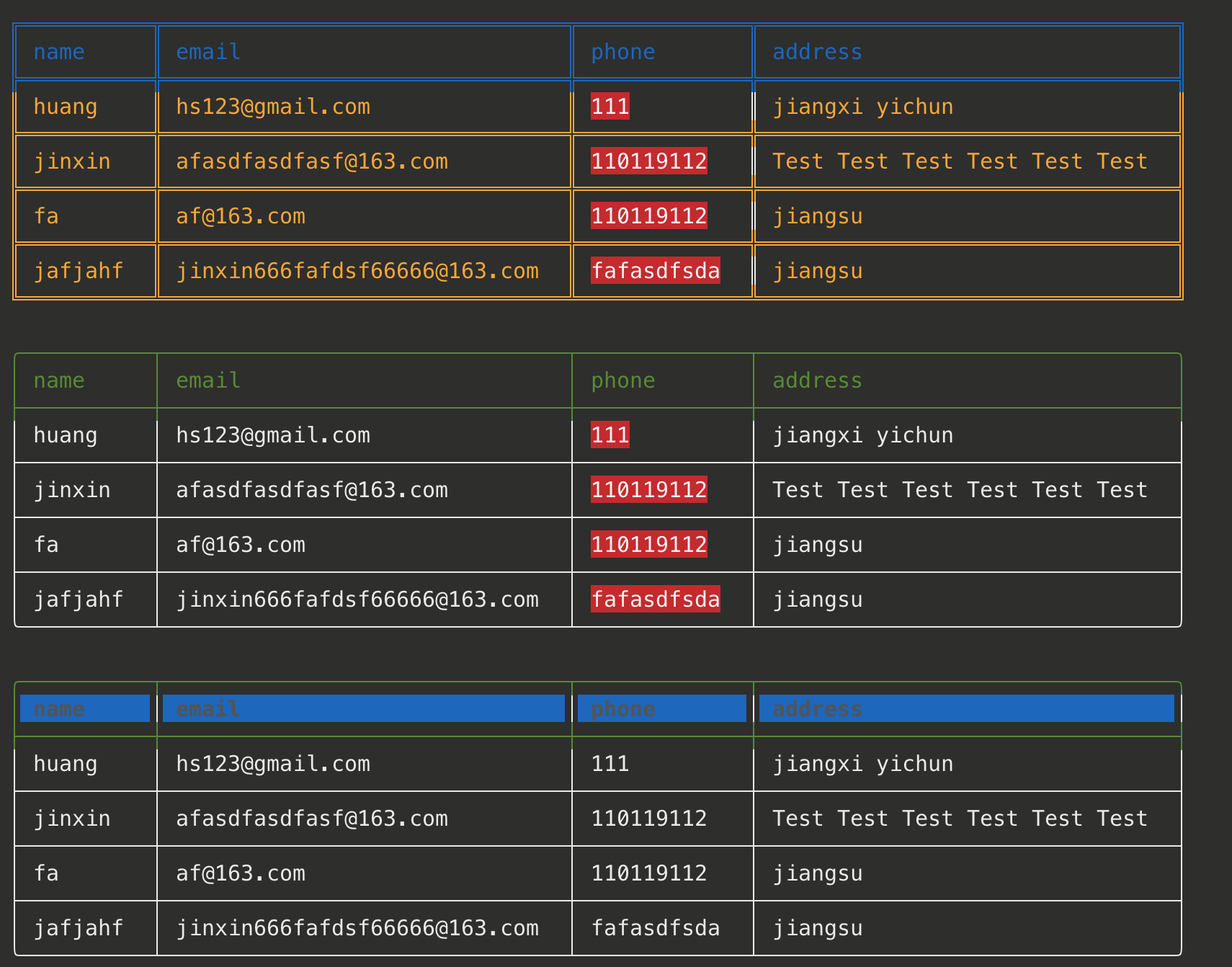
Beautify table print is supported starting with version 2.0 ^_^
    table = []
    title = ['name','email','phone','address']
    row1 = ['huang','hs123@gmail.com',111,'jiangxi yichun']
    row2 = ['jinxin','jinxin666@163.com','110119112','jiangsu jiangyin']
    row3 = ['jinxin','jinxin666@163.com','110119112','jiangsu jiangyin']
    row4 = ['jinxin','jinxin666@163.com','110119112','jiangsu jiangyin']
    table.append(title)
    table.append(row1)
    table.append(row2)
    table.append(row3)
    table.append(row4)
    rp.print_table(table, title, theme=rp.Table_Theme.BLUE_YELLOW,hilight=[2])
    rp.print_table(table,title,border_style=rp.BorderStyle.SINGLE_LINE.value,hilight=[2])
    rp.print_table(table, title, border_style=rp.BorderStyle.ROUND.value,hilight=[2])
The print_table method takes 5 arguments:
table, Two-dimensional tabletitle, Table tiletheme, Default value is Table_Theme.GREEN,border_style, Default value is BorderStyle.DEFAULT.value. There are three options:ROUND,SINGLE_LINE,DEFAULThilight, Default value is[]. Specifies the columns that need to be highlighted, such ashilight=[2]
Release history Release notifications | RSS feed


Download files
Download the file for your platform. If you're not sure which to choose, learn more about installing packages.
Source Distribution
RainbowPrint-2.0.5.tar.gz
(4.6 kB
view details)
File details
Details for the file RainbowPrint-2.0.5.tar.gz.
File metadata
- Download URL: RainbowPrint-2.0.5.tar.gz
- Upload date:
- Size: 4.6 kB
- Tags: Source
- Uploaded using Trusted Publishing? No
- Uploaded via: twine/3.4.1 importlib_metadata/3.10.0 pkginfo/1.4.2 requests/2.25.1 requests-toolbelt/0.9.1 tqdm/4.26.0 CPython/3.7.0
File hashes
| Algorithm | Hash digest | |
|---|---|---|
| SHA256 |
2a3c26299716312d2eefe987fdf984b8be0f33ed1812b12ebbc661e618c8df99
|
|
| MD5 |
20a49743f4d25a0ae0d016c9bae00e96
|
|
| BLAKE2b-256 |
2f01f1a8803bcdabc59668ab97e4663589bb2033a75daf33ea126e5381a0ff0d
|






