
RangeDisplay 2021.7.1
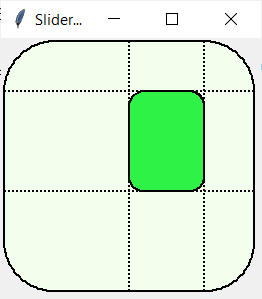
2D Fractional display widget for Python Tkinter GUI developement.
Features:
- Range Display
- Dimensions and Colour customisable
Preview
Usage
Importing display
from RangeDisplay.RangeDisplay import RangeDisplay
Creating RangeDisplay widget:
from tkinter.ttk import *
from tkinter import as tk

root = tk.Tk()

display = RangeDisplay(root, 200, 200)
display.pack()  # or grid or place method could be used

root.mainloop()
Updating display fraction
display.update(0.5,0.5,0.75,0.75)
Attributes
| Attribute | Default value | Acceptable value |
|---|---|---|
| master | N/A | parent like Tk instance, TopLevel, or Frame etc. |
| Width | N/A | width of widget in px |
| Height | N/A | height of widget in px |
| padX | 6 | x padding distributed both sides of widget |
| padY | 6 | y padding distributed both sides of widget |
| radiusO | 20 | percentage rounding the corners of base display |
| radiusI | 20 | percentage rounding the corners of inner display |
| bdSize | 2 | thickness of border of displays and reference lines in px |
| bgColor | "#f3ffed" | color of base display |
| bdColor | "#000000" | color of border and reference lines |
| fgColor | "#2ef245" | color of inner display |
| xsf | 0.5 | x start fraction 0 to 1 |
| xef | 0.8 | x end fraction 0 to 1 |
| ysf | 0.2 | y start fraction 0 to 1 |
| yef | 0.6 | y end fraction 0 to 1 |
Words of Developer
This is the first version of this library. It is one of its kind widget for tkinter. When I was developing a tool for my college project I found that at the time no inbuilt or external tool is available for tkinter allowing range selection. However, range selection is a high demand tool specially for applications dealing with data visualizations. I would appreciate any developer from any community who wants to contribute to this project.
Being a graduation student, I am unable to work over it for long. I will try to release next version having more features as soon as possible.
1 maintainer

Metadata
1 maintainer
Release files for RangeDisplay 2021.7.1
For a detailed explanation of source distributions (sdists) and built distributions (wheels), please see the package formats documentation.
Source distribution (sdist)
| File | Size | Uploaded | Provenance | Actions |
|---|---|---|---|---|
| RangeDisplay-2021.7.1.tar.gz | 3.9 kB | Without provenance | Details for RangeDisplay-2021.7.1.tar.gz |
Release files / RangeDisplay-2021.7.1.tar.gz
| Download URL | RangeDisplay-2021.7.1.tar.gz |
|---|---|
| Size | 3.9 kB |
| Tags | Source |
|
SHA-256 checksum How to use checksums |
88d55636dbf388566873570fbc5901417dedfff0a23919f527d205520b0c338e
|
|
BLAKE2b-256 checksum How to use checksums |
ad1b1711885fc0e6d39d02f133a03d025f371785521cda4cf46b210f1ff3b63e
|
| Upload date | |
|
Uploaded using Trusted Publishing? What is trusted publishing? |
No |
| Uploaded via |
twine/3.3.0 pkginfo/1.7.0 requests/2.24.0 setuptools/50.3.2 requests-toolbelt/0.9.1 tqdm/4.56.0 CPython/3.7.9
|
Security for RangeDisplay 2021.7.1
Provenance
Provenance describes where a file came from. On PyPI, provenance is shared via attestations, which provide a verifiable record of the build or publishing details. View details, limitations and caveats.
No provenance found
None of the files in this release were uploaded with provenance metadata.
A note on package security
PyPI is a repository for distributing packages, not a service for auditing them. While third-party security researchers and our staff do their best to detect and remove malicious packages, PyPI cannot guarantee the quality, security or suitability of any given package.
To learn more about protecting yourself from malicious actors, visit our package security documentation.














