
Rasterio
Rasterio reads and writes geospatial raster data.


Geographic information systems use GeoTIFF and other formats to organize and store gridded, or raster, datasets. Rasterio reads and writes these formats and provides a Python API based on N-D arrays.
Rasterio 1.0.x works with Python versions 2.7.x and 3.5.0 through 3.7.x, and GDAL versions 1.11.x through 2.4.x. Official binary packages for Linux and Mac OS X are available on PyPI. Unofficial binary packages for Windows are available through other channels.
Rasterio 1.0.x is not compatible with GDAL versions 3.0.0 or greater.
Read the documentation for more details: https://rasterio.readthedocs.io/.
Example
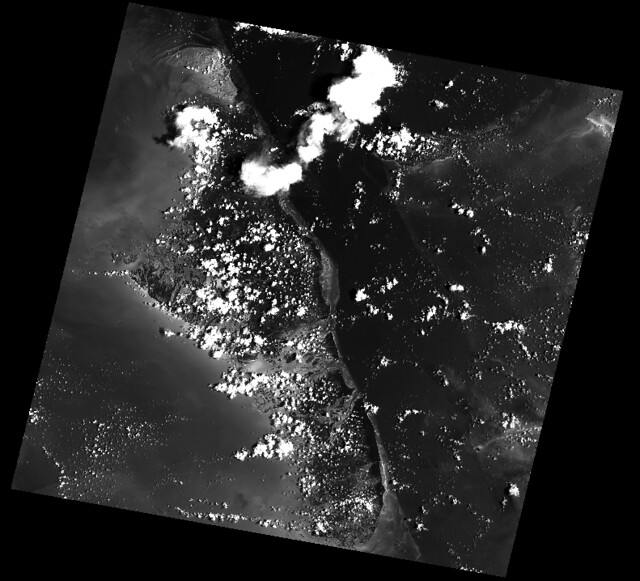
Here’s an example of some basic features that Rasterio provides. Three bands are read from an image and averaged to produce something like a panchromatic band. This new band is then written to a new single band TIFF.
import numpy as np
import rasterio

# Read raster bands directly to Numpy arrays.
#
with rasterio.open('tests/data/RGB.byte.tif') as src:
    r, g, b = src.read()

# Combine arrays in place. Expecting that the sum will
# temporarily exceed the 8-bit integer range, initialize it as
# a 64-bit float (the numpy default) array. Adding other
# arrays to it in-place converts those arrays "up" and
# preserves the type of the total array.
total = np.zeros(r.shape)
for band in r, g, b:
    total += band
total /= 3

# Write the product as a raster band to a new 8-bit file. For
# the new file's profile, we start with the meta attributes of
# the source file, but then change the band count to 1, set the
# dtype to uint8, and specify LZW compression.
profile = src.profile
profile.update(dtype=rasterio.uint8, count=1, compress='lzw')

with rasterio.open('example-total.tif', 'w', **profile) as dst:
    dst.write(total.astype(rasterio.uint8), 1)
The output:
API Overview
Rasterio gives access to properties of a geospatial raster file.
with rasterio.open('tests/data/RGB.byte.tif') as src:
    print(src.width, src.height)
    print(src.crs)
    print(src.transform)
    print(src.count)
    print(src.indexes)

# Printed:
# (791, 718)
# {u'units': u'm', u'no_defs': True, u'ellps': u'WGS84', u'proj': u'utm', u'zone': 18}
# Affine(300.0379266750948, 0.0, 101985.0,
#        0.0, -300.041782729805, 2826915.0)
# 3
# [1, 2, 3]
A rasterio dataset also provides methods for getting extended array slices given georeferenced coordinates.
with rasterio.open('tests/data/RGB.byte.tif') as src:
    print src.window(**src.window_bounds(((100, 200), (100, 200))))

# Printed:
# ((100, 200), (100, 200))
Rasterio CLI
Rasterio’s command line interface, named “rio”, is documented at cli.rst. Its rio insp command opens the hood of any raster dataset so you can poke around using Python.
$ rio insp tests/data/RGB.byte.tif
Rasterio 0.10 Interactive Inspector (Python 3.4.1)
Type "src.meta", "src.read(1)", or "help(src)" for more information.
>>> src.name
'tests/data/RGB.byte.tif'
>>> src.closed
False
>>> src.shape
(718, 791)
>>> src.crs
{'init': 'epsg:32618'}
>>> b, g, r = src.read()
>>> b
masked_array(data =
 [[-- -- -- ..., -- -- --]
 [-- -- -- ..., -- -- --]
 [-- -- -- ..., -- -- --]
 ...,
 [-- -- -- ..., -- -- --]
 [-- -- -- ..., -- -- --]
 [-- -- -- ..., -- -- --]],
             mask =
 [[ True  True  True ...,  True  True  True]
 [ True  True  True ...,  True  True  True]
 [ True  True  True ...,  True  True  True]
 ...,
 [ True  True  True ...,  True  True  True]
 [ True  True  True ...,  True  True  True]
 [ True  True  True ...,  True  True  True]],
       fill_value = 0)

>>> np.nanmin(b), np.nanmax(b), np.nanmean(b)
(0, 255, 29.94772668847656)
Rio Plugins
Rio provides the ability to create subcommands using plugins. See cli.rst for more information on building plugins.
See the plugin registry for a list of available plugins.
Installation
Please install Rasterio in a virtual environment so that its requirements don’t tamper with your system’s Python.
SSL certs
The Linux wheels on PyPI are built on CentOS and libcurl expects certs to be in /etc/pki/tls/certs/ca-bundle.crt. Ubuntu’s certs, for example, are in a different location. You may need to use the CURL_CA_BUNDLE environment variable to specify the location of SSL certs on your computer. On an Ubuntu system set the variable as shown below.
$ export CURL_CA_BUNDLE=/etc/ssl/certs/ca-certificates.crtDependencies
Rasterio has a C library dependency: GDAL >=1.11. GDAL itself depends on some other libraries provided by most major operating systems and also depends on the non standard GEOS and PROJ4 libraries. How to meet these requirement will be explained below.
Rasterio’s Python dependencies are listed in its requirements.txt file.
Development also requires (see requirements-dev.txt) Cython and other packages.
Binary Distributions
Use a binary distributions that directly or indirectly provide GDAL if possible.
Linux
Rasterio distributions are available from UbuntuGIS and Anaconda’s conda-forge channel.
Manylinux1 wheels are available on PyPI.
OS X
Binary distributions with GDAL, GEOS, and PROJ4 libraries included are available for OS X versions 10.7+ starting with Rasterio version 0.17. To install, run pip install rasterio. These binary wheels are preferred by newer versions of pip.
If you don’t want these wheels and want to install from a source distribution, run pip install rasterio --no-binary rasterio instead.
The included GDAL library is fairly minimal, providing only the format drivers that ship with GDAL and are enabled by default. To get access to more formats, you must build from a source distribution (see below).
Windows
Binary wheels for rasterio and GDAL are created by Christoph Gohlke and are available from his website.
To install rasterio, simply download both binaries for your system (rasterio and GDAL) and run something like this from the downloads folder:
$ pip install -U pip
$ pip install GDAL-2.0.2-cp27-none-win32.whl
$ pip install rasterio-0.34.0-cp27-cp27m-win32.whl
You can also install rasterio with conda using Anaconda’s conda-forge channel.
$ conda install -c conda-forge rasterioSource Distributions
Rasterio is a Python C extension and to build you’ll need a working compiler (XCode on OS X etc). You’ll also need Numpy preinstalled; the Numpy headers are required to run the rasterio setup script. Numpy has to be installed (via the indicated requirements file) before rasterio can be installed. See rasterio’s Travis configuration for more guidance.
Linux
The following commands are adapted from Rasterio’s Travis-CI configuration.
$ sudo add-apt-repository ppa:ubuntugis/ppa
$ sudo apt-get update
$ sudo apt-get install gdal-bin libgdal-dev
$ pip install -U pip
$ pip install rasterio
Adapt them as necessary for your Linux system.
OS X
For a Homebrew based Python environment, do the following.
$ brew update
$ brew install gdal
$ pip install -U pip
$ pip install --no-use-wheel rasterio
Alternatively, you can install GDAL binaries from kyngchaos. You will then need to add the installed location /Library/Frameworks/GDAL.framework/Programs to your system path.
Windows
You can download a binary distribution of GDAL from here. You will also need to download the compiled libraries and headers (include files).
When building from source on Windows, it is important to know that setup.py cannot rely on gdal-config, which is only present on UNIX systems, to discover the locations of header files and libraries that rasterio needs to compile its C extensions. On Windows, these paths need to be provided by the user. You will need to find the include files and the library files for gdal and use setup.py as follows.
$ python setup.py build_ext -I<path to gdal include files> -lgdal_i -L<path to gdal library>
$ python setup.py install
We have had success compiling code using the same version of Microsoft’s Visual Studio used to compile the targeted version of Python (more info on versions used here.).
Note: The GDAL dll (gdal111.dll) and gdal-data directory need to be in your Windows PATH otherwise rasterio will fail to work.
Support
The primary forum for questions about installation and usage of Rasterio is https://rasterio.groups.io/g/main. The authors and other users will answer questions when they have expertise to share and time to explain. Please take the time to craft a clear question and be patient about responses.
Please do not bring these questions to Rasterio’s issue tracker, which we want to reserve for bug reports and other actionable issues.
While Rasterio’s repo is in the Mapbox GitHub organization, Mapbox’s Support team is focused on customer support for its commercial platform and Rasterio support requests may be perfunctorily closed with or without a link to https://rasterio.groups.io/g/main. It’s better to bring questions directly to the main Rasterio group at groups.io.
Development and Testing
See CONTRIBUTING.rst.
Documentation
See docs/.
License
See LICENSE.txt.
Changes
See CHANGES.txt.
Who is Using Rasterio?
See here.
1 maintainer

Metadata
1 maintainer
Release files for rasterio 1.1.4
For a detailed explanation of source distributions (sdists) and built distributions (wheels), please see the package formats documentation.
Source distribution (sdist)
| File | Size | Uploaded | Provenance | Actions |
|---|---|---|---|---|
| rasterio-1.1.4.tar.gz | 2.2 MB | Without provenance | Details for rasterio-1.1.4.tar.gz |
Built distributions (wheels)
Total release size: 162.6 MB
Release files / rasterio-1.1.4.tar.gz
| Download URL | rasterio-1.1.4.tar.gz |
|---|---|
| Size | 2.2 MB |
| Tags | Source |
|
SHA-256 checksum How to use checksums |
5d7393f3a690a91813022452022df1d5a3a2c732019f24f2bd0b051fd47a03c1
|
|
BLAKE2b-256 checksum How to use checksums |
3a61c91a2faa4e7bd1b3ec915d8cb9fb6cf16fe5b85e967c0336c9f0ec837ca0
|
| Upload date | |
|
Uploaded using Trusted Publishing? What is trusted publishing? |
No |
| Uploaded via |
twine/3.1.1 pkginfo/1.5.0.1 requests/2.23.0 setuptools/46.1.3 requests-toolbelt/0.9.1 tqdm/4.45.0 CPython/3.7.5
|
Release files / rasterio-1.1.4-cp38-cp38-manylinux1_x86_64.whl
| Download URL | rasterio-1.1.4-cp38-cp38-manylinux1_x86_64.whl |
|---|---|
| Size | 18.1 MB |
| Tags | CPython 3.8 Linux glibc 2.5+ x86-64 |
|
SHA-256 checksum How to use checksums |
fa7ef6fe2dfab12fc46186cc675fe3d6b50bdb0c0a4a5cdfcab4a4778268e9f1
|
|
BLAKE2b-256 checksum How to use checksums |
efa177ef24666485c3bf5f470b2b1ba4ec3b767dc2358c543353dcc0a60b74c6
|
| Upload date | |
|
Uploaded using Trusted Publishing? What is trusted publishing? |
No |
| Uploaded via |
twine/3.1.1 pkginfo/1.5.0.1 requests/2.23.0 setuptools/46.1.3 requests-toolbelt/0.9.1 tqdm/4.45.0 CPython/3.7.5
|
Release files / rasterio-1.1.4-cp38-cp38-macosx_10_9_x86_64.whl
| Download URL | rasterio-1.1.4-cp38-cp38-macosx_10_9_x86_64.whl |
|---|---|
| Size | 17.4 MB |
| Tags | CPython 3.8 macOS 10.9+ x86-64 |
|
SHA-256 checksum How to use checksums |
03a429be02dade1516709ffa86a8edb0560424c933cd7ce98fc3db971bd046a0
|
|
BLAKE2b-256 checksum How to use checksums |
15d0ce1be8ec3840a98dbfe1904750512c829d184f4f10c278d9b2c1478b7163
|
| Upload date | |
|
Uploaded using Trusted Publishing? What is trusted publishing? |
No |
| Uploaded via |
twine/3.1.1 pkginfo/1.5.0.1 requests/2.23.0 setuptools/46.1.3 requests-toolbelt/0.9.1 tqdm/4.45.0 CPython/3.7.5
|
Release files / rasterio-1.1.4-cp37-cp37m-manylinux1_x86_64.whl
| Download URL | rasterio-1.1.4-cp37-cp37m-manylinux1_x86_64.whl |
|---|---|
| Size | 18.2 MB |
| Tags | CPython 3.7 CPython 3.7 pymalloc Linux glibc 2.5+ x86-64 |
|
SHA-256 checksum How to use checksums |
b50a00da49aaf2fdcac2478254a2ffa0ac599e3e4e301e13d2406da435ff1592
|
|
BLAKE2b-256 checksum How to use checksums |
018373a0b1b9a9a5dc5f167036f26b30652cffd06d02cc31947c01cbe4ca4444
|
| Upload date | |
|
Uploaded using Trusted Publishing? What is trusted publishing? |
No |
| Uploaded via |
twine/3.1.1 pkginfo/1.5.0.1 requests/2.23.0 setuptools/46.1.3 requests-toolbelt/0.9.1 tqdm/4.45.0 CPython/3.7.5
|
Release files / rasterio-1.1.4-cp37-cp37m-macosx_10_9_x86_64.whl
| Download URL | rasterio-1.1.4-cp37-cp37m-macosx_10_9_x86_64.whl |
|---|---|
| Size | 17.4 MB |
| Tags | CPython 3.7 CPython 3.7 pymalloc macOS 10.9+ x86-64 |
|
SHA-256 checksum How to use checksums |
7c2f98858d7376420878071bcca4bb3039a76e31e4c4976ea5ec2b2af366522b
|
|
BLAKE2b-256 checksum How to use checksums |
895c817615fdec752669ba651a0ac6fc64d028cd2ce79bd9812433ebaea774b6
|
| Upload date | |
|
Uploaded using Trusted Publishing? What is trusted publishing? |
No |
| Uploaded via |
twine/3.1.1 pkginfo/1.5.0.1 requests/2.23.0 setuptools/46.1.3 requests-toolbelt/0.9.1 tqdm/4.45.0 CPython/3.7.5
|
Release files / rasterio-1.1.4-cp36-cp36m-manylinux1_x86_64.whl
| Download URL | rasterio-1.1.4-cp36-cp36m-manylinux1_x86_64.whl |
|---|---|
| Size | 18.2 MB |
| Tags | CPython 3.6 CPython 3.6 pymalloc Linux glibc 2.5+ x86-64 |
|
SHA-256 checksum How to use checksums |
6963ebb322afc10644c1e58a0b443e1b3074552469982485de3510fa56d39002
|
|
BLAKE2b-256 checksum How to use checksums |
39767487c1eefeb8f3a0a60b37d74702c63c1b4ea701e8ce16bb7283b7f20a1f
|
| Upload date | |
|
Uploaded using Trusted Publishing? What is trusted publishing? |
No |
| Uploaded via |
twine/3.1.1 pkginfo/1.5.0.1 requests/2.23.0 setuptools/46.1.3 requests-toolbelt/0.9.1 tqdm/4.45.0 CPython/3.7.5
|
Release files / rasterio-1.1.4-cp36-cp36m-macosx_10_9_x86_64.whl
| Download URL | rasterio-1.1.4-cp36-cp36m-macosx_10_9_x86_64.whl |
|---|---|
| Size | 17.4 MB |
| Tags | CPython 3.6 CPython 3.6 pymalloc macOS 10.9+ x86-64 |
|
SHA-256 checksum How to use checksums |
c88d562c92451b170f33098f71afdedc9061b4113507e02e18b62d89ecd8d924
|
|
BLAKE2b-256 checksum How to use checksums |
1e07ddacc6732ff045ee1373adf3b965c37e7e5250f17c3f631f3f4fa5a5253f
|
| Upload date | |
|
Uploaded using Trusted Publishing? What is trusted publishing? |
No |
| Uploaded via |
twine/3.1.1 pkginfo/1.5.0.1 requests/2.23.0 setuptools/46.1.3 requests-toolbelt/0.9.1 tqdm/4.45.0 CPython/3.7.5
|
Release files / rasterio-1.1.4-cp35-cp35m-manylinux1_x86_64.whl
| Download URL | rasterio-1.1.4-cp35-cp35m-manylinux1_x86_64.whl |
|---|---|
| Size | 18.2 MB |
| Tags | CPython 3.5 CPython 3.5 pymalloc Linux glibc 2.5+ x86-64 |
|
SHA-256 checksum How to use checksums |
831c202d4521a26cbfea5435be2f4a37d7d098cf3c7bd3df2a961e7fcfa29378
|
|
BLAKE2b-256 checksum How to use checksums |
578cc32fa7af779be732ba01e4ee77ab4079fe58e9d20e6b2aa3dde3bab79b76
|
| Upload date | |
|
Uploaded using Trusted Publishing? What is trusted publishing? |
No |
| Uploaded via |
twine/3.1.1 pkginfo/1.5.0.1 requests/2.23.0 setuptools/46.1.3 requests-toolbelt/0.9.1 tqdm/4.45.0 CPython/3.7.5
|
Release files / rasterio-1.1.4-cp35-cp35m-macosx_10_9_intel.whl
| Download URL | rasterio-1.1.4-cp35-cp35m-macosx_10_9_intel.whl |
|---|---|
| Size | 17.3 MB |
| Tags | CPython 3.5 CPython 3.5 pymalloc macOS 10.9+ Intel (x86-64, i386) |
|
SHA-256 checksum How to use checksums |
a9e39442135225c862f66dc1456fdbc722ffed9a44e9bc561072d923ed1f295e
|
|
BLAKE2b-256 checksum How to use checksums |
35e0a37542dd56055166b0cec81c84f3adadb4082450f6c6589f1642e58fd2bf
|
| Upload date | |
|
Uploaded using Trusted Publishing? What is trusted publishing? |
No |
| Uploaded via |
twine/3.1.1 pkginfo/1.5.0.1 requests/2.23.0 setuptools/46.1.3 requests-toolbelt/0.9.1 tqdm/4.45.0 CPython/3.7.5
|
Release files / rasterio-1.1.4-cp27-cp27mu-manylinux1_x86_64.whl
| Download URL | rasterio-1.1.4-cp27-cp27mu-manylinux1_x86_64.whl |
|---|---|
| Size | 18.2 MB |
| Tags | CPython 2.7 CPython 2.7 pymalloc wide-unicode Linux glibc 2.5+ x86-64 |
|
SHA-256 checksum How to use checksums |
f1a5ae3e6a4f263e879b22c2cf366c28aa1d4e5962475181162602a68b196bc2
|
|
BLAKE2b-256 checksum How to use checksums |
e1729eb0681b505fe586a13e8953e86b938715f0d18acc2654033008fc99b0ba
|
| Upload date | |
|
Uploaded using Trusted Publishing? What is trusted publishing? |
No |
| Uploaded via |
twine/3.1.1 pkginfo/1.5.0.1 requests/2.23.0 setuptools/46.1.3 requests-toolbelt/0.9.1 tqdm/4.45.0 CPython/3.7.5
|
Security for rasterio 1.1.4
Provenance
Provenance describes where a file came from. On PyPI, provenance is shared via attestations, which provide a verifiable record of the build or publishing details. View details, limitations and caveats.
No provenance found
None of the files in this release were uploaded with provenance metadata.
A note on package security
PyPI is a repository for distributing packages, not a service for auditing them. While third-party security researchers and our staff do their best to detect and remove malicious packages, PyPI cannot guarantee the quality, security or suitability of any given package.
To learn more about protecting yourself from malicious actors, visit our package security documentation.














