
Unofficial reclaim.ai Python Library for creating tasks which go into reclaim.ai

Project description
reclaim.py
Unofficial https://reclaim.ai Python Client for creating tasks
- Works via Google Tasks (for now)
- Only Task Creation supported (for now)
Setup Guide
-
Install via pip:
pip3 install reclaim.py -
Setup Google Tasks API
If you use this for yourself, you are likely going to stay in Google API's free quota, so no worries there!
- Visit the Google Cloud Console and accept the terms
- Search for "Google Tasks API" or go here and click the blue "Activate" button
- Once activated, click "Manage" (also blue button)
- Naviagte to "OAuth consent screen"
- Create an "external" Consent Screen and fill out the required fields (Email fields: Put your Gmail there, Name fields: put in anything)
- "Save and Continue", then click "Add or Remove Scopes
- Seach for "Tasks" and coninue like this:
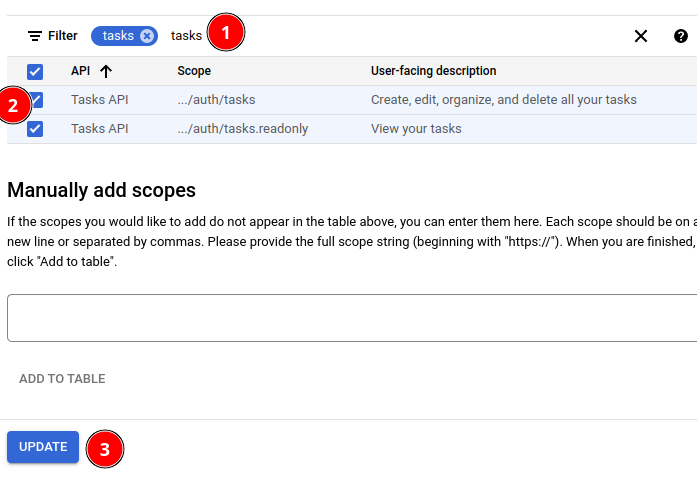
8) Click "Save and Continue" and add your email to "Test users". There will be no need to ever leave the "Testing" phase. 9) Once you added your email as Test User, it should look like this:
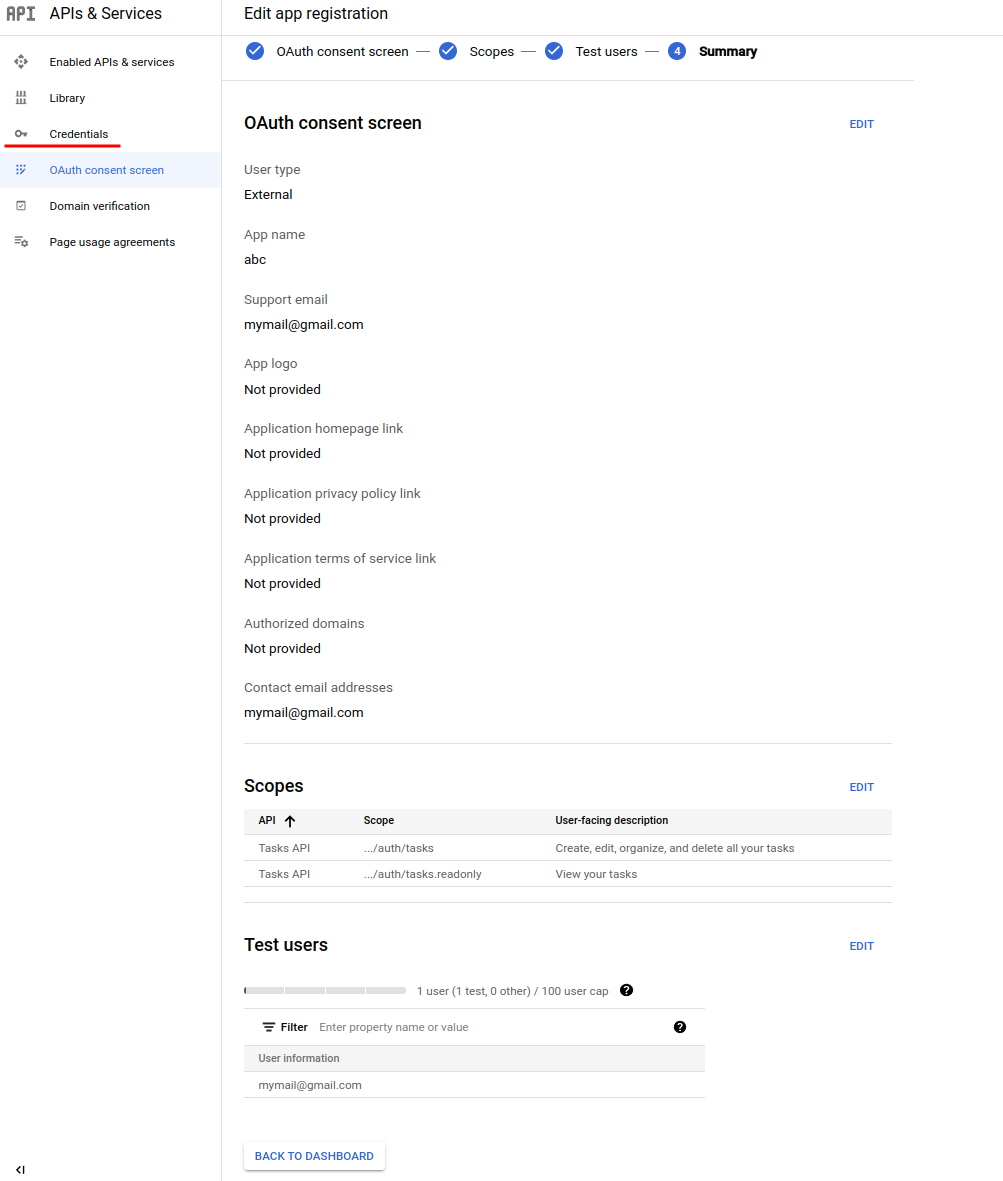
10) Naviage to "Credentials" and click "Create Credentials", "OAuth Client ID". Then select "Desktop app" as type. 11) Once created, click "Download Json" on the popup shown. Save this file as `credentials.json` in your project folder.
1. With the `credentials.json` in the same folder as your application, you can start creating some tasks:
import reclaim
from datetime import datetime, timedelta

client = reclaim.Client(credentials = "credentails.json", token_store = "token.json")
                        # you can optionally set reclaim_task_list_id if you don't want it to be detected automatically


if not client.authorized: # authorize your google account once
    client.do_authorization() # You will be asked to Login with Google. Just follow the instructions printed.

assert client.authorized # ensure you are authorized with Google

succeeded:bool = client.create_task(is_work = True,
                    title = "My fancy Reclaim task",
                    duration = timedelta(hours = 2, minutes = 30), # 2 hours, 30 minutes
                    due_at = datetime.now() + timedelta(weeks = 3),
                    not_before = datetime.now() + timedelta(days = 4), # only start in 4 days
                )
print(succeeded) # should output True
Release history Release notifications | RSS feed

Download files
Download the file for your platform. If you're not sure which to choose, learn more about installing packages.
Source Distribution
reclaim.py-0.1.tar.gz
(3.6 kB
view details)
File details
Details for the file reclaim.py-0.1.tar.gz.
File metadata
- Download URL: reclaim.py-0.1.tar.gz
- Upload date:
- Size: 3.6 kB
- Tags: Source
- Uploaded using Trusted Publishing? No
- Uploaded via: twine/4.0.0 CPython/3.10.2
File hashes
| Algorithm | Hash digest | |
|---|---|---|
| SHA256 |
5ef8d05d913a04657ae1f8044ac2d981d1cdccb7cf43dfc6f46a609cf83c1156
|
|
| MD5 |
4a2fc2d1f2355de915f2f50e3bcfeeba
|
|
| BLAKE2b-256 |
5720c30485a64542be3670850bc75d5f6e0dba50f64e3fab8c55e3c2c2385719
|






