
Introduction
This product overrides Plone’s standard view for ZMI root with an overview of available Plone sites.
Features
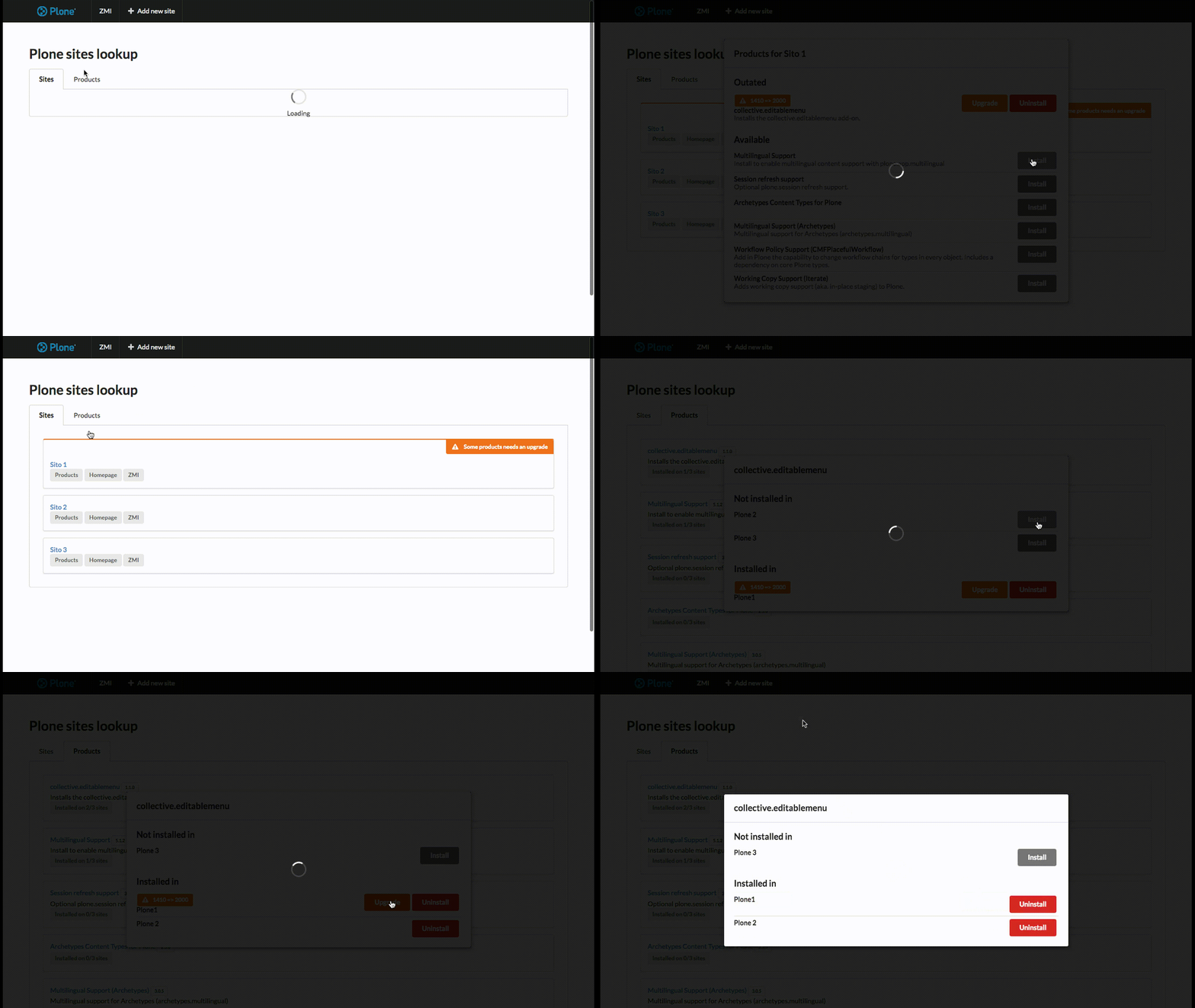
Possibility to have an overview about sites or products.
In sites list, show which sites need to upgrade products and let to manage products install/upgrade/uninstall profiles.
In products list, show which sites have a specific product installed and let to manage install/upgrade/uninstall profiles for each site.
Installation
Install redturtle.lookup by adding it to your buildout:
[buildout]

...

eggs =
    redturtle.lookup
and then running bin/buildout
How to use
You simply need to go to your ZMI root (for example: http://localhost:8080).
Development
There are two main parts:
api
app
Api
Api folder is the folder where there are some api endpoints called from the frontend view to manage sites and products.
App
App folder contains a React app bootstrapped with create-react-app.
The app is bult with sematic-ui framework.
To develop, you need to start a Plone site in background: you can use the buildout in this package, or the instance that you want.
In package.json there is a proxy set for 8080 port, so if your instance runs on another port, you need to change that value.
The first time that you develop react app, you need to install its dependencies:
yarn
Then you need to run the dev server:
yarn start
To build a new version of the app:
yarn build
The new build will be automatically seen in the Plone view.
Contribute
Issue Tracker: https://github.com/RedTurtle/redturtle.lookup/issues
Source Code: https://github.com/RedTurtle/redturtle.lookup
License
The project is licensed under the GPLv2.
Authors
This product was developed by RedTurtle Technology team.

Changelog
3.1.0 (2019-02-11)
Refactoring to improve speed when we have several sites with a lot of products. [cekk]
Fix uninstall endpoint. Now use portal_quickinstaller to uninstall products properly [cekk]
3.0.0 (2018-07-09)
New interface. [cekk]
2.4 (2016-10-13)
Disabled csrf [cekk]
2.3 (2014-10-20)
Fix styles and removed datatables [cekk]
2.2 (2014-10-20)
View improvements: font-awesome dependency and refactoring buttons in table [cekk]
2.1 (2014-09-09)
New view that allows to install/upgrade products [cekk]
2.0 (2012-12-11)
Plone 4 compatible version
z3c.autoinclude support [keul]
egg cleanup [keul]
fixed permission for @@lookup.sites [keul]
display a warning icon if a site needs to be upgraded [keul]
@@lookup.sites now properly displayed [keul]
i18n support [keul]
1.0.2 (Unreleased)
1.0.1 (2011/05/23)
sites [mauro]
anonymous users [mauro]
zelenium tests [mauro]
jquery accordion [mauro]
1.0 - (2010/03/05)
Initial release
1 maintainer

Metadata
1 maintainer
Release files for redturtle.lookup 3.1.0
For a detailed explanation of source distributions (sdists) and built distributions (wheels), please see the package formats documentation.
Source distribution (sdist)
| File | Size | Uploaded | Provenance | Actions |
|---|---|---|---|---|
| redturtle.lookup-3.1.0.tar.gz | 2.2 MB | Without provenance | Details for redturtle.lookup-3.1.0.tar.gz |
Release files / redturtle.lookup-3.1.0.tar.gz
| Download URL | redturtle.lookup-3.1.0.tar.gz |
|---|---|
| Size | 2.2 MB |
| Tags | Source |
|
SHA-256 checksum How to use checksums |
1c0812c11166e23d91eab281108726b15126387da59a724419793a27ec45b149
|
|
BLAKE2b-256 checksum How to use checksums |
f83525fd899138bbb920c7479247b875b3cb578e099d1d9dc6d52516cf7656ba
|
| Upload date | |
|
Uploaded using Trusted Publishing? What is trusted publishing? |
No |
| Uploaded via |
twine/1.12.1 pkginfo/1.4.2 requests/2.20.1 setuptools/40.6.2 requests-toolbelt/0.8.0 tqdm/4.28.1 CPython/2.7.15
|
Security for redturtle.lookup 3.1.0
Provenance
Provenance describes where a file came from. On PyPI, provenance is shared via attestations, which provide a verifiable record of the build or publishing details. View details, limitations and caveats.
No provenance found
None of the files in this release were uploaded with provenance metadata.
A note on package security
PyPI is a repository for distributing packages, not a service for auditing them. While third-party security researchers and our staff do their best to detect and remove malicious packages, PyPI cannot guarantee the quality, security or suitability of any given package.
To learn more about protecting yourself from malicious actors, visit our package security documentation.














