

Documentation Status:

Contact Us:



The Retica Backend Server
Retica Is A Performant, Easy To Use Web Server Based On Python With HTTPS & Plugins Support.
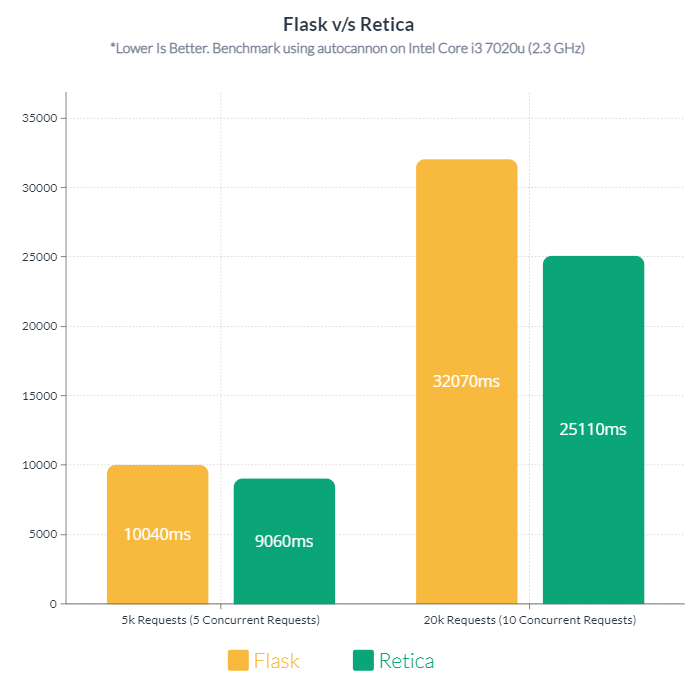
Retica V/S Flask
The Following Graph Shows A Performane Comparision Between Flask & Retica.
- Total 5,000 Requests with 5 Concurrent Connections
- Total 20,000 Requests with 20 Concurrent Connections
Installing Retica
The easiest way to install Retica is to use the pip command line tool.
$~ pip install retica
Creating A Retica Server
Once you have installed Retica, you can import it into your Python environment. The server class is used to create a server, in which you can add endpoints(locations) and open HTTP(s) ports.
import Retica
retica = Retica.Server(__name__)
Creating An Endpoint
Endpoints are functions that are assigned to a location and are called when a request is made to that location.
@retica.create_endpoint("/hello/{name}")
def index(request: Retica.Request.request, response: Retica.Response.response, **data):
    response.body = f"Hello {data['name']}"
Creating A Socket
Sockets are used to open a server port that listens for incoming connections. The server will listen on the specified port and host. Sockets can use 2 protocols:
- HTTP
- HTTPS (Certificate & key files are required)
- You can also create your own protocols(In Development).
http_socket = Retica.Sockets.HTTP_Socket("localhost", 80)
https_socket = Retica.Sockets.HTTPS_Socket("localhost", 443, "cert.pem", "key.pem")
Running the Server
To run the server, you must call the run method on the server. An array of sockets should be passed in as an argument.
if __name__ == "__main__":
    retica.run([
        http_socket,
        https_socket
    ])
Boilerplate
This is the boilerplate code that you will need to create your own server.
import Retica
retica = Retica.Server(__name__)

@retica.create_endpoint("/hello/{name}")
def index(request: Retica.Request.request, response: Retica.Response.response, **data):
    response.body = f"Hello {data['name']}"

http_socket = Retica.Sockets.HTTP_Socket(Retica.Sockets.gethostname(), 80)

if __name__ == "__main__":
    retica.run([http_socket])
1 maintainer

Metadata
1 maintainer
Release files for Retica 1.1.2
For a detailed explanation of source distributions (sdists) and built distributions (wheels), please see the package formats documentation.
Source distribution (sdist)
| File | Size | Uploaded | |
|---|---|---|---|
| Retica-1.1.2.tar.gz | 10.7 kB | Details |
Release files / Retica-1.1.2.tar.gz
| Download URL | Retica-1.1.2.tar.gz |
|---|---|
| Size | 10.7 kB |
| Tags | Source |
|
SHA-256 checksum How to use checksums |
4dc8f4645fb2afff318d030598860dfcc220fd57c27798d948aab69a2c81ecea
|
|
BLAKE2b-256 checksum How to use checksums |
358d151d5a716258fc8349acca8b49356903984bafb32d29f1578c3440c00423
|
| Upload date | |
|
Uploaded using Trusted Publishing? What is trusted publishing? |
No |
| Uploaded via |
twine/4.0.1 CPython/3.10.4
|














