
RevPyKit
Overview
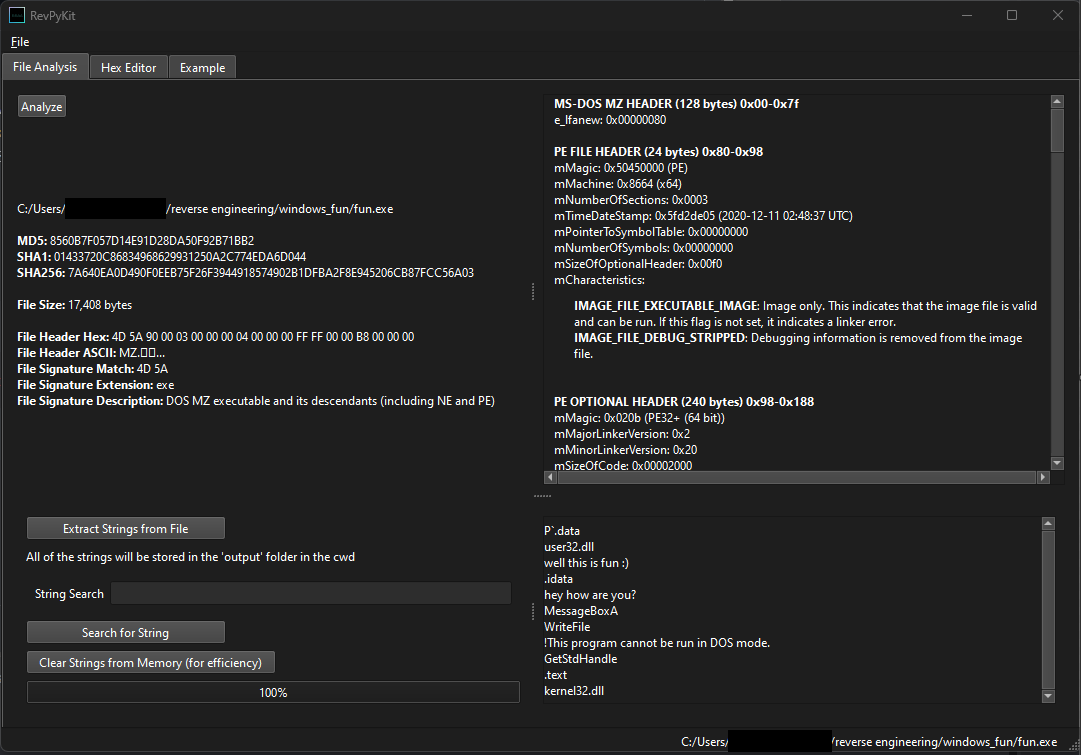
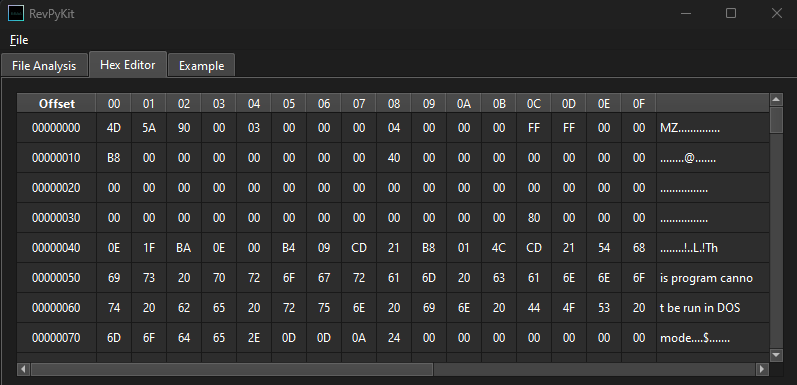
RevPyKit is a reverse engineering toolkit written in Python. It is an extendable platform which currently supports hashing, file signature detection, string searches, hex editing, and Windows PE analysis. Output from the tool is displayed in the UI (created using PyQt6) and saved to a "output" folder for further analysis (primarily .json & .txt files).
Installation
- Install python 3.*
- Install the PyQt6 module
python -m pip install PyQt6
You can either install via pip (https://pypi.org/project/RevPyKit/)
python -m pip install RevPyKit
import RevPyKit
RevPyKit.RevPyKit.launch()
or
- Download this repo and run RevPyKit.py. The UI should show up.
python RevPyKit.py
Code Layout/Design Decisions
Since this application is intended for reverse engineering I wanted to prioritize user control over automation. What this means practically is that RevPyKit won't automagically perform actions in the background. For example, when you open a file it will not automatically be analyzed. You have to click the "Analyze" button for that. The strings will not automatically be extracted, you have to click the "Extract Strings from File" button. You get the idea. Although this may be a slight annoyance, the hope is that full user control is worth an extra couple button clicks.
Almost every action you take will cause a resulting file to be created in the current working directory's "output" folder. This is useful if you want to take the extracted strings or PE information and plug it into a ML model or some other tool.
The layout of the code is hopefully intuitive to everyone. Every tab has it's own file. Some tabs need more than one file. The tab3_Example file is a premade starter kit to encourage others to write their own code and add it themselves.
Below are details on each file:
RevPyKit.py
- This is the main file that sets up the UI and the tabs.
tab1_Analysis.py
- This tab analyzes file signatures, extracts strings, and shows output from special files such as Windows PEs.
tab1_Analysis_PE.py
- This file is called by tab1_Analysis.py if the opened file is a Windows PE. It contains a custom PE parser I made from scratch. All of the imports/exports for x86/x64 EXEs/DLLs will be included.
tab2_HexEditor.py
- A simple hex editor. You can't make the file any longer but you can at least patch bytes.
tab3_Example.py
- In case you want to write your own code this tab will give you a head start.
Technical Details
The UI should be in dark mode on Windows if that's your default theme. In RevPyKit.py the line
app.setStyle("Fusion")
is responsible for this. You can try different values here depending on your OS.
tab1_Analysis.py
- It doesn't rely on file extensions, it checks the first few bytes of the file and compares it to the list of known file signatures at the bottom of this python file. Feel free to add more to that list.
- It will only extract English strings encoded in UTF-8, UTF-16LE, or UTF_16BE. This should be very easy to expand to other languages or encodings.
- The UI will only show the first 1000 extracted strings otherwise things get very slow. All of the strings will be stored in the "output" folder.
tab1_Analysis_PE.py
- It doesn't parse every possible table but it gets a large chunk. The main goal was imports/exports.
- If you read through the code you'll see that it's adding to a gigantic string of HTML and also adding to a dict that will eventually be written to a JSON file in the output folder.
- Almost all of the values are formatted in little endian so when I read 4 bytes I add a [::-1] at the end to swap the order.
- Most of the fields in PEs contain RVAs so you have to do some work to convert them to file offsets. You'll see this throughout the file.
Software Bill of Materials
- Python 3.*
- PyQt6
1 maintainer

Release files for RevPyKit 0.1.0
For a detailed explanation of source distributions (sdists) and built distributions (wheels), please see the package formats documentation.
Source distribution (sdist)
| File | Size | Uploaded | |
|---|---|---|---|
| revpykit-0.1.0.tar.gz | 72.0 kB | Details |
Built distribution (wheel)
| File | Interpreter | ABI | Platform | Reset |
|---|---|---|---|---|
| revpykit-0.1.0-py3-none-any.whl | Python 3 | none | any | Details |
Total release size: 145.5 kB
Release files / revpykit-0.1.0.tar.gz
| Download URL | revpykit-0.1.0.tar.gz |
|---|---|
| Size | 72.0 kB |
| Tags | Source |
|
SHA-256 checksum How to use checksums |
6eaff68b802006aa401df4e218b1db3c3c577c44b42fd26f0b3e1b3d944e43a2
|
|
BLAKE2b-256 checksum How to use checksums |
efe01877a854a79f6f03ce7a090b0a629e803dcee7f2e3d0cbdd794b38a3b168
|
| Upload date | |
|
Uploaded using Trusted Publishing? What is trusted publishing? |
No |
| Uploaded via |
twine/5.0.0 CPython/3.11.0
|
Release files / revpykit-0.1.0-py3-none-any.whl
| Download URL | revpykit-0.1.0-py3-none-any.whl |
|---|---|
| Size | 73.5 kB |
| Tags | Python 3 |
|
SHA-256 checksum How to use checksums |
0e07151342b267c8be630869e6b97597b35f25f63e96cea2bba8faaedd24436a
|
|
BLAKE2b-256 checksum How to use checksums |
fffbbd0b8286ca4c9ffcdf3c2579a9f41bde30b81877b2eeadd3209a25a602c8
|
| Upload date | |
|
Uploaded using Trusted Publishing? What is trusted publishing? |
No |
| Uploaded via |
twine/5.0.0 CPython/3.11.0
|













