
revQianWen
revQianWen 是一个 Qwen Web 端逆向 Python 库,由于本人从 2023 年用到 2026 年 8 月的 revTongYi 已长期停更,且 2026 年 8 月 Qwen 接口更新后(返回“你正在使用较早版本,为了获得更好的对话体验,请升级至最新版。”)旧库不再可用,因此开发此库,用于对接Qwen新版 Web 接口。
支持流式和非流式聊天接口,以及会话列表、历史消息、改标题、删除会话、图片上传相关接口。图片上传还有鉴权 todo,由于本人不用暂不深挖,欢迎 PR。覆盖新版 chat2.qianwen.com/api/v2/chat SSE 聊天协议。
如果你是从revTongYi迁移,仅需安装本库然后将业务代码import revTongYi.qianwen as qwen 改为 import revQianWen as qwen就大功告成了。
安装
在本地开发目录中安装:
pip install revQianWen
快速开始
import revQianWen as qwen

bot = qwen.Chatbot(cookies_str="从浏览器复制的 Cookie")
resp = bot.ask("你好呀,请只回复 ok")
print(resp.contents[-1].content)
流式调用:
for resp in bot.ask("写一段自我介绍", stream=True):
    if resp.contents:
        print(resp.contents[-1].content)
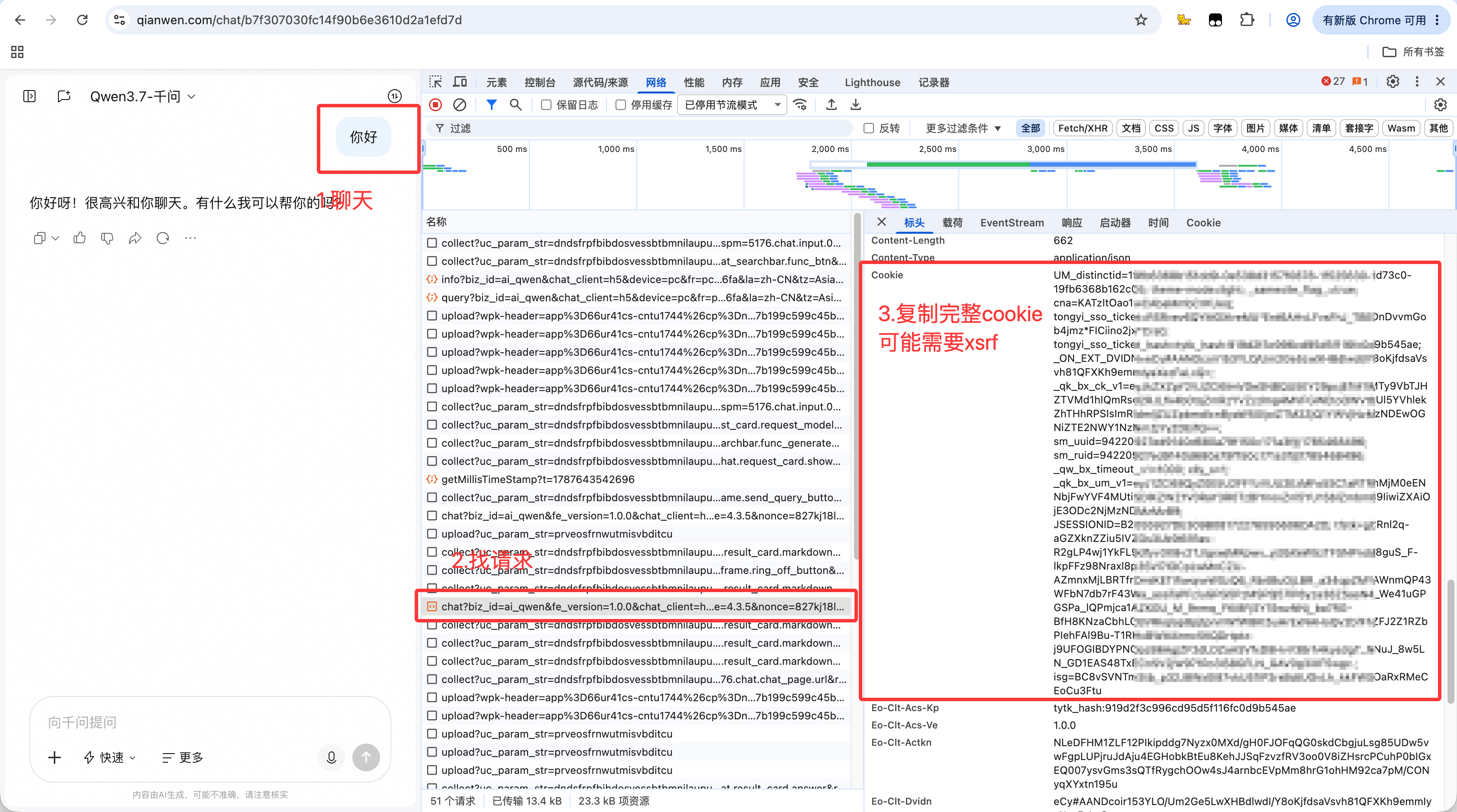
cookie获取方式:
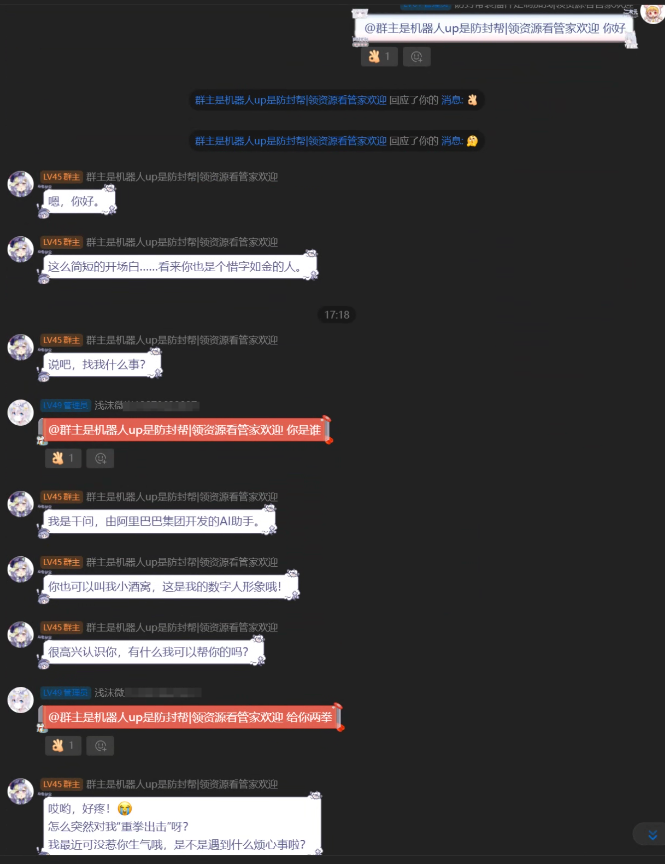
对话示例:
基础接口
主要通过顶层包直接使用:
import revQianWen as qwen

bot = qwen.Chatbot(cookies={...})
bot = qwen.Chatbot(cookies_str="...")
resp = bot.ask(prompt="...", parentId="0", sessionId="", stream=False)
返回对象支持属性访问和字典式访问:
print(resp.sessionId)
print(resp.msgId)
print(resp.contents[-1].content)
print(resp["sessionId"])
print(resp.to_dict())
会话接口
创建本地会话上下文:
session = bot.create_session("测试会话")
print(session.session_id)
print(session.topic_id)

resp = bot.ask("第一句话", sessionId=session.session_id, parentId="0")
说明:Web 端是在第一次 /api/v2/chat 请求里携带新的 session_id 和 topic_id,服务端随后生成远端会话。因此 create_session(...) 当前只是准备本地会话上下文,真正远端可见需要调用第一轮 ask(...)。
列出会话:
sessions = bot.list_session(limit=50)
for item in sessions:
    print(item.session_id, item.title)

print(bot.last_session_page.have_next_page)
print(bot.last_session_page.next_token)
读取历史消息:
history = bot.get_session_history(sessionId="会话 ID", page_size=10)
for item in history:
    print(item.request_messages)
    print(item.qwen_response_messages)
如果需要完整原始结构:
raw = bot.get_session_history(sessionId="会话 ID", raw=True)
print(raw.list)
修改标题:
bot.update_session(sessionId="会话 ID", summary="新的标题")
删除会话:
bot.delete_session("会话 ID")
bot.delete_sessions(["会话 ID 1", "会话 ID 2"])
同步变更:
changes = bot.sync_changes(last_sync_time=0, limit=100)
print(changes.to_dict())
图片接口当前形态
当前已经按抓包补齐图片上传链路的代码结构:
1. POST https://workspace-res.qianwen.com/1/oss_token
2. PUT  图片二进制到返回的 Aliyun OSS object URL
3. POST https://workspace-res.qianwen.com/1/oss/callback
4. POST https://chat-side.qianwen.com/api/v2/file/record/add
5. POST https://chat2.qianwen.com/api/v2/chat,messages 里带 image/url + resource_infos
已确认可直接跑到的部分:
_get_upload_token(...)
_put_oss_object(...)
当前已知限制:
oss/callback 可能返回 code=10009,msg=签名验证失败。
原因是 callback、file record、带图 chat 请求在浏览器里会带动态安全头,例如:
clt-acs-sign
clt-acs-bfg
clt-acs-reqt
clt-acs-request-params
eo-clt-actkn
eo-clt-dvidn
eo-clt-sacsft
eo-clt-snver
bx-ua
bx-umidtoken
bx_et
这些值看起来由Qwen前端 JS 或风控 SDK 动态生成,不能简单复用固定字符串。因此目前图片上传接口是“协议形态已实现,完整可用性取决于能否提供有效动态安全头”。
传入动态安全头
如果已经从浏览器抓包拿到了同一时刻可用的安全头,可以在初始化时传入:
bot = qianwen.Chatbot(
    cookies_str="从浏览器复制的 Cookie",
    user_id="1715511985223686",
    device_id="01c75faf-0831-aedc-e49f-58ca08f126fa",
    security_headers={
        "clt-acs-caer": "vrad",
        "clt-acs-reqt": "...",
        "clt-acs-request-params": "...",
        "clt-acs-sign": "...",
        "eo-clt-actkn": "...",
        "eo-clt-dvidn": "...",
        "eo-clt-sacsft": "...",
        "eo-clt-snver": "lv",
    },
)
也可以在运行过程中更新:
bot.set_security_headers({
    "clt-acs-sign": "...",
    "eo-clt-actkn": "...",
})

bot.clear_security_headers()
上传本地图片并提问
with open("image.png", "rb") as f:
    image_bytes = f.read()

resp = bot.ask("这张图里有什么?", image=image_bytes)
print(resp.contents[-1].content)
注意:如果没有有效动态安全头,这一步可能会在 oss/callback 返回签名验证失败。
复用已上传图片资源
如果你已经通过浏览器或抓包拿到了 material_id 和 CDN URL,可以绕过上传阶段,直接构造 image_info 发带图聊天:
image_info = bot.make_image_info(
    url="https://workspace-zb-cdn.qianwen.com/xxx.png?auth_key=...",
    material_id="f38851819ef6490fb4f1023e53ae8ca9",
    file_format="PNG",
    file_name="image.png",
    file_size=435722,
    width=1840,
    height=872,
)

resp = bot.ask("哪些是压缩文件", image_info=image_info)
print(resp.contents[-1].content)
已实现接口
ask(...)
create_session(...)
list_session(...)
sync_changes(...)
update_session(...)
delete_session(...)
delete_sessions(...)
get_session_history(...)
_get_upload_token(...)
_put_oss_object(...)
_get_download_link(...)
_add_file_record(...)
upload_image(...)
make_image_info(...)
set_security_headers(...)
clear_security_headers(...)
已知仍缺或不完整
1. 浏览器动态安全签名生成逻辑尚未逆向,因此图片 callback/file record/带图 chat 在无有效安全头时可能失败。
2. 文件上传目前按图片链路整理,普通文档、音频、视频等文件类型尚未单独适配。
3. 分享、置顶、归档、收藏、标签筛选细节等会话管理接口还没有抓包确认。
4. 多模型切换、深度搜索、联网搜索开关等高级参数只保留默认值,尚未系统化封装。
注意事项
本项目依赖用户从浏览器中复制的有效Qwen Cookie,不绕过登录或鉴权。请只用于个人自动化、调试和学习用途。Qwen Web 接口可能随时变更,如果出现协议错误,需要重新抓包确认参数和 header。
1 maintainer

Metadata
1 maintainer
Release files for revQianWen 0.1.3
For a detailed explanation of source distributions (sdists) and built distributions (wheels), please see the package formats documentation.
Source distribution (sdist)
| File | Size | Uploaded | Provenance | Actions |
|---|---|---|---|---|
| revqianwen-0.1.3.tar.gz | 18.0 kB | Without provenance | Details for revqianwen-0.1.3.tar.gz |
Built distribution (wheel)
| File | Interpreter | ABI | Platform | Actions Reset |
|---|---|---|---|---|
| revqianwen-0.1.3-py3-none-any.whl | Python 3 | none | any | Details for revqianwen-0.1.3-py3-none-any.whl |
Total release size: 33.2 kB
Release files / revqianwen-0.1.3.tar.gz
| Download URL | revqianwen-0.1.3.tar.gz |
|---|---|
| Size | 18.0 kB |
| Tags | Source |
|
SHA-256 checksum How to use checksums |
6232d977b6d0faf81dd1764d54e3e658e35b987b33f21c1a2db7f228a057a1f9
|
|
BLAKE2b-256 checksum How to use checksums |
12c31b9d4f2c24a06008197e9d91a576e8bd3230f2bfa8a5eca1d427e9a99769
|
| Upload date | |
|
Uploaded using Trusted Publishing? What is trusted publishing? |
No |
| Uploaded via |
twine/6.2.0 CPython/3.9.6
|
Release files / revqianwen-0.1.3-py3-none-any.whl
| Download URL | revqianwen-0.1.3-py3-none-any.whl |
|---|---|
| Size | 15.2 kB |
| Tags | Python 3 |
|
SHA-256 checksum How to use checksums |
08629f193fb912cf1900d42b4527e7347d51b617d1839eb34cb9077b29c66a08
|
|
BLAKE2b-256 checksum How to use checksums |
ae980462df7192574022be9654560ec80001bc2dae863e218bf6a9593a559020
|
| Upload date | |
|
Uploaded using Trusted Publishing? What is trusted publishing? |
No |
| Uploaded via |
twine/6.2.0 CPython/3.9.6
|
Security for revQianWen 0.1.3
Provenance
Provenance describes where a file came from. On PyPI, provenance is shared via attestations, which provide a verifiable record of the build or publishing details. View details, limitations and caveats.
No provenance found
None of the files in this release were uploaded with provenance metadata.
A note on package security
PyPI is a repository for distributing packages, not a service for auditing them. While third-party security researchers and our staff do their best to detect and remove malicious packages, PyPI cannot guarantee the quality, security or suitability of any given package.
To learn more about protecting yourself from malicious actors, visit our package security documentation.














