
REX | Automatically Update requirements.txt




REX allows for the automatic management of dependencies in requirements.txt using pip as a package manager.
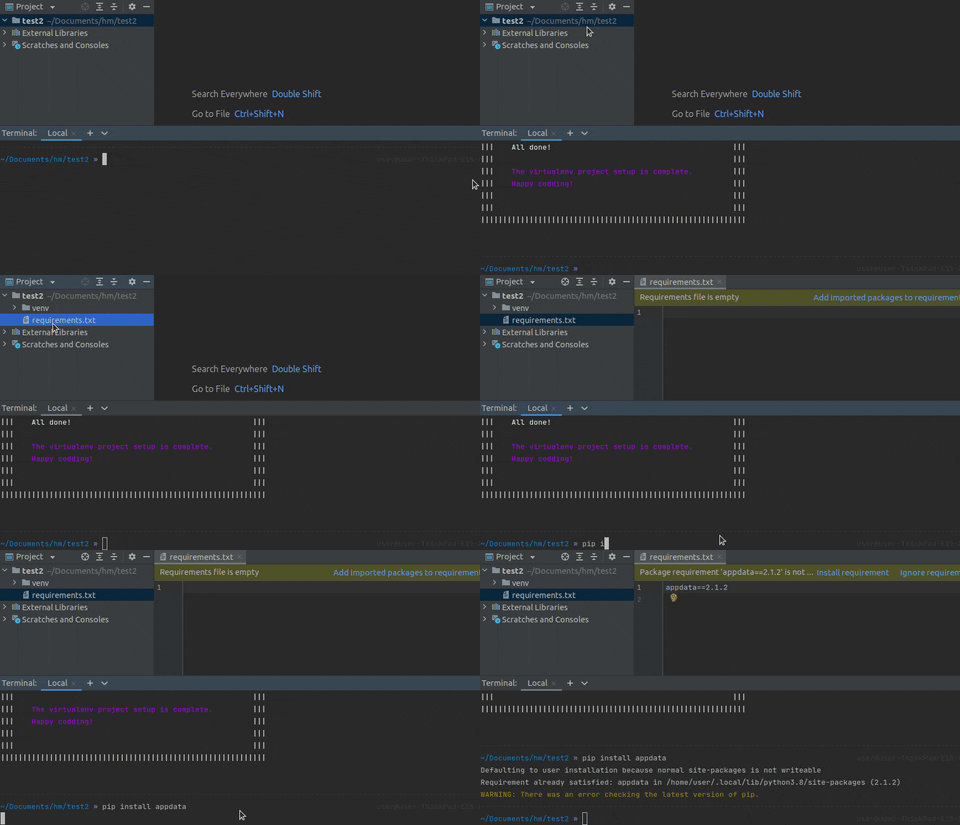
Benefits
-
Easy Setup: The installation process involves just two steps: installing the package using pip and setting it up using the provided script. That's it.
-
One-Command Setup: Set up a VirtualEnv-based project in a single command. It creates a virtual environment and installs to-requirements.txt automatically.
-
Customizable: Customize it as you prefer: use it only in Git repositories, allow or disallow automated
requirements.txtfile creation, enable or disable the package itself. -
User-Friendly: After installation and setup, there are no additional conditions to use. Simply install, uninstall, or upgrade packages using pip as usual.
-
Always in Sync: With to-requirements.txt, the project's
requirements.txtwill always stay in sync with packages installed via pip.
Installation
To install the package, run the following command:
pip install rex
To enable all available functionality, add the following lines to your .bashrc, .zshrc, or other .*rc file:
rex alias
or just paste this lines to your .bashrc, .zshrc, or other .*rc file:
alias rt=". rt"
alias requirements-txt=". requirements-txt"
alias rex=". rex"
This enables sourced mode of the CLI execution and allows the CLI to activate or deactivate your virtual environment if required.
Setup Project
To set up a VirtualEnv-based project, simply type:
rex init
Or, achieve the same effect more easily with aliases:
rex i
Note: The changes made to pip scripts will not affect the ordinary pip workflow after uninstalling to-requirements.txt.
Aliases
There are a few aliases available to use instead of rex command:
requirements-txt- legacy command.rt- legacy command shortened.
Documentation
For detailed documentation, visit requirements-txt.readthedocs.io.
Contributing
See CONTRIBUTING.md for contribution guidelines.
License
This project is licensed under the MIT License.
1 maintainer

Metadata
1 maintainer
Release files for rex 2.0.14
For a detailed explanation of source distributions (sdists) and built distributions (wheels), please see the package formats documentation.
Source distribution (sdist)
| File | Size | Uploaded | Provenance | Actions |
|---|---|---|---|---|
| rex-2.0.14.tar.gz | 22.3 kB | Without provenance | Details for rex-2.0.14.tar.gz |
Built distribution (wheel)
| File | Interpreter | ABI | Platform | Actions Reset |
|---|---|---|---|---|
| rex-2.0.14-py3-none-any.whl | Python 3 | none | any | Details for rex-2.0.14-py3-none-any.whl |
Total release size: 60.1 kB
Release files / rex-2.0.14.tar.gz
| Download URL | rex-2.0.14.tar.gz |
|---|---|
| Size | 22.3 kB |
| Tags | Source |
|
SHA-256 checksum How to use checksums |
6d75a92254efe86c344db62a0737542a65c9ce9c263ee0134865d081bc26461a
|
|
BLAKE2b-256 checksum How to use checksums |
582d1a9033dba031b7109945c923ebc65b4578e5338ae8764adc32a7c56db6f5
|
| Upload date | |
|
Uploaded using Trusted Publishing? What is trusted publishing? |
No |
| Uploaded via |
twine/6.1.0 CPython/3.9.22
|
Release files / rex-2.0.14-py3-none-any.whl
| Download URL | rex-2.0.14-py3-none-any.whl |
|---|---|
| Size | 37.8 kB |
| Tags | Python 3 |
|
SHA-256 checksum How to use checksums |
31383891f5c57e57a55bcfa34d7537ce5ce3b1bb4f531bf980530d50bfa574f2
|
|
BLAKE2b-256 checksum How to use checksums |
bc22098dd21dc8ac69c81ed013e7bd4ea3a3b85c6987921251dbf3171bafbd5b
|
| Upload date | |
|
Uploaded using Trusted Publishing? What is trusted publishing? |
No |
| Uploaded via |
twine/6.1.0 CPython/3.9.22
|
Security for rex 2.0.14
Provenance
Provenance describes where a file came from. On PyPI, provenance is shared via attestations, which provide a verifiable record of the build or publishing details. View details, limitations and caveats.
No provenance found
None of the files in this release were uploaded with provenance metadata.
A note on package security
PyPI is a repository for distributing packages, not a service for auditing them. While third-party security researchers and our staff do their best to detect and remove malicious packages, PyPI cannot guarantee the quality, security or suitability of any given package.
To learn more about protecting yourself from malicious actors, visit our package security documentation.














