
rich-bench
A little Python benchmarking tool.
Why do I need this?
The builtin timeit module for Python is great, but the typical usage for micro-benchmarks is to run a small script like this:
python -m timeit "a = 1; b = 2; a * b"
The problem with this approach is that the compiled code is a module, so any variables on the top-level are globals. The compiled bytecode is different to the same statements being inside a local scope (e.g. a method or function). They behave and perform very differently in CPython.
richbench encourages you to write benchmarks inside functions to properly simulate the closures and scope of production code.
Installation
Requires Python 3.6+ and can be installed using pip:
pip install richbench
Usage
Write your benchmark functions in a directory and run richbench with that target to get the results:
$ richbench my_benchmarks/
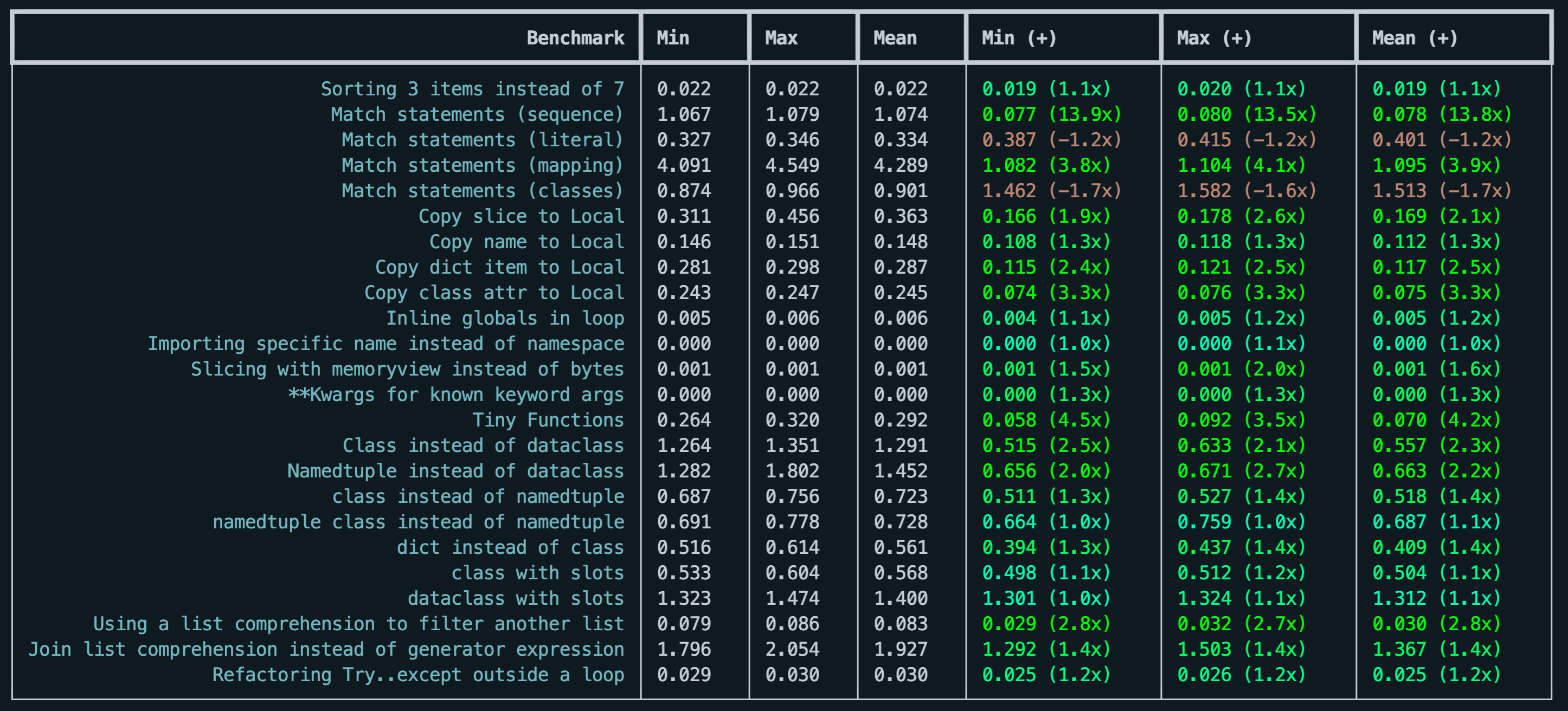
Results are displayed in a table like this:
$ richbench --help
usage: richbench [-h] [--profile] [--percentage] [--markdown] [--benchmark [BENCHMARK]] [--repeat REPEAT] [--times TIMES] target [target ...]

positional arguments:
  target

options:
  -h, --help            show this help message and exit
  --profile             Profile the benchmarks and store in .profiles/
  --percentage          Show percentage of improvement instead of multiplier
  --markdown            Prints a markdown friendly table
  --benchmark [BENCHMARK]
                        Run specific benchmark
  --repeat REPEAT       Repeat benchmark this many times
  --times TIMES         Run benchmark this many times
Writing benchmarks
Benchmarks should be in a directory and must have the filename bench_{name}.py.
The last statement in the benchmark file should be a list, called __benchmarks__ with a list of tuples containing:
- function a
- function b
- the name of the benchmark
def sort_seven():
    """Sort a list of seven items"""
    for _ in range(10_000):
        sorted([3,2,4,5,1,5,3])

def sort_three():
    """Sort a list of three items"""
    for _ in range(10_000):
        sorted([3,2,4])

__benchmarks__ = [
    (sort_seven, sort_three, "Sorting 3 items instead of 7")
]
Tips for benchmarking
Inside your benchmark function try to:
- Run setup commands once
- Repeat the code you want to benchmark as many times as possible to create a stable benchmark
For micro-benchmarks, this can be achieved by calling 1000 - 100,000 times.
If your benchmark code completes within 0.001s it is likely you will get unstable benchmarks because of the CPU doing other activities. Increase the times the target code is run within the function.
Profiling
By adding the --profile flag to the command line, it will generate a subdirectory .profiles with HTML profile data of your target functions.
1 maintainer

Release files for richbench 1.0.3
For a detailed explanation of source distributions (sdists) and built distributions (wheels), please see the package formats documentation.
Source distribution (sdist)
| File | Size | Uploaded | |
|---|---|---|---|
| richbench-1.0.3.tar.gz | 1.1 MB | Details |
Built distribution (wheel)
| File | Interpreter | ABI | Platform | Reset |
|---|---|---|---|---|
| richbench-1.0.3-py3-none-any.whl | Python 3 | none | any | Details |
Total release size: 1.1 MB
Release files / richbench-1.0.3.tar.gz
| Download URL | richbench-1.0.3.tar.gz |
|---|---|
| Size | 1.1 MB |
| Tags | Source |
|
SHA-256 checksum How to use checksums |
744afa3e78cbd919721042c11f7b7f9d2f546cebb3333d40290c4a0d88791701
|
|
BLAKE2b-256 checksum How to use checksums |
9e5bd400ecddd716348ff7eac2a40df67cde1c9b60b1f7083577605db4bd4b31
|
| Upload date | |
|
Uploaded using Trusted Publishing? What is trusted publishing? |
No |
| Uploaded via |
python-requests/2.26.0
|
Release files / richbench-1.0.3-py3-none-any.whl
| Download URL | richbench-1.0.3-py3-none-any.whl |
|---|---|
| Size | 5.2 kB |
| Tags | Python 3 |
|
SHA-256 checksum How to use checksums |
f52651cc0e0069a1355c5ed8cda214cb3f8961e7aaa431e440071d30f62e3e55
|
|
BLAKE2b-256 checksum How to use checksums |
caa2725f87821d93f82cba818037fba0b86b14c721d75d4e9935b441ced8471f
|
| Upload date | |
|
Uploaded using Trusted Publishing? What is trusted publishing? |
No |
| Uploaded via |
python-requests/2.26.0
|














