
RuG_IntroToOptimization Package
This repository provides tools for image manipulation and visualization, intended for educational purposes in the field of optimization and computational image processing.
Installation
To install this package, run the following command:
pip install RuG_IntroToOptimization
Usage
The following functions and classes are provided through the module:
R: A function that applies blurring to the input image.R_T: A function that applies the adjoint of the blurring operator to the input image.grad: A function that computes the discrete gradient of the input image.grad_T: A function that computes the adjoint of the discrete gradient operator.load_image: A utility for loading and preprocessing images (resize, grayscale, and array conversion).ImagePlotter: A class for creating flexible image grids for visualization.
Description of Functions and Classes
load_image(filename: str) -> np.ndarray
Loads an image, resizes it, converts it to grayscale, and returns the processed image as a NumPy array.
Parameters:
filename(str): The path to the image file.
Returns:
X_ref(np.ndarray): Processed image array.
R(image: np.ndarray) -> np.ndarray
Applies a blurring effect or other specified transformation to the input image.
Note: R is a linear operator, yet the matrix form of it is not accessible. See below for more details.
Parameters:
image(np.ndarray): Input image as a NumPy array.
Returns:
X_blur(np.ndarray): Transformed image array.
R_T(image: np.ndarray) -> np.ndarray
Applies the adjoint of the blurring operator to the input image.
Note: R_T is a linear operator, yet the matrix form of it is not accessible. See below for more details.
Parameters:
image(np.ndarray): Input image as a NumPy array.
Return:
X_blur_T(np.ndarray): Adjoint of the blurring operator applied to input.
grad(image: np.ndarray) -> Tuple[np.ndarray, np.ndarray]
Computes the discrete gradient of the input image in the x and y directions.
Note: grad is a linear operator, yet the matrix form of it is not accessible. See below for more details.
Parameters:
image(np.ndarray): Input image as a NumPy array.
Returns:
X_grad(Tuple[np.ndarray]): Discrete gradient in the x and y direction.
grad_T(grad: Tuple[np.ndarray]) -> np.ndarray
Adjoint of the discrete gradient operator.
Note: grad_T is a linear operator, yet the matrix form of it is not accessible. See below for more details.
Parameters:
X_grad(Tuple[np.ndarray]): Discrete gradient in the x and y direction.
Returns:
X_grad_T(np.ndarray): Adjoint discrete gradient operator applied to input.
ImagePlotter(rows: int, cols: int)
A class for creating a grid of images for display. It contains multiples methods.
Parameters:
rows(int): Number of rows in the grid.cols(int): Number of columns in the grid.
Methods:
plot_image(image: np.ndarray, title: str, row: int, col: int): Adds an image to the specified grid cell (rowandcolare 0-indexed) with a title.show(): Displays the plotted grid.
Example Script
To run this example script, you must have a file called 'cat.jpg' in your file system, at the same location as the
script. You may change the filename and path, but the image must remain a .jpg file.
from RuG_IntroToOptimization import R, R_T, load_image, ImagePlotter, grad, grad_T

# Load an image
X_ref = load_image('cat.jpg')

# Create an image plotter for a 2x3 grid
plot = ImagePlotter(2, 3)

# Display the original and transformed images
plot.plot_image(X_ref, "Original Image", 0, 0)
plot.plot_image(R(X_ref), "Blurry Image", 0, 1)
plot.plot_image(R_T(X_ref), "Blurry^T Image", 0, 2)
plot.plot_image(grad(X_ref)[0], "Discrete Gradient in X", 1, 0)
plot.plot_image(grad(X_ref)[1], "Discrete Gradient in Y", 1, 1)
plot.plot_image(grad_T(grad(X_ref)), "grad^T(grad(X))", 1, 2)
plot.show()
This example produces the following result:
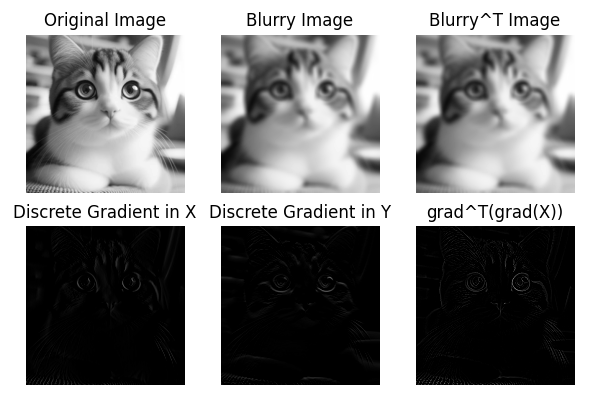
Your task will be to deblur the blurred image, and plot the result as above. Obviously, the last three plots are not
representative of the original image, but the functions grad and grad_T will be useful for the implementation.
Linear Operators
The functions R, R_T, grad and grad_T are linear operators, but their matrix forms are not accessible. This
means that while they can be applied to images, the underlying matrix representation is abstracted away. This is typical
in many image processing libraries where the operations are optimized for performance and memory usage. In cases where
you need to solve linear systems involving these operators, please use the SciPy implementations LinearOperator (
see here) and cg (
see here).
1 maintainer

Metadata
1 maintainer
Release files for RuG-IntroToOptimization 0.1.0
For a detailed explanation of source distributions (sdists) and built distributions (wheels), please see the package formats documentation.
Source distribution (sdist)
| File | Size | Uploaded | |
|---|---|---|---|
| rug_introtooptimization-0.1.0.tar.gz | 5.9 kB | Details |
Built distribution (wheel)
| File | Interpreter | ABI | Platform | Reset |
|---|---|---|---|---|
| rug_introtooptimization-0.1.0-py3-none-any.whl | Python 3 | none | any | Details |
Total release size: 12.5 kB
Release files / rug_introtooptimization-0.1.0.tar.gz
| Download URL | rug_introtooptimization-0.1.0.tar.gz |
|---|---|
| Size | 5.9 kB |
| Tags | Source |
|
SHA-256 checksum How to use checksums |
85ab029bd6261156e8557367c46a13338f79be6c34b23d39bcb68322eed0141b
|
|
BLAKE2b-256 checksum How to use checksums |
45c08f50eac042d17e3a9a9bb608303cd9bf18629d5e800334e64f5301386a26
|
| Upload date | |
|
Uploaded using Trusted Publishing? What is trusted publishing? |
No |
| Uploaded via |
twine/6.2.0 CPython/3.13.3
|
Release files / rug_introtooptimization-0.1.0-py3-none-any.whl
| Download URL | rug_introtooptimization-0.1.0-py3-none-any.whl |
|---|---|
| Size | 6.6 kB |
| Tags | Python 3 |
|
SHA-256 checksum How to use checksums |
50398c32628b527c0a4a759a8e5e1e2a37bbd652985223dc36760310aa456209
|
|
BLAKE2b-256 checksum How to use checksums |
0a1027e4fd2b551fcdfb6455bcbf786303ac66315a815d47ff7670572b12c325
|
| Upload date | |
|
Uploaded using Trusted Publishing? What is trusted publishing? |
No |
| Uploaded via |
twine/6.2.0 CPython/3.13.3
|














