
A simple DSL for S-Clustr

Project description
S-Clustr (Shadow Cluster) Simple






Game Air Battle
This is a game plugin that maps the game visuals to real-world lighting, allowing for malicious control to complete the game.
Start the game server:
$ python3 game.py

Start the floor simulation client (if you are connecting to real devices, it must be a 5-column by 6-row building), input and connect to the shadow cluster server.

$ python3 scctest.py

Start the shadow cluster client and connect to the game server:
python3 S-Clustr_Client.py
set rhost 192.168.0.109
set key 038c97dac0397d783c078df6b6b07efb
game 192.168.0.104 10011

After successfully connecting to the game server, the device will synchronize your game visuals in real time...
Perhaps playing this game on a displayed building would be even more fun...
Pseudo-compiler

1. Write the pseudocode into the input box and compile it; a clustr package will be generated in the ./sccopt directory.
2. Start the S-Clustr client and use the load command to execute the automation package. Example: load <key> <Path>

| Type | Controlled Device | Wired | Wireless | 4G | Security Encryption | Protocol |
|---|---|---|---|---|---|---|
| Embedded | Arduino | √ | × | √ | × | TCP/IP |
| Embedded | Ai-Thinker AIR780E | × | × | √ | × | TCP/IP |
| Embedded | ESP8266 | × | √ | × | × | TCP/IP |
| Embedded | AT89C51 | × | × | √ | × | TCP/IP |
| Embedded | STM32[103fc6t6] | × | × | √ | × | TCP/IP |
| PLC | SIEMENS S7-1200 | √ | × | × | √ | TCP/IP |
| PLC | SIEMENS S7-200 | √ | × | × | √ | TCP/IP |
| Controlled PC Platform | Protocol | Security Encryption |
|---|---|---|
| Windows | TCP/IP | Optional |
| Linux | TCP/IP | Optional |
| Mac OS | TCP/IP | Optional |
| Server Files | Description |
|---|---|
| S-Clustr_Server | Server |
| S-Clustr_Client | Attacker Client |
| DebugDevice | Simulates embedded device connecting to server |
| Generate | One-click generation of embedded device programs |
| Testpc | Windows host connecting to server |
| blacklist.conf | Blacklist, marks IP groups that are prohibited from connecting |
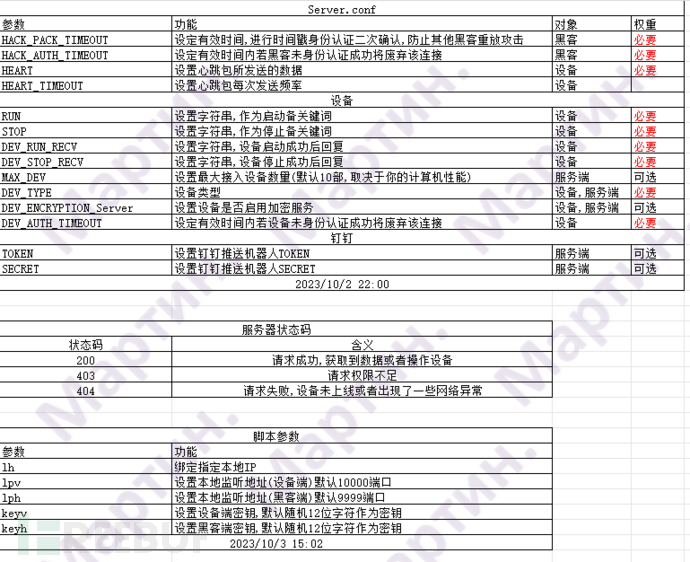
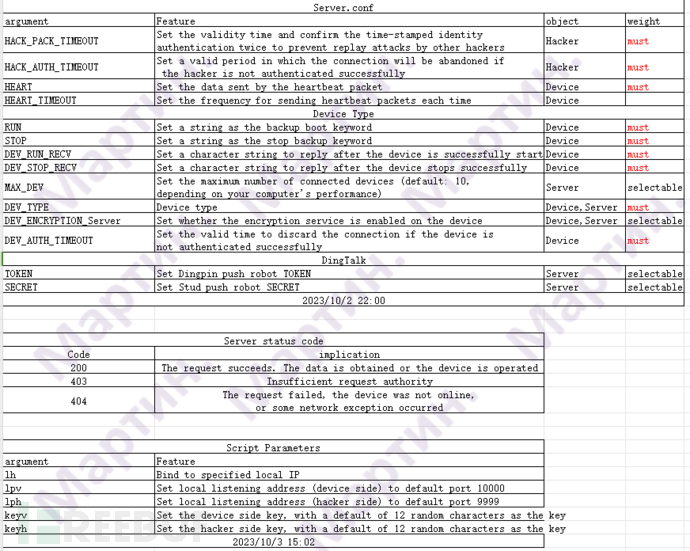
| Server.conf | Configuration parameters for the server |
| Version.conf | Version information |
| Linux_Installer.sh | Linux environment dependency installer |
| Windows_Installer.bat | Windows environment dependency installer |
| Parameter_Description-EN.xls | [English] Description of parameters in Server.conf |
| Parameter_Description-ZH.xls | [Chinese] Description of parameters in Server.conf |
S-Clustr Embedded Device Side
Arduino
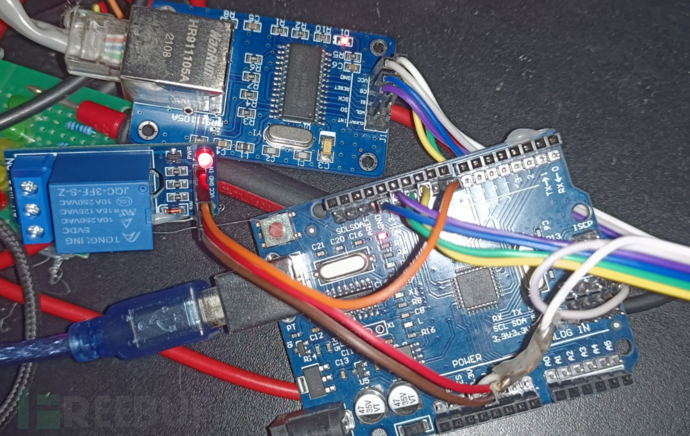
Wired LAN Control
Prepare Materials
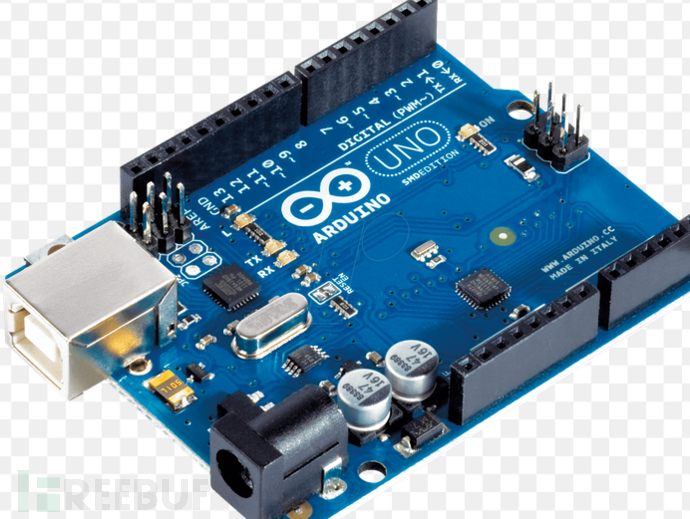
- Arduino UNO
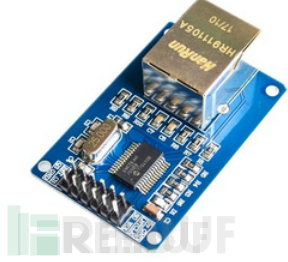
- ENC28J60
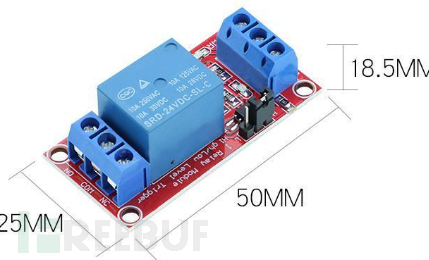
- 1-channel Relay Module 5V
- Dupont Wires

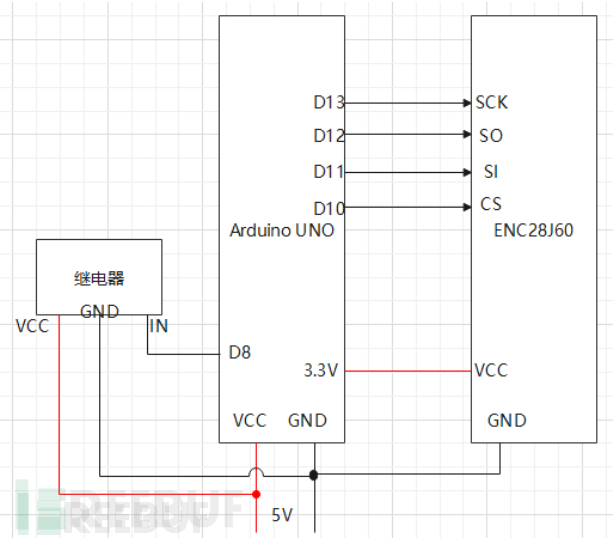
Wiring Diagram
4G Wireless Public Network Control
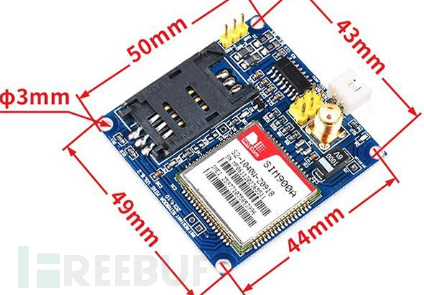
Prepare Materials
- Arduino UNO
- SIM900A or SIM800A
- 1-channel Relay Module 5V
- Dupont Wires (Female to Female)
- Mobile SIM Card
Mobile SIM is required because SIM800A and SIM900A support only 2G networks from Mobile, not Telecom or Unicom... However, the Airm2m AIR780e module should work with Unicom, so SIM series may not be needed as it is internally integrated.

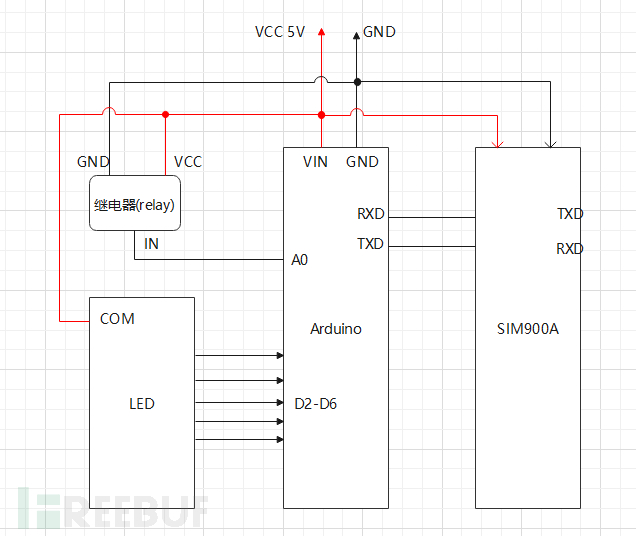
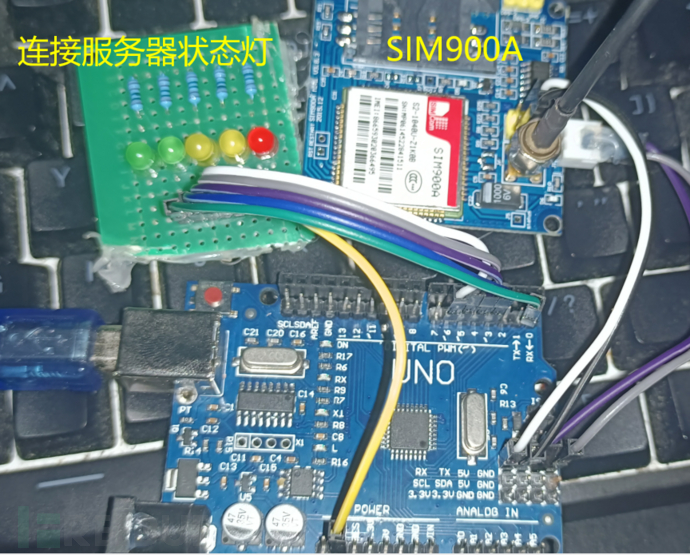
Wiring Diagram
Simulates controlling relay behavior upon receiving signal from Arduino.
Don’t know how to code?... Use Generate.py to generate Arduino code.
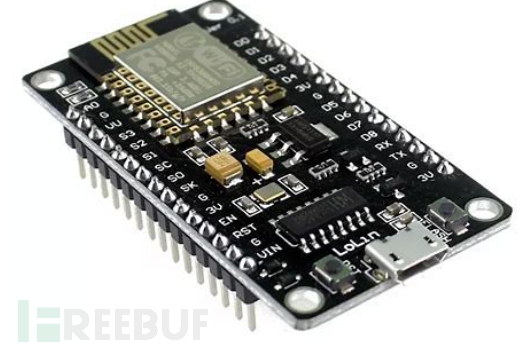
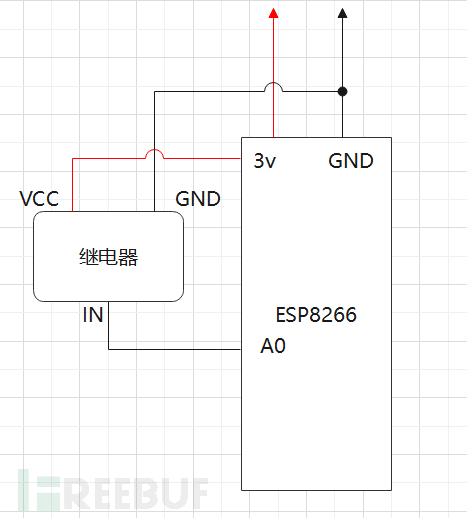
ESP8266 (WIFI LAN Control)
Prepare Materials
- ESP8266
- 1-channel Relay Module 5V
- Dupont Wires
Wiring Diagram
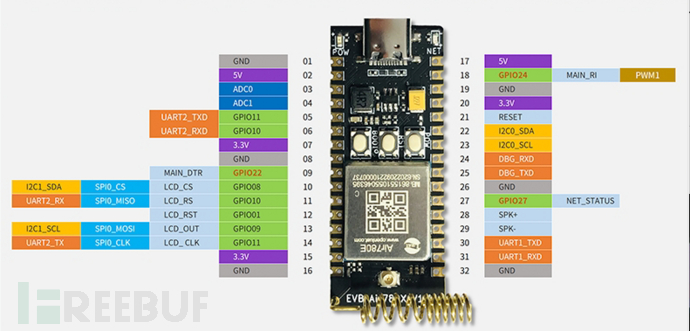
AIR780E (4G Wireless Public Network Control) [Recommended]
Notes
- This development board has been tested and indeed is faster and more stable than the SIM series.
- Install Luatools: For programming. [https://doc.openluat.com/wiki/37?wiki_page_id=4489]
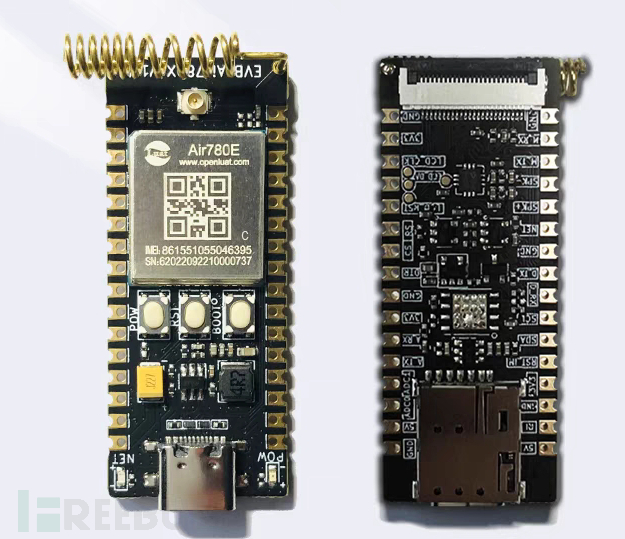
Prepare Materials
- Air780e Development Board
There is a SIM card slot on the back.
- 1-channel Relay Module 5V
- Dupont Wires
Wiring Diagram
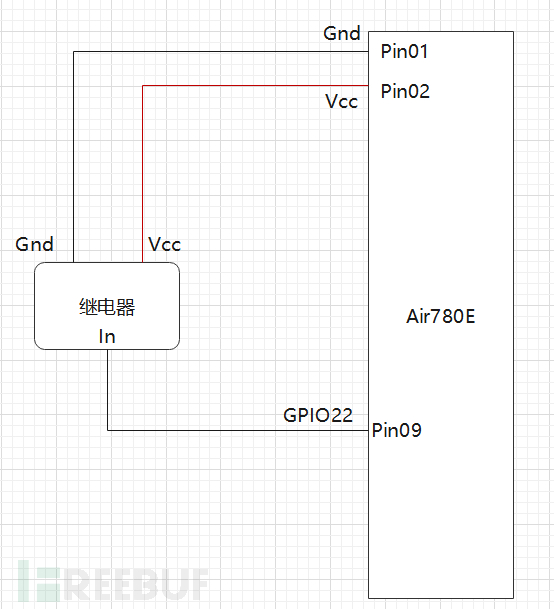
Programming
Import the generated file into Luatools.
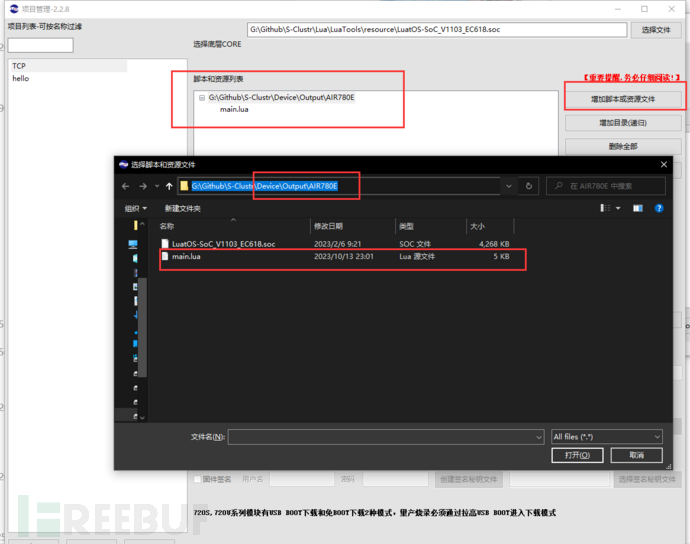
Select the core, provided in our Output\AIR780E\LuatOS-SoC_V1103_EC618.soc.
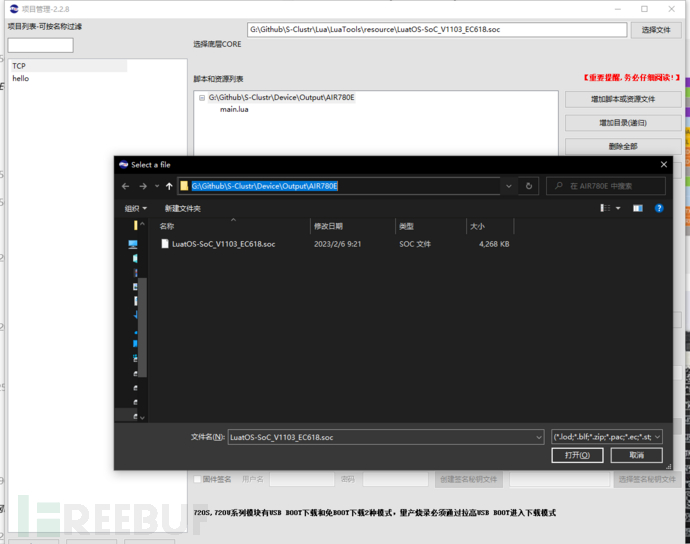
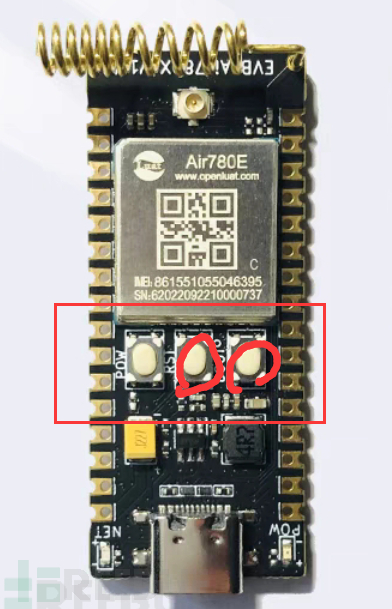
Complete the programming according to the prompts. Note the three buttons on the board: Start, Reset, BOOT.
AT89C51
Prepare Materials
- 51 Microcontroller Minimal System Development Board with CH340 Downloader

- 1-channel Relay Module 5V
- Dupont Wires (Female to Female)
- SIM900A or SIM800A
- Mobile SIM Card
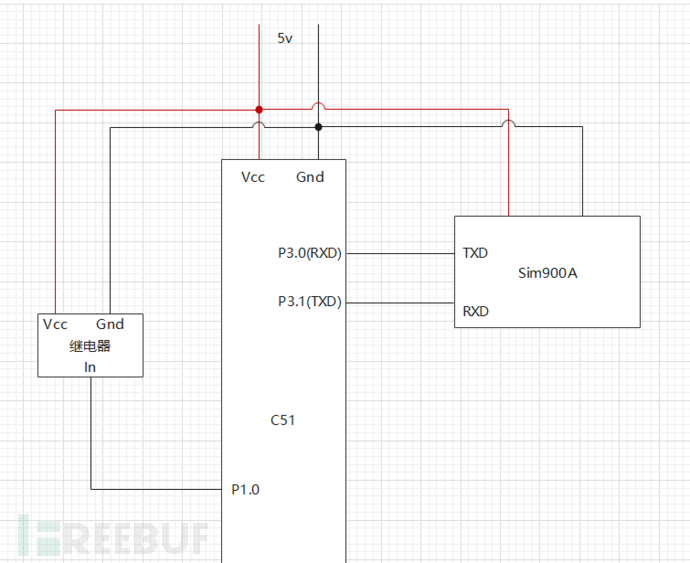
Wiring Diagram
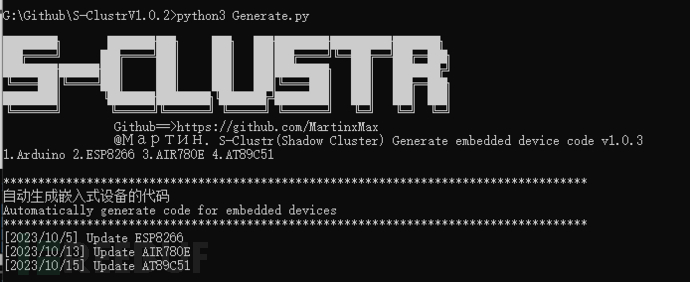
Generate一键生成烧录代码
Generate One-Click Programming Code
Run the command:
python3 Generate.py
Fill in the parameters. Note that 127.0.0.1 is incorrect; you should enter the public IP address of the server, which is the IP of the machine running S-Clustr_Server.py.
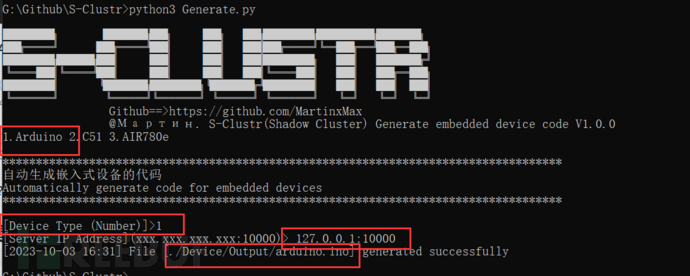
The output programming code will be located in the directory .\Device\Output\Model.
S-Clustr Server
Note:
- The server must be on a public network. If your server is on a private network, you can consider port forwarding. The hacker's service defaults to port 9999, and the device service defaults to port 10000.
- The server and hacker client communicate with full encryption throughout. Encryption services are mandatory and cannot be disabled. Additionally, you can configure in the Server.conf file whether to provide encryption services when embedded devices or controlled PCs connect.
- For parameters in the Server.conf file that you do not understand, please refer to the detailed manual documentation.
- Each time the server starts, it generates a random 12-character key for authentication between the hacker and the controlled device to prevent unauthorized access by other hackers. You can manually specify the key (python3 S-Clustr_Server.py -keyh Maptnh -keyv Maptnh). Here, there are two keys for both the hacker and the controlled device: the first is a plaintext key, and if you find it too sensitive, you can use the subsequent temporary TOKEN as a key, which effectively prevents plaintext key exposure.


- This setup effectively prevents man-in-the-middle (MITM) sniffing of communication packets between the hacker client and the server, further preventing replay attacks and decryption of encrypted data.
Server Script Parameters
-lh: Bind to a specified local IP address, default is 0.0.0.0
-lpv: Set the local listening address for the device side, default port is 10000
-lph: Set the local listening address for the hacker side, default port is 9999
-keyh: Set the hacker side key, default is a randomly generated 12-character key
-keyv: Set the device side key, default is a randomly generated 12-character key
Running the Server
python3 S-Clustr_Server.py
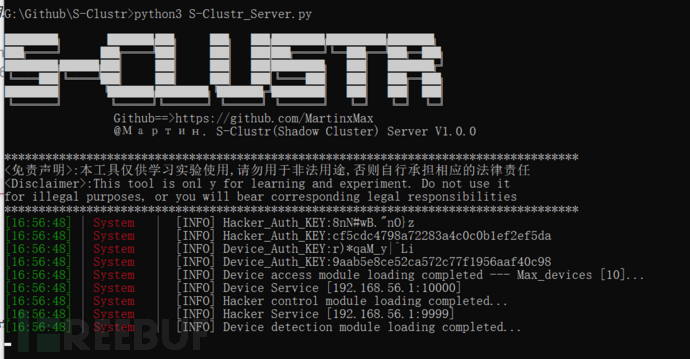
S-Clustr Hacker Client
Note: The client operates interactively, similar to the Metasploit penetration testing framework.
Hacker Client Script Parameters
After entering, type help or ? or options to view the required settings:
set rhosts <IP>: Set the IP address of the server
set rport <Port>: Set the port of the server
set id <number>: Select the ID number of the device to control, 0 means select all devices
set pwr <state>: Control device status: Start [1], Stop [2], Query status [3]
Connecting the Hacker Client to the Server
python3 S-Clustr_Client.py
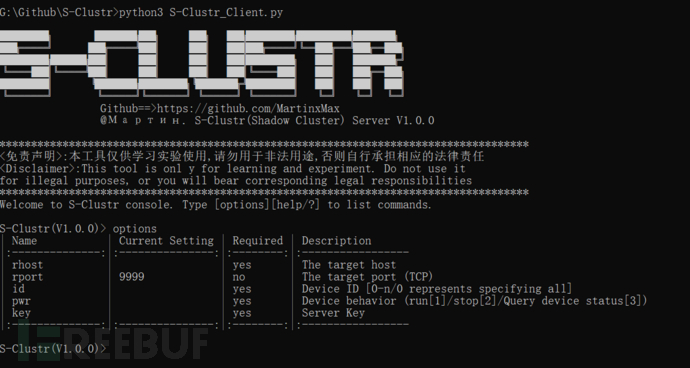
Query the current status of all devices
S-Clustr(V1.0.0)> set rhost 127.0.0.1
[*] rhost => 127.0.0.1
S-Clustr(V1.0.0)> set id 0
[*] id => 0
S-Clustr(V1.0.0)> set pwr 3
[*] pwr => 3
PS: You must provide the Key here, which determines whether you have permission to access the server. You can choose any key from the server.

S-Clustr(V1.0.0)> set key cf5cdc4798a72283a4c0c0b1ef2ef5da
[*] key => cf5cdc4798a72283a4c0c0b1ef2ef5da
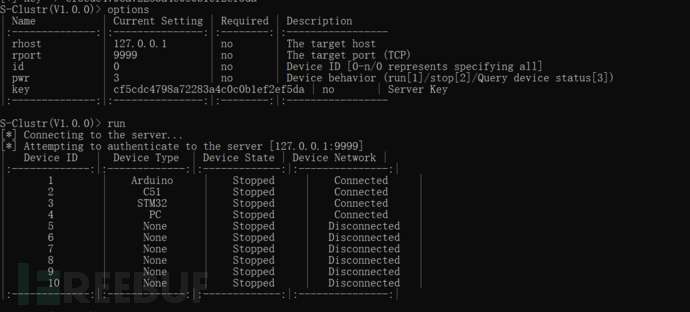
Querying the Status of All Devices
S-Clustr(V1.0.0)> set id 0
[*] id => 0
S-Clustr(V1.0.0)> set pwr 3
[*] pwr => 3
S-Clustr(V1.0.0)> run
[*] Connecting to the server...
[*] Attempting to authenticate to the server [127.0.0.1:9999]
|   Device ID   |  Device Type  | Device State | Device Network |
|:-------------:|:-------------:|:-------------:|:---------------:|
|       1        |      None      |    Stopped     |   Disconnected   |
|       2        |      None      |    Stopped     |   Disconnected   |
|       3        |      None      |    Stopped     |   Disconnected   |
|       4        |      None      |    Stopped     |   Disconnected   |
|       5        |      None      |    Stopped     |   Disconnected   |
|       6        |      None      |    Stopped     |   Disconnected   |
|       7        |      None      |    Stopped     |   Disconnected   |
|       8        |      None      |    Stopped     |   Disconnected   |
|       9        |      None      |    Stopped     |   Disconnected   |
|       10       |      None      |    Stopped     |   Disconnected   |
|:-------------:|:-------------:|:-------------:|:---------------:|
We can see that the connection to the server was successful, and authentication was successful.
If we set an incorrect Key, the server will not authorize you.


Simulating controlled devices connecting to the server and controlling all devices through the hacker client.
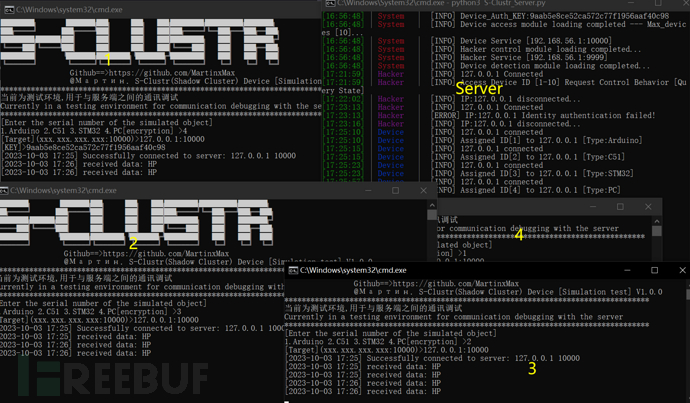
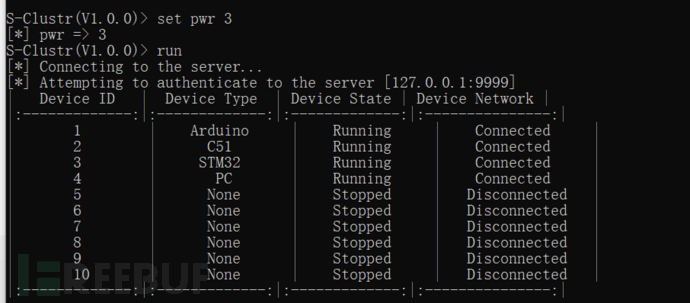
All devices are online.
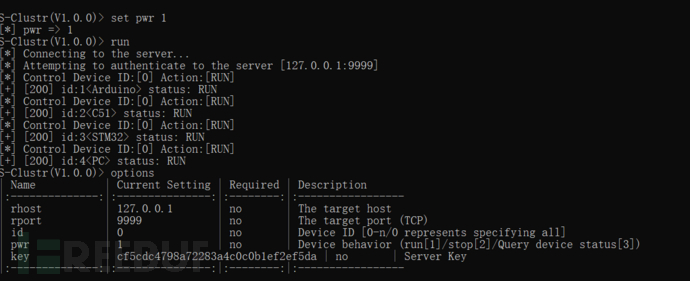
Starting All Devices
S-Clustr(V1.0.0)> set id 0
[*] id => 0
S-Clustr(V1.0.0)> set pwr 1
[*] pwr => 1
S-Clustr(V1.0.0)> run
Stopping All Devices
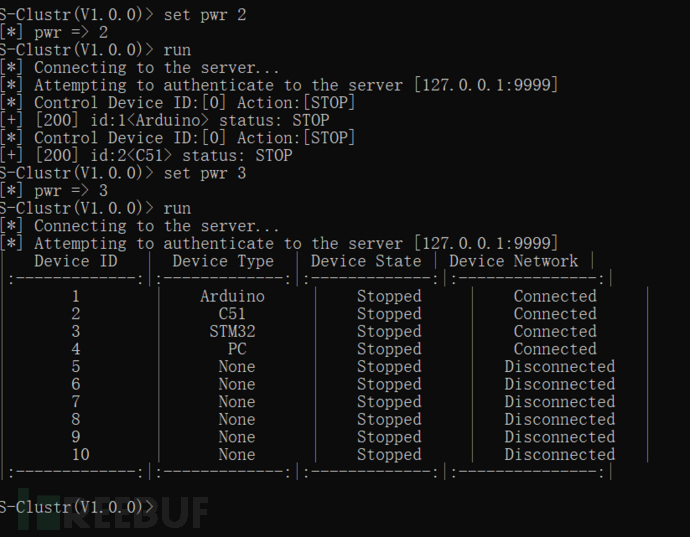
S-Clustr(V1.0.0)> set id 0
[*] id => 0
S-Clustr(V1.0.0)> set pwr 2
[*] pwr => 2
S-Clustr(V1.0.0)> run
Case Study: Controlled Device Accesses www.bing.com and Opens Calculator
Scenario:
After receiving the command, the controlled device should:
- Access the website
www.bing.com. - Open the calculator application.
1. Input the Controlled Device Key
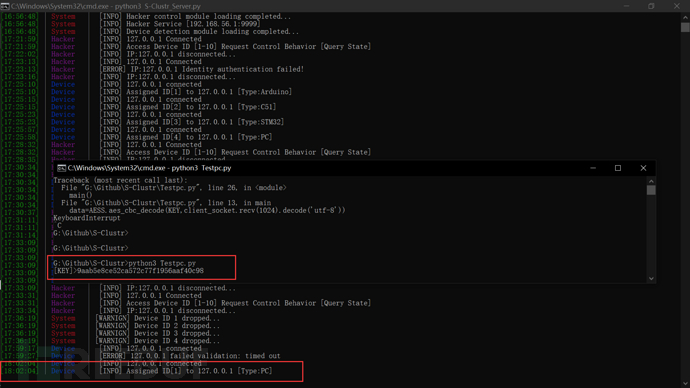
Ensure that the correct key is entered for the controlled device.
2. Successful Connection
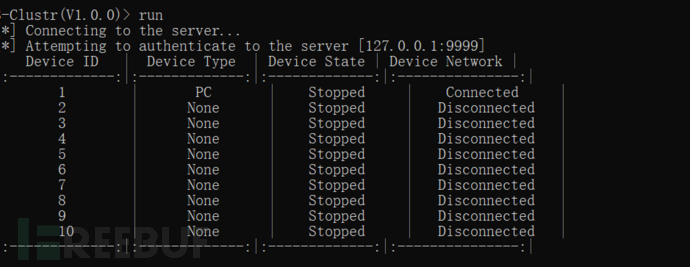
The device is successfully connected, and the hacker client has recognized it.
3. Controlling the Device
The hacker client successfully queries the device and performs the desired actions.

4. Manual Documents
For more information and detailed configuration parameters, refer to the following documents:
-
Parameter_Description-ZH.xls: Chinese version of the parameter description.
-
Parameter_Description-EN.xls: English version of the parameter description.
Release history Release notifications | RSS feed

Download files
Download the file for your platform. If you're not sure which to choose, learn more about installing packages.
Source Distribution
Built Distribution
Filter files by name, interpreter, ABI, and platform.
If you're not sure about the file name format, learn more about wheel file names.
Copy a direct link to the current filters
File details
Details for the file s_clustr_dsl-1.3.7.tar.gz.
File metadata
- Download URL: s_clustr_dsl-1.3.7.tar.gz
- Upload date:
- Size: 30.4 kB
- Tags: Source
- Uploaded using Trusted Publishing? No
- Uploaded via: twine/6.0.1 CPython/3.9.13
File hashes
| Algorithm | Hash digest | |
|---|---|---|
| SHA256 |
f1621ae45bda70036d97259a9a3ad9cc3bd41e9d364aa4a3ddc01b5afefc6fd2
|
|
| MD5 |
780c1a06238a649a1a824692b19db566
|
|
| BLAKE2b-256 |
6891ca3aada2b3f2e2a0cbfa1d1787b7ea1582d516f0d5dc980516cdb1ba79ad
|
File details
Details for the file S_Clustr_DSL-1.3.7-py3-none-any.whl.
File metadata
- Download URL: S_Clustr_DSL-1.3.7-py3-none-any.whl
- Upload date:
- Size: 36.2 kB
- Tags: Python 3
- Uploaded using Trusted Publishing? No
- Uploaded via: twine/6.0.1 CPython/3.9.13
File hashes
| Algorithm | Hash digest | |
|---|---|---|
| SHA256 |
f467a290fa32815984fa16aa88e591a43322ff5bb6a658dd5b85e853c51c7971
|
|
| MD5 |
d37de5649624e3473c9f3995de238d0a
|
|
| BLAKE2b-256 |
5bdd2693ebc28e55e2031c05785448d77b37539d9b1bf59df4730189e4414a78
|






