





SAPsim
Simulation of SAP (Simple-As-Possible computer) programs from COMP 311 (Computer Organization) @ UNC.
Install
pip install SAPsim
Python 3.9+ is required. If your pip command doesn't work, use pip31.
Usage
Write a SAP program in a CSV file using the format shown below.

Two commented example programs are in public_prog/. Also, there's an empty template file here. Lastly, I recommend editing the CSV using VSCode's Edit csv extension or Excel.
To run the SAP program, open a Python terminal and use SAPsim.run().
>>> from SAPsim import run
>>> run("ex1.csv")                  # Run at full speed (default)
┌──────┬────────┬───────────────┬───────┬───────┐
│ PC   │   Addr │ Instruction   │   Dec │ Hex   │
├──────┼────────┼───────────────┼───────┼───────┤
│      │      0 │ LDA 14        │    30 │ 0x1e  │
│      │      1 │ SUB 13        │    61 │ 0x3d  │
│      │      2 │ JZ 6          │   134 │ 0x86  │
│      │      3 │ LDI 0         │    80 │ 0x50  │
│      │      4 │ STA 15        │    79 │ 0x4f  │
│      │      5 │ HLT 0         │   240 │ 0xf0  │
│      │      6 │ LDI 1         │    81 │ 0x51  │
│      │      7 │ STA 15        │    79 │ 0x4f  │
│ >    │      8 │ HLT 0         │   240 │ 0xf0  │
│      │     13 │ NOP 3         │     3 │ 0x03  │
│      │     14 │ NOP 3         │     3 │ 0x03  │
│      │     15 │ NOP 1         │     1 │ 0x01  │
└──────┴────────┴───────────────┴───────┴───────┘
┌───────┬───┐
│ PC    │ 8 │
│ Reg A │ 1 │
│ Reg B │ 3 │
│ FlagC │ 1 │
│ FlagZ │ 1 │
└───────┴───┘
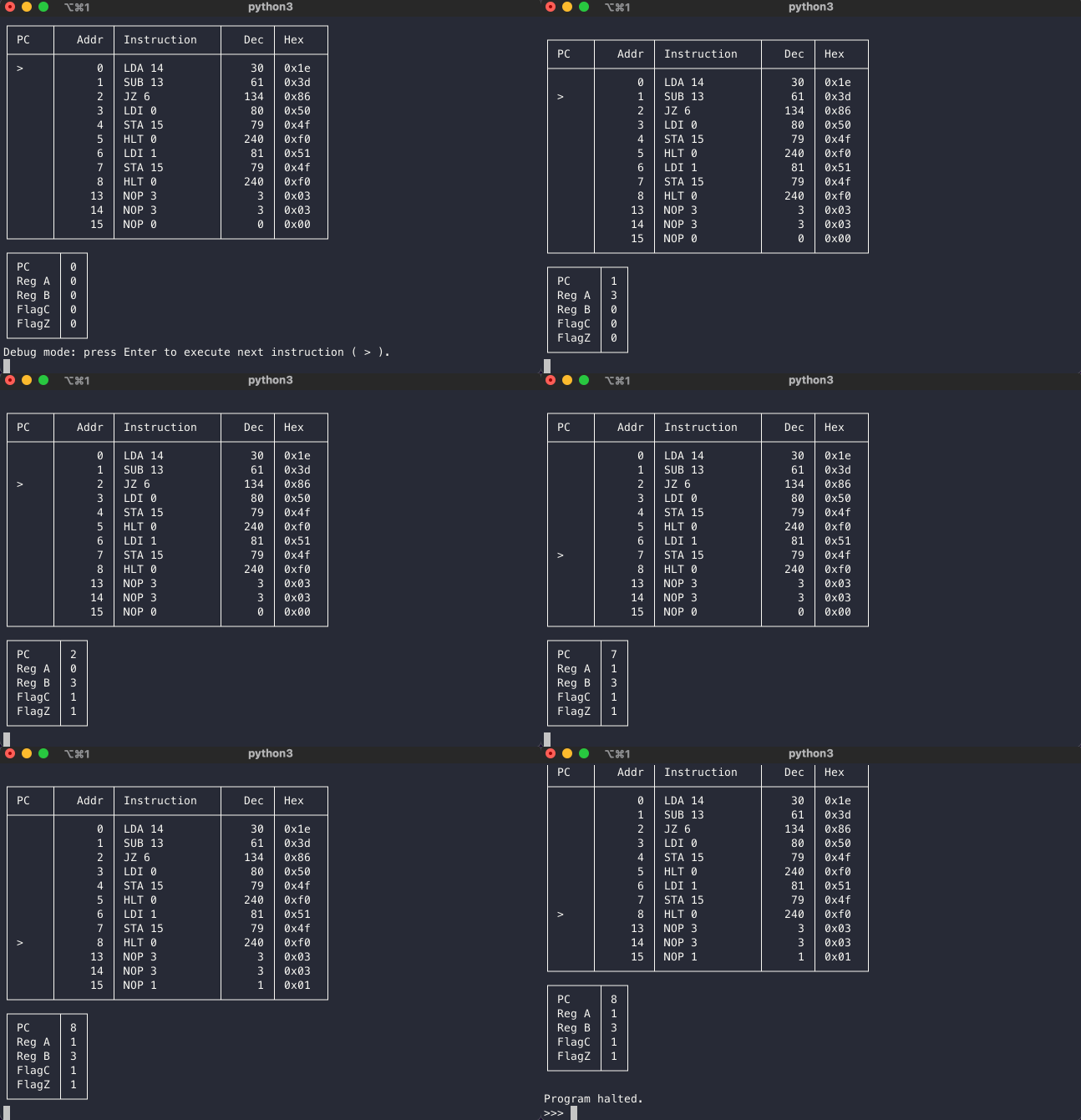
>>> run("ex1.csv", debug=True)      # Run in debug (step) mode
Initial state of simulation of tests/public_prog/ex1.csv
...
Debug mode: press Enter to execute next instruction ( > ).
...
Note: There is a debug (step) mode that runs an instruction each time you press Enter, as shown above. The default behavior is to run at full speed.
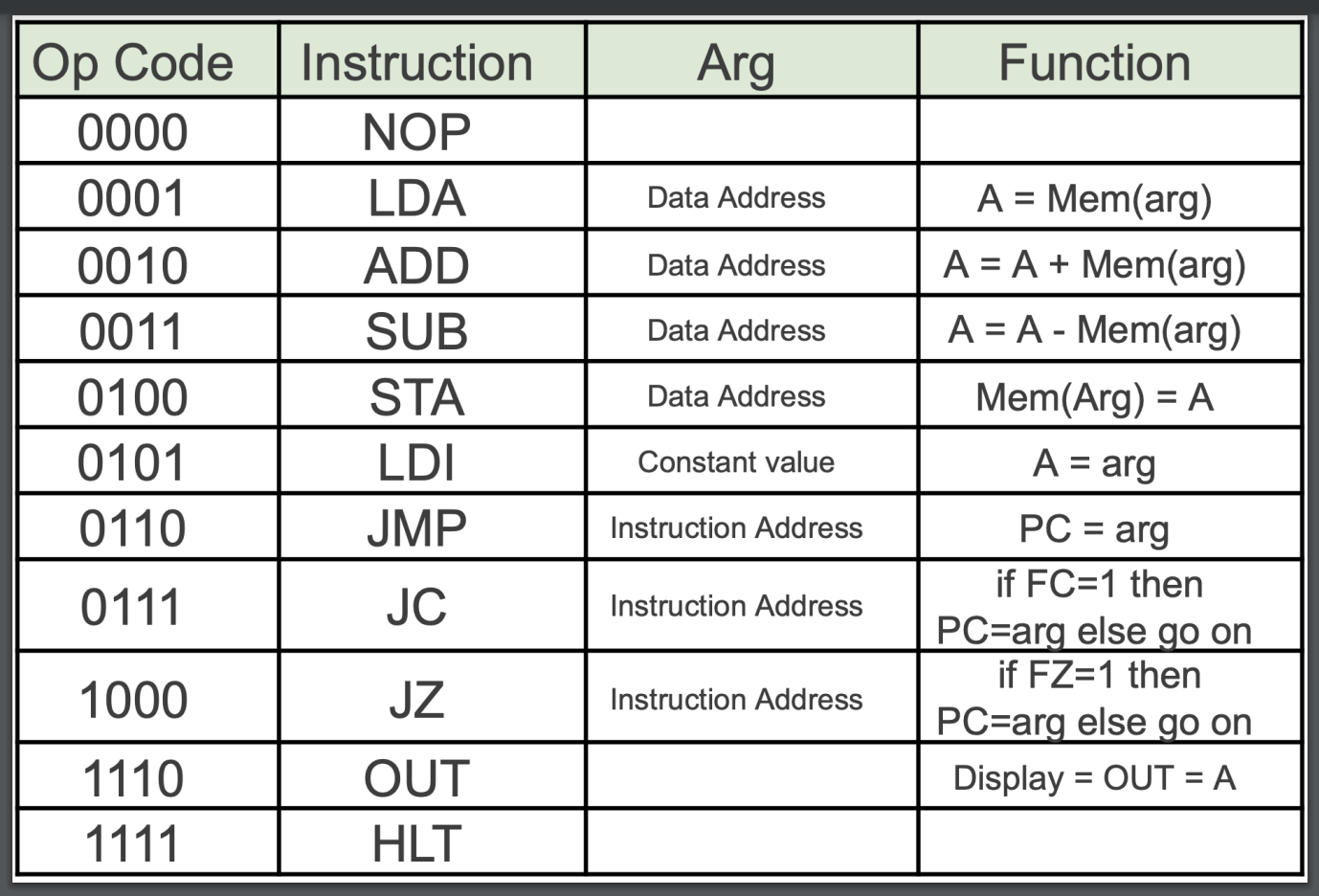
SAP instruction set
Settings
To customize table appearance, use table_format. Options.
>>> run("ex1.csv", table_format="github")
| PC   |   Addr | Instruction   |   Dec | Hex   |
|------|--------|---------------|-------|-------|
|      |      0 | LDA 14        |    30 | 0x1e  |
|      |      1 | SUB 13        |    61 | 0x3d  |
|      |      2 | JZ 6          |   134 | 0x86  |
|      |      3 | LDI 0         |    80 | 0x50  |
|      |      4 | STA 15        |    79 | 0x4f  |
|      |      5 | HLT 0         |   240 | 0xf0  |
|      |      6 | LDI 1         |    81 | 0x51  |
|      |      7 | STA 15        |    79 | 0x4f  |
| >    |      8 | HLT 0         |   240 | 0xf0  |
|      |     13 | NOP 3         |     3 | 0x03  |
|      |     14 | NOP 3         |     3 | 0x03  |
|      |     15 | NOP 1         |     1 | 0x01  |
|-------|---|
| PC    | 8 |
| Reg A | 1 |
| Reg B | 3 |
| FlagC | 1 |
| FlagZ | 1 |
To modify values in the SAP program without editing the CSV, use the change keyword argument.
>>> run("ex1.csv", change={14: 4, 13: 2})      # Change initial byte at address 14 to 4 and at 13 to 2
┌──────┬────────┬───────────────┬───────┬───────┐
│ PC   │   Addr │ Instruction   │   Dec │ Hex   │
├──────┼────────┼───────────────┼───────┼───────┤
│      │      0 │ LDA 14        │    30 │ 0x1e  │
│      │      1 │ SUB 13        │    61 │ 0x3d  │
│      │      2 │ JZ 6          │   134 │ 0x86  │
│      │      3 │ LDI 0         │    80 │ 0x50  │
│      │      4 │ STA 15        │    79 │ 0x4f  │
│ >    │      5 │ HLT 0         │   240 │ 0xf0  │
│      │      6 │ LDI 1         │    81 │ 0x51  │
│      │      7 │ STA 15        │    79 │ 0x4f  │
│      │      8 │ HLT 0         │   240 │ 0xf0  │
│      │     13 │ NOP 2         │     2 │ 0x02  │
│      │     14 │ NOP 4         │     4 │ 0x04  │
│      │     15 │ NOP 0         │     0 │ 0x00  │
└──────┴────────┴───────────────┴───────┴───────┘
┌───────┬───┐
│ PC    │ 5 │
│ Reg A │ 0 │
│ Reg B │ 2 │
│ FlagC │ 1 │
│ FlagZ │ 0 │
└───────┴───┘
Rules
It's easy to just mimic the example programs, but if you need it, here are the rules for SAPsim programs.
Documentation
-
Consider aliasing
piptopip3. ↩
1 maintainer

Metadata
1 maintainer
Release files for SAPsim 1.1.1
For a detailed explanation of source distributions (sdists) and built distributions (wheels), please see the package formats documentation.
Source distribution (sdist)
| File | Size | Uploaded | |
|---|---|---|---|
| SAPsim-1.1.1.tar.gz | 20.7 kB | Details |
Built distribution (wheel)
| File | Interpreter | ABI | Platform | Reset |
|---|---|---|---|---|
| SAPsim-1.1.1-py3-none-any.whl | Python 3 | none | any | Details |
Total release size: 43.5 kB
Release files / SAPsim-1.1.1.tar.gz
| Download URL | SAPsim-1.1.1.tar.gz |
|---|---|
| Size | 20.7 kB |
| Tags | Source |
|
SHA-256 checksum How to use checksums |
61569e4a9dacd71dd03dd10f9fd2d7a90f504d013fcf46f73f330331110596f9
|
|
BLAKE2b-256 checksum How to use checksums |
8d87c944634226b138bccc401b6540f6102951c56281b529c967bca6a43b55dc
|
| Upload date | |
|
Uploaded using Trusted Publishing? What is trusted publishing? |
No |
| Uploaded via |
twine/4.0.2 CPython/3.11.6
|
Release files / SAPsim-1.1.1-py3-none-any.whl
| Download URL | SAPsim-1.1.1-py3-none-any.whl |
|---|---|
| Size | 22.8 kB |
| Tags | Python 3 |
|
SHA-256 checksum How to use checksums |
c74249e26cb77f722c4ec92d47b4d39f923a74a21861b115331c3f806e9e9c70
|
|
BLAKE2b-256 checksum How to use checksums |
29c09d9d9fc6d24c73d2db68f915da2d907bf8ea09a786f24c448937f70abc09
|
| Upload date | |
|
Uploaded using Trusted Publishing? What is trusted publishing? |
No |
| Uploaded via |
twine/4.0.2 CPython/3.11.6
|














