
scaffy
Initialize a project with a standard .collab/ workspace scaffold for multi-agent collaboration.
Install
pipx install scaffy-collab
That's it. scaffy is now available system-wide. Requires Python 3.9+ and pipx.
scaffy --help
Windows users: grab the GUI instead — see below.
Quickstart
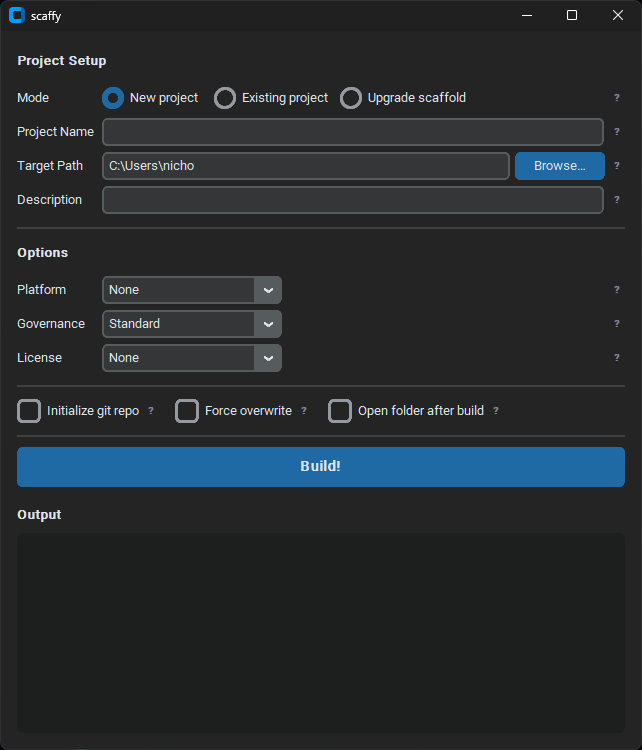
Windows — GUI (exe)
- Download
scaffy.exefrom the latest release - Double-click to run — no install needed
- Fill in Project Name and Target Path, adjust options, click Build!
- When the build completes, a popup shows the initial prompt — copy it and paste into your AI agent to start your first session
Python — CLI (Mac / Linux / Windows)
Recommended: install via pipx (see above), then run:
scaffy
Alternative: download scaffy.py from the latest release and run directly — no install needed:
python3 scaffy.py
Either way, scaffy walks you through the rest. Follow the prompts — at any step, type b to go back or q to quit. When scaffolding completes, the terminal prints the initial prompt — copy it and paste into your AI agent to start your first session.
To skip the prompts entirely:
scaffy --name my-project --path /path/to/base \
  --governance standard \
  --platform github
Purpose
scaffy.py creates a collaboration scaffold with:
.collab/collab-contract.md— Rules, guardrails, and session protocols (OPEN/CLOSE SESSION).collab/kanban-board.md— Task tracking board.collab/context.md— Stable project facts: tech stack, key files, conventions.collab/project.yaml— Machine-readable project metadata.collab/prompts/initial-prompt.md— First-session onboarding prompt (paste on first launch).collab/prompts/agent-profile.md— Fill-in questionnaire for generating agent instructions (CLAUDE.md, AGENTS.md, etc.).collab/brainstorms/— Thinking space for pre-ticket concepts and proposals.collab/session-summaries/— Session summary directory with template.collab/audit/— Analysis reports and planning documents.collab/project-plans/— Long-form plans, architecture docs, and multi-phase roadmaps.collab/skills/— Project-specific agent skills and slash commands.collab/supporting-artifacts/— Diagrams, specs, research, and other project-adjacent materials.collab/prompts/— Reusable agent prompts, including the agent instructions generator.collab/guides/— Reference docs: git governance modes, branching strategy, label taxonomy.collab/playbooks/— Step-by-step procedures: coding standards, per-mode git governance playbooks.collab/playbooks/templates/— Fill-in-the-blank forms: issue and pull request templates.gitignore— Sane defaults (.collab/and agent dirs excluded from version control)
Usage
# Interactive
scaffy

# Fully scripted (non-interactive)
scaffy --name my-project --path /path/to/base

# With flags
scaffy --name my-project --path /path/to/base \
  --governance strict \
  --platform github \
  --description "Automates AWS resource exports to Excel" \
  --init-git

# Preview without writing
scaffy --dry-run
Flags
| Flag | Description | Default |
|---|---|---|
--name NAME |
Project name | interactive |
--path PATH |
Base directory for scaffold installation | interactive |
--force |
Overwrite existing files | off |
--dry-run |
Show planned actions without writing | off |
--governance MODE |
lightweight, standard, or strict |
interactive (standard) |
--platform PLATFORM |
github, gitlab, azure-devops, or none — writes platform-native issue and PR/MR templates |
interactive (none) |
--license LICENSE |
mit, apache-2.0, gpl-3.0, agpl-3.0, bsd-2-clause, bsd-3-clause, mpl-2.0, unlicense, or none — writes a LICENSE file |
interactive (none) |
--ticket-prefix PREFIX |
Task ID prefix rendered in kanban-board.md (e.g. SCAF) |
interactive (TASK) |
--init-git |
Run git init in the project root after scaffolding |
off |
--description TEXT |
Short description injected into context.md |
interactive (optional) |
--upgrade |
Upgrade an existing .collab/ scaffold to the latest templates |
off |
--save-chat |
Export the current agent session to .collab/chat-logs/ |
off |
--list-chats |
List recent agent sessions | off |
--session-id UUID |
Session UUID prefix to export (use with --save-chat) |
most recent |
--cli CLI |
Agent CLI for --save-chat / --list-chats: claude, codex, gemini |
auto-detect |
Governance Modes
| Mode | Use when |
|---|---|
lightweight |
Prototypes, solo work, fast iteration |
standard |
Most active projects (recommended default) |
strict |
Compliance, regulated, or high-risk work |
First Session
After scaffolding, the terminal prints the full onboarding prompt between separator lines — copy it and paste it directly into your agent on first launch. The same prompt is saved to .collab/prompts/initial-prompt.md as a backup.
The prompt orients the agent to the .collab/ structure, initializes its memory with stable project facts, and installs the OPEN/CLOSE SESSION protocols for all future sessions.
Session Protocols
The scaffold installs four trigger phrases into the agent contract and initial prompt:
OPEN SESSION— Agent reads the latest session summary, kanban board, and context, then delivers a concise resume of where things stand. Use at the start of every session.SAVE SESSION— Mid-session checkpoint. Agent writes a summary, updates the kanban, and generates a re-entry prompt — a self-contained block you can paste into a new chat to resume exactly where you left off after clearing context. Then continues working.CLOSE SESSION— Agent writes a session summary and updates the kanban board. Use at the end of every session.SAVE CHAT— Exports the full session transcript to.collab/chat-logs/as a markdown file. Session UUID preserved in the header for traceability. Supported for Claude Code, Gemini CLI, and Codex CLI. scaffy auto-detects the running agent when invoked from inside a chat session. If run from a plain terminal after the session ends, auto-detection is not possible and scaffy will prompt you to select the agent (1/2/3). Usescaffy --save-chat --cli <agent>to skip the prompt.
Brainstorm Workflow
The .collab/brainstorms/ directory is a persistent thinking space for ideas that aren't ready to
become formal tickets yet. It bridges the gap between "I had a thought" and "I opened an issue."
How it works:
- Create a file for your idea:
.collab/brainstorms/my-idea-name.md - Use
.collab/brainstorms/brainstorm-template.mdas a starting point - Brain dump freely — no rules, no required format in the idea body
- When ready, point your agent at the file: "Hey, look at this idea — does it have legs?"
- The agent will engage honestly, then append a dated summary to the Discussion Log section
- Ideas evolve over time. Status tracks the lifecycle:
drafting→workshopping→parkedorgraduated - When an idea becomes a ticket, note the issue number at the bottom and leave the file in place
Key property: nothing in brainstorms/ is required to go anywhere. Ideas can sit, evolve slowly,
or be parked indefinitely. The point is keeping them on paper so they aren't lost when a session closes.
When scaffolding into an existing project, scaffy will print a reminder to migrate any ideas you already have written down or in your head into the new directory.
Additional Enhancements
The scaffold includes two optional tools in .collab/prompts/ to help you get more out of your agent setup:
Agent Instructions Generator
.collab/prompts/agent-profile.md is a fill-in questionnaire that captures your project's
tech stack, key commands, conventions, and guardrails — the things an agent needs to collaborate
well with you. Once filled out, paste .collab/prompts/agent-md-prompt.md into your agent
and it will generate a tailored CLAUDE.md, AGENTS.md, or equivalent instructions file
for the project root.
Coding Playbook
.collab/playbooks/coding-playbook.md is a pre-populated reference covering general software
development best practices — code quality, testing, security, documentation, and more.
It's a starting point: edit it down to what matters for your project, or leave it as a
general reference for your agent to consult.
Git Governance
.collab/guides/git-guidelines.md is a reference guide explaining the governance modes,
branching strategy, label taxonomy, PR standards, and platform notes for GitHub and GitLab.
Three matching execution playbooks in .collab/playbooks/ give each governance mode a
concrete step-by-step procedure for starting work, committing, opening PRs, merging, and
handling hotfixes:
git-governance-lightweight.md— prototypes and sandboxesgit-governance-standard.md— active product development (default)git-governance-strict.md— compliance-sensitive or auditable work
Fill-in-the-blank issue and PR templates live in .collab/playbooks/templates/.
Agent Skills
The skills/ directory contains installable slash commands for Claude Code and Gemini CLI, and a passive skill for Codex CLI. Once installed, your agent knows how to run scaffy without you explaining it.
| Agent | File | Invocation |
|---|---|---|
| Claude Code | skills/claude/scaffy/SKILL.md |
/scaffy |
| Gemini CLI | skills/gemini/scaffy/SKILL.md |
/scaffy |
| Codex CLI | skills/codex/scaffy/SKILL.md |
AI-activated |
Install (global):
# Claude Code
mkdir -p ~/.claude/skills && cp -r skills/claude/scaffy ~/.claude/skills/scaffy

# Gemini CLI
mkdir -p ~/.gemini/skills && cp -r skills/gemini/scaffy ~/.gemini/skills/scaffy

# Codex CLI
mkdir -p ~/.codex/skills && cp -r skills/codex/scaffy ~/.codex/skills/scaffy
Claude & Gemini: type /scaffy to bootstrap a project — the agent gathers inputs and runs scaffy for you. Pass a project name or path as arguments to skip the prompts.
All three skills support session protocols and workspace commands. If you use scaffy's session conventions in your projects, invoke them via the skill:
/scaffy initialize          # First-session onboarding — reads workspace, does repo recon, seeds kanban
/scaffy open session        # Resume from latest session summary
/scaffy save session        # Mid-session checkpoint with re-entry prompt
/scaffy close session       # End-of-session summary and kanban update
/scaffy save chat           # Export transcript to .collab/chat-logs/
/scaffy brainstorm          # List brainstorms with statuses
/scaffy brainstorm <title>  # Create or resume a brainstorm and start workshopping
/scaffy project plan        # List project plans with statuses
/scaffy project plan <title> # Create or resume a project plan and start workshopping
Codex: no slash command — Codex pulls the skill in automatically when it detects a scaffolding or session need.
scafrag — Optional Companion Tool
scafrag.py is a completely optional companion script that lives alongside scaffy.py. Nothing
in scaffy requires it, and you won't miss anything by skipping it. But if you end up using
scaffy across multiple projects, it becomes useful.
What it does: indexes the .collab/ workspaces across all your projects and lets you query
them — searching for past decisions, checking cross-project status, or dumping full context for
a project in one command.
# Build the index (point it at your projects root)
python3 scafrag.py index --root ~/code

# Search across all projects
python3 scafrag.py query "authentication middleware"

# Full context dump for one project
python3 scafrag.py context my-project

# Portfolio view — all projects with kanban lane counts
python3 scafrag.py status

# List all indexed projects
python3 scafrag.py projects
All commands support --format text (default), --format json, and --format markdown.
Output goes to stdout — pipe it wherever you want, including directly into an AI agent.
Requirements: Python 3.9+. No external dependencies — same as scaffy.py.
Windows users: scafrag.exe is available in the latest release — no Python required. Run it from Command Prompt or PowerShell.
Behavior
- If
--nameand--pathare both provided, runs non-interactively. - Otherwise launches an interactive wizard: at any prompt, type
bto go back one step orqto quit. - Existing
.gitignoreis not overwritten — template is written to.collab/.gitignore.templateinstead. - Uses
America/New_YorkandMM.DD.YYYYdate formatting in generated templates.
See Also
Tools and resources that pair well with the structured approach scaffy promotes. None are required.
- GSD — Spec-driven development system for autonomous multi-phase agent work: research, planning, execution, and git management in a single pipeline.
- MemPalace — Local-first AI memory with semantic search. Complements scaffy's session summaries with queryable, persistent long-term recall.
- Caveman — Claude Code skill that compresses agent output by ~75% using terse, technical language. Same accuracy, far fewer tokens.
- Karpathy's LLM Wiki — Pattern for building a personal knowledge base where an LLM incrementally maintains a persistent wiki synthesized from source documents.
1 maintainer

Metadata
1 maintainer
Release files for scaffy-collab 1.11.0
For a detailed explanation of source distributions (sdists) and built distributions (wheels), please see the package formats documentation.
Source distribution (sdist)
| File | Size | Uploaded | |
|---|---|---|---|
| scaffy_collab-1.11.0.tar.gz | 51.4 kB | Details |
Built distribution (wheel)
| File | Interpreter | ABI | Platform | Reset |
|---|---|---|---|---|
| scaffy_collab-1.11.0-py3-none-any.whl | Python 3 | none | any | Details |
Total release size: 98.7 kB
Release files / scaffy_collab-1.11.0.tar.gz
| Download URL | scaffy_collab-1.11.0.tar.gz |
|---|---|
| Size | 51.4 kB |
| Tags | Source |
|
SHA-256 checksum How to use checksums |
c5b7f646e47d771141b30cfb6ef8687c3aa5e1966cef636a83f3813bb00282f6
|
|
BLAKE2b-256 checksum How to use checksums |
b82aee9adc7e9e55f408afbfe0eb68b47c2c2a3a89a7ea897f307f721727efb6
|
| Upload date | |
|
Uploaded using Trusted Publishing? What is trusted publishing? |
Yes |
| Uploaded via |
twine/6.1.0 CPython/3.13.12
|
Provenance
Provenance describes where a file came from. On PyPI, provenance is shared via attestations, which provide a verifiable record of the build or publishing details. View details, limitations and caveats.


PyPI Publish Attestation
PyPI verified that this artifact, at this checksum, originated from the publisher listed below.
Signed by GitHub Actions, verified by PyPI on May 27, 2026.
Transparency logRelease files / scaffy_collab-1.11.0-py3-none-any.whl
| Download URL | scaffy_collab-1.11.0-py3-none-any.whl |
|---|---|
| Size | 47.3 kB |
| Tags | Python 3 |
|
SHA-256 checksum How to use checksums |
8bb0c1692fceb227a667e494f77116350c031942b81f7c40029fe335a3d119ed
|
|
BLAKE2b-256 checksum How to use checksums |
3be21c66fc4b8d3cf59a508a10086ceebf169549eb48ef3ac67a863097beb345
|
| Upload date | |
|
Uploaded using Trusted Publishing? What is trusted publishing? |
Yes |
| Uploaded via |
twine/6.1.0 CPython/3.13.12
|
Provenance
Provenance describes where a file came from. On PyPI, provenance is shared via attestations, which provide a verifiable record of the build or publishing details. View details, limitations and caveats.
PyPI Publish Attestation
PyPI verified that this artifact, at this checksum, originated from the publisher listed below.
Signed by GitHub Actions, verified by PyPI on May 27, 2026.
Transparency log













