
Pixel art image scaling - Scale2x, Scale3x, Scale2xSFX and Scale3xSFX in pure Python


Overview
ScaleNx, encompassing Scale2x, Scale3x, Scale2xSFX, and Scale3xSFX, is a group of pixel-art scaling algorithms, intended to rescale images without blurring sharp edges.
Scale2x and Scale3x (aka AdvMAME2x and AdvMAME3x) algorithms were developed by Andrea Mazzoleni for the sole purpose of scaling up small graphics like icons and game sprites while keeping sharp edges and avoiding blurs.
Later on versions called Scale2xSFX and Scale3xSFX were introduced for the same purpose, providing better diagonals rendering and less artifacts on some patterns.
| Fig. 1. Example of consecutive upscaling with Scale3xSFX. |
|---|
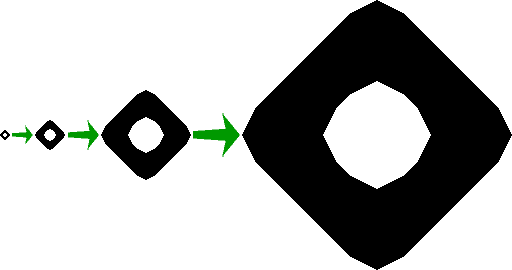 |
| Consecutive upscaling of tiny diagonal object with Scale3xSFX thrice. Source object on the left upscaled 3x3x3=27 times bigger in linear size, i.e. 27x27=729 times bigger by area, meaning that 728 out of 729 resulting pixels are purely artificial; yet the result looks surprisingly clear. |
Being initially created for tiny game sprite images, these algorithms appeared to be useful for some completely different tasks, e.g. scaling up text scans with low resolution before OCR, to improve OCR quality, or upscaling old low quality gravure and line art prints. One of the advantages of these algorithms is that they don't use any empirical chroma mask or something else specifically adopted for game sprites on screen, and therefore are capable to work efficiently on any image, including images intended for print.
| Fig. 2. Example of low resolution drawing upscaling with Scale3xSFX. |
|---|
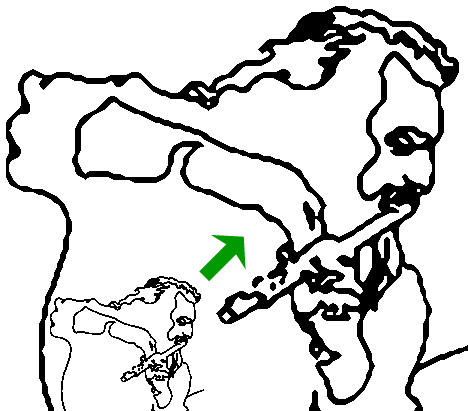 |
| Jagged lines of low resolution original are turned into smoother diagonals. |
Unfortunately, while specialised Scale2x and Scale3x screen renderers (e.g. for DOS emulators) are numerous, it appears to be next to impossible to find ready-made batch processing application working with arbitrary images in common graphics formats.
Therefore, current general purpose pure Python implementation of algorithms above was developed. Current implementation does not use any import, neither Python standard nor third party, and therefore is quite cross-platform and next to omnicompatible.
Note that current PyPI-distributed package is intended for developers, and therefore include ScaleNx core module only. For example of practical Python program utilizing this module, with Tkinter GUI, multiprocessing etc., please visit ScaleNx at Github (PNG support in this program is based on PyPNG, and PPM and PGM support - on PyPNM, both of the above being pure Python modules as well).
Python compatibility
Current ScaleNx version is maximal backward compatibility build, created for PyPI distribution. While most of the development was performed using Python 3.12, testing with other versions was carried out, and ScaleNx proven to work with antique Python 3.4 under Windows XP 32-bit.
Installation
python -m pip install --upgrade scalenx, then from scalenx import scalenx, scalenxsfx.
Usage
Example for Scale3xSFX:
scaled_image = scalenxsfx.scale3x(source_image)
where both images are of 3D nested list (image) of lists (rows) of lists (pixels) of int (channel values) type.
Note that functions names in scalenx and scalenxsfx match, making it easy to switch external software from older scalenx to scalenxsfx or vs. by changing one import line. When creating new software, one may easily make it reconfigurable with reassigning functions names, like
if use_sfx:
    chosen_scaler = scalenxsfx.scale2x
else:
    chosen_scaler = scalenx.scale2x

scaled_image = chosen_scaler(source_image)
Copyright and redistribution
Current Python implementation was written by Ilya Razmanov and may be freely used, copied and improved. In case of making substantial improvements it's almost obligatory to share your work with the developer and lesser species.
References
-
Scale2x and Scale3x algorithms description by the inventor, Andrea Mazzoleni.
-
Scale2xSFX and Scale3xSFX algorithms description at forums archive.
-
Pixel-art scaling algorithms review at Wikipedia.
-
ScaleNx source code at Github - current ScaleNx source at Github, containing main program for single and batch image processing, with GUI, multiprocessing etc..
-
ScaleNx source code for Python 3.4 at Github - same as above, but fully compatible with Python 3.4 (both ScaleNx and image formats I/O and main application).
1 maintainer

Metadata
1 maintainer
Release files for ScaleNx 2025.9.25.34
For a detailed explanation of source distributions (sdists) and built distributions (wheels), please see the package formats documentation.
Source distribution (sdist)
| File | Size | Uploaded | Provenance | Actions |
|---|---|---|---|---|
| scalenx-2025.9.25.34.tar.gz | 7.9 kB | Without provenance | Details for scalenx-2025.9.25.34.tar.gz |
Built distribution (wheel)
| File | Interpreter | ABI | Platform | Actions Reset |
|---|---|---|---|---|
| scalenx-2025.9.25.34-py3-none-any.whl | Python 3 | none | any | Details for scalenx-2025.9.25.34-py3-none-any.whl |
Total release size: 18.0 kB
Release files / scalenx-2025.9.25.34.tar.gz
| Download URL | scalenx-2025.9.25.34.tar.gz |
|---|---|
| Size | 7.9 kB |
| Tags | Source |
|
SHA-256 checksum How to use checksums |
5ed9d9ad7a4d8f0ace17869e475ee5f89f05fe586c900ad774e2b83571365cfe
|
|
BLAKE2b-256 checksum How to use checksums |
db6ac12e9b0ba20fe639fcb0f14983e531d2c260c109aa7e6d25821b0a345cd2
|
| Upload date | |
|
Uploaded using Trusted Publishing? What is trusted publishing? |
No |
| Uploaded via |
twine/6.1.0 CPython/3.12.10
|
Release files / scalenx-2025.9.25.34-py3-none-any.whl
| Download URL | scalenx-2025.9.25.34-py3-none-any.whl |
|---|---|
| Size | 10.0 kB |
| Tags | Python 3 |
|
SHA-256 checksum How to use checksums |
fea52eebde0d8f32e752ba64fb204f905cde8f402fd82d34b4e14738922a22d1
|
|
BLAKE2b-256 checksum How to use checksums |
9eea43a8e826bc749cdf74c4e9a45804d73cdfd9a8b4968e2679d7a1c759b7e6
|
| Upload date | |
|
Uploaded using Trusted Publishing? What is trusted publishing? |
No |
| Uploaded via |
twine/6.1.0 CPython/3.12.10
|
Security for ScaleNx 2025.9.25.34
Provenance
Provenance describes where a file came from. On PyPI, provenance is shared via attestations, which provide a verifiable record of the build or publishing details. View details, limitations and caveats.
No provenance found
None of the files in this release were uploaded with provenance metadata.
A note on package security
PyPI is a repository for distributing packages, not a service for auditing them. While third-party security researchers and our staff do their best to detect and remove malicious packages, PyPI cannot guarantee the quality, security or suitability of any given package.
To learn more about protecting yourself from malicious actors, visit our package security documentation.














