
Data Fitting with SciPy



Built from makenew/python-package.
Description
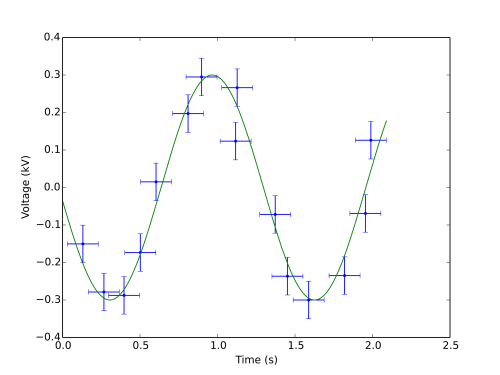
Complete pipeline for easy data fitting with Python 3.
Check out the example fits on Fitalyzer. See the Fitalyzer README for details on how to use Fitalyzer for visualizing your fits.
Installation
This package is registered on the Python Package Index (PyPI) as scipy_data_fitting.
Add this line to your application’s requirements.txt
scipy_data_fitting
and install it with
$ pip install -r requirements.txt
If you are writing a Python package which will depend on this, add this to your requirements in setup.py.
Alternatively, install it directly using pip with
$ pip install scipy_data_fitting
Documentation
Documentation is generated from source with pdoc. The latest version is hosted at pythonhosted.org/scipy-data_fitting/.
To get started quickly, check out the examples.
Then, refer to the source documentation for details on how to use each class.
Basic Usage
from scipy_data_fitting import Data, Model, Fit, Plot

# Load data from a CSV file.
data = Data('linear')
data.path = 'linear.csv'
data.error = (0.5, None)

# Create a linear model.
model = Model('linear')
model.add_symbols('t', 'v', 'x_0')
t, v, x_0 = model.get_symbols('t', 'v', 'x_0')
model.expressions['line'] = v * t + x_0

# Create the fit using the data and model.
fit = Fit('linear', data=data, model=model)
fit.expression = 'line'
fit.independent = {'symbol': 't', 'name': 'Time', 'units': 's'}
fit.dependent = {'name': 'Distance', 'units': 'm'}
fit.parameters = [
    {'symbol': 'v', 'guess': 1, 'units': 'm/s'},
    {'symbol': 'x_0', 'value': 1, 'units': 'm'},
]

# Save the fit result to a json file.
fit.to_json(fit.name + '.json', meta=fit.metadata)

# Save a plot of the fit to an image file.
plot = Plot(fit)
plot.save(fit.name + '.svg')
plot.close()
Controlling the fitting process
The above example will fit the line using the default algorithm scipy.optimize.curve_fit.
For a linear fit, it may be more desirable to use a more efficient algorithm.
For example, to use numpy.polyfit, one could set a fit_function and allow both parameters to vary,
fit.parameters = [
    {'symbol': 'v', 'guess': 1, 'units': 'm/s'},
    {'symbol': 'x_0', 'guess': 1, 'units': 'm'},
]
fit.options['fit_function'] = \
    lambda f, x, y, p0, **op: (numpy.polyfit(x, y, 1), )
Controlling the fitting process this way allows, for example, incorporating error values and computing and returning goodness of fit information.
See scipy_data_fitting.Fit.options for further details on how to control the fit and also how to use lmfit.
Development and Testing
Source Code
The scipy-data_fitting source is hosted on GitHub. Clone the project with
$ git clone https://github.com/razor-x/scipy-data_fitting.git
Requirements
You will need Python 3 with pip.
Install the development dependencies with
$ pip install -r requirements.devel.txt
Tests
Lint code with
$ python setup.py lint
Run tests with
$ python setup.py test
or
$ make test
Documentation
Generate documentation with pdoc by running
$ make docs
Examples
Run an example with
$ python examples/example_fit.py
or run all the examples with
$ make examples
Contributing
Please submit and comment on bug reports and feature requests.
To submit a patch:
Fork it (https://github.com/razor-x/scipy-data_fitting/fork).
Create your feature branch (git checkout -b my-new-feature).
Make changes. Write and run tests.
Commit your changes (git commit -am 'Add some feature').
Push to the branch (git push origin my-new-feature).
Create a new Pull Request.
License
This Python package is licensed under the MIT license.
Warranty
This software is provided “as is” and without any express or implied warranties, including, without limitation, the implied warranties of merchantibility and fitness for a particular purpose.
1 maintainer

Metadata
1 maintainer
Release files for scipy-data_fitting 1.0.2
For a detailed explanation of source distributions (sdists) and built distributions (wheels), please see the package formats documentation.
Source distribution (sdist)
| File | Size | Uploaded | Provenance | |
|---|---|---|---|---|
| scipy-data_fitting-1.0.2.tar.gz | 22.1 kB | Without provenance | Details |
Built distribution (wheel)
| File | Interpreter | ABI | Platform | Reset |
|---|---|---|---|---|
| scipy_data_fitting-1.0.2-py3-none-any.whl | Python 3 | none | any | Details |
Total release size: 45.9 kB
Release files / scipy-data_fitting-1.0.2.tar.gz
| Download URL | scipy-data_fitting-1.0.2.tar.gz |
|---|---|
| Size | 22.1 kB |
| Tags | Source |
|
SHA-256 checksum How to use checksums |
7ba95cf86ee2ac762c199207c337d183bba6d1cd95271a93a7a16fb6c8fe0ecf
|
|
BLAKE2b-256 checksum How to use checksums |
d23cadb97631d99164322a6c923212e9e838221fda12bf05e3e3aa29f6f75777
|
| Upload date | |
|
Uploaded using Trusted Publishing? What is trusted publishing? |
No |
Release files / scipy_data_fitting-1.0.2-py3-none-any.whl
| Download URL | scipy_data_fitting-1.0.2-py3-none-any.whl |
|---|---|
| Size | 23.8 kB |
| Tags | Python 3 |
|
SHA-256 checksum How to use checksums |
df874e9b636c32bca712fc61ddc3fccc042965ebb21ea5765ace48b13ca7de4f
|
|
BLAKE2b-256 checksum How to use checksums |
64908c56dd374722a4ad010f484ea883ce9a82b18258ae8dca1da8860835ea2c
|
| Upload date | |
|
Uploaded using Trusted Publishing? What is trusted publishing? |
No |
Security for scipy-data_fitting 1.0.2
Provenance
Provenance describes where a file came from. On PyPI, provenance is shared via attestations, which provide a verifiable record of the build or publishing details. View details, limitations and caveats.
No provenance found
None of the files in this release were uploaded with provenance metadata.
A note on package security
PyPI is a repository for distributing packages, not a service for auditing them. While third-party security researchers and our staff do their best to detect and remove malicious packages, PyPI cannot guarantee the quality, security or suitability of any given package.
To learn more about protecting yourself from malicious actors, visit our package security documentation.














