
Scyland3D: Processing 3D landmarks
Scyland3D is a Python tool for converting 3D raw landmark and semilandmark coordinates exported from landmark acquisition software (e.g. Landmark Editor 3.6 from IDAV, UC Davis) to a csv format best suited for geometric morphometric analyses.
Processing schemes to mirror and reorder these points are provided to address further symmetry issues.
By:
- Fidji Berio (GitHub) from ISEM and IGFL,
- Yann Bayle (Website, GitHub) from LaBRI, Univ. Bordeaux, CNRS, and SCRIME.
Installation
Install and update using pip:
pip install -U Scyland3D
Dependencies:
- Python 2 or 3. Scyland3D has been tested with Python 2.7.16 and 3.6.3 and should work with older versions of Python.
- Numpy >= 1.13.3. Scyland3D has been tested with Numpy 1.13.3 and 1.16.2 and should work with older versions of Numpy.
If you encounter an error with other versions, please submit an issue.
Use-case example
To quickly process landmarks files, you can give Scyland3D the path to the folder containing the .pts files (format defined on page 37 in http://www.idav.ucdavis.edu/research/projects/EvoMorph/supplement/LandmarkDoc_v3_b6.pdf), as shown in the example files provided:
from Scyland3D import Scyland3D
Scyland3D.pts2csv("example/")
This will create a file named landmarks.csv that you can use for statistical analyses in any language/software you want.
The example files provided come from a subset of our dataset for studying teeth of the small-spotted catshark Scyliorhinus canicula.
We provide 7 landmark and 31 semilandmark coordinates for 2 upper teeth and for 3 lower ones, stored in two folders that describe the specimens they belong to.
A landmark is a point set up by hand as opposed to a semilandmark that is interpolated by the computer between two landmarks by following the curvature of the studied form.
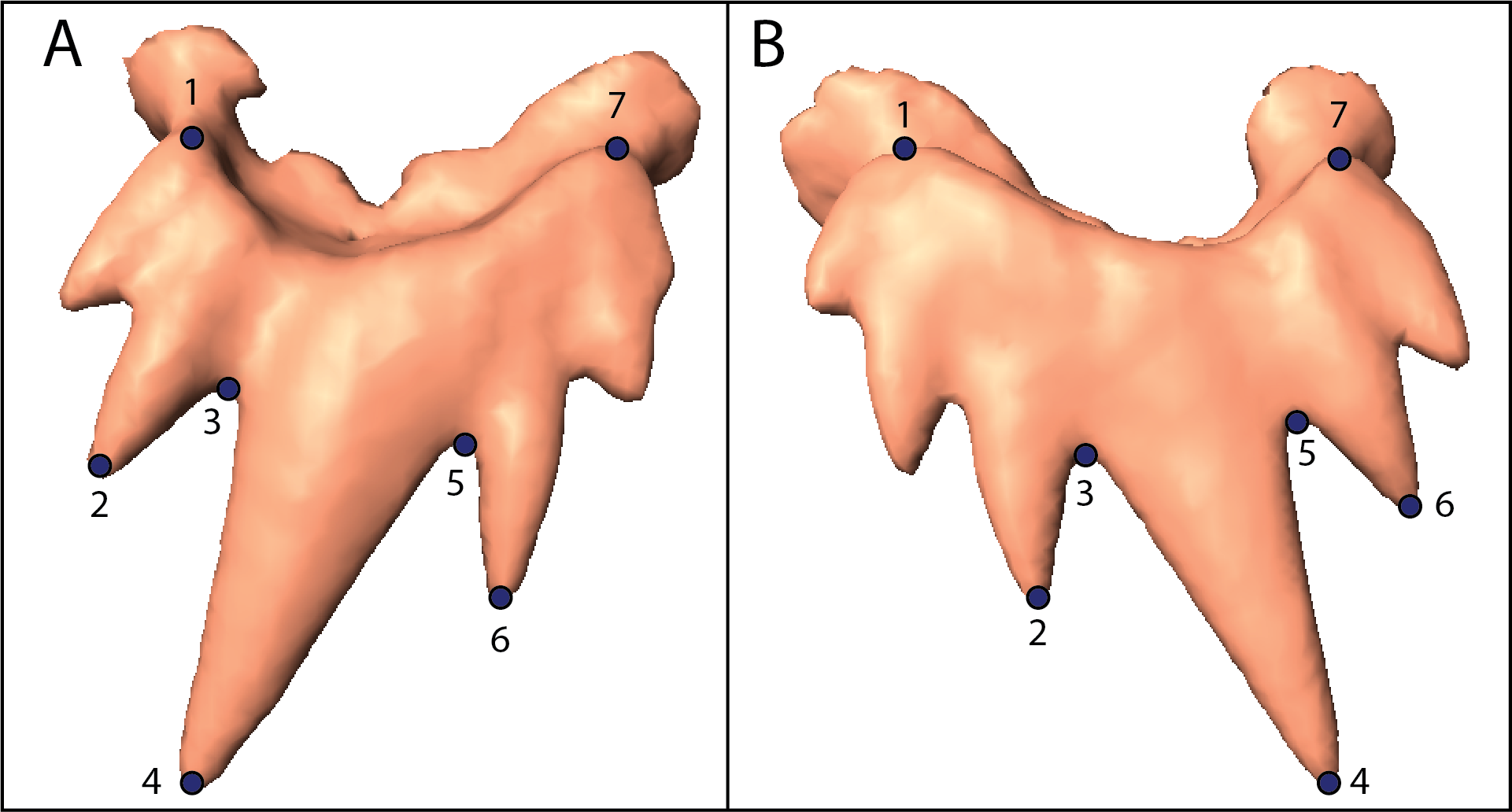
Below, the image A is the representation of 7 landmarks for an input right shark tooth and the image B is the output produced by Scyland3D when using the options to mirror and reorder the landmarks. This process can be used to process right teeth in order to superimpose and compare them with left teeth in order to compare analogous elements. More information can be found on the related article.
API documentation
The function pts2csv() is the core of Scyland3D and is also called when using the script from the terminal with the following arguments:
- indir (required)
- A string containing the input directory where the files are stored. File names can specify the feature modalities separated by
_(e.g. speciesA_ageX_sex1.pts). - Example:
Scyland3D.pts2csv(indir="path/") - Command line:
python -m Scyland3D.Scyland3D -i "path/"
- A string containing the input directory where the files are stored. File names can specify the feature modalities separated by
- outdir (optional)
- A string containing the output directory where the files will be generated.
- Default: Use the current folder.
- Example:
Scyland3D.pts2csv(indir="path/", outdir="outpath/") - Command line:
python -m Scyland3D.Scyland3D -i "path/" -o "path/"
- order (optional)
- A list of integer indicating the new order to apply to the landmarks. The order_factor argument must also be supplied.
- Default: None
- Example:
Scyland3D.pts2csv(indir="path/", order_factor="upper", order=[36, 35, 34, 33, 32, 31, 30, 29, 28, 27, 26, 25, 24, 23, 22, 21, 20, 19, 18, 17, 16, 15, 14, 13, 12, 11, 10, 9, 8, 7, 6, 5, 4, 3, 2, 1, 0, 37]) - Command line:
python -m Scyland3D.Scyland3D -i "path/" -f "upper" -r "36, 35, 34, 33, 32, 31, 30, 29, 28, 27, 26, 25, 24, 23, 22, 21, 20, 19, 18, 17, 16, 15, 14, 13, 12, 11, 10, 9, 8, 7, 6, 5, 4, 3, 2, 1, 0, 37"
- order_factor (optional)
- A string containing the keyword for items that need their landmarks and semilandmarks to be reordered. The order argument must also be supplied. Warning: no checks are made on the factor, so be sure to avoid any typo.
- Default: None
- Example: if the dataset contains lower and upper teeth where only the upper teeth need to be reordered, one can use:
Scyland3D.pts2csv(indir="path/", order_factor="upper", order=[36, 35, 34, 33, 32, 31, 30, 29, 28, 27, 26, 25, 24, 23, 22, 21, 20, 19, 18, 17, 16, 15, 14, 13, 12, 11, 10, 9, 8, 7, 6, 5, 4, 3, 2, 1, 0, 37]) - Command line:
python -m Scyland3D.Scyland3D -i "path/" -f "upper" -r "36, 35, 34, 33, 32, 31, 30, 29, 28, 27, 26, 25, 24, 23, 22, 21, 20, 19, 18, 17, 16, 15, 14, 13, 12, 11, 10, 9, 8, 7, 6, 5, 4, 3, 2, 1, 0, 37". This is only valid if the keywordupperis present in the file name.
- feature_names (optional)
- A list of string containing the feature names.
- Default: None
- Example:
Scyland3D.pts2csv(indir="path/", feature_names=["identifier", "species", "location", "length", "sex", "stage", "jaw", "position", "generation"]) - Command line:
python -m Scyland3D.Scyland3D -i "path/" -n "identifier,species,location,length,sex,stage,jaw,position,generation"
- verbose (optional)
- A boolean indicating if information should be printed on the console by the process.
- Default: False
- Example:
Scyland3D.pts2csv(indir="path/", verbose=True)displays information to the console. - Command line:
python -m Scyland3D.Scyland3D -i "path/" -vdisplays information to the console.
- mirror_factor (optional)
- A string containing the keyword for items to be mirrored in the 3D space. Warning: no checks are made on the factor, so be sure to avoid any typo.
- Default: None
- Example:
Scyland3D.pts2csv(indir="path/", mirror_factor="upper") - Command line:
python -m Scyland3D.Scyland3D -i "path/" -m "upper"will mirror in 3D the landmarks stored in.ptsfiles with the keyword upper in their filename. Then, it will export to a.csvfile those mirrored landmarks and also the unprocessed landmarks from.ptsfiles that do not contain the keywordupperin their filename. The figure above depicts the mirroring.
How To Contribute
Contributions are welcome! Please refer to the CONTRIBUTING.md file.
License
Scyland3D is licensed under the MIT License as described in the license file. Please use the following citation:
@article{Berio2019,
    author  = {Berio, Fidji and Bayle, Yann},
    title   = {{Scyland3D: Processing 3D landmarks}},
    journal = {{The Journal of Open Source Software}},
    page    = {1153--1155},
    volume  = {4},
    issue   = {33},
    doi     = {10.21105/joss.01153},
    note    = {Review pending}
}
Acknowledgements
- We acknowledge the contribution of SFR Biosciences (UMS3444/CNRS, US8/Inserm, ENS de Lyon, UCBL) facilities: AniRA-ImmOs and Mathilde Bouchet for her help with X-ray microtomography.
- We are thankful to @patrikhuber and @r-barnes, the two reviewers from JOSS that helped improved a lot the code and the documentation.
1 maintainer

Metadata
1 maintainer
Release files for Scyland3D 1.1.0
For a detailed explanation of source distributions (sdists) and built distributions (wheels), please see the package formats documentation.
Source distribution (sdist)
| File | Size | Uploaded | |
|---|---|---|---|
| Scyland3D-1.1.0.tar.gz | 22.0 kB | Details |
Built distribution (wheel)
| File | Interpreter | ABI | Platform | Reset |
|---|---|---|---|---|
| Scyland3D-1.1.0-py2-none-any.whl | Python 2 | none | any | Details |
Total release size: 49.5 kB
Release files / Scyland3D-1.1.0.tar.gz
| Download URL | Scyland3D-1.1.0.tar.gz |
|---|---|
| Size | 22.0 kB |
| Tags | Source |
|
SHA-256 checksum How to use checksums |
b6d37e3e9173a0542d2babca8a3e6f66950be083b11dc33b4df108c34c7aa447
|
|
BLAKE2b-256 checksum How to use checksums |
71093725341f5331573a710f25564496984c1e196644183581775cc48c4d63b3
|
| Upload date | |
|
Uploaded using Trusted Publishing? What is trusted publishing? |
No |
| Uploaded via |
twine/3.1.1 pkginfo/1.5.0.1 requests/2.21.0 setuptools/40.8.0 requests-toolbelt/0.9.1 tqdm/4.42.1 CPython/3.7.3
|
Release files / Scyland3D-1.1.0-py2-none-any.whl
| Download URL | Scyland3D-1.1.0-py2-none-any.whl |
|---|---|
| Size | 27.5 kB |
| Tags | Python 2 |
|
SHA-256 checksum How to use checksums |
00fda3439bfcd3e7259334b6eb0f8490ec814208c334dc91749b71924d268d83
|
|
BLAKE2b-256 checksum How to use checksums |
969783b94bdaa576e218a027c0026315c57a0259b0d638f53b52333edaaf81aa
|
| Upload date | |
|
Uploaded using Trusted Publishing? What is trusted publishing? |
No |
| Uploaded via |
twine/3.1.1 pkginfo/1.5.0.1 requests/2.21.0 setuptools/40.8.0 requests-toolbelt/0.9.1 tqdm/4.42.1 CPython/3.7.3
|














