
Send To Kindle
A utility to send documents to your Kindle via the Internet.
Currently only works on Ubuntu, because it uses an app indicator. Patches to supported other distributions are welcome.
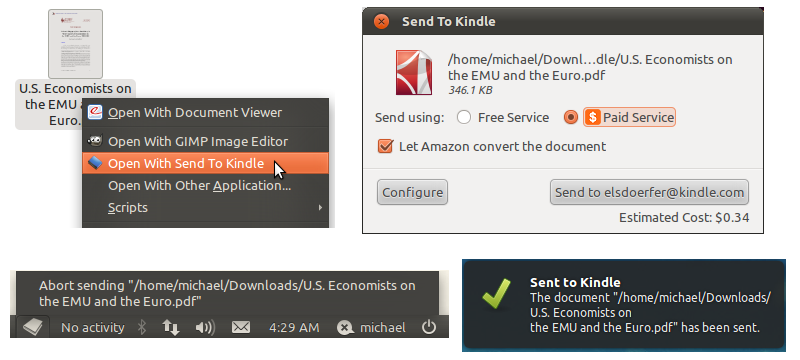
See http://elsdoerfer.com/sendtokindle for more screenshots.
Installation
You currently must install via pip (easy_install does not place the data files in the correct place):
$ sudo easy_install pip $ sudo pip install sendtokindle
It will add itself to the Gnome Main Menu, as well as the “Open With” menu of supported file types.
Credits
Incorporates code from https://github.com/kparal/sendKindle, which is a command line tool that does the same thing.
1 maintainer

Metadata
1 maintainer
Release files for sendtokindle 0.5.9
For a detailed explanation of source distributions (sdists) and built distributions (wheels), please see the package formats documentation.
Source distribution (sdist)
| File | Size | Uploaded | |
|---|---|---|---|
| sendtokindle-0.5.9.tar.gz | 92.8 kB | Details |
Release files / sendtokindle-0.5.9.tar.gz
| Download URL | sendtokindle-0.5.9.tar.gz |
|---|---|
| Size | 92.8 kB |
| Tags | Source |
|
SHA-256 checksum How to use checksums |
d0c7f086d1aee3f31370cea67c65ba6bb6b698ada5e2246161fc5ebb0d903f7b
|
|
BLAKE2b-256 checksum How to use checksums |
c13bb9952a3b674fedbf3faf09d78f698eb3004b73ce90ba457dcd2ca079f6e4
|
| Upload date | |
|
Uploaded using Trusted Publishing? What is trusted publishing? |
No |














