









sheet2dict
A simple XLSX/CSV reader - to dictionary converter
Installing
To install the package from pip, first run:
python3 -m pip install --no-cache-dir sheet2dict
Required pip packages for sheet2doc: csv, openpyxl
Usage
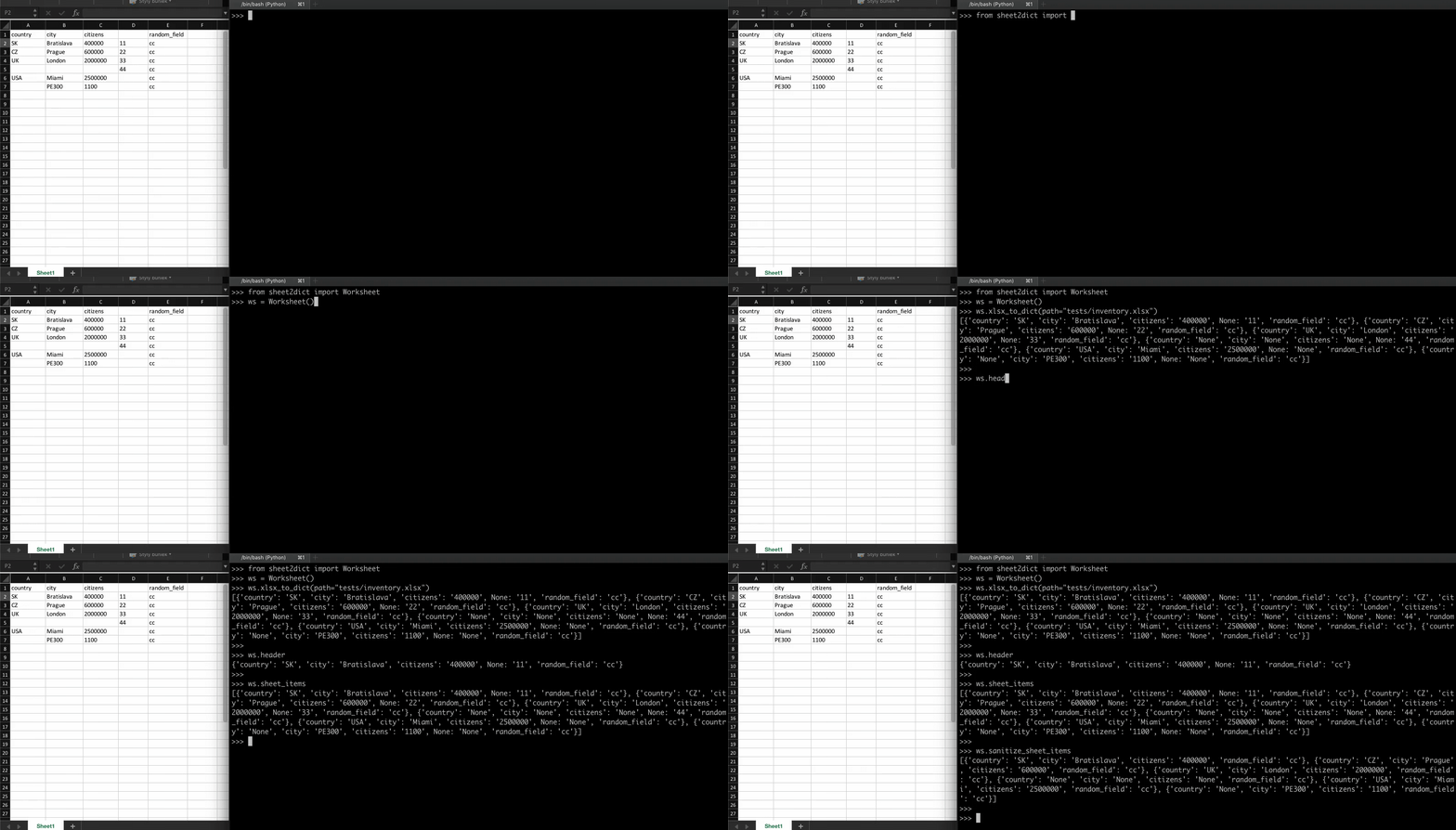
This library has 2 main features: reading a spreadsheet files and converting them to array of python dictionaries.
- XLSX
Use xlsx_to_dict() method when converting form spreadsheets.
Supported file formats for spreadsheets are: .xlsx,.xlsm,.xltx,.xltm
Spreadsheets with multiple worksheets are supported. If no sheet is specified, the active sheet is selected. If there is only one sheet, it is considered active.
# Import the library
from sheet2dict import Worksheet

# Create an object
ws = Worksheet()

# Convert active sheet (without specifying sheet name)
ws.xlsx_to_dict(path='inventory.xlsx')

# Convert the 'Main Warehouse' sheet of the 'inventory.xslx' spreadsheet file.
ws.xlsx_to_dict(path='inventory.xlsx', select_sheet='Main Warehouse')

# object.header returns first row with the data in a spreadsheet
print(ws.header)

# object.sheet_items returns converted rows as dictionaries in the array
print(ws.sheet_items)
You can parse data when worksheet is an object
# Import the library
from sheet2dict import Worksheet

# Example: read spreadsheet as object
path = 'inventory.xlsx'
xlsx_file = open(path, 'rb')
xlsx_file = BytesIO(xlsx_file.read())

# Parse spreadsheet from object
ws = Worksheet()
ws.xlsx_to_dict(path=xlsx_file)
print(ws.header)
- CSV
Use csv_to_dict() method when converting form csv.
CSV is a format with many variations, better handle encodings and delimiters on user side and not within module itself.
# Import the library
from sheet2dict import Worksheet

# Create an object
ws = Worksheet()

# Read CSV file
csv_file = open('inventory.csv', 'r', encoding='utf-8-sig')

# Convert
ws.csv_to_dict(csv_file=csv_file, delimiter=';')

# object.header returns first row with the data in a spreadsheet
print(ws.header)

# object.sheet_items returns converted rows as dictionaries in the array
print(ws.sheet_items)
- Other functions
Worksheet object.header returns first row with the data in a spreadsheet
Python 3.9.1
[Clang 12.0.0 (clang-1200.0.32.28)] on darwin
>>> from sheet2dict import Worksheet
>>> ws = Worksheet()
>>> ws.xlsx_to_dict(path="inventory.xlsx")

>>> ws.header
{'country': 'SK', 'city': 'Bratislava', 'citizens': '400000', 'random_field': 'cc'}
Worksheet object.sanitize_sheet_items removes None or empty dictionary keys from sheet_items
>>> from sheet2dict import Worksheet
>>> ws = Worksheet()
>>> ws.xlsx_to_dict(path="inventory.xlsx")

>>> ws.sheet_items
[
  {'country': 'CZ', 'city': 'Prague', 'citizens': '600000', None: '22', 'random_field': 'cc'},
  {'country': 'UK', 'city': 'London', 'citizens': '2000000', None: '33', 'random_field': 'cc'}
]

>>> ws.sanitize_sheet_items
[
  {'country': 'CZ', 'city': 'Prague', 'citizens': '600000', 'random_field': 'cc'},
  {'country': 'UK', 'city': 'London', 'citizens': '2000000', 'random_field': 'cc'}
]
Contributing and Code of Conduct
Contributing to sheet2dict
As an open source project, sheet2dict welcomes contributions of many forms.
Please read and follow our Contributing to sheet2dict
Contributors:
- Thanks to 白一百 (bái-yī-bǎi) for making sheet2dict work with multi-sheet Excel files.
Code of Conduct
As a contributor, you can help us keep the sheet2dict project open and inclusive.
Please read and follow our Code of Conduct
1 maintainer

Release files for sheet2dict 0.1.5
For a detailed explanation of source distributions (sdists) and built distributions (wheels), please see the package formats documentation.
Source distribution (sdist)
| File | Size | Uploaded | |
|---|---|---|---|
| sheet2dict-0.1.5.tar.gz | 831.9 kB | Details |
Built distribution (wheel)
| File | Interpreter | ABI | Platform | Reset |
|---|---|---|---|---|
| sheet2dict-0.1.5-py3-none-any.whl | Python 3 | none | any | Details |
Total release size: 839.7 kB
Release files / sheet2dict-0.1.5.tar.gz
| Download URL | sheet2dict-0.1.5.tar.gz |
|---|---|
| Size | 831.9 kB |
| Tags | Source |
|
SHA-256 checksum How to use checksums |
efa356159dedc05a57482b50dd01fe870d8b4ae589ec97253701e526fda3f269
|
|
BLAKE2b-256 checksum How to use checksums |
5aa56fa5cacc2c21d78b9eaeab41503a8d4ab2ac6c8dd22769ef61cec6d02eec
|
| Upload date | |
|
Uploaded using Trusted Publishing? What is trusted publishing? |
No |
| Uploaded via |
twine/4.0.1 CPython/3.10.8
|
Release files / sheet2dict-0.1.5-py3-none-any.whl
| Download URL | sheet2dict-0.1.5-py3-none-any.whl |
|---|---|
| Size | 7.8 kB |
| Tags | Python 3 |
|
SHA-256 checksum How to use checksums |
7fc2ec0ca0958f6deeb27aa6742821c3cba3d93c5710312a4f0f743ba9552943
|
|
BLAKE2b-256 checksum How to use checksums |
3d8b9a604c3cd716be00b26918ce27d3b1064807f17ac843ae5b38fd16c9c405
|
| Upload date | |
|
Uploaded using Trusted Publishing? What is trusted publishing? |
No |
| Uploaded via |
twine/4.0.1 CPython/3.10.8
|














