
Shell GPT
A command-line productivity tool powered by OpenAI's ChatGPT (GPT-3.5). As developers, we can leverage ChatGPT capabilities to generate shell commands, code snippets, comments, and documentation, among other things. Forget about cheat sheets and notes, with this tool you can get accurate answers right in your terminal, and you'll probably find yourself reducing your daily Google searches, saving you valuable time and effort.
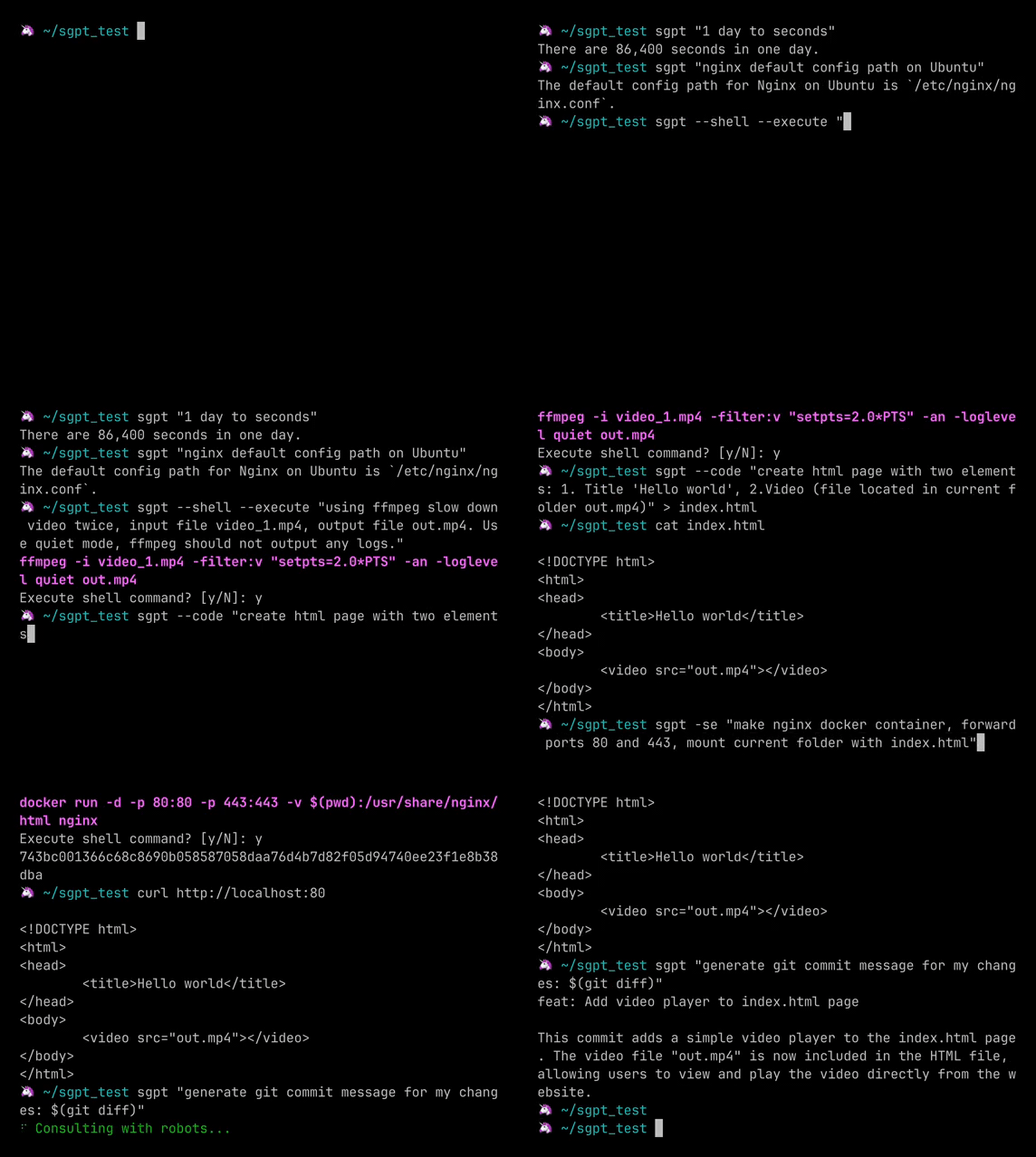
Installation
pip install shell-gpt --user
On first start you would need to generate and provide your API key, get one here.
Usage
sgpt has a variety of use cases, including simple queries, shell queries, and code queries.
Simple queries
We can use it as normal search engine, asking about anything:
sgpt "nginx default config file location"
# -> The default configuration file for Nginx is located at /etc/nginx/nginx.conf.
sgpt "docker show all local images"
# -> You can view all locally available Docker images by running: `docker images`
sgpt "mass of sun"
# -> = 1.99 × 10^30 kg
Conversion
Convert various units and measurements without having to search for the conversion formula or use a separate conversion website. You can convert units such as time, distance, weight, temperature, and more.
sgpt "1 hour and 30 minutes to seconds"
# -> 5,400 seconds
sgpt "1 kilometer to mile"
# -> 1 kilometer is equal to 0.62137 miles.
sgpt "$(date) to Unix timestamp"
# -> The Unix timestamp for Thu Mar 2 00:13:11 CET 2023 is 1677327191.
Shell commands
Have you ever found yourself forgetting common shell commands, such as chmod, and needing to look up the syntax online? With --shell option, you can quickly find and execute the commands you need right in the terminal.
sgpt --shell "make all files in current directory read only"
# -> chmod 444 *
Since we are receiving valid shell command, we can execute it using eval $(sgpt --shell "make all files in current directory read only") but this is not very convenient, instead we can use --execute (or shortcut -se for --shell --execute) parameter:
sgpt --shell --execute "make all files in current directory read only"
# -> chmod 444 *
# -> Execute shell command? [y/N]: y
# ...
Let's try some docker containers:
sgpt -se "start nginx using docker, forward 443 and 80 port, mount current folder with index.html"
# -> docker run -d -p 443:443 -p 80:80 -v $(pwd):/usr/share/nginx/html nginx
# -> Execute shell command? [y/N]: y
# ...
Also, we can provide some parameters name in our prompt, for example, passing output file name to ffmpeg:
sgpt -se "slow down video twice using ffmpeg, input video name \"input.mp4\" output video name \"output.mp4\""
# -> ffmpeg -i input.mp4 -filter:v "setpts=2.0*PTS" output.mp4
# -> Execute shell command? [y/N]: y
# ...
We can apply additional shell magic in our prompt, in this example passing file names to ffmpeg:
ls
# -> 1.mp4 2.mp4 3.mp4
sgpt -se "using ffmpeg combine multiple videos into one without audio. Video file names: $(ls -m)"
# -> ffmpeg -i 1.mp4 -i 2.mp4 -i 3.mp4 -filter_complex "[0:v] [1:v] [2:v] concat=n=3:v=1 [v]" -map "[v]" out.mp4
# -> Execute shell command? [y/N]: y
# ...
Since ChatGPT can also do summarization and analyzing of input text, we can ask it to generate commit message:
sgpt "Generate git commit message, my changes: $(git diff)"
# -> Commit message: Implement Model enum and get_edited_prompt() func, add temperature, top_p and editor args for OpenAI request.
Or ask it to find error in logs and provide more details:
sgpt "check these logs, find errors, and explain what the error is about: ${docker logs -n 20 container_name}"
# ...
Generating code
With --code parameters we can query only code as output, for example:
sgpt --code "Solve classic fizz buzz problem using Python"
for i in range(1, 101):
    if i % 3 == 0 and i % 5 == 0:
        print("FizzBuzz")
    elif i % 3 == 0:
        print("Fizz")
    elif i % 5 == 0:
        print("Buzz")
    else:
        print(i)
Since it is valid python code, we can redirect the output to file:
sgpt --code "solve classic fizz buzz problem using Python" > fizz_buzz.py
python fizz_buzz.py
# 1
# 2
# Fizz
# 4
# Buzz
# Fizz
# ...
This is, just some examples of what we can do using ChatGPT model, I'm sure you will find it useful for your specific use cases.
Full list of arguments
╭─ Arguments ──────────────────────────────────────────────────────────────────────────────────────────────────╮
│   prompt      [PROMPT]  The prompt to generate completions for.                                              │
╰──────────────────────────────────────────────────────────────────────────────────────────────────────────────╯
╭─ Options ────────────────────────────────────────────────────────────────────────────────────────────────────╮
│ --temperature                            FLOAT RANGE [0.0<=x<=1.0]  Randomness of generated output.          │
│                                                                     [default: 1.0]                           │
│ --top-probability                        FLOAT RANGE [0.1<=x<=1.0]  Limits highest probable tokens (words).  │
│                                                                     [default: 1.0]                           │
│ --shell            -s                                               Provide shell command as output.         │
│ --execute          -e                                               Will execute --shell command.            │
│ --code                 --no-code                                    Provide code as output.                  │
│                                                                     [default: no-code]                       │
│ --editor               --no-editor                                  Open $EDITOR to provide a prompt.        │
│                                                                     [default: no-editor]                     │
│ --animation            --no-animation                               Typewriter animation.                    │
│                                                                     [default: animation]                     │
│ --spinner              --no-spinner                                 Show loading spinner during API request. │
│                                                                     [default: spinner]                       │
│ --help                                                              Show this message and exit.              │
╰──────────────────────────────────────────────────────────────────────────────────────────────────────────────╯
Docker
Use the provided Dockerfile to build a container:
docker build -t sgpt .
You may use a named volume (therefore sgpt will ask your API key only once) to run the container:
docker run --rm -ti -v gpt-config:/home/app/.config/shell-gpt sgpt "what are the colors of a rainbow"
1 maintainer

Metadata
1 maintainer
Release files for shell-gpt 0.6.0
For a detailed explanation of source distributions (sdists) and built distributions (wheels), please see the package formats documentation.
Source distribution (sdist)
| File | Size | Uploaded | |
|---|---|---|---|
| shell_gpt-0.6.0.tar.gz | 6.2 kB | Details |
Built distribution (wheel)
| File | Interpreter | ABI | Platform | Reset |
|---|---|---|---|---|
| shell_gpt-0.6.0-py3-none-any.whl | Python 3 | none | any | Details |
Total release size: 12.7 kB
Release files / shell_gpt-0.6.0.tar.gz
| Download URL | shell_gpt-0.6.0.tar.gz |
|---|---|
| Size | 6.2 kB |
| Tags | Source |
|
SHA-256 checksum How to use checksums |
208d874e5351a34d6f44f0c9815a55dbfcd98b863c0da173873aea16bd6fd44b
|
|
BLAKE2b-256 checksum How to use checksums |
aa06148996c0864f0c4c39e05650185b1358f77ab07faa26c192ac0f64ece2cb
|
| Upload date | |
|
Uploaded using Trusted Publishing? What is trusted publishing? |
No |
| Uploaded via |
twine/4.0.2 CPython/3.9.6
|
Release files / shell_gpt-0.6.0-py3-none-any.whl
| Download URL | shell_gpt-0.6.0-py3-none-any.whl |
|---|---|
| Size | 6.4 kB |
| Tags | Python 3 |
|
SHA-256 checksum How to use checksums |
f8b67dd933feb572a00a8a286be98af7fb8f38ee036c1afd4f517a2f4c93d506
|
|
BLAKE2b-256 checksum How to use checksums |
de7171aae42b913cccd107b63a767f2d17d0df5e6533012bc5dc51a29343c401
|
| Upload date | |
|
Uploaded using Trusted Publishing? What is trusted publishing? |
No |
| Uploaded via |
twine/4.0.2 CPython/3.9.6
|














