
Usage
# Get the history file
$ history > history.txt

# Install
$ pip install shell_history_analysis

# You have to know which shell you have
# This is important, because the `history` command has different outputs in
# different shells.
# Fish shell has only the command itself as an output.
$ python analyze.py history.txt --shell bash
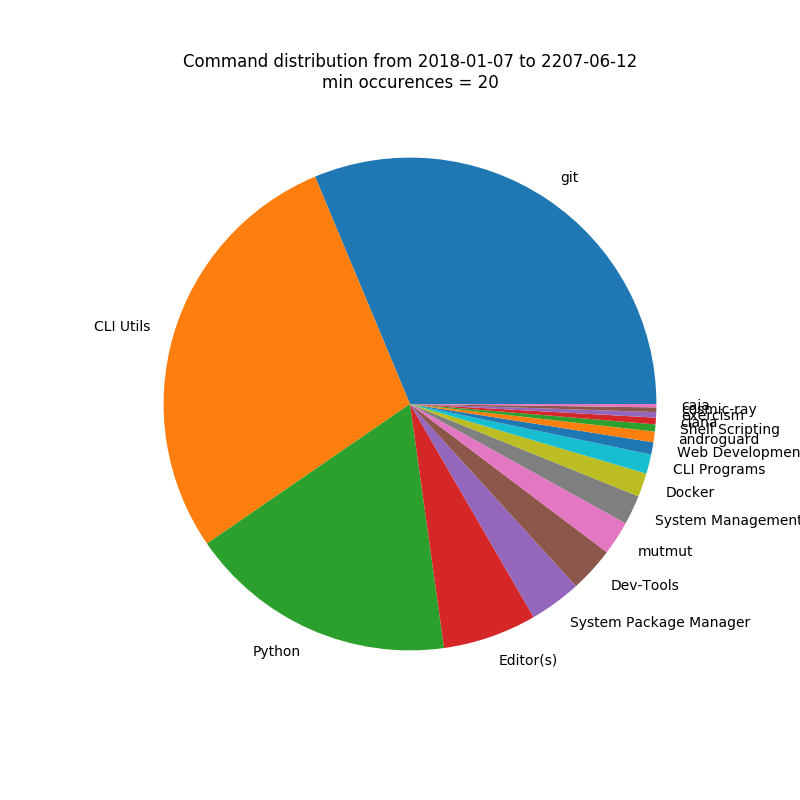
Grouping and Anonymization
You can provide a grouping.yaml file to group commands together. The default
is the following:
'CLI Programs':
  - aspell
  - ffmpeg
  - ffprobe
  - dot
  - neato
  - fdp
  - circo
  - convert
  - md5sum
  - curl
  - wget
  - jq
  - netstat
'CLI Utils':
  - mv
  - cd
  - ..
  - ...
  - ls
  - rm
  - grep
  - cat
  - cp
  - mkdir
  - head
  - tail
  - chmod
  - chown
  - watch
  - open
  - xdg-open
  - file
  - history
  - tree
  - touch
  - find
  - locate
  - ping
  - man
  - ln
  - wc
  - df
  - du
  - pwd
  - ll
Databases:
  - mysql
  - psql
Dev-Tools:
  - make
  - meld
  - diff
  - cookiecutter
  - cloc
Docker:
  - docker
  - docker-compose
Editor(s):
  - sublime
  - subl
  - vim
  - vi
  - spyder
  - spyder3
  - nano
Java:
  - mvn
  - java
  - javac
JS:
  - npm
  - node
  - ntl
  - yarn
  - nvm
  - lerna
Cloud:
  - az
  - aws
LaTeX:
  - pdflatex
  - tlmgr
Python:
  - python
  - python2
  - python3
  - pip
  - pip2
  - pip3
  - virtualenv
  - venv
  - black
  - isort
  - pylint
  - mypy
  - pytest
  - flask
  - pyenv
  - coverage
  - tox
  - flake8
  - twine
  - pydocstyle
  - pip-compile
  - pylama
  - pybabel
  - pep8
  - piprot
  - jupyter
  - alembic
Remote:
  - scp
  - ssh
  - ssh-keygen
Rust:
  - cargo
'Shell Scripting':
  - for
  - date
'System Management':
  - kill
  - killall
  - echo
  - export
  - env
  - ps
  - top
  - htop
  - atop
  - systemctl
  - sysctl
  - ip
  - ifconfig
  - which
  - sysbench
  - service
  - dmesg
'System Package Manager':
  - apt
  - apt-get
  - apt-cache
  - update-alternatives
  - dpkg
  - add-apt-repository
  - brew
  - mas
'Web Development':
  - ab
  - http
  - ng
git:
  - git
  - git-fame
1 maintainer

Metadata
1 maintainer
Release files for shell-history-analysis 0.1.1
For a detailed explanation of source distributions (sdists) and built distributions (wheels), please see the package formats documentation.
Source distribution (sdist)
| File | Size | Uploaded | Provenance | |
|---|---|---|---|---|
| shell_history_analysis-0.1.1.tar.gz | 5.3 kB | Without provenance | Details |
Built distribution (wheel)
| File | Interpreter | ABI | Platform | Reset |
|---|---|---|---|---|
| shell_history_analysis-0.1.1-py3-none-any.whl | Python 3 | none | any | Details |
Total release size: 12.6 kB
Release files / shell_history_analysis-0.1.1.tar.gz
| Download URL | shell_history_analysis-0.1.1.tar.gz |
|---|---|
| Size | 5.3 kB |
| Tags | Source |
|
SHA-256 checksum How to use checksums |
c4205571b1bfba8898734d6535bf974390e727761e794373614e48df3e1441b1
|
|
BLAKE2b-256 checksum How to use checksums |
b414b34820c00c5f260eba165e78e5c48ef4adb15574c13fc356dc79921a8cf1
|
| Upload date | |
|
Uploaded using Trusted Publishing? What is trusted publishing? |
No |
| Uploaded via |
twine/1.11.0 pkginfo/1.4.2 requests/2.22.0 setuptools/44.0.0 requests-toolbelt/0.8.0 tqdm/4.40.0 CPython/3.6.9
|
Release files / shell_history_analysis-0.1.1-py3-none-any.whl
| Download URL | shell_history_analysis-0.1.1-py3-none-any.whl |
|---|---|
| Size | 7.3 kB |
| Tags | Python 3 |
|
SHA-256 checksum How to use checksums |
64c5f658ad804685a8e78b9773a1e1d6a3048049633efc6eecc871a1881aa948
|
|
BLAKE2b-256 checksum How to use checksums |
8ed2f681a75cb4119ff8bd618d2112a062f79ab43c6bcee8d0c60b486404f46b
|
| Upload date | |
|
Uploaded using Trusted Publishing? What is trusted publishing? |
No |
| Uploaded via |
twine/1.11.0 pkginfo/1.4.2 requests/2.22.0 setuptools/44.0.0 requests-toolbelt/0.8.0 tqdm/4.40.0 CPython/3.6.9
|
Security for shell-history-analysis 0.1.1
Provenance
Provenance describes where a file came from. On PyPI, provenance is shared via attestations, which provide a verifiable record of the build or publishing details. View details, limitations and caveats.
No provenance found
None of the files in this release were uploaded with provenance metadata.
A note on package security
PyPI is a repository for distributing packages, not a service for auditing them. While third-party security researchers and our staff do their best to detect and remove malicious packages, PyPI cannot guarantee the quality, security or suitability of any given package.














