
SHIELD permeation rig Data Acquisition System




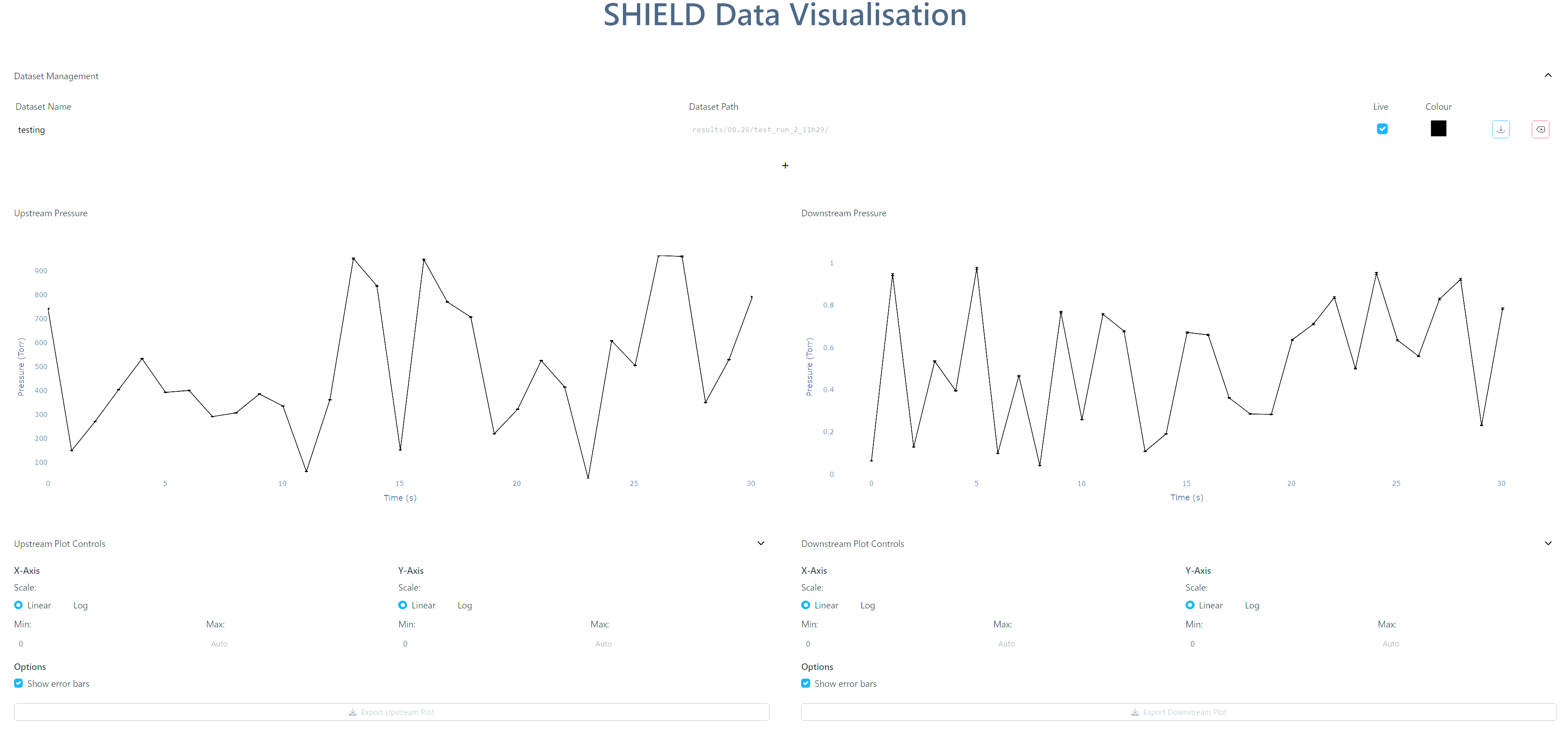
This is a tool to be used with the SHIELD hydrogen permeation rig, providing a way to both record data from the rig and have a live UI displaying plots of the pressure values in the gauges connected to the rig and the temperature of the connected thermocouple.
Installation
The shield DAS package can be downloaded with pip
pip install SHIELD-DAS
However, in order to interact with the Labjack, additional drivers are required from the manufacturers site.
Example data recording script
This is an example of a script that can be used to activate the DAS.
from shield_das import (
    DataRecorder,
    WGM701_Gauge,
    CVM211_Gauge,
    Baratron626D_Gauge
)

# Define gauges
gauge_1 = WGM701_Gauge(
    gauge_location="downstream",
    ain_channel=10,
)
gauge_2 = CVM211_Gauge(
    gauge_location="upstream",
    ain_channel=8,
)
gauge_3 = Baratron626D_Gauge(
    name="Baratron626D_1KT",
    gauge_location="upstream",
    full_scale_torr=1000,
    ain_channel=6,
)
gauge_4 = Baratron626D_Gauge(
    name="Baratron626D_1T",
    gauge_location="downstream",
    full_scale_torr=1,
    ain_channel=4,
)

# Create recorder
my_recorder = DataRecorder(
    gauges=[gauge_1, gauge_2, gauge_3, gauge_4],
    thermocouples=[thermocouple_1],
    run_type="test_mode",
    recording_interval=0.5,
    backup_interval=5,
    furnace_setpoint=500,
)

# Start recording
my_recorder.run()
Example data visualisation script
from shield_das import DataPlotter

data_500C_run1 = "results/08.12/run_2_11h45/"
data_500C_run2 = "results/08.18/run_2_09h47/"
data_500C_run3 = "results/08.19/run_2_09h21/"
data_500C_run4 = "results/08.25/run_1_09h07/"

my_plotter = DataPlotter(
    dataset_paths=[data_500C_run1, data_500C_run2, data_500C_run3, data_500C_run4],
    dataset_names=["500C_run1", "500C_run2", "500C_run3", "500C_run4"],
)
my_plotter.start()
Standalone Analysis Functions
SHIELD_DAS provides analysis functions that can be used independently without running the full plotter application. This is useful when you want to:
- Convert raw voltage data to pressure/temperature values
- Perform custom analysis on experimental data
- Use the conversion functions in your own scripts
- Create your own plots with the converted data
Quick Examples
Convert voltage to pressure:
from shield_das import voltage_to_pressure
import numpy as np

voltage = np.array([5.0, 7.5, 10.0])  # 0-10V gauge readings
pressure = voltage_to_pressure(voltage, full_scale_torr=1000)
print(pressure)  # [500.0, 750.0, 1000.0] torr
Convert thermocouple voltage to temperature:
from shield_das import voltage_to_temperature
import numpy as np

tc_voltage_mv = np.array([10.0, 20.0, 30.0])  # millivolts
local_temp_c = np.array([25.0, 25.0, 25.0])   # cold junction temp

temperature = voltage_to_temperature(local_temp_c, tc_voltage_mv)
print(temperature)  # [270.7, 508.3, 744.9] °C
Calculate flux and permeability:
from shield_das import calculate_flux_from_sample, calculate_error_on_pressure_reading
import numpy as np

# Your experimental data
time = np.linspace(0, 1000, 5000)
pressure = 0.1 + 0.001 * time  # Downstream pressure rise

# Calculate hydrogen flux
flux = calculate_flux_from_sample(time, pressure)
print(f"Flux: {flux:.6e} torr/s")

# Calculate measurement uncertainties
pressure_error = calculate_error_on_pressure_reading(pressure)
Available Functions
Data Conversion:
voltage_to_pressure(voltage, full_scale_torr)- Convert gauge voltage to pressurevoltage_to_temperature(local_temp_c, voltage_mv)- Convert thermocouple voltagecalculate_error_on_pressure_reading(pressure)- Calculate measurement uncertainties
Analysis:
calculate_flux_from_sample(time, pressure)- Calculate hydrogen fluxcalculate_permeability_from_flux(...)- Calculate permeability using Takaishi-Sensui methodfit_permeability_data(temps, perms)- Fit Arrhenius equationaverage_pressure_after_increase(time, pressure)- Detect stable pressure after transientevaluate_permeability_values(datasets)- Extract permeability from multiple datasets
For complete documentation and examples, see examples_standalone_analysis.py
2 maintainers


Metadata
2 maintainers
Release files for SHIELD-DAS 0.3.2
For a detailed explanation of source distributions (sdists) and built distributions (wheels), please see the package formats documentation.
Source distribution (sdist)
| File | Size | Uploaded | |
|---|---|---|---|
| shield_das-0.3.2.tar.gz | 136.6 kB | Details |
Built distribution (wheel)
| File | Interpreter | ABI | Platform | Reset |
|---|---|---|---|---|
| shield_das-0.3.2-py3-none-any.whl | Python 3 | none | any | Details |
Total release size: 202.2 kB
Release files / shield_das-0.3.2.tar.gz
| Download URL | shield_das-0.3.2.tar.gz |
|---|---|
| Size | 136.6 kB |
| Tags | Source |
|
SHA-256 checksum How to use checksums |
5271dd000be66ead96681c0f9f8e937df2abf81889a9d2dcbccf376a0ccb2c60
|
|
BLAKE2b-256 checksum How to use checksums |
4a4c1c083dae27432296d43cc80c7f1f622aa44b78f8883b950a070802bd4509
|
| Upload date | |
|
Uploaded using Trusted Publishing? What is trusted publishing? |
Yes |
| Uploaded via |
twine/6.1.0 CPython/3.13.7
|
Provenance
Provenance describes where a file came from. On PyPI, provenance is shared via attestations, which provide a verifiable record of the build or publishing details. View details, limitations and caveats.


PyPI Publish Attestation
PyPI verified that this artifact, at this checksum, originated from the publisher listed below.
Signed by GitHub Actions, verified by PyPI on Nov 26, 2025.
Transparency logRelease files / shield_das-0.3.2-py3-none-any.whl
| Download URL | shield_das-0.3.2-py3-none-any.whl |
|---|---|
| Size | 65.6 kB |
| Tags | Python 3 |
|
SHA-256 checksum How to use checksums |
78f9ea7faff40242eca300ea300f9e4d370ea95d455b5157861181b29caedaae
|
|
BLAKE2b-256 checksum How to use checksums |
5610fbbc92b908ed56e60c0dbd43bfc5db7a48a2cb7c30e0211c35035cbf419c
|
| Upload date | |
|
Uploaded using Trusted Publishing? What is trusted publishing? |
Yes |
| Uploaded via |
twine/6.1.0 CPython/3.13.7
|
Provenance
Provenance describes where a file came from. On PyPI, provenance is shared via attestations, which provide a verifiable record of the build or publishing details. View details, limitations and caveats.
PyPI Publish Attestation
PyPI verified that this artifact, at this checksum, originated from the publisher listed below.
Signed by GitHub Actions, verified by PyPI on Nov 26, 2025.
Transparency log













