
showtools
This tool displays information about disks or network cards in a nice ASCII table format on the command line.
- All network interfaces and some of their properties
- All storage devices (hdd/sdd) and some of their properties (SMART)
Examples:
Show information about network interfaces:

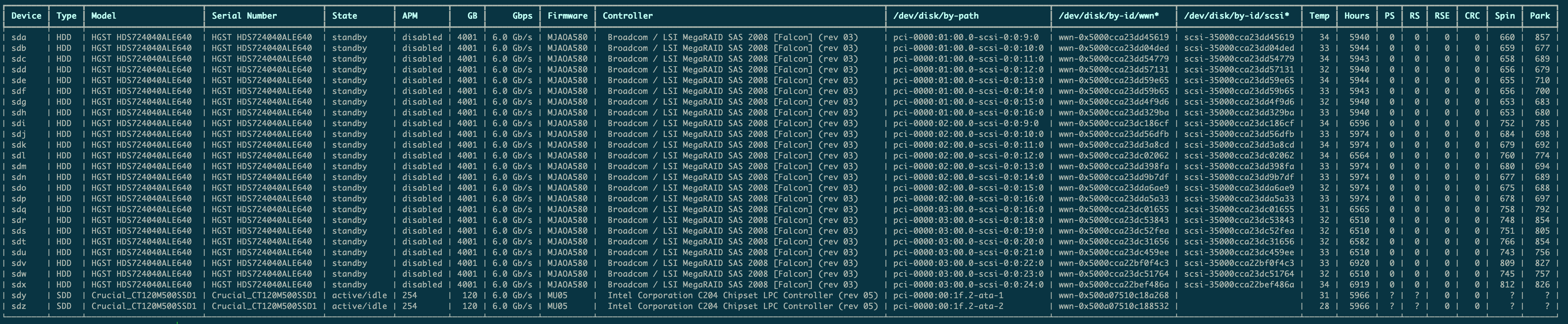
Show SMART information about disks:
- PS = Pending Sector
- RS = Reallocated Sector
- RSE = Reallocated Sector Event

This is the output for a 24-drive NAS. You can zoom in by clicking on the image.
Installation
Showtools is available through pypi. Just enter:
pip install showtools
Manual install:
-
clone this repository with git clone https://github.com/louwrentius/showtools
-
cd showtools
-
python3 setup.py install
-
install hdparm, smartmontools and ethtool
apt install hdparm smartmontools ethtool
Usage:
usage: show [-h] [-E] [-g] [-a] [-m] [-k] [-S] [-D] [-e] [-s] [-z] [-f] [-c] [-p] [-w] [-o] [-t] [-H] [-P] [-r] [-R] [-C] [-u] [-n] [-l] [-4] [-6] [-M] [-T] [-d] [-F] {disk,net}

Show detailed disk|net device information in ASCII table format

positional arguments:
  {disk,net}            Show disk information

optional arguments:
  -h, --help            show this help message and exit

generic_settings:
  Options that apply for all device types.

  -E, --transparent     Disable table formatting (no lines)
  -g, --noheader        Disable table header (in transparent mode)
  -a, --all-opts        show all information

storage:
  Generic options for storage devices

  -m, --model           device model
  -k, --type            device type (HDD/SDD)
  -S, --serial          device serial number
  -D, --state           drive power status (active/standby)
  -e, --apm             Advanced Power Mode
  -s, --size            device size in Gigabytes
  -z, --speed           SATA Link in Gbps
  -f, --firmware        device firmware version
  -c, --controller      controller to which device is connected
  -p, --pcipath         /dev/disk/by-path/ ID of the device
  -w, --wwn             device World Wide Name
  -o, --scsi            /dev/by-id/scsi
  -t, --temp            temperature in Celcius
  -H, --hours           power on hours
  -P, --pending         pending sector count
  -r, --reallocated     reallocated sector count
  -R, --reallocatedevent
                        reallocated sector event count
  -C, --crc             CRC error
  -u, --startstop       spin up/down
  -n, --park            head parking

network:
  Available options for network devices

  -l, --link            network card link status
  -4, --ipv4            IPv4 address
  -6, --ipv6            IPv6 address
  -M, --mac             hardware / MAC address
  -T, --show-type       network card type
  -d, --driver          driver module
  -F, --firmware-version
                        firmware version
1 maintainer

Metadata
1 maintainer
Release files for showtools 2.0.3
For a detailed explanation of source distributions (sdists) and built distributions (wheels), please see the package formats documentation.
Source distribution (sdist)
| File | Size | Uploaded | |
|---|---|---|---|
| showtools-2.0.3.tar.gz | 10.3 kB | Details |
Release files / showtools-2.0.3.tar.gz
| Download URL | showtools-2.0.3.tar.gz |
|---|---|
| Size | 10.3 kB |
| Tags | Source |
|
SHA-256 checksum How to use checksums |
23766d4b90b0dfba877c1308583a1b2d9da3c3001ef6fc77b060bf475579e251
|
|
BLAKE2b-256 checksum How to use checksums |
f8beba2c10042f243aead67480db7b399f3a5280cca2a3662d1ecbecf07f54f1
|
| Upload date | |
|
Uploaded using Trusted Publishing? What is trusted publishing? |
No |
| Uploaded via |
twine/4.0.2 CPython/3.11.6
|














