
SideJITServer
This project allows you to start a server that wirelessly or via USB gives you JIT for iOS 17+ on Windows/macOS/Linux if you use the correct newer pymobiledevice3 version.
How to get this running (Run with Administrator!)
Option 1: Python install
python3 -m venv venv # Run inside SideJITServer directory!

# Activate Python venv

# macOS
. ./venv/bin/activate

# Windows but using Powershell
.\venv\Scripts\Activate.ps1

# Windows but using Command Prompt/CMD
.\venv\Scripts\Activate.bat

# Now let's install all the required packages! (Make sure you're still inside venv!)
# All OS
pip3 install -r requirements.txt
pip3 install SideJITServer
# If you got an error saying pip3 not found just change pip3 to pip

# Let's see if everything works (Make sure you're still inside venv!)
SideJITServer --version
# Output should show SideJITServer!
Or use PyPI
python3 -m venv venv
# Activate venv..

pip3 install SideJITServer
SideJITServer --help
Option 2: Direct download (if available)
Go to the latest GitHub Release and check if there are executable downloads, such as SideJITServer-windows-x86_64.exe, depending on your OS and your architecture. If there is no attached executable, you might find one in the GitHub Actions if a recent build worked and did not expire.
Download the correct executable, and run it as Administrator from your terminal or Powershell following the directions below. If you are on Mac or Linux, you must first run chmod +x ./(your downloaded .bin file) before executing the file with sudo.
Python is not necessary for this approach.
How to use SideJITServer?
- Make sure your device is connected!
- Make sure you're still inside the venv, if applicable!
- Common Knowledge
Now run SideJITServer --pair and on your PC make sure you click on Trust this PC!
Also it will show you a prompt to continue just type "y"
Usage
MacOS
1. Run the server
# First run
sudo SideJITServer --pair
# Consecutive runs once paired
sudo SideJITServer
You should see an output similar to this.
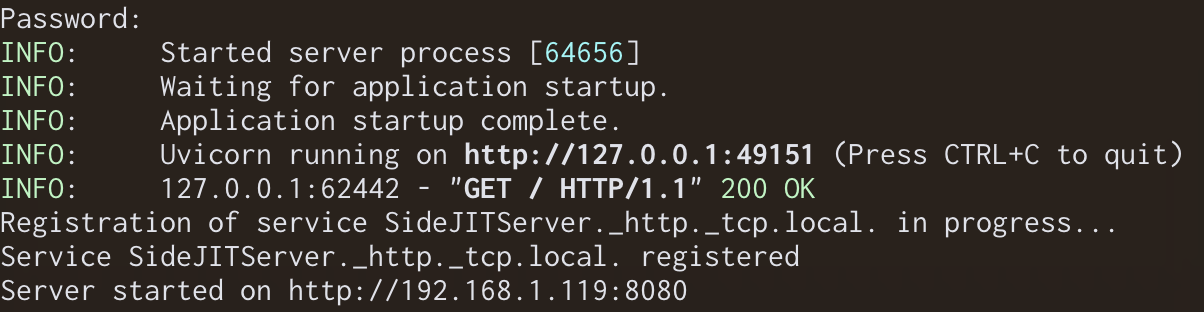
2. Install / Run the shortcut
Install this shortcut❗
After that it's going ask you to put on your device's UDID, Go to your PC and see your local ipaddress mine is 192.168.0.6:8080 and on your phone go to that (your local address) and copy the one beside usbmux (example : 00001111-000A1100A11101A)
Now it's gonna ask you for SideJIT Server address! Just type in the address you used earlier to access the device's UDID
for example : http://192.168.0.6:8080 (You must include the http and not include / at the end!)
Now run the shortcut!
It going to ask you to allow to access your local ip address just click allow!
Now select the application that you want to give JIT access to and you're done! (it might ask for notification permissions). It is recommended that you allow so you see if the JIT fail or succeed.
Happy JITing! :3
1 maintainer

Metadata
1 maintainer
Release files for SideJITServer 1.4.2
For a detailed explanation of source distributions (sdists) and built distributions (wheels), please see the package formats documentation.
Source distribution (sdist)
| File | Size | Uploaded | |
|---|---|---|---|
| sidejitserver-1.4.2.tar.gz | 30.5 kB | Details |
Built distribution (wheel)
| File | Interpreter | ABI | Platform | Reset |
|---|---|---|---|---|
| SideJITServer-1.4.2-py3-none-any.whl | Python 3 | none | any | Details |
Total release size: 51.5 kB
Release files / sidejitserver-1.4.2.tar.gz
| Download URL | sidejitserver-1.4.2.tar.gz |
|---|---|
| Size | 30.5 kB |
| Tags | Source |
|
SHA-256 checksum How to use checksums |
12b09bd1c970920b3ccdebfb83303ef7698c8f2a16356a26d9396445c1dff611
|
|
BLAKE2b-256 checksum How to use checksums |
1a70f954194855d5a9871526fa9e92dc4201f59ce68e517be54c3e9f4c3f043c
|
| Upload date | |
|
Uploaded using Trusted Publishing? What is trusted publishing? |
No |
| Uploaded via |
twine/6.0.1 CPython/3.12.8
|
Release files / SideJITServer-1.4.2-py3-none-any.whl
| Download URL | SideJITServer-1.4.2-py3-none-any.whl |
|---|---|
| Size | 20.9 kB |
| Tags | Python 3 |
|
SHA-256 checksum How to use checksums |
43dccea9b00c0bbe81b5bfd96161076b2d8d9dd0482686f0dd031b9cf430be78
|
|
BLAKE2b-256 checksum How to use checksums |
28de663269f6a3951a377f1e983af2b1a54c52dc2245d7951fd29d6e2c880f71
|
| Upload date | |
|
Uploaded using Trusted Publishing? What is trusted publishing? |
No |
| Uploaded via |
twine/6.0.1 CPython/3.12.8
|














