
SIGPLAY
A terminal music player with a retro-modern vibe. Built with Python and Textual.


What it does
- Plays music from your
~/Musicfolder (MP3, WAV, OGG, FLAC) - Keyboard-driven interface with vim-style navigation
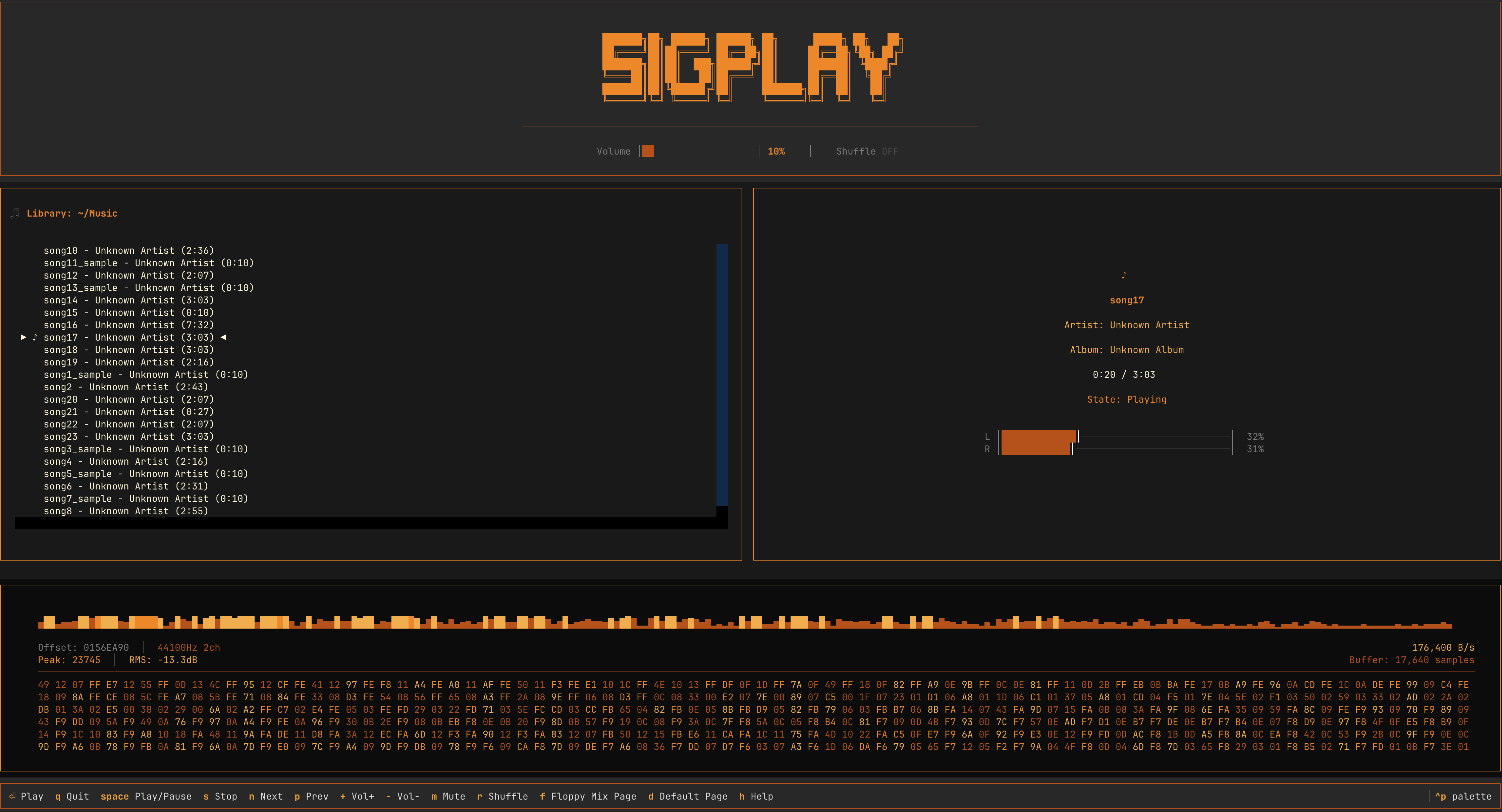
- Real-time audio visualization
- Floppy Mix: AI-powered DJ mixing using natural language instructions
What it looks like
Run
First, install uv if you don't have it:
curl -LsSf https://astral.sh/uv/install.sh | sh
Then run:
uvx sigplay
That's all! No other things needed.
Controls
| Key | Action |
|---|---|
j/k |
Navigate track list |
Enter |
Play selected track |
Space |
Play/Pause |
s |
Stop |
n/p |
Next/Previous track |
+/- |
Volume up/down |
m |
Mute |
r |
Shuffle |
f |
Floppy Mix (AI DJ) |
d |
Back to main view |
h or ? |
Help |
q |
Quit |
Floppy Mix
Press f to open the AI DJ mixer. Select tracks, write instructions in plain English, and let the AI create a mix.
Example instructions:
- "Mix these with smooth 4-second crossfades"
- "Boost the bass and add reverb"
- "Create a high-energy mix with compression"
Requires an OpenRouter API key. You can set it as an environment variable or enter it when prompted:
export OPENROUTER_API_KEY="your-key-here"
export SIGPLAY_MIX_MODEL_ID="anthropic/claude-haiku-4.5"  # optional
Requirements
uvinstalled- Audio files in
~/Music
License
MIT
1 maintainer

Metadata
1 maintainer
Release files for sigplay 0.0.12
For a detailed explanation of source distributions (sdists) and built distributions (wheels), please see the package formats documentation.
Source distribution (sdist)
| File | Size | Uploaded | Provenance | Actions |
|---|---|---|---|---|
| sigplay-0.0.12.tar.gz | 206.6 kB | Without provenance | Details for sigplay-0.0.12.tar.gz |
Built distribution (wheel)
| File | Interpreter | ABI | Platform | Actions Reset |
|---|---|---|---|---|
| sigplay-0.0.12-py3-none-any.whl | Python 3 | none | any | Details for sigplay-0.0.12-py3-none-any.whl |
Total release size: 259.0 kB
Release files / sigplay-0.0.12.tar.gz
| Download URL | sigplay-0.0.12.tar.gz |
|---|---|
| Size | 206.6 kB |
| Tags | Source |
|
SHA-256 checksum How to use checksums |
4928150b03d609f725c38c366e188f74238cdf337b7973cfc99cbb53b8ad2611
|
|
BLAKE2b-256 checksum How to use checksums |
6af8fa7141c73fbddfb23a2055f76e37e65cacf6c7876ca6707c755667eb3119
|
| Upload date | |
|
Uploaded using Trusted Publishing? What is trusted publishing? |
No |
| Uploaded via |
uv/0.5.11
|
Release files / sigplay-0.0.12-py3-none-any.whl
| Download URL | sigplay-0.0.12-py3-none-any.whl |
|---|---|
| Size | 52.4 kB |
| Tags | Python 3 |
|
SHA-256 checksum How to use checksums |
afac0c231d9d183cc5df54aaf2c06cfeba8d1d61c78c1b7235c756cd124a565d
|
|
BLAKE2b-256 checksum How to use checksums |
51134263fc89a9c05d8fd18f1df5eede9c990cc331991f5ac628ea85e203918c
|
| Upload date | |
|
Uploaded using Trusted Publishing? What is trusted publishing? |
No |
| Uploaded via |
uv/0.5.11
|
Security for sigplay 0.0.12
Provenance
Provenance describes where a file came from. On PyPI, provenance is shared via attestations, which provide a verifiable record of the build or publishing details. View details, limitations and caveats.
No provenance found
None of the files in this release were uploaded with provenance metadata.
A note on package security
PyPI is a repository for distributing packages, not a service for auditing them. While third-party security researchers and our staff do their best to detect and remove malicious packages, PyPI cannot guarantee the quality, security or suitability of any given package.
To learn more about protecting yourself from malicious actors, visit our package security documentation.














