
Simple Python native access library for Video4Linux camera devices
Warning: Work (slowly) in progress. Currently hardwired to YUV format. This will be fixed soon
This is a simple library that allows one to access camera devices accessible via Video4Linux from Python without using libraries with huge dependency chains that allows easy and fast testing of ideas and algorithms for image processing before implementing them in a proper way in some programming language such as C. It’s built in the most simple way on purpose.
Tested on:
Python 3.8:
FreeBSD 12 (amd64, aarch64)
FreeBSD 13 (amd64, aarch64)
Currently not implemented / not optimal
Currently the library does not support anything else than YUV422 captures from the cameras and only outputs RGB888 images as nested Python lists. This will be fixed as soon as possible but will introduce a breaking change.
Installing via PyPi
Note that you have to install some native packages on FreeBSD before building the extension. Those are:
multimedia/v4l_compat
multimedia/webcamd
To install and start the required services:
pkg install multimedia/v4l_compat multimedia/webcamd
echo "webcamd_enable=\"YES\"" >> /etc/rc.conf
echo "cuse_load=\"YES\"" >> /boot/loader.conf
kldload cuse
/etc/rc.d/devd restart
/usr/local/etc/rc.d/webcamd start
The package is available as a source distribution via PyPi:
pip install simplepycam-tspspi
Building
Use setup.py in cext:
$ python setup.py build
Example usage
More sophisticated examples can be found in the samples directory.
Using the stream callback interface, the default format and with
import simplepycam

def processFrame(camera, frame):
    if shouldStopProcessing:
        return False
    else:
        return True

with simplepycam.Camera("/dev/video0") as cam:
    cam.frameCallback = [ processFrame ]
    cam.stream()
Using the stream callback interface, the default format and open/close
import simplepycam

def processFrame(camera, frame):
    if shouldStopProcessing:
        return False
    else:
        return True

cam = simplepycam.Camera("/dev/video0")
cam.open()
cam.frameCallback = [ processFrame ]
cam.stream()
cam.close()
Using the polling API, the default format and with
import simplepycam

with simplepycam.Camera("/dev/video0") as cam:
    cam.streamOn()
    for i in range(100):
        frame = cam.nextFrame()
    cam.streamOff()
Using the polling API, the default format and open/close
import simplepycam

cam = simplepycam.Camera("/dev/video0")
cam.open()
cam.streamOn()
for i in range(100):
    frame = cam.nextFrame()
cam.streamOff()
cam.close()
API documentation
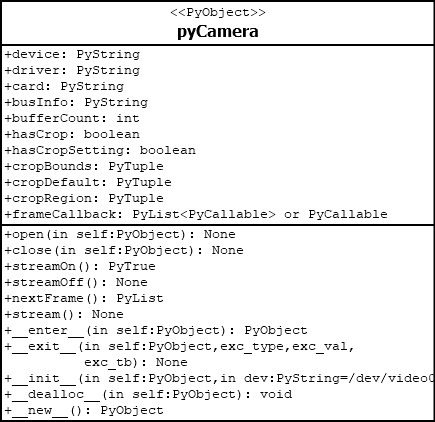
UML diagram of Python side
1 maintainer

Metadata
1 maintainer
Release files for simplepycam-tspspi 0.1.7
For a detailed explanation of source distributions (sdists) and built distributions (wheels), please see the package formats documentation.
Source distribution (sdist)
| File | Size | Uploaded | |
|---|---|---|---|
| simplepycam-tspspi-0.1.7.tar.gz | 12.8 kB | Details |
Release files / simplepycam-tspspi-0.1.7.tar.gz
| Download URL | simplepycam-tspspi-0.1.7.tar.gz |
|---|---|
| Size | 12.8 kB |
| Tags | Source |
|
SHA-256 checksum How to use checksums |
cf9d554c1372e4590752ce93f2ea0e89783bd8aa1ae4ea0bd3a10d245fdffc12
|
|
BLAKE2b-256 checksum How to use checksums |
f1270e8c5039deb1b8f05005c5c64f75fd5ff80e937a2aa5fbcf2421e29fee7c
|
| Upload date | |
|
Uploaded using Trusted Publishing? What is trusted publishing? |
No |
| Uploaded via |
twine/5.0.0 CPython/3.8.13
|














