
SIMPLYSKLEARN

Time to even automate your machine learning process!
Description
As Bill Gates once said, “I choose a lazy person to do a hard job. Because a lazy person will find an easy way to do it.”.
After numerous hours, days, weeks and months spent on Kaggle, I was inspired to sum up all the repetitive and tedious process to one single package. For any machine learning projects, the user must perform data manipulations, check the dataset is all set for models. After that, they must fit it into models and take note of how the model performs.
With this package, I want to eliminate that tedious stage for any user. This package would mainly be beneficial to those recently starting out in the field of machine learning or intermediate users. It is probably unsuitable for highly complex models or datasets.
The main usage should be to assist the user by assessing the performances of myriad of models.
What it provides

- Prepares datatset by taking care of categorical feature by one-hot-encoding and numerical feature by scaling.
- Automatically fits the engineered dataset on myriad of Scikit-Learn models.
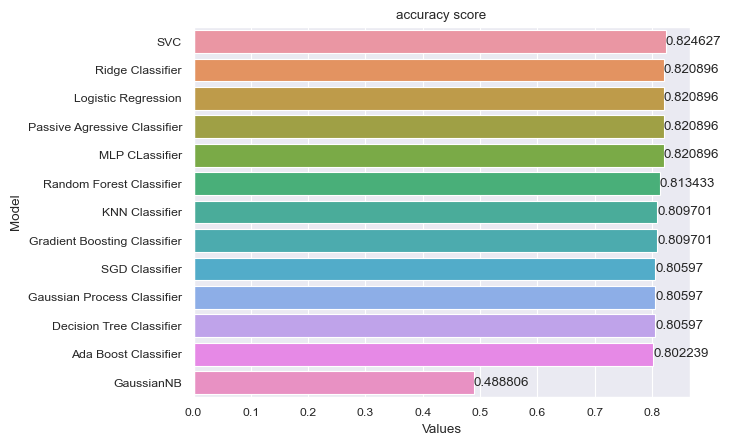
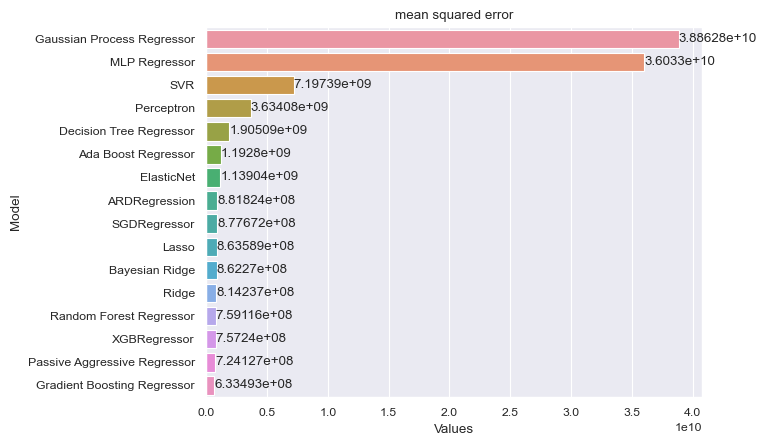
- Depending on what metric you want to observe, will plot you a colorful comparison of metrics of different models.
Future Improvements
- Automated hyperparameter tuning process
- Option to display feature importances
Getting Started
Dependencies
- Programming Language: Python
- License: MIT
- Operating System: Independent
- Dependencies
Installing
pip install simplysklearn
The python package website can be accessed here
Executing program
from simplysklearn import Classification
from simplysklearn import Regression
Classification Example
df = pd.read_csv('titanic.csv')
model = Classification(df, feature_columns_list, target_column)
model.fit()
model.plot('accuracy_score')
print(model.outlier_values)
Regression Example
df = pd.read_csv('housing_prices.csv')
model = Regression(df, feature_columns_list, target_column)
model.fit()
model.plot('mean_squared_error')
print(model.outlier_values)
Documentation
Documentation can be accessed here.
Contributing
Contributions are very much welcomed from everyone!
Just make sure to fork this repo, make changes and open a pull request.
Or you are always welcome to contact me via email!
When you have created a pull request, we can take a look and improve on this package! ^_^
Authors
Version History
-
0.2.0
- Major overhaul for organization (2023.04.04)
-
0.1.0
- Fixes for Classification Module (2023.04.03)
-
0.0.11
- Separation of Regression and Classification for clarity (2023.02.04)
-
0.0.5
- Various regression bug fixes(2023.01.29)
-
0.0.1
- Initial Release (2023.01.28)
License
This project is licensed under the MIT License - see the LICENSE file for details.
1 maintainer

Metadata
1 maintainer
Release files for simplysklearn 0.2.4
For a detailed explanation of source distributions (sdists) and built distributions (wheels), please see the package formats documentation.
Source distribution (sdist)
| File | Size | Uploaded | Provenance | Actions |
|---|---|---|---|---|
| simplysklearn-0.2.4.tar.gz | 10.4 kB | Without provenance | Details for simplysklearn-0.2.4.tar.gz |
Built distribution (wheel)
| File | Interpreter | ABI | Platform | Actions Reset |
|---|---|---|---|---|
| simplysklearn-0.2.4-py3-none-any.whl | Python 3 | none | any | Details for simplysklearn-0.2.4-py3-none-any.whl |
Total release size: 30.6 kB
Release files / simplysklearn-0.2.4.tar.gz
| Download URL | simplysklearn-0.2.4.tar.gz |
|---|---|
| Size | 10.4 kB |
| Tags | Source |
|
SHA-256 checksum How to use checksums |
5e50f90ee591df1baa04ecd763378564b3c3952f4a1e4bd628eee4a987dc450e
|
|
BLAKE2b-256 checksum How to use checksums |
3f16cd084c59e858f564dd570f6b558806c556957ae0a3325ba9053a7f196b45
|
| Upload date | |
|
Uploaded using Trusted Publishing? What is trusted publishing? |
No |
| Uploaded via |
twine/4.0.2 CPython/3.11.2
|
Release files / simplysklearn-0.2.4-py3-none-any.whl
| Download URL | simplysklearn-0.2.4-py3-none-any.whl |
|---|---|
| Size | 20.2 kB |
| Tags | Python 3 |
|
SHA-256 checksum How to use checksums |
ac0ead6b9431ab724ab78e486cede4d22603caf91fabe2952c8bc89851cfa258
|
|
BLAKE2b-256 checksum How to use checksums |
3c06addca3bc84c74ce024a94e4200b34c99ef46316d16bb805c1d75bbeef801
|
| Upload date | |
|
Uploaded using Trusted Publishing? What is trusted publishing? |
No |
| Uploaded via |
twine/4.0.2 CPython/3.11.2
|
Security for simplysklearn 0.2.4
Provenance
Provenance describes where a file came from. On PyPI, provenance is shared via attestations, which provide a verifiable record of the build or publishing details. View details, limitations and caveats.
No provenance found
None of the files in this release were uploaded with provenance metadata.
A note on package security
PyPI is a repository for distributing packages, not a service for auditing them. While third-party security researchers and our staff do their best to detect and remove malicious packages, PyPI cannot guarantee the quality, security or suitability of any given package.
To learn more about protecting yourself from malicious actors, visit our package security documentation.














