
sims
Python module to read Cameca (nano)SIMS data files.
Highlights
-
Read in data from Cameca SIMS or nanoSIMS files, making the data directly accessible in the Python science stack (numpy/pandas/xarray/matplotlib).
-
Read in the complete header of the file. Get access to every setting of the machine recorded at the time of the experiment. No other software can do this, to my knowledge.
-
Read in almost every file the Cameca software can produce. Besides the usual data files (.im image files and .is 'isotope' or spot files), the software produces a host of other files. To name a few:
- High Mass Resolution scans (.hmr)
- Secondary Ion Beam Centering scans (.sib)
- Pulse Height Distribution scans (.phd)
- E0S Centering scans (.e0s)
- Energy scans (.nrj)
- Beam Stability traces (.bs)
- and many more!
Most of these can be read by the sims module. Support for more files is added whenever possible. No other software can do this, to my knowledge.
-
Reading data directly from compressed files. Especially the .im image files tend to take up a lot of space, even if the majority of the data is zeros. They can compress down to as much as 90 % of their original size. sims supports reading directly from files compressed with gzip, bzip2, xz, lzma, 7zip, and zip. You can also combine multiple files in a multifile archive with tar, zip, or 7zip and read some or all files directly from that.
-
It's open source and free, allowing you to see exactly how calculations and data transformations were done. This is in stark contrast with other, closed-source programs, where you have to just trust that the writers of those programs implemented everything correctly. You can not see how they did it exactly, because they won't let you see inside the code. This program is completely open! Look how things are done and if you don't like it, improve!
What's new
v2.0.2
Fixed scikit-image version, 0.19 not 1.9.
v2.0.1
Updated utils.align() to use phase_cross_correlation() which changed in scikit-image v0.19. Also updated minimum Python version to 3.8.
v2.0.0
Since version 0.25 pandas no longer supports 4DPanel and Panel. sims has switched to using xarray, the recommended data structure for multi-dimensional data. Xarray is in a large part based on pandas and the syntax for accessing data is almost identical. See xarray for more information.
Version 2.0 of sims also dropped support for Python 2.x. Python 3.4 or newer is now required.
v1.0.0
This version supports Python 2.7 and uses pandas as the data structure. Use this version if you need support for either.
Installation
Requirements to install this Python module:
- Python 3.4 or newer
- xarray
- scipy
- scikit-image
- matplotlib
To install, simply run from the command line:
$ pip install sims
Getting started
Once you have sims installed, you can start working with nanoSIMS files.
[1]: import matplotlib.pyplot as plt
[2]: import sims

[3]: s = sims.SIMS('data_file.im')

[4]: s.data
<xarray.DataArray (species: 8, frame: 25, y: 256, x: 256)>
array([[[[411, ..., 159],
         ...,
         [325, ..., 398]],

        ...,
        [[ 30, ...,   1],
         ...,
         [  0, ...,   0]]]], dtype=uint16)
Coordinates:
  * species  (species) <U7 '12C' '16O' '17O' '18O' ... 'SE' '12C 15N' '28Si'
Dimensions without coordinates: frame, y, x
Attributes:
    unit:     counts

# Select the first frame (0) of mass 12C
[5]: s.data.loc['12C', 0]
<xarray.DataArray (y: 256, x: 256)>
array([[411,  86, 113, ..., 188, 138, 159],
       [114,  73,  79, ...,  82,  96,  96],
       [ 91,  70, 117, ...,  58,  53,  55],
       ...,
       [341,  32,  16, ..., 251, 313, 317],
       [316,  31,  37, ..., 221, 314, 368],
       [325,  21,  26, ..., 210, 325, 398]], dtype=uint16)
Coordinates:
    species  <U7 '12C'
Dimensions without coordinates: y, x
Attributes:
    unit:     counts

# Align the image stack
[6]: aligned_data, shifts = sims.utils.align(s)

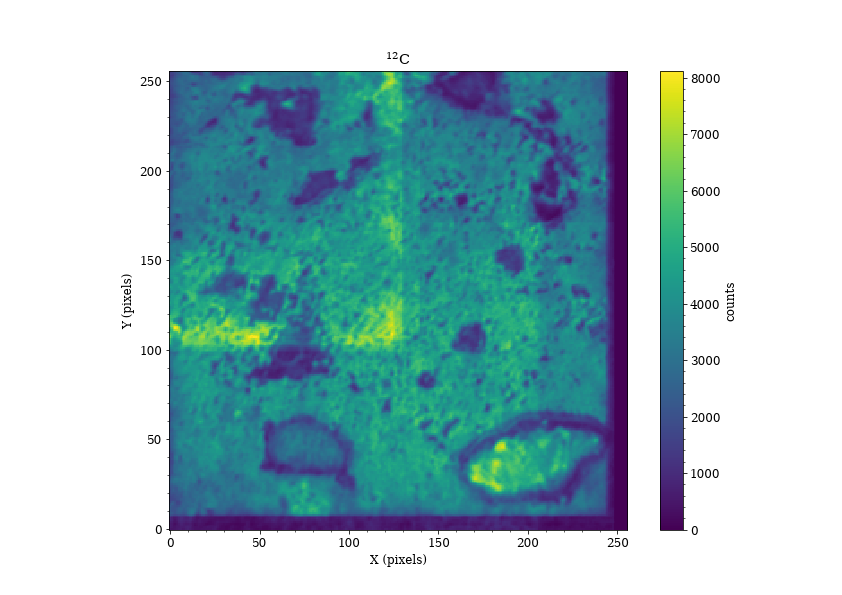
# Display total counts of aligned mass 12C as an image
[7]: plt.imshow(aligned_data.loc['12C'].sum(dim='frame'))
[8]: cbar = plt.colorbar()
# The unit of the data is stored in the attributed dictionary
[9]: cbar.set_label(s.data.attrs['unit'])
[10]: plt.xlabel('X (pixels)')
[11]: plt.ylabel('Y (pixels)')
# There is a list of formatted labels for pretty printing in the header
[12]: plt.title(s.header['label list fmt'][0])
# Show the header
[13]: s.header
... # too big to show here

# Show a small portion of the header
[14]: s.header['BFields'][0]
{'b field enabled': True,
 'b field bits': 856507,
 'wait time': 0.0,
 'time per pixel': 0.0075,
 'time per step': 20.0,
 'wait time computed': False,
 'E0W offset': -13,
 'Q': 389,
 'LF4': 1601,
 'hex val': 575,
 'frames per bfield': 1,
 'Trolleys': [{
   'label': '12C',
   'mass': 12.004397767933469,
   'radius': 442.47767499881127,
   'deflection plate 1': -68,
   'deflection plate 2': 67,
   'detector': 'EM',
   'exit slit': 268850,
   'real trolley': True,
   'cameca trolley index': 0,
   'peakcenter index': 1,
   'peakcenter follow': 1,
   'focus': 0.0,
   'hmr start': -16.996336996336996,
   'start dac plate 1': -68,
   'start dac plate 2': 67,
   'hmr step': 4,
   'hmr points': 50,
   'hmr count time': 0.54,
   'used for baseline': False,
   '50% width': 95.616,
   'peakcenter side': 'both',
   'peakcenter count time': 0.54,
   'used for sib center': False,
   'unit correction': 0,
   'deflection': -9.963369963369964,
   'used for energy center': False,
   'used for E0S center': False,
   'trolley enabled': True,
   'used for phd scan': False,
   'phd start': 3995,
   'phd step size': -30,
   'phd points': 30,
   'phd count time': 0.54,
   'phd scan repeat': 3,
   'trolley label': 'Trolley 1',
   'detector label': 'Detector 1'},
  ... # Skipped all the other trolleys
  ],
 'counting frame time': 491.52,
 'scanning frame time': 491.52,
 'working frame time': 491.52}

# Export header to JSON (text) format
[19]: sims.utils.export_header(s, filename='header.txt')
1 maintainer

Metadata
1 maintainer
Release files for sims 2.0.2
For a detailed explanation of source distributions (sdists) and built distributions (wheels), please see the package formats documentation.
Source distribution (sdist)
| File | Size | Uploaded | Provenance | Actions |
|---|---|---|---|---|
| sims-2.0.2.tar.gz | 47.1 kB | Without provenance | Details for sims-2.0.2.tar.gz |
Built distribution (wheel)
| File | Interpreter | ABI | Platform | Actions Reset |
|---|---|---|---|---|
| sims-2.0.2-py3-none-any.whl | Python 3 | none | any | Details for sims-2.0.2-py3-none-any.whl |
Total release size: 96.5 kB
Release files / sims-2.0.2.tar.gz
| Download URL | sims-2.0.2.tar.gz |
|---|---|
| Size | 47.1 kB |
| Tags | Source |
|
SHA-256 checksum How to use checksums |
e3adc7aac469ea5a697b86bf68810eea11e6c64b4fada9b9ad5fd275da9fa61e
|
|
BLAKE2b-256 checksum How to use checksums |
aae2dff7a7f29e10332cc259829a6ca0036a25c6db45a6375349dca3fefefc97
|
| Upload date | |
|
Uploaded using Trusted Publishing? What is trusted publishing? |
No |
| Uploaded via |
twine/4.0.1 CPython/3.8.13
|
Release files / sims-2.0.2-py3-none-any.whl
| Download URL | sims-2.0.2-py3-none-any.whl |
|---|---|
| Size | 49.5 kB |
| Tags | Python 3 |
|
SHA-256 checksum How to use checksums |
052bcb0906828ef322f85da1de376228298c29d78caf658cb84350967c3c0515
|
|
BLAKE2b-256 checksum How to use checksums |
a1409e7d9a06ff9c76b41c56eaab0e9edb1fb95de7b5d1162a524c0ee0e8b61e
|
| Upload date | |
|
Uploaded using Trusted Publishing? What is trusted publishing? |
No |
| Uploaded via |
twine/4.0.1 CPython/3.8.13
|
Security for sims 2.0.2
Provenance
Provenance describes where a file came from. On PyPI, provenance is shared via attestations, which provide a verifiable record of the build or publishing details. View details, limitations and caveats.
No provenance found
None of the files in this release were uploaded with provenance metadata.
A note on package security
PyPI is a repository for distributing packages, not a service for auditing them. While third-party security researchers and our staff do their best to detect and remove malicious packages, PyPI cannot guarantee the quality, security or suitability of any given package.
To learn more about protecting yourself from malicious actors, visit our package security documentation.














