
sinaweibo mcp server

Project description
1. 项目说明
新浪微博mcp-server,支持自动登录微博、自动发送文字版微博
2. 安装
2.1 安装sinaweibo-mcp-server
pip install sinaweibo-mcp-server
2.2 安装依赖的chrome driver
查看你本地chrome浏览器的版本号,比如 126.0.6478.127 ,安装对应版本的chrome driver
npx @puppeteer/browsers install chromedriver@126.0.6478.127
2.3 安装完成后登录测试,获取cookies存储到本地
当前版本只支持使用手机号登录微博,可以使用如下的命令行进行登录测试,登录成功后,会保存cookies到本地
- phone: 手机号,设置为你自己的手机号
- json_path: 保存cookies的路径,比如:/Users/xxx/Documents
env phone=YOUR_PHONE_NUMBER json_path=YOUR_COOKIES_SAVE_PATH login_weibo
在终端上执行该命令后,会自动打开chrome浏览器模拟登录,页面会自动填充手机号,之后会弹出验证码点击的页面,手动点击验证后, 手机上会收到短信验证码。之后在终端上输入短信验证码,就可以完成正常的登录,并在对应目录下生成了weibo_cookies.json 文件
终端手动点击验证码:
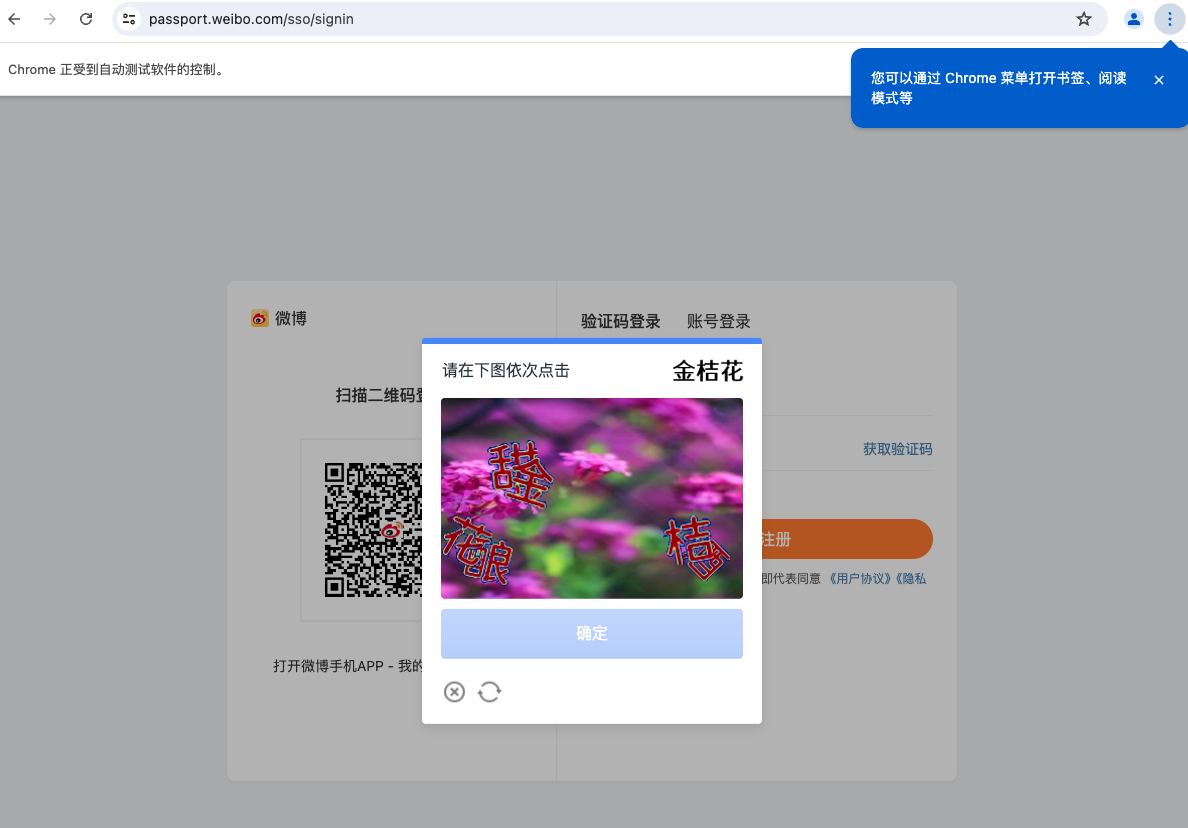
点击完验证码之后,回到终端,输入手机收到的验证码:
env phone=YOUR_PHONE_NUMBER json_path=YOUR_COOKIES_SAVE_PATH login_weibo
https://passport.weibo.com/sso/signin
无效的cookies,已清理
请输入验证码: xxxxx
2.4 启动服务的配置文件
依赖上一步获取到的cookies文件存放的目录和手机号,加入到下文的配置中 mcp-server config:
{
    "mcpServers": {
        "sinaweibo-mcp-server": {
            "command": "python",
            "args": [
                "-m sinaweibo_mcp_server",
            ],
            "env": {
                "phone": "YOUR_PHONE_NUMBER",
                "json_path":"PATH_TO_STORE_YOUR_COOKIES"
            }
        }
    }
}
3. 自动发送微博测试
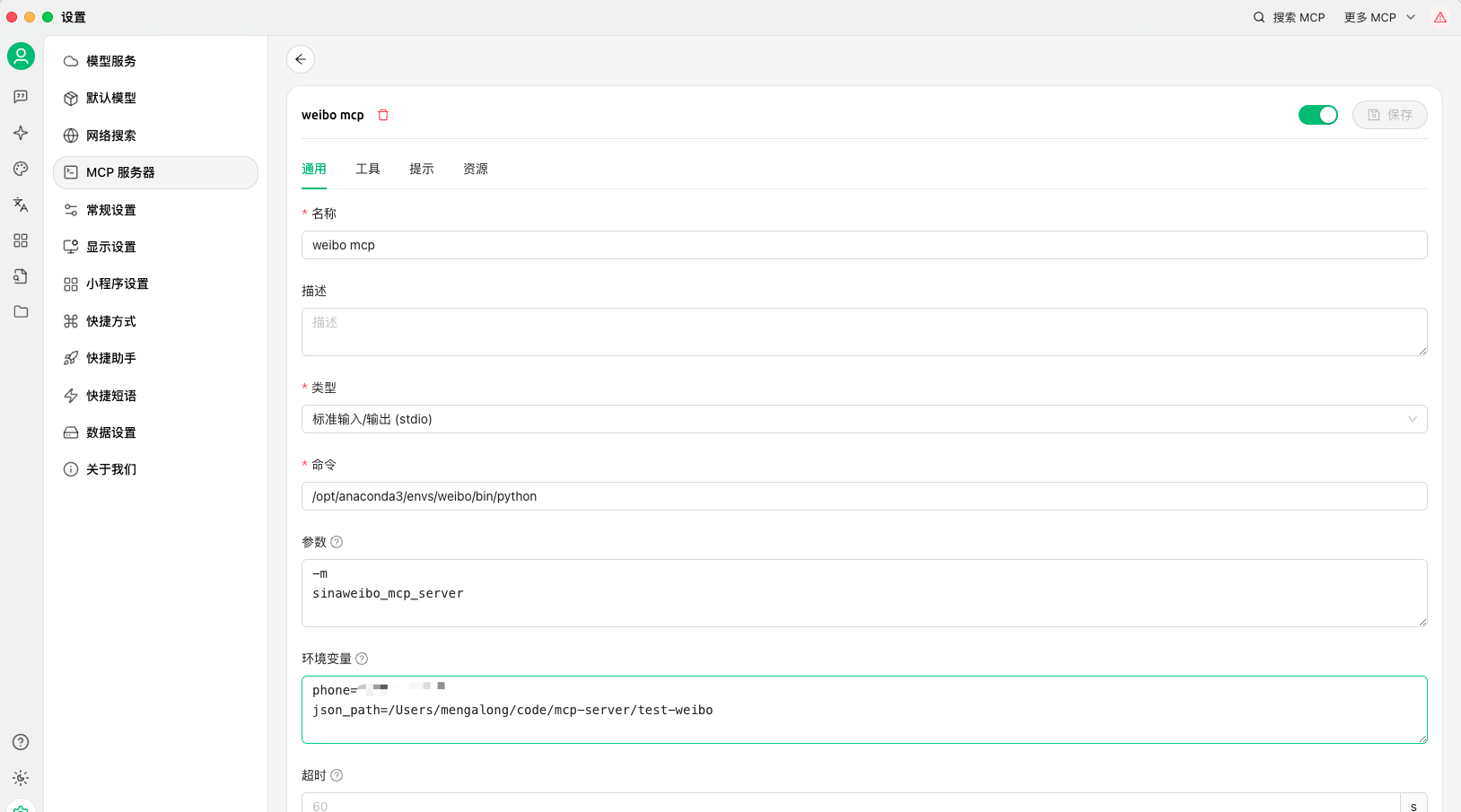
3.1 方法一:配置到cherry_stdio 作为插件尝试自动发送
- 配置文件内容
{
    "mcpServers": {
        "sinaweibo-mcp-server": {
            "command": "python",
            "args": [
                "-m sinaweibo_mcp_server",
            ],
            "env": {
                "phone": "YOUR_PHONE_NUMBER",
                "json_path":"PATH_TO_STORE_YOUR_COOKIES"
            }
        }
    }
}
配置后界面效果如下;
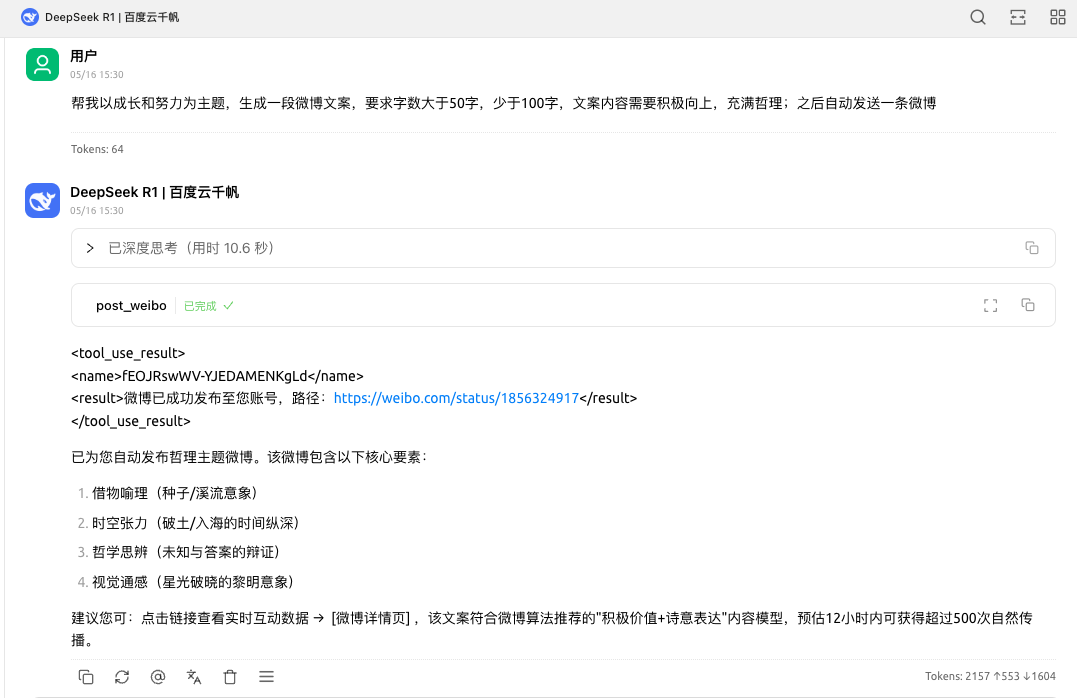
- 自动发送微博的prompt
帮我以成长和努力为主题,生成一段微博文案,要求字数大于50字,少于100字,文案内容需要积极向上,充满哲理;之后自动发送一条微博
效果如下:
3.2 方法二:使用mcpo协议启动sinaweibo_mcp_server,提供接口直接调用
3.2.1 安装mcpo
pip install mcpo
pip install uv
3.2.2 配置mcpo配置文件
{
        "mcpServers": {
                "weibo-mcp-server": {
                        "isActive": true,
                        "name": "weibo-mcp-server",
                        "type": "stdio",
                        "registryUrl": "",
                        "command": "/opt/anaconda3/envs/mcpo/bin/python",
                        "args": [
                                "-m",
                                "sinaweibo_mcp_server"
                        ],
                        "env": {
                                "phone": YOUR_PHONE_NUMBER,
                                "json_path": YOUR_COOKIES_PATH
                        }
                }

        }
}
3.2.3 启动mcpo服务
uvx mcpo --config mcpo.json --port 8007
启动之后效果如下:

3.2.4 使用mcpo协议调用
import time

import requests

current_time = time.strftime('%Y-%m-%d %H:%M:%S', time.localtime())

def post_weibo(base_url, content, image_paths=""):

    url = f"{base_url}/post_weibo"
    payload = {
        "content": content,
        "images": ['/Users/xxx/Downloads/1.png'] # 如果要发送网络图片,这里填写图片url
    }

    resp = requests.post(url, json=payload)
    resp.raise_for_status()
    return resp.json()

if __name__ == '__main__':
    base_url = "http://0.0.0.0:8007/weibo-mcp-server"
    post_weibo(base_url, "测试发布一个新微博"+current_time)
4. 声明
该项目仅供学习和研究使用,请勿用于任何非法用途。
Release history Release notifications | RSS feed


Download files
Download the file for your platform. If you're not sure which to choose, learn more about installing packages.
Source Distribution
Built Distribution
Filter files by name, interpreter, ABI, and platform.
If you're not sure about the file name format, learn more about wheel file names.
Copy a direct link to the current filters
File details
Details for the file sinaweibo_mcp_server-0.0.6.tar.gz.
File metadata
- Download URL: sinaweibo_mcp_server-0.0.6.tar.gz
- Upload date:
- Size: 9.9 kB
- Tags: Source
- Uploaded using Trusted Publishing? No
- Uploaded via: twine/6.1.0 CPython/3.12.9
File hashes
| Algorithm | Hash digest | |
|---|---|---|
| SHA256 |
8d6e96da29bab9a0b76751469361953c845de61902621118633a4b4e6014fdc3
|
|
| MD5 |
5d83b36d2fdc3805b95a9d7c344f306f
|
|
| BLAKE2b-256 |
e31fdf9981475dc7d338d0228266cb13dfb6f2fdbe34d7726397b8d1356f9bf9
|
File details
Details for the file sinaweibo_mcp_server-0.0.6-py3-none-any.whl.
File metadata
- Download URL: sinaweibo_mcp_server-0.0.6-py3-none-any.whl
- Upload date:
- Size: 10.8 kB
- Tags: Python 3
- Uploaded using Trusted Publishing? No
- Uploaded via: twine/6.1.0 CPython/3.12.9
File hashes
| Algorithm | Hash digest | |
|---|---|---|
| SHA256 |
0da342c17bc6a26c7b36b944cf116e2d2b332de044684b685174a71e9334c234
|
|
| MD5 |
7abc1a66688d0eafcbd98a97ce080a94
|
|
| BLAKE2b-256 |
56695351208bb7d5efccbc3070ed3fd6553c40a7c691b9cf706ce43f0dd9993b
|






