
SlowPics Offsets Plugin for VSPreview
[!WARNING] If slow.pics rate-limits or bans your IP while using this plugin, do not bother Slowbro about plugin-specific issues directly. Please open an issue in this repository instead. Slowbro has made some security / cloudflare tweaks and is in the process of adjusting them so they don't affect plugins as much. Enforcement updates can affect how this plugin behaves over time, so use this at your own risk.
Compare multiple video sources with per-frame, per-source offsets, then upload either as a new slow.pics comp or append to an existing comp.
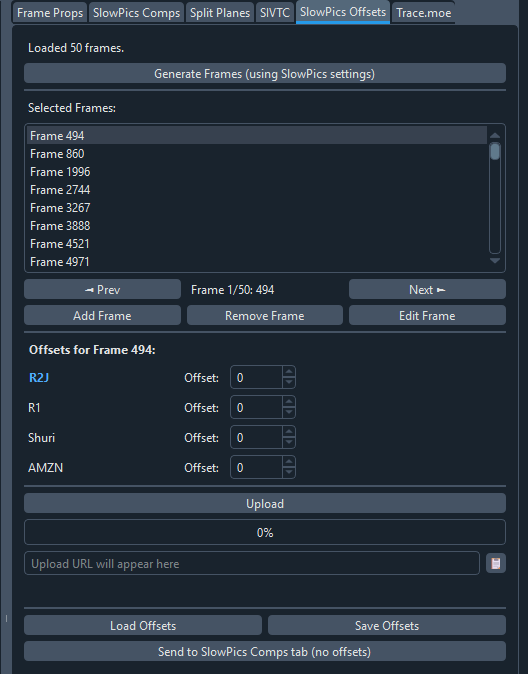
Features
- Per-frame offsets - Set different offsets for each frame, per source
- SlowPics Comp support - Generate frames using SlowPics Comp settings
- Frame management - Add, edit, remove frames manually
- Upload modes -
New ComparisonandAppend to Existing - Append by clone - Loads an existing comp, clones it, and appends selected local sources
- Manual frame mapping fallback - Provide an explicit row-to-frame map when frame parsing fails
- Offset-aware upload - Upload to slow.pics with offsets applied per source
- State persistence - Save and load frame selections with offsets for future comps
Installation
Method 1: PyPI (Recommended)
-
Install via pip:
pip install slowpics-offsets
-
Run the setup command to link it to VSPreview:
spo-install
This detects your VSPreview plugins folder and installs a loader file.
To specify a custom path:
spo-install --path /path/to/plugins
Method 2: Local Source Install
- Clone this repository:
git clone https://github.com/JanitorialMess/slowpics-offsets.git
cd slowpics-offsets
- Install in editable mode:
pip install -e .
- Link it to VSPreview:
spo-install
Requirements
- VSPreview with the built-in
SlowPics Compplugin available
Usage
1. Select Frames
Use Generate Frames (using SlowPics settings) to import frame selection from the built-in SlowPics Comp settings.
Or manage frames manually with:
- Add Frame
- Edit Frame
- Remove Frame
- Prev / Next navigation
2. Set Offsets
For each frame in your selection:
- Select the frame from the list
- Adjust the offset spinboxes for each source
- The preview updates automatically to show the offset frame
- Navigate between frames to verify alignment
Each frame can have different offsets per source. For example, if a transition appears on frame 5000 in one source, you can set a +10 offset just for that frame.
3. Choose Upload Mode
- New Comparison:
- Uploads selected local sources as a new comp
- Cookies are optional (anonymous upload can work, same as built-in behavior)
- Append to Existing:
- Paste a target key/URL (for example
https://slow.pics/c/abcd1234) - Click Load
- If frame numbers were not parsed from target rows, enter a manual frame map and click Apply
- Select local sources to append
- Click Upload
- This mode may require cookies (clone permission can fail with 401/403)
- Paste a target key/URL (for example
Manual Frame Mapping (Append Mode)
Append mode must map target rows to local frame numbers 1:1 and in order.
- The plugin first tries to parse frame indices from target row names.
- If parsing fails, or your local frame list changes after loading target, you must provide the map manually.
- Format: comma-separated frame numbers (for example
100, 250, 500). - The number of entries must match target row count exactly.
Append mode uses the original slow.pics clone flow.
4. Save/Load and Interop
- Save Offsets: save selected frames + offsets to JSON
- Load Offsets: restore selected frames + offsets from JSON
- Send Frame List to SlowPics Comps Tab: send frame numbers to built-in SlowPics Comp without offsets
Keyboard Shortcuts
- Ctrl+[ - Previous generated frame
- Ctrl+] - Next generated frame
JSON Format
State files use this format:
{
  "version": 1,
  "selected_frames": [100, 500, 1000],
  "offsets": {
    "500": {
      "Source1": 10,
      "Source2": -5
    }
  }
}
Only frames with non-zero offsets are stored. Offsets are keyed by source name. If source names change between sessions, remapping is required.
Warning
This plugin intentionally relies on internals from VSPreview's built-in SlowPics Comp plugin. Updates in VSPreview may change those internals and break behavior.
1 maintainer

Metadata
1 maintainer
Release files for slowpics-offsets 1.0.1
For a detailed explanation of source distributions (sdists) and built distributions (wheels), please see the package formats documentation.
Source distribution (sdist)
| File | Size | Uploaded | Provenance | Actions |
|---|---|---|---|---|
| slowpics_offsets-1.0.1.tar.gz | 147.2 kB | Without provenance | Details for slowpics_offsets-1.0.1.tar.gz |
Built distribution (wheel)
| File | Interpreter | ABI | Platform | Actions Reset |
|---|---|---|---|---|
| slowpics_offsets-1.0.1-py3-none-any.whl | Python 3 | none | any | Details for slowpics_offsets-1.0.1-py3-none-any.whl |
Total release size: 300.1 kB
Release files / slowpics_offsets-1.0.1.tar.gz
| Download URL | slowpics_offsets-1.0.1.tar.gz |
|---|---|
| Size | 147.2 kB |
| Tags | Source |
|
SHA-256 checksum How to use checksums |
dd4805b33f5d4a3f1717f56f2a52fff48625e1f5e30850139945be839d6fc53a
|
|
BLAKE2b-256 checksum How to use checksums |
ab6ba31a062e6a57edd587c81bd8bcc4756eabc93543bbb5b62a231b452fae8e
|
| Upload date | |
|
Uploaded using Trusted Publishing? What is trusted publishing? |
No |
| Uploaded via |
twine/6.2.0 CPython/3.13.2
|
Release files / slowpics_offsets-1.0.1-py3-none-any.whl
| Download URL | slowpics_offsets-1.0.1-py3-none-any.whl |
|---|---|
| Size | 152.9 kB |
| Tags | Python 3 |
|
SHA-256 checksum How to use checksums |
dee2753d4b00625d5a1d2cdeeac28fbfc154fd69c1b856672bcfd125c5a7e134
|
|
BLAKE2b-256 checksum How to use checksums |
52fe77b25601f976f55285475824b6e50f12493ececd5b938865468368e9ade4
|
| Upload date | |
|
Uploaded using Trusted Publishing? What is trusted publishing? |
No |
| Uploaded via |
twine/6.2.0 CPython/3.13.2
|
Security for slowpics-offsets 1.0.1
Provenance
Provenance describes where a file came from. On PyPI, provenance is shared via attestations, which provide a verifiable record of the build or publishing details. View details, limitations and caveats.
No provenance found
None of the files in this release were uploaded with provenance metadata.
A note on package security
PyPI is a repository for distributing packages, not a service for auditing them. While third-party security researchers and our staff do their best to detect and remove malicious packages, PyPI cannot guarantee the quality, security or suitability of any given package.
To learn more about protecting yourself from malicious actors, visit our package security documentation.














