
Smile Arguments
Version 1.1.2
- Improving
- Clean up
Why SmileArgs
It is a modern args catching with python3 and OOP structure and implementation.
Optional
Some parameters will clarify more, when instance starting
smile = SmileArgs(isAllowedNoValue= False, isDuplicated= False, console= True, debug= False)
- allowNoValue: bool= False | True
- No require value on args
- -c command does not need any assign value (Ex: python test.py -c)
- duplicated: bool= False | True
- Allowing a user types many times of any command on args (Ex: python test.py -b -b -b)
- Will execute 3 times of the command "-b" regarding to the above example
- console: bool= False | True
- A method will print error when the system catches and throw a particular error
- debug bool= False | True
- This property will track any prompt while working
catchCommand()
- after executed run() method, it allows us to get catch command list
- show all cli command that matched to the added command
- return list
getCommand()
- show all added commands
- return list
run()
- find and match command via cli
- Ex: python test.py -a=Miss -b=Mom
show()
- display all added commands
- if found commands, it will display all cough commands
Example 1
Create a test.py
from SmileArgs import SmileArgs
smile   = SmileArgs(console= True, debug= True)
# add command to list
smile.addCommand('a', 'alphabet', 'show alphabet')
smile.addCommand('b', 'baby', 'miss mom by her baby')
smile.addCommand('m', 'miss', 'miss mom everyday')

# catch cli command
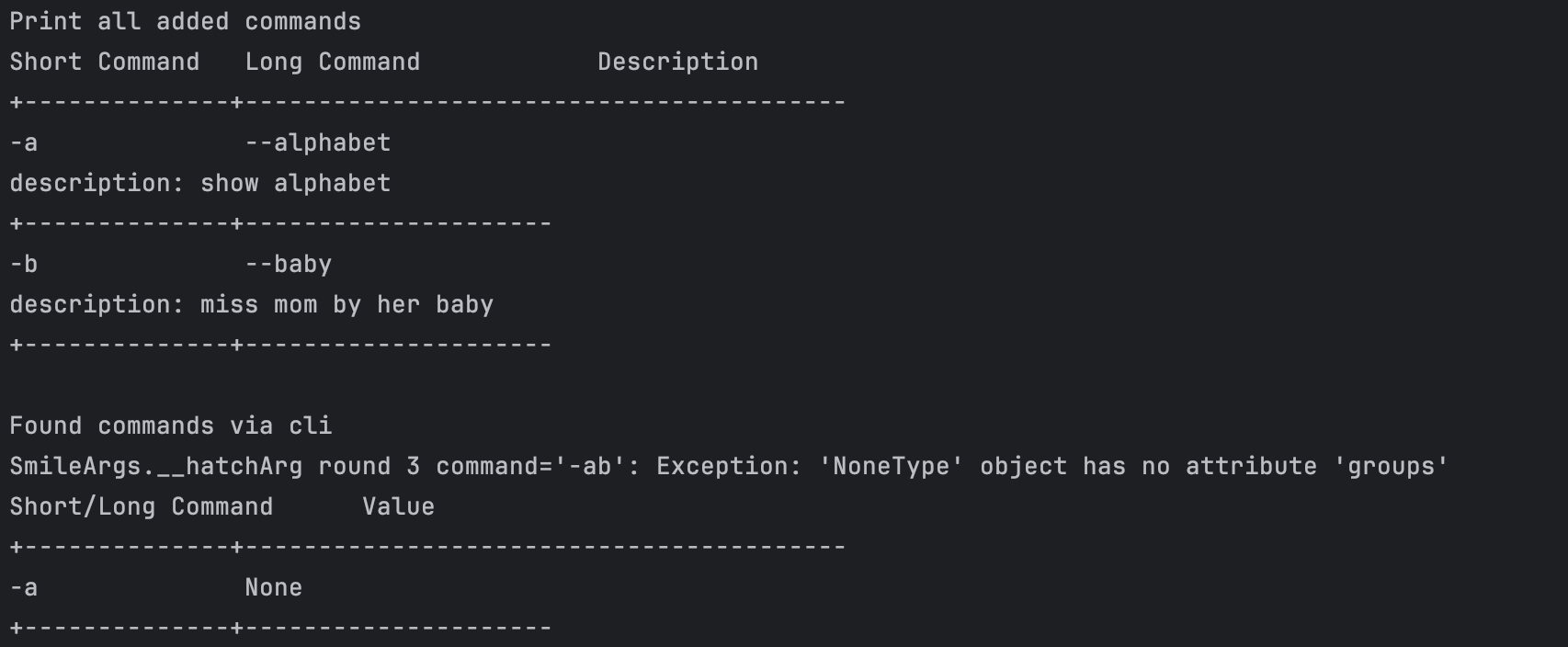
print(f'\nFound commands via cli')
smile.run()

# show
smile.show()
On terminal try with this
$ python3.10 test.py -a -ab -a --miss=mom
Example 2
create a testclass.py
from SmileArgs import SmileArgs

class TestClass:
  def __init__(self):
    """
    """
    # private
    self.__smile   = SmileArgs()
    self.__load()

  def __load(self) -> None:
    """
    """
    self.__smile.addCommand('a', 'alphabet', 'show alphabet')
    self.__smile.addCommand('b', 'barbie', 'Wow, movies')
    self.__smile.addCommand('m', 'miss', 'miss mom everyday')

  def checkCLI(self) -> None:
    """
    """
    self.__smile.run()

  def executeCLICommand(self) -> None:
    """
    """
    #
    self.checkCLI()
    #
    for s in self.__smile.catchCommand():
      print(f'{f.cmdShort or f.cmdLong} \t\t{f.value}')


testClass = TestClass()
testClass.executeCLICommand()
cli
$ python3.10 testclass.py -a -ab -a --miss=mom
it will catch '-a' as a short command, and '--miss' as a long command; then use match or if statement to control those states.
It is available on PyPi store via https://pypi.org/project/SmileArgs/
To Support my work, please donate me via 
1 maintainer

Metadata
1 maintainer
Release files for SmileArgs 1.1.2
For a detailed explanation of source distributions (sdists) and built distributions (wheels), please see the package formats documentation.
Source distribution (sdist)
| File | Size | Uploaded | Provenance | Actions |
|---|---|---|---|---|
| SmileArgs-1.1.2.tar.gz | 6.1 kB | Without provenance | Details for SmileArgs-1.1.2.tar.gz |
Built distribution (wheel)
| File | Interpreter | ABI | Platform | Actions Reset |
|---|---|---|---|---|
| SmileArgs-1.1.2-py3-none-any.whl | Python 3 | none | any | Details for SmileArgs-1.1.2-py3-none-any.whl |
Total release size: 12.3 kB
Release files / SmileArgs-1.1.2.tar.gz
| Download URL | SmileArgs-1.1.2.tar.gz |
|---|---|
| Size | 6.1 kB |
| Tags | Source |
|
SHA-256 checksum How to use checksums |
17557fee880b845e18c32240af13f3daa613aabc2c1df4b1de6fa772743ca780
|
|
BLAKE2b-256 checksum How to use checksums |
3183bd857cc23973a97193979898bc337c4217930cc4a1c3f3f74bbf70e9e19e
|
| Upload date | |
|
Uploaded using Trusted Publishing? What is trusted publishing? |
No |
| Uploaded via |
twine/4.0.2 CPython/3.11.7
|
Release files / SmileArgs-1.1.2-py3-none-any.whl
| Download URL | SmileArgs-1.1.2-py3-none-any.whl |
|---|---|
| Size | 6.2 kB |
| Tags | Python 3 |
|
SHA-256 checksum How to use checksums |
fc6064974f9069c35de8bd9ffdef09f6da5ef87a6891cbaa94a07c47439f2602
|
|
BLAKE2b-256 checksum How to use checksums |
3c49a33fd314e8c2eccdeb12a2111ec2c74dbcab25c27cfb2ea14f3689daf2e7
|
| Upload date | |
|
Uploaded using Trusted Publishing? What is trusted publishing? |
No |
| Uploaded via |
twine/4.0.2 CPython/3.11.7
|
Security for SmileArgs 1.1.2
Provenance
Provenance describes where a file came from. On PyPI, provenance is shared via attestations, which provide a verifiable record of the build or publishing details. View details, limitations and caveats.
No provenance found
None of the files in this release were uploaded with provenance metadata.
A note on package security
PyPI is a repository for distributing packages, not a service for auditing them. While third-party security researchers and our staff do their best to detect and remove malicious packages, PyPI cannot guarantee the quality, security or suitability of any given package.
To learn more about protecting yourself from malicious actors, visit our package security documentation.














