
SmileLog

Appending a silent feature which auto-remove itself the current content file if over a limit that given by a parameter 'maxMb'.
It won't do anything unless the value of the 'autoclean' equals 'False'.
autoclean= True
maxMb=100
Every writing a log, it will check these value.
The features since version 4.x.x:
- Log to a static file
- Backup file everyday
- Enable series of log session
- Parallel log between static log and session log
- Push any log to redis via pubsub method
- Dynamic line separation
- on or off
- editable line character
- editable number of line character
- Fix bugs
- Improve performance
- Clean up code
It's going to change the traditional tracing in another way.
What will it assist us:
- Showing the colorized log by following the standard color
- Ignoring any track by reading id in the list
- Each statement list down with a big span and symbols
- Using a static file to output the content that will be easier
- Disable the entire tracing in a second
- 5 methods for 5 outputs
- Backup file if log start a new date
- Separating a new file with a new file name This feature will cover to a specific tracking.
- Group the log with specific key(series key)
- Able to set maxSize log
It is available on PyPi store via https://pypi.org/project/SmileLog/
To Support my work, please donate me via 
Installation
# pip3 install SmileLog
5 Methods
Use in the different situation, and show up in different color
- error: error(title, content, id= None, channel= None)
- fail: fail(title, content, id= None, channel= None)
- information: info(title, content, id= None, channel= None)
- success: success(title, content, id= None, channel= None)
- track: track(title, content, id= None, channel= None)
- warning: warning(title, content, id= None, channel= None)
- title is a string
- content can be a string or dict
Figure (version 2.0)
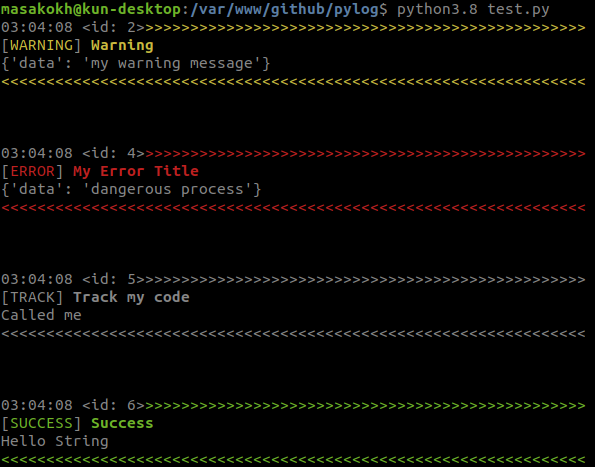
Start using in the simple way:
from smilelog import Logger


# first instant
log	= Logger(
            enableLog= True
	)

# try to print out
log.info(
	'My Info Title'
	, {'data':'My Dictionary Content'}
)

# success method
log.success(
	title	 	= 'My Success Title'
	, content	= 'My String'
)

# setKeySeries is a new method to indicate to the token of a long message
log.setKeySeries('NbcseX32cDse')
Logger
Logger is a tracing class library and write/output into a file.
This will need generating a file and keep writing the content.
Let's Look at its configure would explain more:
log	= Logger(
           path:                str	= 'log'
           , filename: 			str = 'access'
           , extension: 		str = 'log'
            , enableLog: 		bool= True
            , enableConsole:    bool= True
            , line: 			bool= True
            , charInLine: 		int	= 55
            , lineCharStart:    str = '>'
            , lineCharEnd: 		str = '<',
            , color: 			bool= True
            , autoClean:        bool= False
            , maxMb:            int=100
	)
- path: is a directory
Ex:
/var/www/my-project/logs/
- filename: is the name of a new file log.
# set name
filename= 'access'

Ex:
/var/www/my-project/logs/access.log
# some app move it into system log directory, it is an advantage of prefix
- color: is for showing the color on terminal with tail command or terminal editor.
# set color
color= True
or
color= False
- enableLog: allow an object to create the file.
- True: To create a file and write content into log file
- False: To disable the logging
# set enable
# enable to write log file
enableLog= True
- enableConsole: to bring something on the screen of log.
- True: To print out on terminal
- False: No action
# set enable
enableConsole= True
Series
Just a series name of output
- setKeySeries: data
# set value
log.setKeySeries('Insert Data')
# stop
log.setKeySeries()
Disable print out
The most feature developer guy needs.
It will disable only the index that we set in disable list.
- disableIds: hide those ids.
- parameter must be Array
# Logger instant
# Ex: Logger logged 10 times
# but we will show some id except 1,2,3,7,8,9
# do this
log.disableIds([1,2,3,7,8,9])
Separate a session file
Here is the method to separate normal log file to a specific. Follow the setting:
- setKeySession: must be a string and maximum length 32
log.setKeySession('cbc98494543823442425488df')
It will separate from the default log, and generate a new file as 'cbc98494543823442425488df.log'.
Note:
To stop running a session, just set it the None.
log.setKeySession()
2022-05-12 21:40:20.345 <id: 4>
_>>>>>>>>>>>>>>>>>>>>>>>>>>>>>>>>>>>>>>>>>>>>>>>>>>
[FAIL] My Title
{'data': 'my content'}
<<<<<<<<<<<<<<<<<<<<<<<<<<<<<<<<<<<<<<<<<<<<<<<<<<<
2022-05-12 21:40:20.345 <id: 5> Insert Data
_>>>>>>>>>>>>>>>>>>>>>>>>>>>>>>>>>>>>>>>>>>>>>>>>>>
[WARNING] Warning
{'data': 'my content'}
<<<<<<<<<<<<<<<<<<<<<<<<<<<<<<<<<<<<<<<<<<<<<<<<<<<
2022-05-12 21:40:20.345 <id: 6> Delete Row
[TRACK] My Title
{'data': 'my content'}
2022-05-12 21:40:20.345 <id: 10>
[SUCCESS] Success
Hello String
Pub/Sub
initializes redis requirement
- setRedis
- host: required
- port: required
- channel: the default is None, scribe and publish
- db: by default is 0
- password: by default is None
enable Redis Engine
- enableRedis: bool
enable any functional alert
- enableError: bool
- enableFail: bool
- enableInfo: bool
- enableTrack: bool
- enableSuccess: bool
- enableWarning: bool
1 maintainer

Metadata
1 maintainer
Release files for SmileLog 4.1.4
For a detailed explanation of source distributions (sdists) and built distributions (wheels), please see the package formats documentation.
Source distribution (sdist)
| File | Size | Uploaded | Provenance | Actions |
|---|---|---|---|---|
| SmileLog-4.1.4.tar.gz | 10.6 kB | Without provenance | Details for SmileLog-4.1.4.tar.gz |
Built distribution (wheel)
| File | Interpreter | ABI | Platform | Actions Reset |
|---|---|---|---|---|
| SmileLog-4.1.4-py3-none-any.whl | Python 3 | none | any | Details for SmileLog-4.1.4-py3-none-any.whl |
Total release size: 22.6 kB
Release files / SmileLog-4.1.4.tar.gz
| Download URL | SmileLog-4.1.4.tar.gz |
|---|---|
| Size | 10.6 kB |
| Tags | Source |
|
SHA-256 checksum How to use checksums |
854d963b46eb381be0b75e56f8c3438b821a0714a711e225c76c7d99c76d7601
|
|
BLAKE2b-256 checksum How to use checksums |
c6e7fa5606db809cdee754a125430f547e247c9cde0884d22da4fff4a2e3a2ff
|
| Upload date | |
|
Uploaded using Trusted Publishing? What is trusted publishing? |
No |
| Uploaded via |
twine/4.0.2 CPython/3.10.13
|
Release files / SmileLog-4.1.4-py3-none-any.whl
| Download URL | SmileLog-4.1.4-py3-none-any.whl |
|---|---|
| Size | 11.9 kB |
| Tags | Python 3 |
|
SHA-256 checksum How to use checksums |
c306b41accb8969b0e96b2ed3214dafeccb2f42f8dc23d61ce8117d13b81077c
|
|
BLAKE2b-256 checksum How to use checksums |
5c1f1feda8913fc4b9992f6e53e79fb724dab2868e6d21e1fa91448fd065cd5b
|
| Upload date | |
|
Uploaded using Trusted Publishing? What is trusted publishing? |
No |
| Uploaded via |
twine/4.0.2 CPython/3.10.13
|
Security for SmileLog 4.1.4
Provenance
Provenance describes where a file came from. On PyPI, provenance is shared via attestations, which provide a verifiable record of the build or publishing details. View details, limitations and caveats.
No provenance found
None of the files in this release were uploaded with provenance metadata.
A note on package security
PyPI is a repository for distributing packages, not a service for auditing them. While third-party security researchers and our staff do their best to detect and remove malicious packages, PyPI cannot guarantee the quality, security or suitability of any given package.
To learn more about protecting yourself from malicious actors, visit our package security documentation.














