


Overview
sofi is an OS agnostic UI module for Python.
The main idea is to allow rapid, pythonic GUI development using standard web-based widgets from Bootstrap and
other common HTML5 libraries and package them in such a way that all event processing is done within python using
websockets.
This was developed as an exercise in poking at the underlying technologies and to see what comes out of merging them together. For a better overview of why it came to be, feel free to take a look at this post: A Python Ate My GUI - Part 3: Implementation
We're in a beta stage for now, feedback appreciated.
Usage
The sofi.app.Sofi object runs the main event thread with .start() and provides a number of functions to help manipulate the state of the user interface, which is actually a webpage opened in a browser. The register and unregister methods provide the mechanism for subscribing to events through callbacks, while the remaining functions (append, replace, style, etc.) wrap the commands intended to dynamically update the widgets (which are actual HTML elements).
The commands map directly to D3 or jQuery methods present in the sofi.js library that's loaded during initialization and is responsible for performing the requested operations.
Following basic practices from bootstrap, the widgets should be within a Container. The base page itself is represented with the View class, which wraps the necessary head, body and style tags that will contain the widgets.
Below is a quick idea of how to get things going, but check out sample.py for a more complicated hello world which instantiates a navbar item, adds a few links, creates some buttons, registers events and performs some timed updates.
from sofi.app import Sofi
from sofi.ui import Container, Paragraph, Heading, View

import json
import asyncio


async def onload(event):
    # Every page is built on top of a View object, which contains the <head> and <body> tags that are filled in by the other objects
    v = View()

    # Make a bootstrap container in which to put all your widgets
    c = Container()

    # Add a heading and paragraph to the container
    c.addelement(Heading(2, "Dude!"))
    c.addelement(Paragraph("Where's My Car?"))

    # Add the container to the view
    v.addelement(c)

    # Tell the UI to load the HTML generated by the view
    app.load(str(v))


# Instantiate the application
app = Sofi()

# Register the event handler that runs when the UI is ready to receive commands
app.register('init', onload)

# Start the app (opens the default browser) and listen for events
app.start()
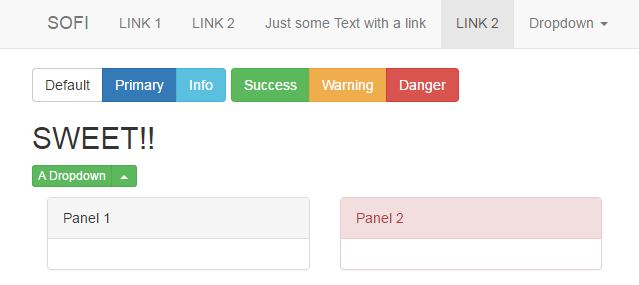
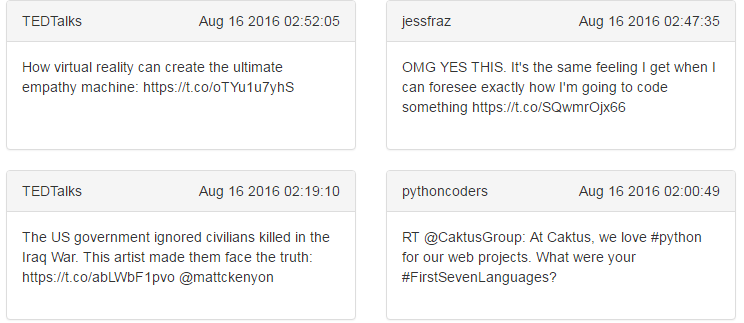
What do the widgets look like?
1 maintainer

Metadata
1 maintainer
Release files for sofi 0.3.9
For a detailed explanation of source distributions (sdists) and built distributions (wheels), please see the package formats documentation.
Source distribution (sdist)
| File | Size | Uploaded | Provenance | |
|---|---|---|---|---|
| sofi-0.3.9.tar.gz | 22.5 kB | Without provenance | Details |
Release files / sofi-0.3.9.tar.gz
| Download URL | sofi-0.3.9.tar.gz |
|---|---|
| Size | 22.5 kB |
| Tags | Source |
|
SHA-256 checksum How to use checksums |
60286bf0fdd9de2f390dcaaaaf495213c5ac671087d09e1f5740e2c4d37c7fa3
|
|
BLAKE2b-256 checksum How to use checksums |
bb9937684ad1731b12310b12785b61072d90723eeaa4d24628be178c5efba033
|
| Upload date | |
|
Uploaded using Trusted Publishing? What is trusted publishing? |
No |
Security for sofi 0.3.9
Provenance
Provenance describes where a file came from. On PyPI, provenance is shared via attestations, which provide a verifiable record of the build or publishing details. View details, limitations and caveats.
No provenance found
None of the files in this release were uploaded with provenance metadata.
A note on package security
PyPI is a repository for distributing packages, not a service for auditing them. While third-party security researchers and our staff do their best to detect and remove malicious packages, PyPI cannot guarantee the quality, security or suitability of any given package.














