
solidbyte


Development tools for creating Ethereum smart contracts.
Curious what a Solidbyte project looks like? Check out the solidbyte-test-project repository.
What makes Solidbyte different?
- Local accounts - Solidbyte can use the local accounts stored as Ethereum secretstore files located at
~/.ethereum/keystore. You do not need to trust the node you are using to handle your private keys and risk opening your account withpersonal.unlock. - Python! - Deploy scripts and tests are written using Python.
- EthPM support - Well, it's in progress and not usable yet, but... it probably will be at some point.
- Vyper and Solidity support - Contracts written in either language can co-exist side by side with eachother in your project.
- Interactive python console - Solidbyte provides a console with an insantiated Web3 object and your deployed contract instances. Have I mentioned Python yet?
- Projcet templates - You can initialize a project template with a single command that includes example deploy scripts, tests, and contracts. Right now only 'bare' and 'erc20' templates are available, but I hope to add more.
- Contract testing with pytest - Pytest is used for contract testing with some provided fixtures. Something something Python.
- eth_tester support for testing - It's super fast and really useful for first-pass testing.
NOTE: Solidbyte has only been tested on Linux. If you use another OS, please consider testing and submit an issue for any bugs you find.
What's in the future?
See the roadmap.
Demo
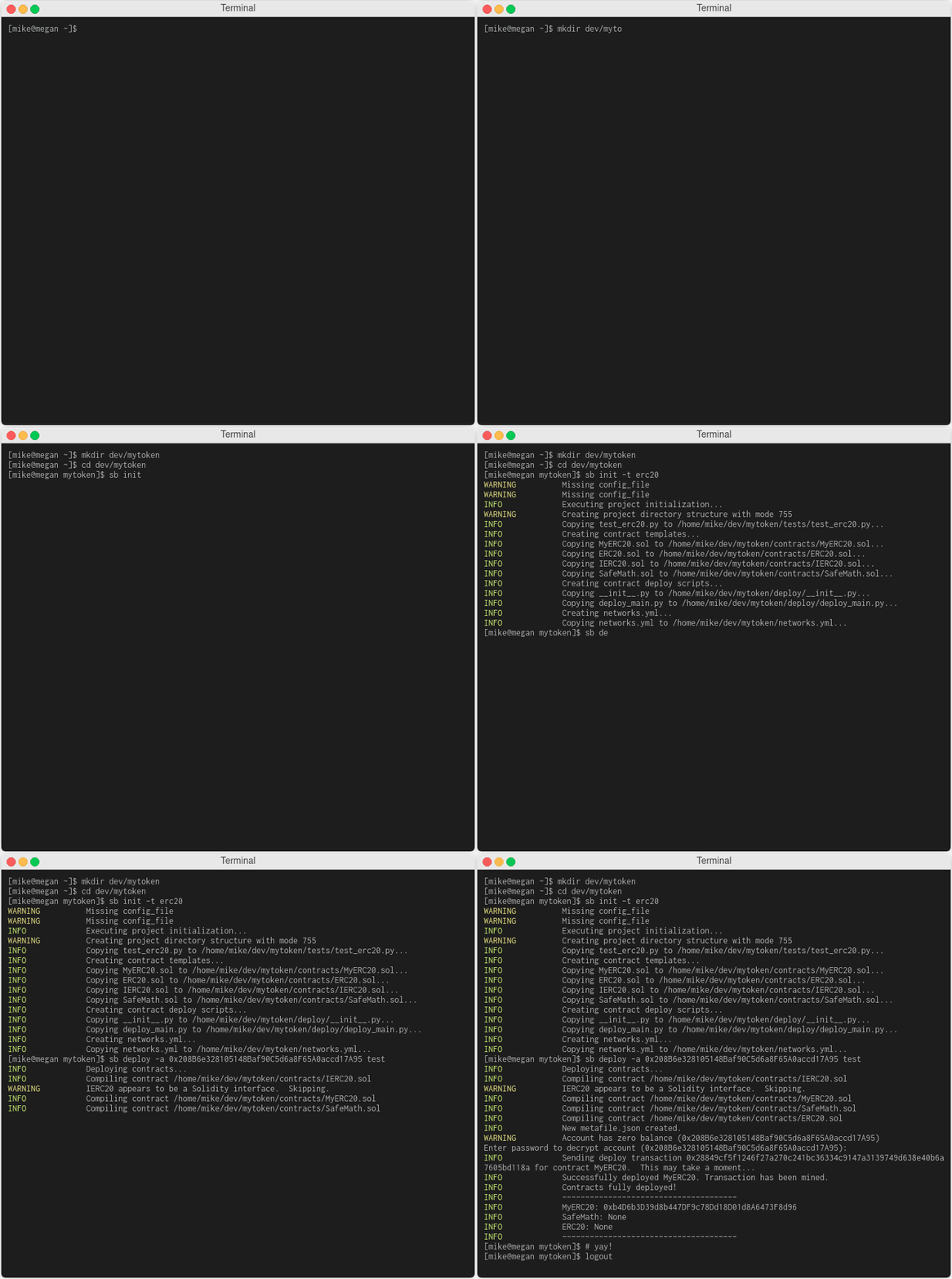
Here's a brief demo (as of 2019-03-25) creating a new ERC20 token named MyToken:
Contents
Quickstart
1) Install Solidbyte
Solidbyte requires some system-level libraries to be installed first. Make sure openssl/libssl and libffi headers are installed before proceeding. For more information, see the longer installation docs.
First, install solidbyte. The easiest way to do that is from PyPi
with pip.
pip install solidbyte
2) Setup your project
To get your project going, create a directory for your project and change to it.
Most sb commands need to be run from the root of your project directory.
mkdir myproject && cd myproject
sb init
Now, all you should have a bare project structure created. You could also
init with an available template,
but for the purposes of this doc, we're just going to create a bare structure.
Your contracts should be in the contracts directory. Your Solidity or Vyper
contracts can be in any directory under it.
The deploy directory will hold your deployment scripts.
And tests will contain your contract unit tests.
The build directory probably doesn't exist yet. This will be created by
solidbyte when necessary.
You can also create scripts to be run by Solidbyte in the scripts directory.
They must be implemented according to the documentation.
1 maintainer

Metadata
1 maintainer
Release files for solidbyte 1.0.2
For a detailed explanation of source distributions (sdists) and built distributions (wheels), please see the package formats documentation.
Source distribution (sdist)
| File | Size | Uploaded | Provenance | Actions |
|---|---|---|---|---|
| solidbyte-1.0.2.tar.gz | 3.7 MB | Without provenance | Details for solidbyte-1.0.2.tar.gz |
Release files / solidbyte-1.0.2.tar.gz
| Download URL | solidbyte-1.0.2.tar.gz |
|---|---|
| Size | 3.7 MB |
| Tags | Source |
|
SHA-256 checksum How to use checksums |
daa9645feaf6a7f4ddd31b881da4818b148e76f49ef06fab3ad1ad32c876a0c2
|
|
BLAKE2b-256 checksum How to use checksums |
76c6149379fefad006f1b217c9e3ba6f3f2f79a3b1ce54553af931743619e557
|
| Upload date | |
|
Uploaded using Trusted Publishing? What is trusted publishing? |
No |
| Uploaded via |
twine/3.2.0 pkginfo/1.5.0.1 requests/2.24.0 setuptools/50.3.0 requests-toolbelt/0.9.1 tqdm/4.48.2 CPython/3.6.7
|
Security for solidbyte 1.0.2
Provenance
Provenance describes where a file came from. On PyPI, provenance is shared via attestations, which provide a verifiable record of the build or publishing details. View details, limitations and caveats.
No provenance found
None of the files in this release were uploaded with provenance metadata.
A note on package security
PyPI is a repository for distributing packages, not a service for auditing them. While third-party security researchers and our staff do their best to detect and remove malicious packages, PyPI cannot guarantee the quality, security or suitability of any given package.
To learn more about protecting yourself from malicious actors, visit our package security documentation.














