
About
solr-zkutil is an easy to use tool written in Python that allows you to quickly understand information about your Solr ZooKeeper cluster.
If you live in an ethereal environment in which solr-hosts are frequently changing, or you have many different solr environments to keep track of, this tool is for you!
The program is designed to work with Windows or Linux hosts, and is easy to install.
Features
Supports environment aliases for ZooKeeper Connections
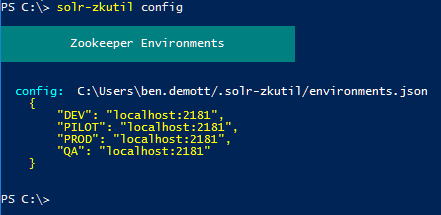
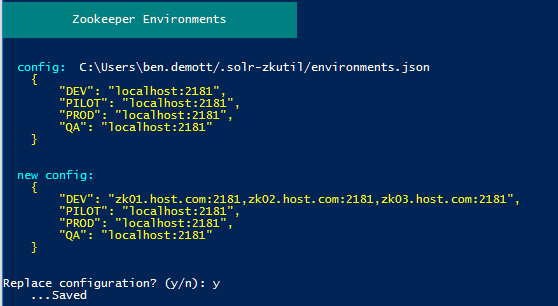
Add your ZooKeeper connection string to the program and an environment alias
solr-zkutil config --add 'DEV=zk01.host.com:2181,zk02.host.com:2181,zk03.host.com:2181'
solr-zkutil config --configuration '{\"DEV\":\"zk01.dev.host.com:2181,zk02.dev.host.com:2181,zk03.dev.host.com:2181\", \"QA\": \"zk01.qa.host.com:2181,zk02.qa.host.com:2181,zk03.qa.host.com:2181\"}'
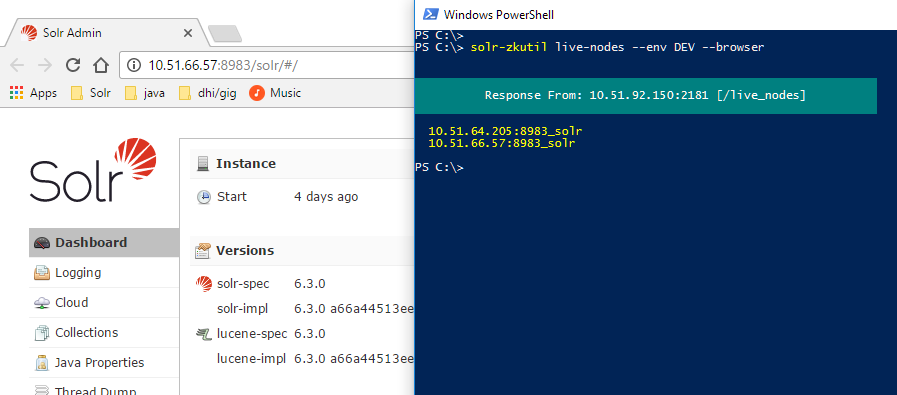
Query ZooKeeper for Solr Hosts, and Open the administration web-interface automatically
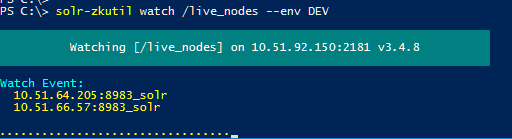
Watch any ZooKeeper file/node for changes, during deployments, etc
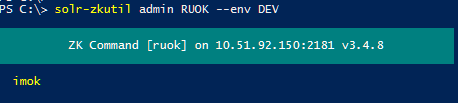
Issue Administrative Commands Easily
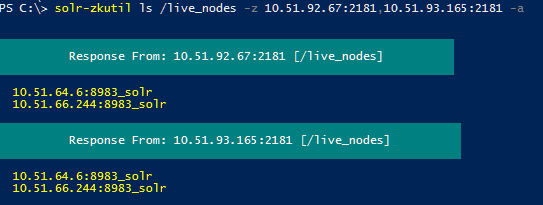
View the contents/children of a node across all ensemble (cluster) members quickly
Installation
Windows
On windows install Python 2.7, and ensure Python 2.7 exe and Scripts paths are configured to be on your Windows Path environment, and the program should be accessible through PowerShell or cmd.exe
Note: I will try to add a bundled exe installer soon for Windows
Python Include Paths
C:\Python27
C:\Python27\Scripts
Once you have this configured you should be able to also execute pip without specifying its path.
Install Manually
Simply download, clone the repository, open a console and execute: python setup.py install
On windows if you have not configured your Python environment you can install with:
C:\Python27\python.exe setup.py install
Install from pip/github
pip install git+https://github.com/bendemott/solr-zkutil.git
Installing from PyPi
pip install solr-zkutil
Program Commands
Once installed the program is executable using the command:
solr-zkutil
For help with the command type:
solr-zkutil --help
If you are having trouble configuring paths the program can also be ran using:
python -m solrzkutil
or for Windows:
C:\Python27\python.exe -m solrzkutil
Usage
usage: solr-zkutil [-h]
                   {live-nodes,clusterstate,watch,ls,stat,admin,config} ...

positional arguments:
  {live-nodes,clusterstate,watch,ls,stat,admin,config}
                        --- available sub-commands ---
    live-nodes          List Solr Live Nodes from ZooKeeper
    clusterstate        List Solr Collections and Nodes
    watch               Watch a ZooKeeper Node for Changes
    ls                  List a ZooKeeper Node
    stat                Check ZooKeeper ensemble status
    admin               Execute a ZooKeeper administrative command
    config              Show connection strings, or set environment
                        configuration

optional arguments:
  -h, --help            show this help message and exit
1 maintainer

Metadata
1 maintainer
Release files for solr-zkutil 0.90
For a detailed explanation of source distributions (sdists) and built distributions (wheels), please see the package formats documentation.
Source distribution (sdist)
| File | Size | Uploaded | Provenance | |
|---|---|---|---|---|
| solr-zkutil-0.90.tar.gz | 13.6 kB | Without provenance | Details |
Release files / solr-zkutil-0.90.tar.gz
| Download URL | solr-zkutil-0.90.tar.gz |
|---|---|
| Size | 13.6 kB |
| Tags | Source |
|
SHA-256 checksum How to use checksums |
645cf6fd9dbc3d20ff28571e255c8a720512157af87d21776707ed9356303b08
|
|
BLAKE2b-256 checksum How to use checksums |
1253e0c7af8866ba0a749b9e241f54ff0276664f1bf233118a3ab5ea7ce0c4e9
|
| Upload date | |
|
Uploaded using Trusted Publishing? What is trusted publishing? |
No |
Security for solr-zkutil 0.90
Provenance
Provenance describes where a file came from. On PyPI, provenance is shared via attestations, which provide a verifiable record of the build or publishing details. View details, limitations and caveats.
No provenance found
None of the files in this release were uploaded with provenance metadata.
A note on package security
PyPI is a repository for distributing packages, not a service for auditing them. While third-party security researchers and our staff do their best to detect and remove malicious packages, PyPI cannot guarantee the quality, security or suitability of any given package.
To learn more about protecting yourself from malicious actors, visit our package security documentation.














