
sota-anchor
Your coding agent doesn't know what shipped after its training.
sota-anchor is an MCP server and Claude Code plugin that checks the last year of papers,
repositories and packages before your agent rebuilds something that already exists,
or tells you it can't be done.




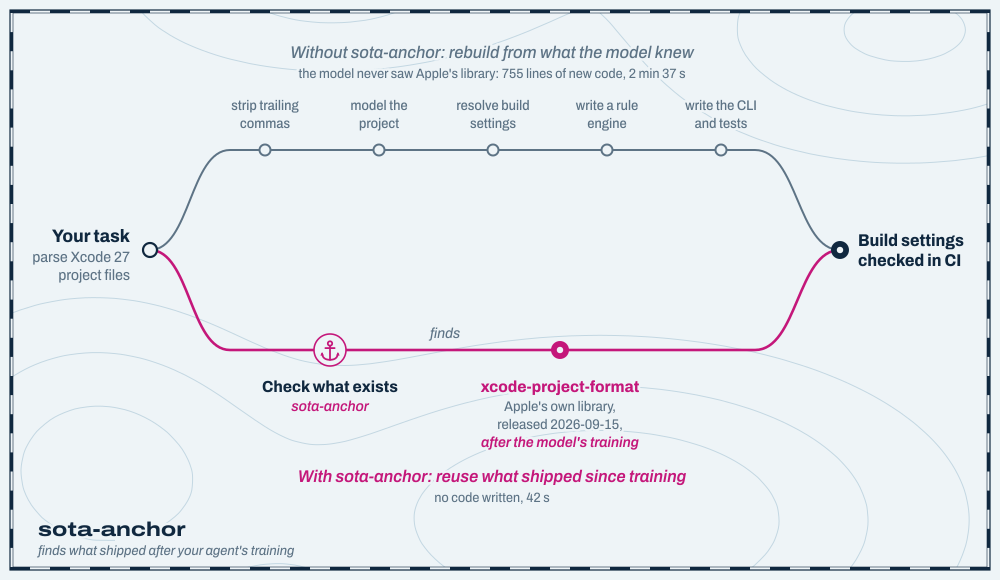
A coding agent plans from what it learned in training. When a task needs something it hasn't heard of, it assumes that thing doesn't exist, and does one of two expensive things: builds it from scratch, or tells you it can't be done. Often the library, the reader or the model that makes the job easy was published after its training ended.
sota-anchor makes the agent check what's been published since. When a plan rests on something being unavailable, the agent searches the last year of papers, repositories and packages, and weighs what comes back, with dates. Then it reuses what exists, or builds knowing that nothing better does.
- Any field. Nothing in the code knows about any domain. The same check runs for a CAD file format, a genomics pipeline or a compiler pass.
- No extra API key. Your agent does the reasoning; sota-anchor does the retrieval.
- Evidence, not memory. Every claim cites a dated source. When the search finds nothing, it says so instead of guessing.
Before and after
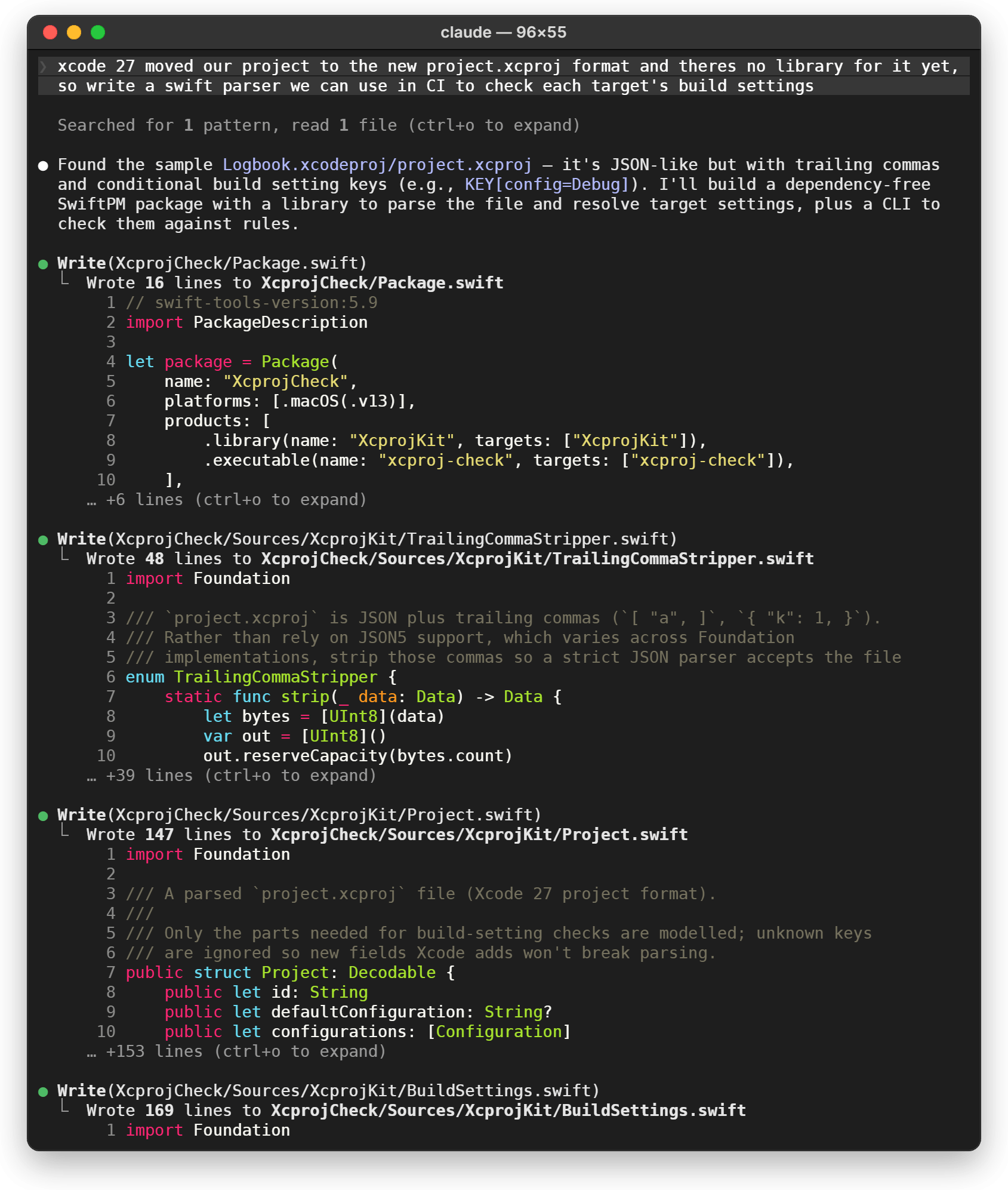
The same request both times, on the same Xcode 27 project: "xcode 27 moved our project to the new project.xcproj format and theres no library for it yet, so write a swift parser we can use in CI to check each target's build settings".
Before. Without sota-anchor, Claude Code took the request at its word and wrote the parser: a Swift package of eight files and 755 lines, with the format worked out, in its own words, "from your Logbook.xcodeproj/project.xcproj, not from any Apple documentation". It took 2 minutes 37 seconds.
After. With sota-anchor, the check runs before any code. It finds Apple's own library for the format, xcode-project-format, published under Apache 2.0 on 2026-09-15, after the model was trained. Claude Code confirms it on GitHub, drops the custom parser because "writing our own would duplicate it", and asks which rules the CI check should enforce before writing it against Apple's library. 42 seconds, and no code written yet.
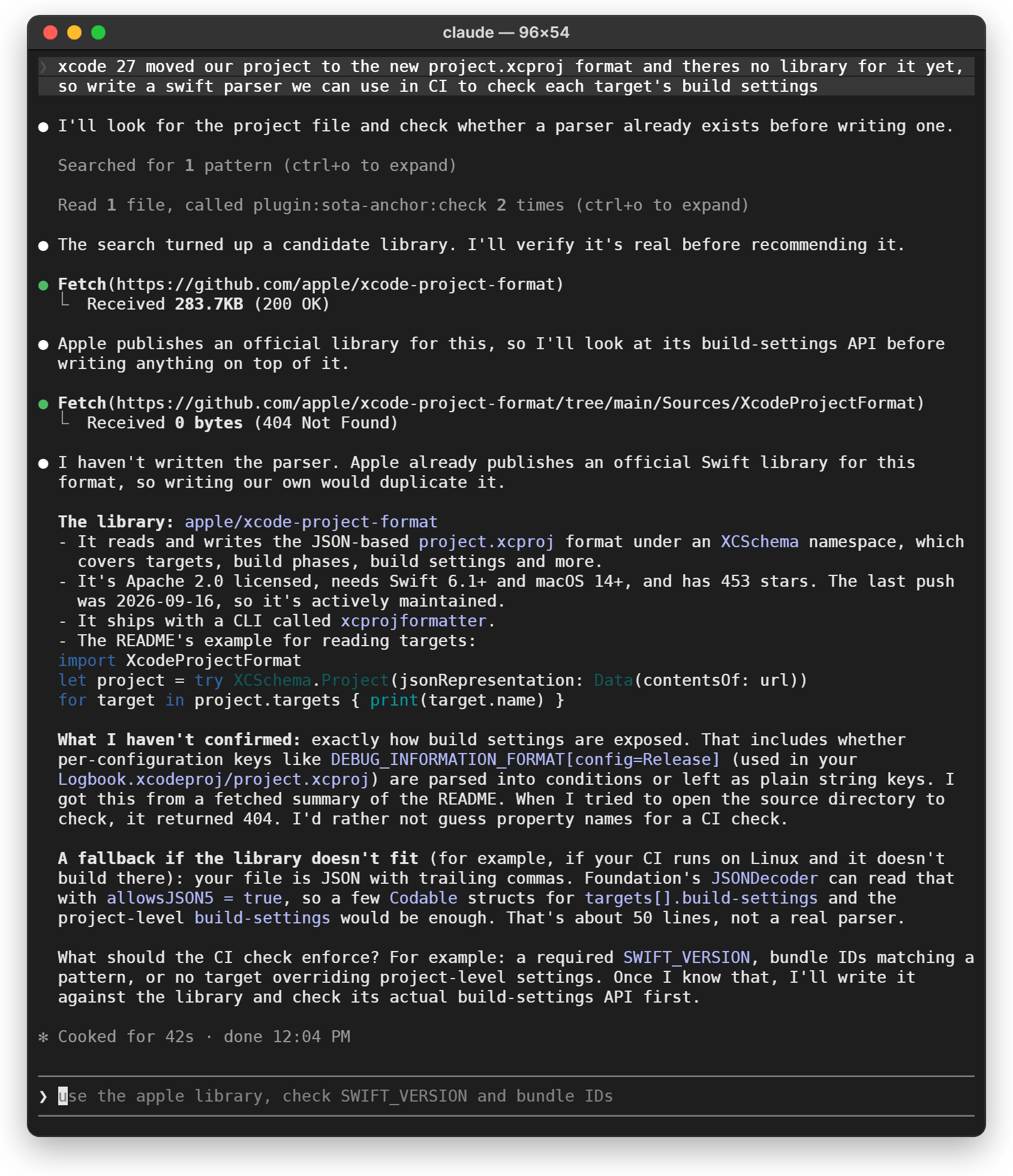
Both are recorded Claude Code sessions (Opus 5.5, 2026-09-25 and 2026-09-26), drawn as a Mac terminal from the recorded screens. The first is shown from the top and runs on for another 116 rows. The sample project's file was generated with Apple's library, so it is the real format.
The same check on other plans
| Your agent, working from memory | Your agent, after checking |
|---|---|
Reverse-engineers the .nwd format byte by byte, assuming nothing can read it without Autodesk's software. |
Finds an independent NWD reader published two weeks earlier, and flags that it has no license, so it can't be reused without its author's permission. |
| Wraps a vision model in an OCR pipeline, assuming models can't read engineering drawings. | Brings back this year's benchmarks of multimodal models on exactly those drawings, AECV-Bench and Enginuity, so the choice rests on measured results. |
Writes gemini-3-pro into a new project's .env. That was never a served model ID. |
Uses gemini-3.1-pro-preview, which a public model registry lists as served today. |
The first and last rows are from recorded runs. The papers in the second are what the search returned for that plan on 2026-09-24.
How it works
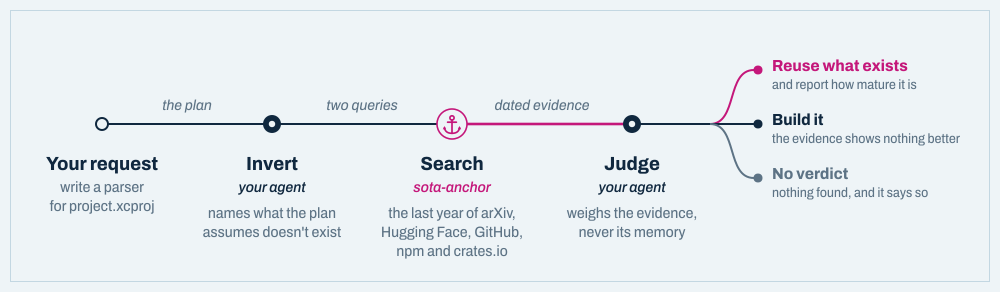
When a request rests on something being unavailable (a reader for a format only the vendor's
software opens, a library nobody has written, a task models can't do yet), the
check-what-exists skill runs a three-step check:
- Invert. Your agent names what the plan assumes doesn't exist: no library reads Xcode 27's project.xcproj format yet. A constraint you state ("we can't use the vendor's SDK") is kept as given; what gets checked is whether anything else meets it. The agent writes two queries: the task in its own field's words, and whatever would make the workaround unnecessary.
- Search. sota-anchor searches the last 12 months of papers (arXiv, Hugging Face), repositories (GitHub) and packages (npm, crates.io), plus the web if you give it a Brave key. It relaxes each query until something relevant comes back, and one 60-second budget covers every source.
- Judge. Your agent weighs only what came back. The assumption stands unless the evidence documents otherwise. "No library exists" is overturned by a published repository or package that does the job, reported with its age and activity, because existing isn't the same as mature. "Models can't do this" needs benchmarked results.
The verdict is one of three. When something already does the job, the agent names it and the evidence behind it, as in the session above. When the evidence doesn't settle the question, the assumption stands and the agent says what would overturn it. When nothing comes back, it says nothing was checked, rather than treating silence as a verdict.
Also: current model IDs
A smaller convenience, mostly for new projects. Every Claude Code session starts with a short, dated list of the model API IDs that OpenRouter's public registry serves today, and the older IDs they replaced, so a fresh config names a model that exists:
- GEMINI_MODEL=gemini-3-pro            # recalled from training: not a served ID
+ GEMINI_MODEL=gemini-3.1-pro-preview  # from the session's registry snapshot
The list names its source and makes no claim about which model is running. It costs about
160 ms per session, because the hook reads a block rendered in advance and refreshes it in
the background once a day. Other agents get the same list through sota-anchor sync.
Quick start: Claude Code
In Claude Code:
/plugin marketplace add luckmanqasim/sota-anchor
/plugin install sota-anchor@sota-anchor
Then start a new session. The first one takes a few seconds longer while uv builds the MCP server's environment; after that it starts straight away.
To try it for one session without installing:
git clone https://github.com/luckmanqasim/sota-anchor
claude --plugin-dir ./sota-anchor
What you get:
| Part | What it does |
|---|---|
check-what-exists skill |
Runs the check by itself when a request rests on something being unavailable. |
/sota-check <plan> |
Runs the check on demand. |
| MCP server | The check_what_exists tool and the models://active resource. |
| Session-start hook | Adds the dated model list to every session. Nothing to remember to run. |
/sota-sync |
Refreshes the model list now and writes it into CLAUDE.md, AGENTS.md and Cursor's rules. |
| Prompt hook (opt-in) | With SOTA_ANCHOR_PROMPT_HOOK=1, adds a nudge when a message says something can't be done. |
Other coding agents
The check is a plain MCP server, so it works in any agent that speaks MCP. The model list goes into the project's instructions file.
| Agent | The check | Model list comes from |
|---|---|---|
| Claude Code | automatic, or /sota-check |
the plugin, every session |
| Cursor | check_what_exists tool |
.cursor/rules/sota.mdc |
| VS Code + GitHub Copilot | check_what_exists tool |
AGENTS.md |
| OpenAI Codex CLI | check_what_exists tool |
AGENTS.md |
| Gemini CLI | check_what_exists tool |
AGENTS.md |
| OpenCode | check_what_exists tool |
AGENTS.md |
| Any other MCP client | check_what_exists tool |
your client's instructions file |
1. Install the CLI once:
uv tool install sota-anchor # or: pipx install sota-anchor
2. Register the MCP server in your agent, using the snippet for it below.
3. Optionally, write the model list into the project, and run it again whenever you want a fresh list:
sota-anchor sync --target agents   # writes AGENTS.md
sota-anchor sync --target cursor   # writes .cursor/rules/sota.mdc and .cursorrules
Only the text between the SOTA-ANCHOR markers is ever touched, so the rest of the file
stays yours.
Cursor
.cursor/mcp.json in the project, or ~/.cursor/mcp.json for every project:
{
  "mcpServers": {
    "sota-anchor": { "command": "sota-anchor", "args": ["serve"] }
  }
}
Model list: sota-anchor sync --target cursor writes .cursor/rules/sota.mdc, which is
always applied. Cursor also reads AGENTS.md.
VS Code (GitHub Copilot)
.vscode/mcp.json. VS Code's key is servers, not mcpServers:
{
  "servers": {
    "sota-anchor": { "command": "sota-anchor", "args": ["serve"] }
  }
}
Or add it to your user profile from a terminal:
code --add-mcp '{"name":"sota-anchor","command":"sota-anchor","args":["serve"]}'
Model list: sota-anchor sync --target agents, then turn on the chat.useAgentsMdFile
setting. VS Code's local agent doesn't read AGENTS.md by default.
OpenAI Codex CLI
codex mcp add sota-anchor -- sota-anchor serve
or in ~/.codex/config.toml:
[mcp_servers.sota-anchor]
command = "sota-anchor"
args = ["serve"]
Model list: sota-anchor sync --target agents. Codex reads AGENTS.md.
Gemini CLI
gemini mcp add sota-anchor sota-anchor serve
or in ~/.gemini/settings.json (.gemini/settings.json for one project). That file is
also where you tell Gemini CLI to read AGENTS.md, since it reads GEMINI.md by default:
{
  "mcpServers": {
    "sota-anchor": { "command": "sota-anchor", "args": ["serve"] }
  },
  "context": { "fileName": ["AGENTS.md", "GEMINI.md"] }
}
Model list: sota-anchor sync --target agents.
OpenCode
opencode.json in the project:
{
  "$schema": "https://opencode.ai/config.json",
  "mcp": {
    "sota-anchor": { "type": "local", "command": ["sota-anchor", "serve"], "enabled": true }
  }
}
To run it through uvx instead of installing it, raise the timeout: OpenCode waits 5 seconds
for a server's tools, and the first launch spends longer than that downloading packages.
"sota-anchor": {
  "type": "local",
  "command": ["uvx", "sota-anchor", "serve"],
  "enabled": true,
  "timeout": 30000
}
Model list: sota-anchor sync --target agents. OpenCode reads AGENTS.md, and falls back
to CLAUDE.md when there isn't one.
Any other MCP client
Most clients, Claude Desktop included, take the common mcpServers shape. Check your
client's docs for where the file lives.
{
  "mcpServers": {
    "sota-anchor": { "command": "sota-anchor", "args": ["serve"] }
  }
}
To run it without installing anything, let uv fetch it from PyPI on demand. The first launch downloads its packages, so a client with a short startup timeout may need a second try:
{
  "mcpServers": {
    "sota-anchor": { "command": "uvx", "args": ["sota-anchor", "serve"] }
  }
}
In Claude Code without the plugin: claude mcp add sota-anchor -- sota-anchor serve.
Command line
Everything the plugin does is also a command, and none of them needs an API key.
| Command | What it does |
|---|---|
sota-anchor check "<your plan>" |
Run the whole check. See In CI for what it returns. |
sota-anchor evidence --query "Xcode 27 project.xcproj parser" |
Search for evidence. No LLM involved; --json for scripts. |
sota-anchor serve |
Run the MCP server over stdio. |
sota-anchor seed |
Print the session block. --refresh fetches the registry first. |
sota-anchor sync --target all |
Write the model list into CLAUDE.md, AGENTS.md and Cursor's rules. |
sync options:
| Option | What it does |
|---|---|
--target |
claude (the default), cursor, agents or all. |
--provider |
Which providers to list. Repeatable; defaults to anthropic, google and openai. |
--all-providers |
List every provider: about 4,600 tokens of context against 510. |
--max-per-provider |
Endpoints listed per provider. Default 4. |
--staleness-months |
How far behind its provider's newest release a model can fall before it counts as superseded. Default 12; raise it for providers that ship slowly. |
--refresh |
Ignore the 24-hour cache. |
In CI
Without an API key, check prints the protocol for an agent to answer. With one it reaches a
verdict itself, which makes it usable as a gate:
| Exit code | Meaning |
|---|---|
0 |
The limitation still holds. |
2 |
The plan relies on something obsolete. |
3 |
No verdict: no key was set, so an agent still has to judge. Deliberately not 0. |
- run: uv tool install sota-anchor
- run: sota-anchor check "$(cat docs/design-notes.md)"
  env:
    SOTA_ANCHOR_API_KEY: ${{ secrets.OPENROUTER_API_KEY }}
Configuration
Nothing needs to be set. These are all optional.
In Claude Code, the plugin asks for its two optional keys when you enable it, and keeps them in your system's credential store. Leave either empty to go without.
| Plugin setting | Effect |
|---|---|
| GitHub token | Raises GitHub's search limit from 10 to 30 requests a minute. Give it no scopes: a token that can see your private repositories adds them to the search results your agent reads. |
| Brave Search API key | Adds general web search as an evidence source. Unset, the web is not queried. |
sota-anchor only reads variables named for it, so a key you've set for other tools, such
as GITHUB_TOKEN, is never picked up. Outside the plugin, set these instead:
| Variable | Effect |
|---|---|
SOTA_ANCHOR_GITHUB_TOKEN |
The GitHub token above. |
SOTA_ANCHOR_BRAVE_API_KEY |
The Brave Search key above. |
SOTA_ANCHOR_CACHE_DIR |
Where the catalog and session block are cached. Default ~/.cache/sota-anchor. |
SOTA_ANCHOR_TTL_MINUTES |
How old the session block can get before the hook refreshes it. Default 1440. |
SOTA_ANCHOR_PROMPT_HOOK |
1 turns on the prompt-time nudge in Claude Code. |
For a headless verdict, where no agent is present to judge (as in CI):
| Variable | Effect |
|---|---|
SOTA_ANCHOR_API_KEY |
Any OpenAI-compatible key. |
SOTA_ANCHOR_BASE_URL |
The API base URL. Defaults to OpenRouter; set it to use another provider's key. Must be https://, or http:// for a server on this machine (localhost, 127.0.0.1, ::1). |
SOTA_ANCHOR_MODEL |
The judging model. Unset, it is picked from the live catalog. |
What it sends and fetches
Everything sota-anchor does over the network, and every file it writes. There is no telemetry.
When the check runs, the search queries your agent writes from your request, and
shorter versions of them as the search relaxes, go to these public APIs with a
sota-anchor/<version> User-Agent:
| Service | Endpoint | What it receives |
|---|---|---|
| arXiv | export.arxiv.org/api/query |
the queries |
| Hugging Face | huggingface.co/api/papers/search |
the queries |
| GitHub | api.github.com/search/repositories |
the queries, and your GitHub token if you set one |
| npm | registry.npmjs.org/-/v1/search |
the queries |
| crates.io | crates.io/api/v1/crates |
the queries |
| Brave Search | api.search.brave.com/res/v1/web/search |
the queries and your key, only if you set one |
For the model list, it fetches openrouter.ai/api/v1/models, a public endpoint that
takes no key and receives nothing about you. The session hook refreshes it in the
background at most once a day.
For a headless verdict, when SOTA_ANCHOR_API_KEY is set, the plan and the evidence
found for it go to the API at SOTA_ANCHOR_BASE_URL, which is openrouter.ai/api/v1
unless you change it. Both sota-anchor check and the MCP tool do this, including the
plugin's server if the variable is in the environment Claude Code starts from. Without
it, your agent does the judging and nothing goes to an LLM API.
On first launch, uv downloads the Python packages the server needs from PyPI, at the
exact versions uv.lock pins.
On disk, it writes the model catalog and the session block to ~/.cache/sota-anchor,
or to SOTA_ANCHOR_CACHE_DIR. /sota-sync and sota-anchor sync write a marked block
into CLAUDE.md, AGENTS.md or Cursor's rules in the current project, and only when you
run them. The opt-in prompt hook reads your prompt on your machine to decide whether to
add a nudge, and sends it nowhere.
Limitations
- Whether the check runs is your agent's decision. In Claude Code it ran before any code was written every time in testing on engineering requests like the ones above, and stayed quiet on ordinary ones. In other agents, ask for it by name when it matters.
- A find is a lead, not a decision. A paper doesn't prove a production-ready tool exists, and a repository doesn't prove it works. Treat a find as a reason to look.
- Relevance is lexical. A result has to mention two of the query's terms, which keeps out projects that merely share an acronym but not ones that share generic words. Your agent sees every description and discards what's off-topic, but expect some noise.
- PyPI isn't searched. It has no search API. Python packages usually still turn up through their GitHub repositories.
- arXiv is slow and particular. Requests are spaced 3.5 s apart per its terms of use. Its edge refuses some HTTP clients, so a refused request retries through the standard library. When a source fails, the errors say so; read them before trusting a "limitation holds".
- Retrieval stops at 60 seconds. A source still running at the deadline keeps what it found and reports the shortfall.
- The model list can be a day old. The hook never waits on the network. Run
/sota-syncto refresh it immediately. - The headless verdict is untested against a live provider. It is covered by tests with a fake model, but no real API run has been made yet.
Design notes
- No topic dictionaries. Retrieval knows generic English function words and nothing about any field. Queries keep the order their author wrote them in, and a query relaxes by dropping its last terms first.
- AND, not OR. arXiv reads
all:{phrase}as an OR over every word; for one test query that matched 329,590 papers, so sorted by date it returned the newest papers about anything at all. Terms are ANDed, and the query is relaxed only when it finds nothing. - No verdict from nothing. An empty evidence set never reaches the judging step, so an agent can't fill an obsolescence verdict in from memory.
- Reference data, not orders. The session block says where its data came from and what it is for, and claims no authority over the model reading it. An earlier wording that did was rightly refused by a host model as a prompt injection.
- No hardcoded models. Tiering reads the structure of a model ID: a slug token with a
digit is a version, an alphabetic token belongs to the lineage. So
gpt-4oandgpt-5.5share a lineage across a naming change. A model counts as superseded when something newer shares its lineage, when it trails its provider's newest release by more than the staleness window, or when the registry has expired it.
Development
git clone https://github.com/luckmanqasim/sota-anchor
cd sota-anchor
uv sync --extra dev
uv run pytest            # all offline
uv run ruff check .
claude plugin validate .
The suite never touches the network or your own cache. HTTP goes through
httpx.MockTransport and the LLM through an injected fake. Every test gets a private cache
directory, a real DNS lookup fails the test, and hook tests put fake refresh tools first on
PATH. CI runs it on Ubuntu and Windows with Python 3.11, 3.12, 3.13 and 3.14.
Background
SciUnlearn (Paul, Patwardhan & Cohan, arXiv:2608.20960) finds that current machine-unlearning methods "are unable to effectively eliminate claim-level knowledge and often achieve only superficial suppression." If outdated claims can't be cleanly removed from a model's weights, the correction has to happen in context, at the moment the model is about to act on the stale belief. That is where sota-anchor works.
The skill asks for its "something already does this" verdict as an assertion-reason block
([SOTA ARBITER PARADIGM SHIFT]), one of the four QA formats in that benchmark, borrowed
here as a shape. The idea that phrasing an update this way makes an agent more likely to act
on it is this project's design hypothesis, not a finding of the paper.
License
MIT © 2026 Luckman Qasim
1 maintainer

Metadata
1 maintainer
Release files for sota-anchor 0.2.0
For a detailed explanation of source distributions (sdists) and built distributions (wheels), please see the package formats documentation.
Source distribution (sdist)
| File | Size | Uploaded | |
|---|---|---|---|
| sota_anchor-0.2.0.tar.gz | 702.8 kB | Details |
Built distribution (wheel)
| File | Interpreter | ABI | Platform | Reset |
|---|---|---|---|---|
| sota_anchor-0.2.0-py3-none-any.whl | Python 3 | none | any | Details |
Total release size: 761.8 kB
Release files / sota_anchor-0.2.0.tar.gz
| Download URL | sota_anchor-0.2.0.tar.gz |
|---|---|
| Size | 702.8 kB |
| Tags | Source |
|
SHA-256 checksum How to use checksums |
23030ec1b9d94008ab40d6aa28f9e55c6630ef9abb5e2c9a6d14929edeeeb9c6
|
|
BLAKE2b-256 checksum How to use checksums |
5d459d0c2acd67513868afb4709f0580f6f80f6ce931e42eeda49bbea9fe2a5d
|
| Upload date | |
|
Uploaded using Trusted Publishing? What is trusted publishing? |
Yes |
| Uploaded via |
uv/0.12.23 {"installer":{"name":"uv","version":"0.12.23","subcommand":["publish"]},"python":null,"implementation":{"name":null,"version":null},"distro":{"name":"Ubuntu","version":"24.04","id":"noble","libc":null},"system":{"name":null,"release":null},"cpu":null,"openssl_version":null,"setuptools_version":null,"rustc_version":null,"ci":true}
|
Release files / sota_anchor-0.2.0-py3-none-any.whl
| Download URL | sota_anchor-0.2.0-py3-none-any.whl |
|---|---|
| Size | 59.0 kB |
| Tags | Python 3 |
|
SHA-256 checksum How to use checksums |
3a4a1a6195048a0cfd83f64939a179529b575afddef7e040da34c50668c40972
|
|
BLAKE2b-256 checksum How to use checksums |
a5b31fa191216eb2778968afdb75dc92bded4d5edaa92b922f27257e7cb9b8ad
|
| Upload date | |
|
Uploaded using Trusted Publishing? What is trusted publishing? |
Yes |
| Uploaded via |
uv/0.12.23 {"installer":{"name":"uv","version":"0.12.23","subcommand":["publish"]},"python":null,"implementation":{"name":null,"version":null},"distro":{"name":"Ubuntu","version":"24.04","id":"noble","libc":null},"system":{"name":null,"release":null},"cpu":null,"openssl_version":null,"setuptools_version":null,"rustc_version":null,"ci":true}
|













