
SpaceShooter
Simple shooter game prototype. Written in Python, utilizes PySide library capabilities.
Not decided yet what will be the target platform and SDK: C++/SDL/multiplatform or C++/WinAPI only.
Description and play
Very simple space shooter, made as a cooperation with my son, Antoni.
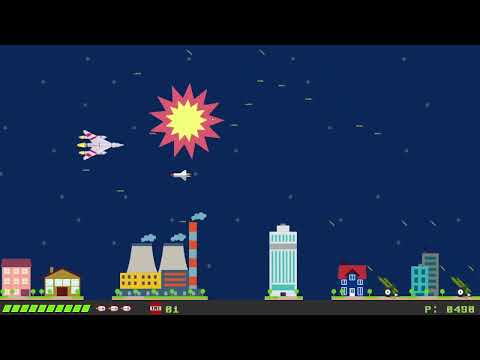
Goal: shoot down all the enemies and the boss at the end.
Game contains 5 levels (so far!) and all of them produces few sets of enemies to shoot down.
Enemies can also shoot you, same as the guns at the bottom.
Watch the drops falling down, which are also deadly.
You have 3 life points (drawn as 3 little rockets at the bottom), all of them is worth of 10 minipoints (also seen there) -- whenever you lost all 10 small points, you loose main life point. No life points means you're dead.
You can shoot your enemies and also the guns. You can use bombs to do this as well (however, bombs are significantly) slower.
Boss appears at the end and can shoot at you with 3 streams of missiles.
Several items are quite useful and can be collected:
tnt box-- allows to useTNT(shoot down 3 enemies at once)lightball-- allows you to use 3 streams of light missiles (for 10s)shield-- you can be immortal (for 10s)medical kit-- can increase your minipointsicebox-- can freeze all the enemies (for 10s)
Installation and configuration
All you need to do is
$ python -m pip install spaceshooter
PySide6 will also be installed as it's required to run.
Running
Running is as easy as typing
$ python -m spaceshooter
in your terminal.
Default font is ugly, so please download some free TTF file that resembles you the 80s and install.
Then, please let the program know about it -- use -f "font name" in the command line:
python -m spaceshooter -f "Best font I found in all the Internets"
Remember about the quotes!
On the next run, font will be used again, as it's stored in the configuration file now.
To reset all the settings (including hi scores, so beware!), you may use:
python -m spaceshooter -r
This will run the program with default settings.
Options can be combined.
Windowing mode
By default, application is using full screen to display its content. To run this in windowing mode, please use -w parameter:
python -m spaceshooter -w
This one:
$ python -m spaceshooter -h
gives you the full list of available options and their arguments.
Navigation
Menu
You can use up/down arrow keys and Enter to select a menu option, as well as mouse left button.
Language icons are available only with mouse.
Also q terminates the program.
Ship selection
You can use left/right arrow keys and Enter to select you ship, as well as mouse left button.
Language icons are available only with mouse.
Other screens
Follow the status line about available keys and actions.
Game play
Default keys are as follows:
up/down/left/right arrowsfor ship navigationspacefor missilesbfor bombstfor TNTs, if availableESCfor pauseqfor leaving game and back to the menu
You can reconfigure navigation keys, missiles, bombs and TNTs.
Other
No, there is no sound. Maybe later.
1 maintainer

Metadata
1 maintainer
Release files for spaceshooter 0.0.11
For a detailed explanation of source distributions (sdists) and built distributions (wheels), please see the package formats documentation.
Source distribution (sdist)
| File | Size | Uploaded | |
|---|---|---|---|
| spaceshooter-0.0.11.tar.gz | 510.2 kB | Details |
Built distribution (wheel)
| File | Interpreter | ABI | Platform | Reset |
|---|---|---|---|---|
| spaceshooter-0.0.11-py3-none-any.whl | Python 3 | none | any | Details |
Total release size: 1.1 MB
Release files / spaceshooter-0.0.11.tar.gz
| Download URL | spaceshooter-0.0.11.tar.gz |
|---|---|
| Size | 510.2 kB |
| Tags | Source |
|
SHA-256 checksum How to use checksums |
ec6514c7bebdab8a068bc38bd9777f57c35fc64191f1b7522bab7a88788606a5
|
|
BLAKE2b-256 checksum How to use checksums |
e8c12ccccb1bd930c2939b9a83d76d7b49dd211ada0f081e993b1ff8a329327a
|
| Upload date | |
|
Uploaded using Trusted Publishing? What is trusted publishing? |
No |
| Uploaded via |
twine/6.1.0 CPython/3.9.23
|
Release files / spaceshooter-0.0.11-py3-none-any.whl
| Download URL | spaceshooter-0.0.11-py3-none-any.whl |
|---|---|
| Size | 554.3 kB |
| Tags | Python 3 |
|
SHA-256 checksum How to use checksums |
f38f6b7b1eca8bcfd4ed6e5007c3f6cb3ef023bf42bb5337a1093b749f6b099e
|
|
BLAKE2b-256 checksum How to use checksums |
d02e737a29a20d5066852b1b5ef85dc4e1590320d52f620f47f7628aac07926e
|
| Upload date | |
|
Uploaded using Trusted Publishing? What is trusted publishing? |
No |
| Uploaded via |
twine/6.1.0 CPython/3.9.23
|














