
SpeakNextcordBot


A python package for adding speak interaction slash commands to a Nextcord bot
Key Features
The package provides 5 features :
-
/speakto make your bot send message in a channel -
/update_speakto edit a message send by your bot -
/replyto make your bot reply to a message -
/add_voteto add a number of vote reaction -
/remove_voteto remove all votes reactions
Usage
By default all slash commands are only available for server admin
-
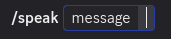
The speak command
Enter your message in the
messageparameter :
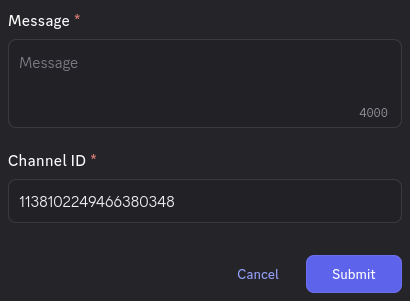
If no message is provided, a modal is open to enter your message (recommended for formated messages)
You can also edit the channel id, if you want send your message in another channel (default is the current channel)
-
The update_speak command
Enter the ID of your bot message you want to edit :
A modal will open, allowing you to edit the message. -
The reply command
Enter the ID of the message you want your bot to reply :
A modal will open, allowing you to enter the reply message. -
The add_vote command
Enter the ID of the message you want to add reaction votes to, and the number of reactions you want (between 1-10)
-
The remove_vote
Enter the ID of the message you want to remove all reaction votes to




Requirements
- Python 3.12 or higher is required
- Nextcord 3.0.1 or higher is required
Installation
Using pip :
pip install SpeakNextcordBot
Setup
Simple setup example
Call init_cog() with your bot in argument :
from nextcord.ext import commands
from speakNextcordBot.init_cog import init_cog

bot = commands.Bot()

init_cog(bot)

bot.run("YOUR_TOKEN")
1 maintainer

Metadata
1 maintainer
Release files for SpeakNextcordBot 1.1.2
For a detailed explanation of source distributions (sdists) and built distributions (wheels), please see the package formats documentation.
Built distribution (wheel)
| File | Interpreter | ABI | Platform | Reset |
|---|---|---|---|---|
| speaknextcordbot-1.1.2-py3-none-any.whl | Python 3 | none | any | Details |
Release files / speaknextcordbot-1.1.2-py3-none-any.whl
| Download URL | speaknextcordbot-1.1.2-py3-none-any.whl |
|---|---|
| Size | 19.1 kB |
| Tags | Python 3 |
|
SHA-256 checksum How to use checksums |
f8dd9f006f45135d8e5413abc489363a90b65057a2f10d036924f5327acdb746
|
|
BLAKE2b-256 checksum How to use checksums |
02aacaaa01454dd55d70cf2167a7b1c2f893f715f37adaa1d4eb369231d3afb2
|
| Upload date | |
|
Uploaded using Trusted Publishing? What is trusted publishing? |
No |
| Uploaded via |
twine/6.2.0 CPython/3.13.7
|














