

sport-activities-features --- A minimalistic toolbox for extracting features from sports activity files written in Python












General outline of the framework
Monitoring sports activities produce many geographic, topologic, and personalized data, with a vast majority of details hidden. Thus, a rigorous ex-post data analysis and statistic evaluation are required to extract them. Namely, most mainstream solutions for analyzing sports activities files rely on integral metrics, such as total duration, total distance, and average heart rate, which may suffer from the "overall (integral) metrics problem." Among others, such problems are expressed in capturing sports activities in general only (omitting crucial components), calculating potentially fallacious and misleading metrics, not recognizing different stages/phases of the sports activity (warm-up, endurance, intervals), and others.
The sport-activities-framework, on the other side, offers a detailed insight into the sports activity files. The framework supports both identification and extraction methods, such as identifying the number of hills, extracting the average altitudes of identified hills, measuring the total distance of identified hills, deriving climbing ratios (total distance of identified hills vs. total distance), average/total ascents of hills and so much more. The framework also integrates many other extensions, among others, historical weather parsing, statistical evaluations, and ex-post visualizations. Previous work on these topical questions was addressed in relevant scientific papers on data mining, also in combination with the generating/predicting automated sport training sessions.
Detailed insights
The sport-activities-features framework is compatible with TCX & GPX activity files and Overpass API nodes. The current version withholds (but is not limited to) the following functions:
- extracting integral metrics, such as total distance, total duration, calories (see example),
- extracting topographic features, such as the number of hills, the average altitude of identified hills, the total distance of identified hills, climbing ratio, average ascent of hills, total ascent, and total descent (see example),
- plotting identified hills (see example),
- extracting the intervals, such as number of intervals, maximum/minimum/average duration of intervals, maximum/minimum/average distance of intervals, maximum/minimum/average heart rate during intervals,
- plotting the identified intervals (see example),
- calculating the training loads, such as Banister TRIMP, Lucia TRIMP(see example),
- parsing the historical weather data from an external service,
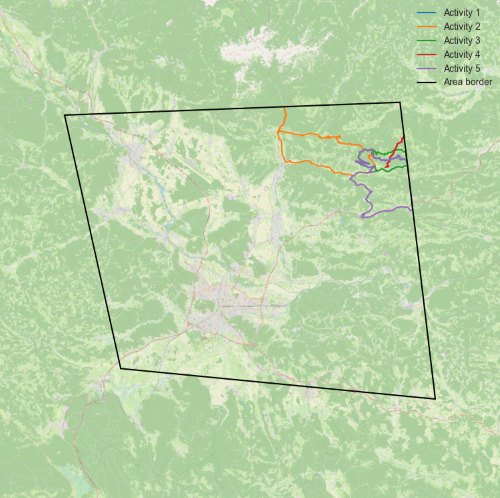
- extracting the integral metrics of the activity inside the area given with coordinates (distance, heart rate, speed) (see example),
- extracting the activities from CSV file(s) and randomly selecting the specific number of activities (see example),
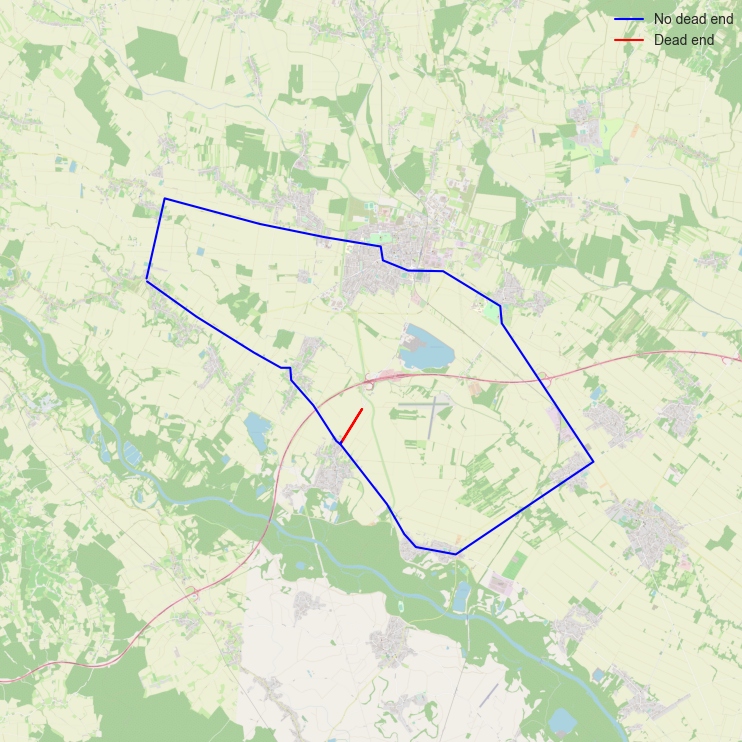
- extracting the dead ends,
- and much more.
The framework comes with two (testing) benchmark datasets, which are freely available to download from: DATASET1, DATASET2.
Installation
pip3
Install sport-activities-features with pip3:
pip3 install sport-activities-features
Alpine Linux
To install sport-activities-features on Alpine, use:
$ apk add py3-sport-activities-features
Fedora Linux
To install sport-activities-features on Fedora, use:
$ dnf install python3-sport-activities-features
Arch Linux
To install sport-activities-features on Arch Linux, please use an AUR helper:
$ yay -Syyu python-sport-activities-features
API
There is a simple API for remote work with the sport-activities-features package available here.
Historical weather data
Weather data parsed is collected from the Visual Crossing Weather API. Please note that this is an external unaffiliated service, and users must register to use the API. The service has a free tier (1000 Weather reports/day) but is otherwise operating on a pay-as-you-go model. For pricing and terms of use, please read the official documentation of the API provider.
Overpass API & Open Elevation API integration
Without performing activities, we can use the OpenStreetMap for the identification of hills, total ascent, and descent. This is done using the Overpass API which is a read-only API that allows querying of OSM map data. In addition to that altitude, data is retrieved by using the Open-Elevation API which is an open-source and free alternative to the Google Elevation API. Both of the solutions can be used by using free publicly acessible APIs (Overpass, Open-Elevation) or can be self hosted on a server or as a Docker container (Overpass, Open-Elevation).
CODE EXAMPLES:
Reading files
(*.TCX)
from sport_activities_features.tcx_manipulation import TCXFile

# Class for reading TCX files
tcx_file=TCXFile()
data = tcx_file.read_one_file("path_to_the_file") # Represents data as dictionary of lists

# Alternative choice
data = tcx_file.read_one_file("path_to_the_file", numpy_array= True) # Represents data as dictionary of numpy.arrays
(*.GPX)
from sport_activities_features.gpx_manipulation import GPXFile

# Class for reading GPX files
gpx_file=GPXFile()

# Read the file and generate a dictionary with
data = gpx_file.read_one_file("path_to_the_file") # Represents data as dictionary of lists

# Alternative choice
data = gpx_file.read_one_file("path_to_the_file", numpy_array= True) # Represents data as dictionary of numpy.arrays
Extraction of topographic features
from sport_activities_features.hill_identification import HillIdentification
from sport_activities_features.tcx_manipulation import TCXFile
from sport_activities_features.topographic_features import TopographicFeatures
from sport_activities_features.plot_data import PlotData

# Read TCX file
tcx_file = TCXFile()
activity = tcx_file.read_one_file("path_to_the_file")

# Detect hills in data
Hill = HillIdentification(activity['altitudes'], 30)
Hill.identify_hills()
all_hills = Hill.return_hills()

# Extract features from data
Top = TopographicFeatures(all_hills)
num_hills = Top.num_of_hills()
avg_altitude = Top.avg_altitude_of_hills(activity['altitudes'])
avg_ascent = Top.avg_ascent_of_hills(activity['altitudes'])
distance_hills = Top.distance_of_hills(activity['positions'])
hills_share = Top.share_of_hills(distance_hills, activity['total_distance'])
Extraction of intervals
import sys
sys.path.append('../')

from sport_activities_features.interval_identification import IntervalIdentificationByPower, IntervalIdentificationByHeartrate
from sport_activities_features.tcx_manipulation import TCXFile

# Reading the TCX file
tcx_file = TCXFile()
activity = tcx_file.read_one_file("path_to_the_data")

# Identifying the intervals in the activity by power
Intervals = IntervalIdentificationByPower(activity["distances"], activity["timestamps"], activity["altitudes"], 70)
Intervals.identify_intervals()
all_intervals = Intervals.return_intervals()

# Identifying the intervals in the activity by heart rate
Intervals = IntervalIdentificationByHeartrate(activity["timestamps"], activity["altitudes"], activity["heartrates"])
Intervals.identify_intervals()
all_intervals = Intervals.return_intervals()
Parsing of Historical weather data from an external service
from sport_activities_features import WeatherIdentification
from sport_activities_features import TCXFile

# Read TCX file
tcx_file = TCXFile()
tcx_data = tcx_file.read_one_file("path_to_file")

# Configure visual crossing api key
visual_crossing_api_key = "weather_api_key" # https://www.visualcrossing.com/weather-api

# Explanation of elements - https://www.visualcrossing.com/resources/documentation/weather-data/weather-data-documentation/
weather = WeatherIdentification(tcx_data['positions'], tcx_data['timestamps'], visual_crossing_api_key)
weatherlist = weather.get_weather(time_delta=30)
tcx_weather = weather.get_average_weather_data(timestamps=tcx_data['timestamps'],weather=weatherlist)
# Add weather to TCX data
tcx_data.update({'weather':tcx_weather})
The weather list is of the following type:
     [
        {
            "temperature": 14.3,
            "maximum_temperature": 14.3,
            "minimum_temperature": 14.3,
            "wind_chill": null,
            "heat_index": null,
            "solar_radiation": null,
            "precipitation": 0.0,
            "sea_level_pressure": 1021.6,
            "snow_depth": null,
            "wind_speed": 6.9,
            "wind_direction": 129.0,
            "wind_gust": null,
            "visibility": 40.0,
            "cloud_cover": 54.3,
            "relative_humidity": 47.6,
            "dew_point": 3.3,
            "weather_type": "",
            "conditions": "Partially cloudy",
            "date": "2016-04-02T17:26:09+00:00",
            "location": [
                46.079871179535985,
                14.738618675619364
            ],
            "index": 0
        }, ...
    ]
Extraction of integral metrics
import sys
sys.path.append('../')

from sport_activities_features.tcx_manipulation import TCXFile

# Read TCX file
tcx_file = TCXFile()

integral_metrics = tcx_file.extract_integral_metrics("path_to_the_file")

print(integral_metrics)
Weather data extraction
from sport_activities_features.weather_identification import WeatherIdentification
from sport_activities_features.tcx_manipulation import TCXFile

#read TCX file
tcx_file = TCXFile()
tcx_data = tcx_file.read_one_file("path_to_the_file")

#configure visual crossing api key
visual_crossing_api_key = "API_KEY" # https://www.visualcrossing.com/weather-api

#return weather objects
weather = WeatherIdentification(tcx_data['positions'], tcx_data['timestamps'], visual_crossing_api_key)
weatherlist = weather.get_weather()
Using Overpass queried Open Street Map nodes
import overpy
from sport_activities_features.overpy_node_manipulation import OverpyNodesReader

# External service Overpass API (https://wiki.openstreetmap.org/wiki/Overpass_API) (can be self-hosted)
overpass_api = "https://lz4.overpass-api.de/api/interpreter"

# External service Open Elevation API (https://api.open-elevation.com/api/v1/lookup) (can be self-hosted)
open_elevation_api = "https://api.open-elevation.com/api/v1/lookup"

# OSM Way (https://wiki.openstreetmap.org/wiki/Way)
open_street_map_way = 164477980

overpass_api = overpy.Overpass(url=overpass_api)

# Get an example Overpass way
q = f"""(way({open_street_map_way});<;);out geom;"""
query = overpass_api.query(q)

# Get nodes of an Overpass way
nodes = query.ways[0].get_nodes(resolve_missing=True)

# Extract basic data from nodes (you can, later on, use Hill Identification and Hill Data Extraction on them)
overpy_reader = OverpyNodesReader(open_elevation_api=open_elevation_api)
# Returns {
#         'positions': positions, 'altitudes': altitudes, 'distances': distances, 'total_distance': total_distance
#         }
data = overpy_reader.read_nodes(nodes)
Extraction of data inside the area
import numpy as np
import sys
sys.path.append('../')

from sport_activities_features.area_identification import AreaIdentification
from sport_activities_features.tcx_manipulation import TCXFile

# Reading the TCX file.
tcx_file = TCXFile()
activity = tcx_file.read_one_file('path_to_the_data')

# Converting the read data to arrays.
positions = np.array([*activity['positions']])
distances = np.array([*activity['distances']])
timestamps = np.array([*activity['timestamps']])
heartrates = np.array([*activity['heartrates']])

# Area coordinates should be given in clockwise orientation in the form of 3D array (number_of_hulls, hull_coordinates, 2).
# Holes in area are permitted.
area_coordinates = np.array([[[10, 10], [10, 50], [50, 50], [50, 10]],
                             [[19, 19], [19, 21], [21, 21], [21, 19]]])

# Extracting the data inside the given area.
area = AreaIdentification(positions, distances, timestamps, heartrates, area_coordinates)
area.identify_points_in_area()
area_data = area.extract_data_in_area()
Identify interruptions
from sport_activities_features.interruptions.interruption_processor import InterruptionProcessor
from sport_activities_features.tcx_manipulation import TCXFile

"""
Identify interruption events from a TCX or GPX file.
"""

# read TCX file (also works with GPX files)
tcx_file = TCXFile()
tcx_data = tcx_file.read_one_file("path_to_the_data")

"""
Time interval = time before and after the start of an event
Min speed = Threshold speed to trigger an event/interruption (trigger when under min_speed)
overpass_api_url = Set to something self-hosted, or use a public instance from https://wiki.openstreetmap.org/wiki/Overpass_API
"""
interruptionProcessor = InterruptionProcessor(time_interval=60, min_speed=2,
                                              overpass_api_url="url_to_overpass_api")

"""
If classify is set to true, also discover if interruptions are close to intersections. Returns a list of [ExerciseEvent]
"""
events = interruptionProcessor.events(tcx_data, True)
Overpy (Overpass API) node manipulation
Generate TCXFile parsed like data object from overpy.Node objects
import overpy
from sport_activities_features.overpy_node_manipulation import OverpyNodesReader


# External service Overpass API (https://wiki.openstreetmap.org/wiki/Overpass_API) (can be self-hosted)
overpass_api = "https://lz4.overpass-api.de/api/interpreter"

# External service Open Elevation API (https://api.open-elevation.com/api/v1/lookup) (can be self-hosted)
open_elevation_api = "https://api.open-elevation.com/api/v1/lookup"

# OSM Way (https://wiki.openstreetmap.org/wiki/Way)
open_street_map_way = 164477980

overpass_api = overpy.Overpass(url=overpass_api)

# Get an example Overpass way
q = f"""(way({open_street_map_way});<;);out geom;"""
query = overpass_api.query(q)

# Get nodes of an Overpass way
nodes = query.ways[0].get_nodes(resolve_missing=True)

# Extract basic data from nodes (you can, later on, use Hill Identification and Hill Data Extraction on them)
overpy_reader = OverpyNodesReader(open_elevation_api=open_elevation_api)
# Returns {
#         'positions': positions, 'altitudes': altitudes, 'distances': distances, 'total_distance': total_distance
#         }
data = overpy_reader.read_nodes(nodes)
Missing elevation data extraction
from sport_activities_features import ElevationIdentification
from sport_activities_features import TCXFile

tcx_file = TCXFile()
tcx_data = tcx_file.read_one_file('path_to_file')

elevations = ElevationIdentification(tcx_data['positions'])
"""Adds tcx_data['elevation'] = eg. [124, 21, 412] for each position"""
tcx_data.update({'elevations':elevations})
Example of a visualization of the area detection
Example of visualization of dead-end identification
License
This package is distributed under the MIT License. This license can be found online at http://www.opensource.org/licenses/MIT.
Disclaimer
This framework is provided as-is, and there are no guarantees that it fits your purposes or that it is bug-free. Use it at your own risk!
Cite us
I. Jr. Fister, L. Lukač, A. Rajšp, I. Fister, L. Pečnik and D. Fister, "A minimalistic toolbox for extracting features from sport activity files", 2021 IEEE 25th International Conference on Intelligent Engineering Systems (INES), 2021, pp. 121-126, doi: 10.1109/INES52918.2021.9512927.
Contributors ✨
Thanks go to these wonderful people (emoji key):
 Iztok Fister Jr. 💻 🐛 ⚠️ 💡 📖 🤔 🧑🏫 📦 🚧 |
 alenrajsp 💻 ⚠️ 💡 📖 🤔 🐛 |
 luckyLukac 🤔 💻 🐛 ⚠️ 💡 |
 rhododendrom 💻 🎨 📖 🤔 |
 Luka Pečnik 💻 📖 ⚠️ 🐛 |
 spelap 💻 |
This project follows the all-contributors specification. Contributions of any kind are welcome!
1 maintainer

Metadata
1 maintainer
Release files for sport-activities-features 0.3.7.1
For a detailed explanation of source distributions (sdists) and built distributions (wheels), please see the package formats documentation.
Source distribution (sdist)
| File | Size | Uploaded | Provenance | |
|---|---|---|---|---|
| sport-activities-features-0.3.7.1.tar.gz | 48.2 kB | Without provenance | Details |
Built distribution (wheel)
| File | Interpreter | ABI | Platform | Reset |
|---|---|---|---|---|
| sport_activities_features-0.3.7.1-py3-none-any.whl | Python 3 | none | any | Details |
Total release size: 99.8 kB
Release files / sport-activities-features-0.3.7.1.tar.gz
| Download URL | sport-activities-features-0.3.7.1.tar.gz |
|---|---|
| Size | 48.2 kB |
| Tags | Source |
|
SHA-256 checksum How to use checksums |
ed4cc444daf65c701354b84407d35e46fa7135e9955624e2dc29c781d803ddd5
|
|
BLAKE2b-256 checksum How to use checksums |
fc08af81a7439444a9111160ee83a7f4a820059617471901ee80f396d8b23781
|
| Upload date | |
|
Uploaded using Trusted Publishing? What is trusted publishing? |
No |
| Uploaded via |
poetry/1.1.13 CPython/3.10.7 Linux/5.19.15-201.fc36.x86_64
|
Release files / sport_activities_features-0.3.7.1-py3-none-any.whl
| Download URL | sport_activities_features-0.3.7.1-py3-none-any.whl |
|---|---|
| Size | 51.5 kB |
| Tags | Python 3 |
|
SHA-256 checksum How to use checksums |
fc7edf0d4a5c04e96066a53d378632f7b8cf5c43614c4be80f5cf6b6c28c2771
|
|
BLAKE2b-256 checksum How to use checksums |
90bf9d7fbdb4c1dc6698a83f3dd99c2ae11c29b08f2bf4c2e47b0751dad5120e
|
| Upload date | |
|
Uploaded using Trusted Publishing? What is trusted publishing? |
No |
| Uploaded via |
poetry/1.1.13 CPython/3.10.7 Linux/5.19.15-201.fc36.x86_64
|
Security for sport-activities-features 0.3.7.1
Provenance
Provenance describes where a file came from. On PyPI, provenance is shared via attestations, which provide a verifiable record of the build or publishing details. View details, limitations and caveats.
No provenance found
None of the files in this release were uploaded with provenance metadata.
A note on package security
PyPI is a repository for distributing packages, not a service for auditing them. While third-party security researchers and our staff do their best to detect and remove malicious packages, PyPI cannot guarantee the quality, security or suitability of any given package.














