
spotify_dl
Downloads songs from any Spotify playlist or from your “My Music” collection.
Tell me more!
I wanted an easy way to grab the songs present in my library so I can download it & use it offline(Spotify still hasn’t launched here. Y U NO COME?). spotify_to_mp3 worked well but it relied on grooveshark, which unfortunately is no more.
So I wrote this script which mimics that library, but instead of downloading from grooveshark, it provides you with a file of youtube URLs which you can then plug into youtube-dl
How do I get this thing running?
Pre-requisite: You need Python 3+
Install using pip sudo pip3 install spotify_dl (use pip if your distro natively provides Python 3)
Create your Spotify app & fetch the client id and client secret from Spotify Developer Console. These keys then need to be assigned as SPOTIPY_CLIENT_ID, SPOTIPY_CLIENT_SECRET and SPOTIPY_REDIRECT_URI environment variables.
You can set environment variables in Linux like so:
export SPOTIPY_CLIENT_ID='your-spotify-client-id'
export SPOTIPY_CLIENT_SECRET='your-spotify-client-secret'
export SPOTIPY_REDIRECT_URI='your-app-redirect-url'
Windows users, check for this question for details on how you can set environment variables.
Note the redirect URL can be a valid URL, just ensure it matches with what you have entered in the developer console & in the environment variable above.
Create your YouTube API key & fetch the keys from Google Developer Console. Set the key as YOUTUBE_DEV_KEY environment variable as mentioned above.
Run the script using spotify_dl. spotify_dl accepts different parameters, for more details run spotify_dl -h.
For most users spotify_dl -l spotify_playlist_link -o download_directory should do where
spotify_playlist_link is a link to Spotify’s playlist. You can get it from the 3-dot menu.
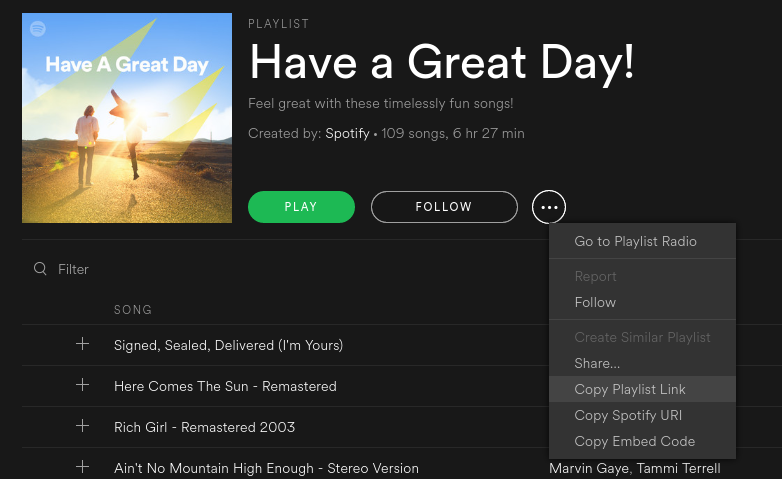
image
If the Spotify playlist link is skipped then it will download songs from your “My Music” collection - download_directory is the location where the songs must be downloaded to. If you give a . then it will download to the current directory.
Alternatively, spotify_dl -p playlist_id -u user_name -o download_directory will also work
playlist_id is the id of the playlist where songs need to be downloaded. If this is skipped then it will download songs ftom your “My Music” collection
user_name is the user name who created the playlist.
download_directory is the location where the songs must be downloaded to.
A first time run will require authentication; you will need to click on the URL prompted to authenticate. Once logged in, paste the URL back in.
To retrieve download songs as MP3, you will need to install ffmpeg. If you prefer to skip MP3 conversion, pass -m or --skip_mp3 as a parameter when running the script
Linux users can get them by installing libav-tools by using apt-get (sudo apt-get install -y libav-tools) or a package manager which comes with your distro
Windows users can download FFMPEG pre-built binaries from here. Extract the file using 7-zip to a foldrer and add the folder to your PATH environment variable
Credits
shantanugoel for adding in User playlist, skip MP3 conversion and Ability to use custom format string support
sildur for adding any user playlist support and other fixes
avinassh for being a Rockstar and not teleporting over to my house to kill me when I innundated him with questions
doulwyi for adding id3 tagging and ability to parse Spotify URI
Gowtham for create playlist in download directory
Issues, Feedback, Contact details
Feel free to raise any bugs/issues under Github issues. Pull requests are also more than welcome. You can reach me on twitter at [@sathyabhat](https://twitter.com/sathyabhat) or drop an email sathya@sathyasays.com
1 maintainer

Metadata
1 maintainer
Release files for spotify-dl 2.5
For a detailed explanation of source distributions (sdists) and built distributions (wheels), please see the package formats documentation.
Source distribution (sdist)
| File | Size | Uploaded | Provenance | |
|---|---|---|---|---|
| spotify_dl-2.5.tar.gz | 7.5 kB | Without provenance | Details |
Built distribution (wheel)
| File | Interpreter | ABI | Platform | Reset |
|---|---|---|---|---|
| spotify_dl-2.5-py3-none-any.whl | Python 3 | none | any | Details |
Total release size: 19.6 kB
Release files / spotify_dl-2.5.tar.gz
| Download URL | spotify_dl-2.5.tar.gz |
|---|---|
| Size | 7.5 kB |
| Tags | Source |
|
SHA-256 checksum How to use checksums |
574f37909142fa549316fdc5813a290556a0f6689f7c6bbd8adf90b1186ecc9e
|
|
BLAKE2b-256 checksum How to use checksums |
6cde105fd575efcfa8320ca4f50c65ccf4076793b234e167ef068344cb59db0f
|
| Upload date | |
|
Uploaded using Trusted Publishing? What is trusted publishing? |
No |
Release files / spotify_dl-2.5-py3-none-any.whl
| Download URL | spotify_dl-2.5-py3-none-any.whl |
|---|---|
| Size | 12.1 kB |
| Tags | Python 3 |
|
SHA-256 checksum How to use checksums |
3a999a175165b946ab0db4a638f577d5a6806456e567f977b0b22614a04614e1
|
|
BLAKE2b-256 checksum How to use checksums |
0f7c5ff962b666d6170a1022f1a531e16f96f968f95559ad0c1de5d58728cbfb
|
| Upload date | |
|
Uploaded using Trusted Publishing? What is trusted publishing? |
No |
Security for spotify-dl 2.5
Provenance
Provenance describes where a file came from. On PyPI, provenance is shared via attestations, which provide a verifiable record of the build or publishing details. View details, limitations and caveats.
No provenance found
None of the files in this release were uploaded with provenance metadata.
A note on package security
PyPI is a repository for distributing packages, not a service for auditing them. While third-party security researchers and our staff do their best to detect and remove malicious packages, PyPI cannot guarantee the quality, security or suitability of any given package.














