
SQLLineage
SQL Lineage Analysis Tool powered by Python









Never get the hang of a SQL parser? SQLLineage comes to the rescue. Given a SQL command, SQLLineage will tell you its source and target tables, without worrying about Tokens, Keyword, Identifier and all the jagons used by SQL parsers.
Behind the scene, SQLLineage pluggable leverages parser library (sqlfluff
and sqlparse) to parse the SQL command, analyze the AST, stores the lineage
information in a graph (using graph library networkx), and brings you all the
human-readable result with ease.
Demo & Documentation
Talk is cheap, show me a demo.
Documentation is online hosted by readthedocs, and you can check the release note there.
Quick Start
Install sqllineage via PyPI:
$ pip install sqllineage
Using sqllineage command to parse a quoted-query-string:
$ sqllineage -e "insert into db1.table1 select * from db2.table2"
Statements(#): 1
Source Tables:
    db2.table2
Target Tables:
    db1.table1
Or you can parse a SQL file with -f option:
$ sqllineage -f foo.sql
Statements(#): 1
Source Tables:
    db1.table_foo
    db1.table_bar
Target Tables:
    db2.table_baz
Advanced Usage
Multiple SQL Statements
Lineage is combined from multiple SQL statements, with intermediate tables identified:
$ sqllineage -e "insert into db1.table1 select * from db2.table2; insert into db3.table3 select * from db1.table1;"
Statements(#): 2
Source Tables:
    db2.table2
Target Tables:
    db3.table3
Intermediate Tables:
    db1.table1
Verbose Lineage Result
And if you want to see lineage for each SQL statement, just toggle verbose option
$ sqllineage -v -e "insert into db1.table1 select * from db2.table2; insert into db3.table3 select * from db1.table1;"
Statement #1: insert into db1.table1 select * from db2.table2;
    table read: [Table: db2.table2]
    table write: [Table: db1.table1]
    table cte: []
    table drop: []
    table rename: []
Statement #2: insert into db3.table3 select * from db1.table1;
    table read: [Table: db1.table1]
    table write: [Table: db3.table3]
    table cte: []
    table drop: []
    table rename: []
==========
Summary:
Statements(#): 2
Source Tables:
    db2.table2
Target Tables:
    db3.table3
Intermediate Tables:
    db1.table1
Dialect-Awareness Lineage
By default, sqllineage use ansi dialect to parse and validate your SQL. However, some SQL syntax you take for granted
in daily life might not be in ANSI standard. In addition, different SQL dialects have different set of SQL keywords,
further weakening sqllineage's capabilities when keyword used as table name or column name. To get the most out of
sqllineage, we strongly encourage you to pass the dialect to assist the lineage analyzing.
Take below example, INSERT OVERWRITE statement is only supported by big data solutions like Hive/SparkSQL, and MAP
is a reserved keyword in Hive thus can not be used as table name while it is not for SparkSQL. Both ansi and hive dialect
tell you this causes syntax error and sparksql gives the correct result:
$ sqllineage -e "INSERT OVERWRITE TABLE map SELECT * FROM foo"
...
sqllineage.exceptions.InvalidSyntaxException: This SQL statement is unparsable, please check potential syntax error for SQL

$ sqllineage -e "INSERT OVERWRITE TABLE map SELECT * FROM foo" --dialect=hive
...
sqllineage.exceptions.InvalidSyntaxException: This SQL statement is unparsable, please check potential syntax error for SQL

$ sqllineage -e "INSERT OVERWRITE TABLE map SELECT * FROM foo" --dialect=sparksql
Statements(#): 1
Source Tables:
    <default>.foo
Target Tables:
    <default>.map
Use sqllineage --dialects to see all available dialects.
Column-Level Lineage
We also support column level lineage in command line interface, set level option to column, all column lineage path will be printed.
INSERT INTO foo
SELECT a.col1,
       b.col1     AS col2,
       c.col3_sum AS col3,
       col4,
       d.*
FROM bar a
         JOIN baz b
              ON a.id = b.bar_id
         LEFT JOIN (SELECT bar_id, sum(col3) AS col3_sum
                    FROM qux
                    GROUP BY bar_id) c
                   ON a.id = c.bar_id
         CROSS JOIN quux d;

INSERT INTO corge
SELECT a.col1,
       a.col2 + b.col2 AS col2
FROM foo a
         LEFT JOIN grault b
              ON a.col1 = b.col1;
Suppose this sql is stored in a file called test.sql
$ sqllineage -f test.sql -l column
<default>.corge.col1 <- <default>.foo.col1 <- <default>.bar.col1
<default>.corge.col2 <- <default>.foo.col2 <- <default>.baz.col1
<default>.corge.col2 <- <default>.grault.col2
<default>.foo.* <- <default>.quux.*
<default>.foo.col3 <- c.col3_sum <- <default>.qux.col3
<default>.foo.col4 <- col4
MetaData-Awareness Lineage
By observing the column lineage generated from previous step, you'll possibly notice that:
<default>.foo.* <- <default>.quux.*: the wildcard is not expanded.<default>.foo.col4 <- col4: col4 is not assigned with source table.
It's not perfect because we don't know the columns encoded in * of table quux. Likewise, given the context,
col4 could be coming from bar, baz or quux. Without metadata, this is the best sqllineage can do.
User can optionally provide the metadata information to sqllineage to improve the lineage result.
Suppose all the tables are created in sqlite database with a file called db.db. In particular,
tables baz and quux are created with the following schema:
sqlite3 db.db 'CREATE TABLE IF NOT EXISTS baz (bar_id int, col1 int, col4 int)';
sqlite3 db.db 'CREATE TABLE IF NOT EXISTS quux (quux_id int, col5 int, col6 int)';
Now given the same SQL, column lineage is fully resolved.
$ SQLLINEAGE_DEFAULT_SCHEMA=main sqllineage -f test.sql -l column --sqlalchemy_url=sqlite:///db.db
main.corge.col1 <- main.foo.col1 <- main.bar.col1
main.corge.col2 <- main.foo.col2 <- main.baz.col1
main.corge.col2 <- main.grault.col2
main.foo.col3 <- c.col3_sum <- main.qux.col3
main.foo.col4 <- main.baz.col4
main.foo.col5 <- main.quux.col5
main.foo.col6 <- main.quux.col6
main.foo.quux_id <- main.quux.quux_id
The default schema name in sqlite is called main, we have to specify here because the tables in SQL file are unqualified.
SQLLineage leverages sqlalchemy to retrieve metadata from different SQL databases.
Check for more details on SQLLineage MetaData.
Lineage Visualization
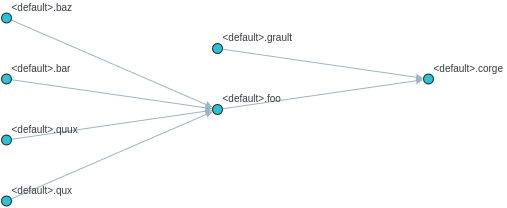
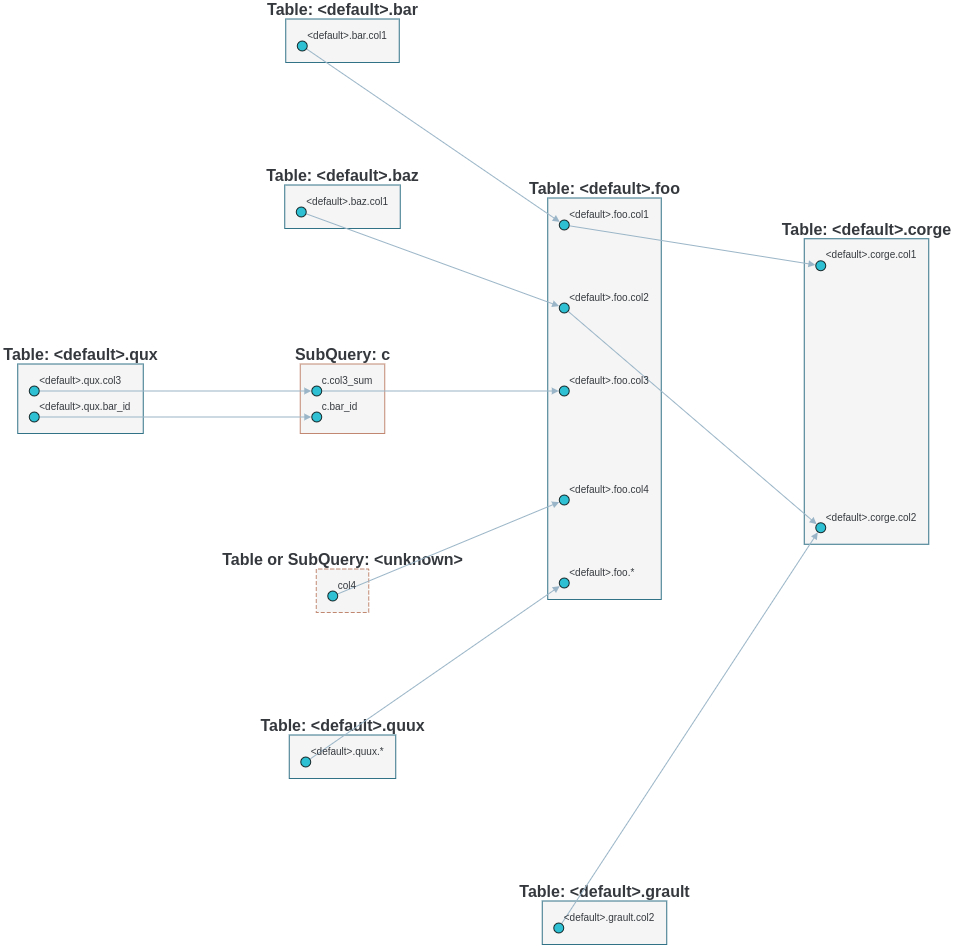
One more cool feature, if you want a graph visualization for the lineage result, toggle graph-visualization option
Still using the above SQL file
sqllineage -g -f foo.sql
A webserver will be started, showing DAG representation of the lineage result in browser:
- Table-Level Lineage
- Column-Level Lineage
1 maintainer

Download files
Download the file for your platform. If you're not sure which to choose, learn more about installing packages.
Source Distribution
Built Distribution
Filter files by name, interpreter, ABI, and platform.
If you're not sure about the file name format, learn more about wheel file names.
Copy a direct link to the current filters
File details
Details for the file sqllineage-1.5.9.tar.gz.
File metadata
- Download URL: sqllineage-1.5.9.tar.gz
- Upload date:
- Size: 362.0 kB
- Tags: Source
- Uploaded using Trusted Publishing? Yes
- Uploaded via:
twine/7.0.0 CPython/3.13.14
File hashes
| Algorithm | Hash digest | |
|---|---|---|
| SHA256 |
f4b9eb0d7e2de52d3d35b4452f39f00bde1cf45d5b3bd4086e4bfe38432aa5f1
|
|
| MD5 |
67dca7879ec3ea3235e39674a48e006c
|
|
| BLAKE2b-256 |
d5a8e0c3e10766eca0cb664beb11dbbb301af446d1131154ca0137f8b8218f24
|
Provenance
The following attestation bundles were made for sqllineage-1.5.9.tar.gz:
Publisher:
python-publish.yml on reata/sqllineage
-
Statement:
-
Statement type:
https://in-toto.io/Statement/v1 -
Predicate type:
https://docs.pypi.org/attestations/publish/v1 -
Subject name:
sqllineage-1.5.9.tar.gz -
Subject digest:
f4b9eb0d7e2de52d3d35b4452f39f00bde1cf45d5b3bd4086e4bfe38432aa5f1 - Sigstore transparency entry: 2721515165
- Sigstore integration time:
-
Permalink:
reata/sqllineage@e9804b406285695f8ca3d5ea29ae4e7d5799ada2 -
Branch / Tag:
refs/tags/v1.5.9 - Owner: https://github.com/reata
-
Access:
public
-
Token Issuer:
https://token.actions.githubusercontent.com -
Runner Environment:
github-hosted -
Publication workflow:
python-publish.yml@e9804b406285695f8ca3d5ea29ae4e7d5799ada2 -
Trigger Event:
release
-
Statement type:
File details
Details for the file sqllineage-1.5.9-py3-none-any.whl.
File metadata
- Download URL: sqllineage-1.5.9-py3-none-any.whl
- Upload date:
- Size: 482.4 kB
- Tags: Python 3
- Uploaded using Trusted Publishing? Yes
- Uploaded via:
twine/7.0.0 CPython/3.13.14
File hashes
| Algorithm | Hash digest | |
|---|---|---|
| SHA256 |
b7dfdd7547517b487fdd41291f56203a46ad7199c7db0a5062e9ebd9fbeac406
|
|
| MD5 |
5961c7c0ae52b00535dcfb5d6bd65bfe
|
|
| BLAKE2b-256 |
8feadca2e9aeea254365695c52457e723d0853926db90252bee3dc306ebccb30
|
Provenance
The following attestation bundles were made for sqllineage-1.5.9-py3-none-any.whl:
Publisher:
python-publish.yml on reata/sqllineage
-
Statement:
-
Statement type:
https://in-toto.io/Statement/v1 -
Predicate type:
https://docs.pypi.org/attestations/publish/v1 -
Subject name:
sqllineage-1.5.9-py3-none-any.whl -
Subject digest:
b7dfdd7547517b487fdd41291f56203a46ad7199c7db0a5062e9ebd9fbeac406 - Sigstore transparency entry: 2721515846
- Sigstore integration time:
-
Permalink:
reata/sqllineage@e9804b406285695f8ca3d5ea29ae4e7d5799ada2 -
Branch / Tag:
refs/tags/v1.5.9 - Owner: https://github.com/reata
-
Access:
public
-
Token Issuer:
https://token.actions.githubusercontent.com -
Runner Environment:
github-hosted -
Publication workflow:
python-publish.yml@e9804b406285695f8ca3d5ea29ae4e7d5799ada2 -
Trigger Event:
release
-
Statement type:














