
Srsinst.sr860
srsinst.sr860 is a Python package to control and acquire data from
Stanford Research Systems (SRS) SR860 series Lock-In Amplifiers:
SR860, SR865 and SR865A. If you prefer instructional videos,
watch these videos.
Installation
You need a working Python 3.7 or later with pip (Python package installer)
installed. If you don't, install Python to your system.
To install srsinst.sr860 as an instrument driver , use Python package installer pip from the command line.
python -m pip install srsinst.sr860
To use it as a GUI application, create a virtual environment, if necessary, and install:
python -m pip install srsinst.sr860[full]
By default, srsinst.sr860 offers RS232 serial and VXI11 interfaces for communication. To communication over GPIB or USB-TMC interface, PyVisa is required. Refer to PyVisa documentation for its installation.
SR860s can choose the termination character for RS232 and TELENT communication. Make sure the line feed, LF, is selected from the SR860 front panel menu.
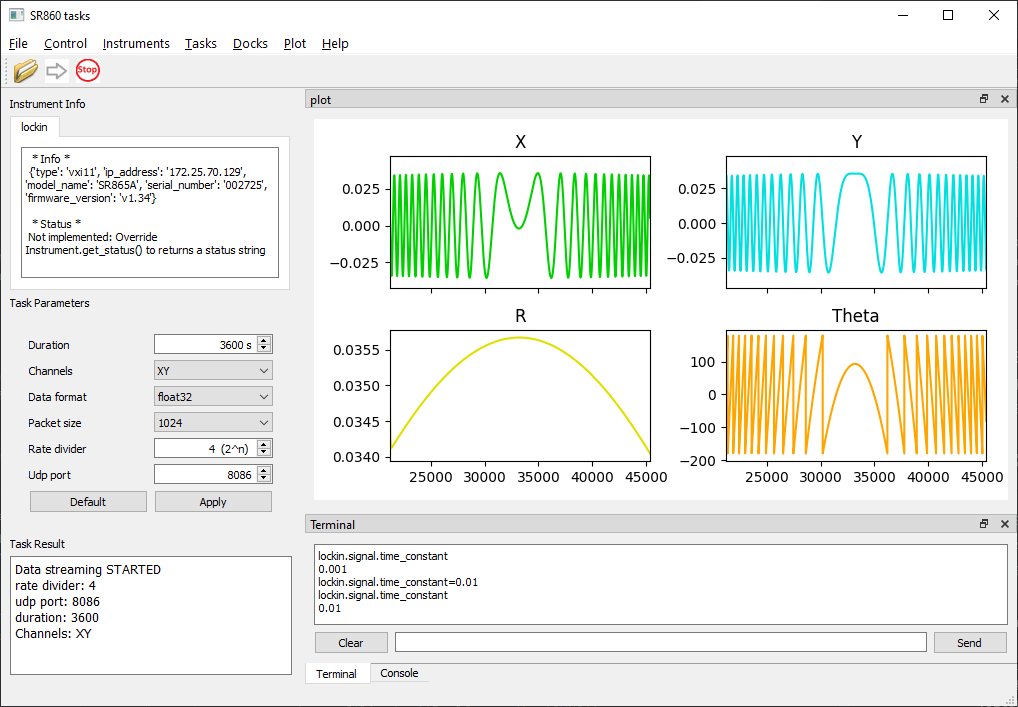
Run srsinst.sr860 as GUI application
If the Python Scripts directory is in PATH environment variable, Start the application by typing from the command line:
sr860
If not,
python -m srsinst.sr860
It will start the GUI application.
- Connect to an SR860 from the Instruments menu.
- Select a task from the Task menu.
- Press the green arrow to run the selected task.
Srsinst.sr860 is written based on srsgui. You can write your own task or modify an existing one and run it from the GUI application, too.
Use srsinst.sr860 as instrument driver
- Start a Python interpreter, a Jupyter notebook, or an editor of your choice to write a Python script.
- import the SR860 class from
sr860package. - Instantiate SR860 to connect to an SR860 unit.
|
C:\>python
Python 3.8.3 (tags/v3.8.3:6f8c832, May 13 2020, 22:37:02) [MSC v.1924 64 bit (AMD64)] on win32
Type "help", "copyright", "credits" or "license" for more information.
>>>
>>> from srsinst.sr860 import SR860
>>> lockin = SR860('vxi11', '172.25.70.129')
Stanford_Research_Systems,SR865A,002725,v1.34
SR860 comprises multiple subcomponents, their associated commands and class methods.
Component class has a convenience attribute dir to show its available attributes
and methods in the Python dictionary format.
>>> lockin.dir.keys()
dict_keys(['components', 'commands', 'methods'])
SR860 has more than 10 components holding their remote commands and methods to configure and acquire data from a SR860 unit.
>>> lockin.dir['components'].keys()
dict_keys(['reference', 'signal', 'output', 'aux',
'auto', 'display', 'chart', 'fft', 'scan', 'data',
'capture', 'stream', 'status'])
The components in SR860 are organized in the same categories with the programming chapter (Chapter 4) in the operational manual for easy reference.
Configure SR860 components
Let's configure the signal components. It has no subcomponents, and no associated class methods. Only commands are available.
>>> lockin.signal.dir
{'components': {},
 'commands': {'input_mode': ('DictCommand', 'IVMD'),
              'voltage_input_mode': ('DictCommand', 'ISRC'),
              'voltage_input_coupling': ('DictCommand', 'ICPL'),
              'voltage_input_shield': ('DictCommand', 'IGND'),
              'voltage_input_range': ('DictCommand', 'IRNG'),
              'voltage_sensitivity': ('DictCommand', 'SCAL'),
              'current_input_gain': ('DictCommand', 'ICUR'),
              'current_sensitivity': ('DictCommand', 'SCAL'),
              'time_constant': ('DictCommand', 'OFLT'),
              'strength_indicator': ('IntGetCommand', 'ILVL'),
              'filter_slope': ('DictCommand', 'OFSL'),
              'sync_filter': ('BoolCommand', 'SYNC'),
              'advanced_filter': ('BoolCommand', 'ADVFILT'),
              'equivalent_noise_bandwidth': ('FloatCommand', 'ENBW')},
 'methods': []}
>>>
If a command is a DictCommand instance, it uses mapped keys and values. Use get_command_info() to find out the mapping dictionary information.
>>> lockin.signal.get_command_info('input_mode')
{'command class': 'DictCommand',
 'raw remote command': 'IVMD',
 'conversion_dict': {'voltage': 0,
                     'current': 1},
 'index_dict': None}
>>>
The command locking.signal.input_mode encapsulates the raw command 'IVMD'
explained in the manual
chapter 4 page 111. Its integer values are mapped to 'voltage' and 'current'.
>>>
>>> lockin.signal.input_mode
'voltage'
>>> lockin.signal.input_mode = 'current'
>>>
>>> print(lockin.signal.input_mode)
current
>>>
You can configure other parameters in the similar way.
>>> lockin.signal.current_input_gain
1000000.0
>>>
>>> lockin.signal.current_sensitivity
2e-08
>>> lockin.signal.get_command_info('current_sensitivity')
{'command class': 'DictCommand',
 'raw remote command': 'SCAL',
 'conversion_dict': {1e-06: 0, 5e-07: 1, 2e-07: 2, 1e-07: 3,
                     5e-08: 4, 2e-08: 5, 1e-08: 6, 5e-09: 7,
                     2e-09: 8, 1e-09: 9, 5e-10: 10, 2e-10: 11,
                     1e-10: 12, 5e-11: 13, 2e-11: 14, 1e-11: 15,
                     5e-12: 16, 2e-12: 17, 1e-12: 18, 5e-13: 19,
                     2e-13: 20, 1e-13: 21, 5e-14: 22, 2e-14: 23,
                     1e-14: 24, 5e-15: 25, 2e-15: 26, 1e-15: 27},
 'index_dict': None}
>>>
>>> lockin.signal.current_input_sensitivity = 1e-7
>>> lockin.signal.current_input_sensitivity
1e-07
>>>
>>> lockin.signal.time_constant
0.001
>>>
Data acquisition with SR860
SR860 provides 3 ways to collect data from a unit: data transfer, data capture and data streaming. The usage of DataCapture and DataStreaming class is coded as tasks. Refer to the scripts under Tasks directory in srsinst.sr860 package.
Usage of DataTransfer component for simple data transfer is shown below.
>>> lockin.data.dir
{'components': {},
 'commands': {'channel_config': ('DictIndexCommand', 'CDSP'),
              'channel_value': ('FloatIndexGetCommand', 'OUTR'),
              'value': ('FloatIndexGetCommand', 'OUTP')},
 'methods': ['get_values', 'get_channel_values']}
>>>
>>> lockin.data.get_command_info('value')
{'command class': 'FloatIndexGetCommand',
 'raw remote command': 'OUTP',
 'conversion_dict': None,
 'index_dict': {'X': 0, 'Y': 1, 'R': 2, 'Theta': 3,
                'aux in 1': 4, 'aux in 2': 5, 'aux in 3': 6, 'aux in 4': 7,
                'X noise': 8, 'Y noise': 9, 'aux out 1': 10, 'aux out 2': 11,
                'Phase': 12, 'amplitude': 13, 'DC level': 14,
                'int. freq.': 15, 'ext. freq.': 16}}
>>>
>>> lockin.data.value['R']
1.717368435e-11
>>> lockin.data.value['Theta']
115.52829742
>>> lockin.data.value['int. freq.']
99999.5
>>>
Note that the interaction with SR860s shown above is also available from the terminal in the GUI application.
1 maintainer

Metadata
1 maintainer
Release files for srsinst.sr860 0.3.2
For a detailed explanation of source distributions (sdists) and built distributions (wheels), please see the package formats documentation.
Source distribution (sdist)
| File | Size | Uploaded | |
|---|---|---|---|
| srsinst_sr860-0.3.2.tar.gz | 259.6 kB | Details |
Built distribution (wheel)
| File | Interpreter | ABI | Platform | Reset |
|---|---|---|---|---|
| srsinst_sr860-0.3.2-py3-none-any.whl | Python 3 | none | any | Details |
Total release size: 307.1 kB
Release files / srsinst_sr860-0.3.2.tar.gz
| Download URL | srsinst_sr860-0.3.2.tar.gz |
|---|---|
| Size | 259.6 kB |
| Tags | Source |
|
SHA-256 checksum How to use checksums |
364811b03f926f67f9d50c26ac56413053e58f45f6232b7a8bf67494118b7f57
|
|
BLAKE2b-256 checksum How to use checksums |
5a781c04505226b4ae2f5b1dce477ec02c32cc71ec7afcfca1857803962bb4ee
|
| Upload date | |
|
Uploaded using Trusted Publishing? What is trusted publishing? |
No |
| Uploaded via |
twine/6.1.0 CPython/3.8.3
|
Release files / srsinst_sr860-0.3.2-py3-none-any.whl
| Download URL | srsinst_sr860-0.3.2-py3-none-any.whl |
|---|---|
| Size | 47.5 kB |
| Tags | Python 3 |
|
SHA-256 checksum How to use checksums |
94c0c6cfc60e6a249b23188f5502a5a0279fcf6d87bbce303f1999b945f8a5ac
|
|
BLAKE2b-256 checksum How to use checksums |
2df5666a31398a150be035c310eaa7b0a56275b5266c5c97e5f9e014a652a86b
|
| Upload date | |
|
Uploaded using Trusted Publishing? What is trusted publishing? |
No |
| Uploaded via |
twine/6.1.0 CPython/3.8.3
|














