
# Subtitle Searcher - SS #
Command line script for searching video subtitles using [OpenSubtitles.org](http://www.opensubtitles.org ) APIs.

[](https://pypi.python.org/pypi/ss/) [](https://pypi.python.org/pypi/ss/) [](https://pypi.python.org/pypi/ss/) [](https://travis-ci.org/nicoddemus/ss) [](https://coveralls.io/r/nicoddemus/ss)
## Features ##
Recursive search: Search subtitles for all videos inside a directory (and sub-directories), making it easy to download subtitles for TV shows packs.
Multiple languages: Search for more than one subtitle languages at the same time.
MKV embedding: Can automatically create an MKV file with embedded subtitles, which is easier to carry around. Requires [mkvmerge](http://www.bunkus.org/videotools/mkvtoolnix).
## Install ##
Install using [pip](http://www.pip-installer.org):
`bash pip install ss `
## Requirements ##
Python 2.6+, 3.3+, PyPy.
[guessit](https://github.com/wackou/guessit).
[mkvmerge](http://www.bunkus.org/videotools/mkvtoolnix) (optional).
## Usage ##
Pass the name of one or more video files or directories:
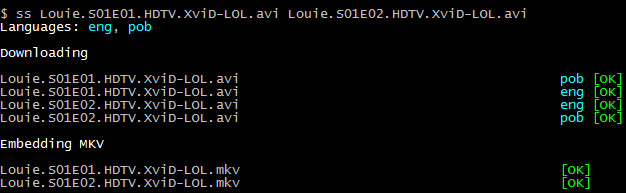
It will try to find the best match online, and automatically download and move the subtitles to the same folder as the video files.
### Configuration ###
Configuration is stored in ~/.ss.ini (or C:Users<user>.ss.ini on Windows) as a standard ini file:
`ini [ss] languages=eng, pob recursive=yes skip=yes mkv=no `
The following options are available:
languages: 3 letter codes with the languages to search subtitles for, separated by commas. For a full list of available languages, see http://www.opensubtitles.org/addons/export_languages.php.
recursive: if directories should be recursively searched for movies (yes|no).
skip: if movies that already have subtitles should be skipped (yes|no).
mkv: if yes, it will automatically create a [mkv](http://www.matroska.org/) file with embedded video and subtitles. Utility [mkvmerge](http://www.bunkus.org/videotools/mkvtoolnix) must be available in the $PATH environment variable (yes|no).
parallel_jobs: number of concurrent threads used to download subtitles and create mkv files. Defaults to 8.
## Support ##
If you find any issues, please report it in the [issues page](https://github.com/nicoddemus/ss/issues).
## Changelog ##
See the [releases page](https://github.com/nicoddemus/ss/releases).
1 maintainer

Release files for ss 1.6.0
For a detailed explanation of source distributions (sdists) and built distributions (wheels), please see the package formats documentation.
Source distribution (sdist)
| File | Size | Uploaded | |
|---|---|---|---|
| ss-1.6.0.zip | 21.8 kB | Details |
Built distribution (wheel)
| File | Interpreter | ABI | Platform | Reset |
|---|---|---|---|---|
| ss-1.6.0-py2.py3-none-any.whl | Python 2, Python 3 | none | any | Details |
Total release size: 61.7 kB
Release files / ss-1.6.0.zip
| Download URL | ss-1.6.0.zip |
|---|---|
| Size | 21.8 kB |
| Tags | Source |
|
SHA-256 checksum How to use checksums |
53e6a5121ea35bb7dd9ae6a1f1ae26e3d532133406a2e9d1f9bbecf6e66c65ae
|
|
BLAKE2b-256 checksum How to use checksums |
ccac672e9b0287d97d382847b0f2668857b4677991d7b01d244049e78737a2f1
|
| Upload date | |
|
Uploaded using Trusted Publishing? What is trusted publishing? |
No |
Release files / ss-1.6.0-py2.py3-none-any.whl
| Download URL | ss-1.6.0-py2.py3-none-any.whl |
|---|---|
| Size | 39.9 kB |
| Tags | Python 2 Python 3 |
|
SHA-256 checksum How to use checksums |
1394d4d39733346bfcdbd8460cfcc3a425223e3f8fbc0ebf474b611995f18418
|
|
BLAKE2b-256 checksum How to use checksums |
83106495ae967813d357e43bc68cbe874ee29653e9497e07840beefba4d2d565
|
| Upload date | |
|
Uploaded using Trusted Publishing? What is trusted publishing? |
No |
















](https://pypi.python.org/pypi/ss/)
](https://pypi.python.org/pypi/ss/)
](https://pypi.python.org/pypi/ss/)
](https://travis-ci.org/nicoddemus/ss)
](https://coveralls.io/r/nicoddemus/ss)
