
st-social-media-links
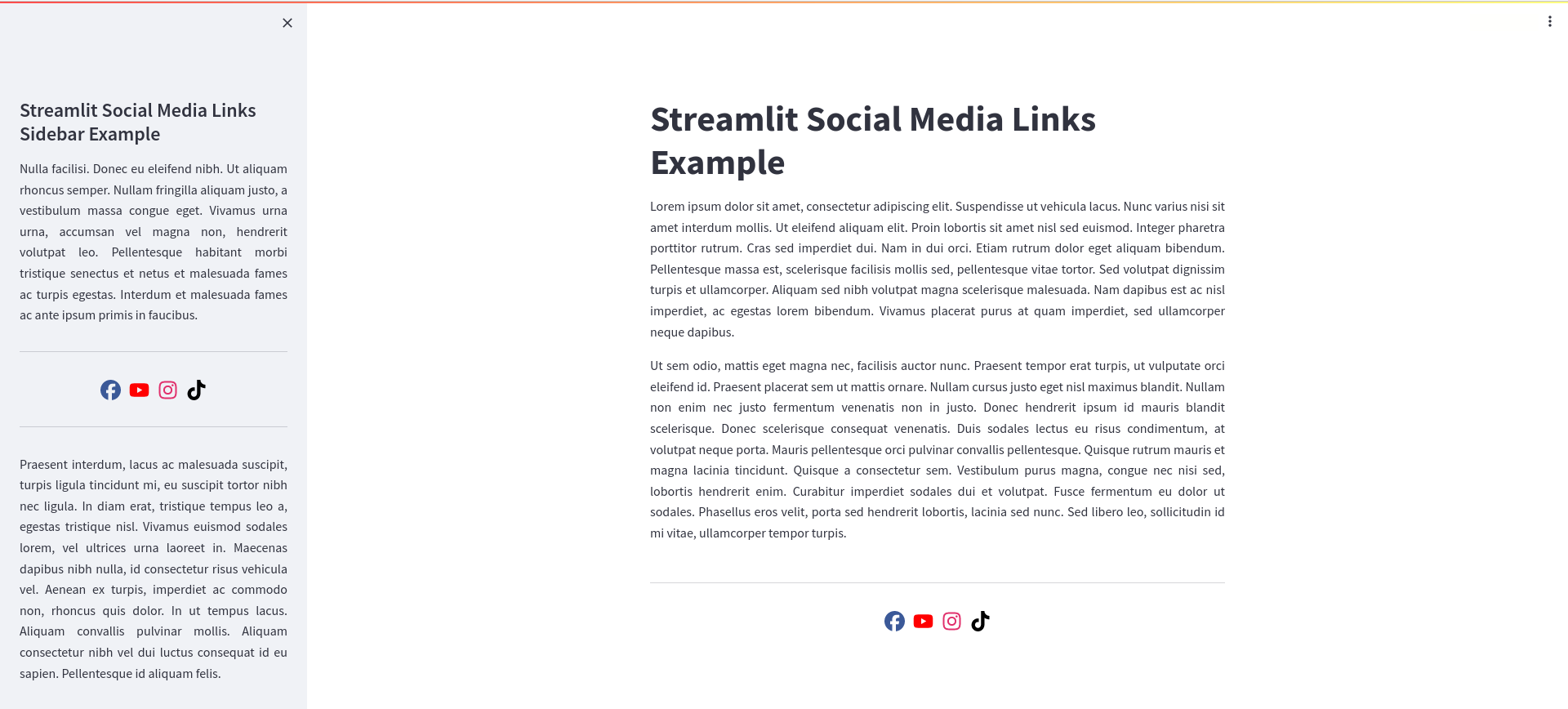
About
A Python package designed to assist in displaying social media links within Streamlit apps.
Install
pip install st-social-media-links
Usage
from st_social_media_links import SocialMediaIcons

social_media_links = [
    "https://www.facebook.com/ThisIsAnExampleLink",
    "https://www.youtube.com/ThisIsAnExampleLink",
    "https://www.instagram.com/ThisIsAnExampleLink",
    "https://www.github.com/jlnetosci/st-social-media-links",
]

social_media_icons = SocialMediaIcons(social_media_links)

social_media_icons.render()

Customization options
SocialMediaIcons takes two arguments:
-
social_media_links: a list with web links. You can choose the order of the icons through the order of the web links, each icon will be displayed in its respective position. -
colors: an optional list of custom colors for the icons. If it is not given, icons show their default color. If given, it should have the same length associal_media_links, if it does not, all icons will show their default color. Accepted values include HTML color names, as well as HEX color codes.
from st_social_media_links import SocialMediaIcons

social_media_links = [
    "https://www.facebook.com/ThisIsAnExampleLink",
    "https://www.youtube.com/ThisIsAnExampleLink",
    "https://www.instagram.com/ThisIsAnExampleLink",
    "https://www.github.com/jlnetosci/st-social-media-links",
]

colors = ["#000000", "Brown", "SteelBlue", "Lime"]

social_media_icons = SocialMediaIcons(social_media_links, colors)

social_media_icons.render()

If you do not want to customize all colors, you can use None at any index in colors and that icon will show its default color.
from st_social_media_links import SocialMediaIcons

social_media_links = [
    "https://www.facebook.com/ThisIsAnExampleLink",
    "https://www.youtube.com/ThisIsAnExampleLink",
    "https://www.instagram.com/ThisIsAnExampleLink",
    "https://www.github.com/jlnetosci/st-social-media-links",
]

colors = ["#000000", None, "SteelBlue", None]

social_media_icons = SocialMediaIcons(social_media_links, colors)

social_media_icons.render()

render has two optional arguments:
-
sidebar -
justify_content
sidebar is a boolean and therefore can be True or False. Its default value is False. It is possible to render with both options simultaneously, if you want to display the icons with social media links in both the main-page and the sidebar, i.e.:
social_media_icons.render(sidebar=False) #will render in the main-page
social_media_icons.render(sidebar=True) #will render in the sidebar
If you want to have the icons exclusively in the sidebar, you only need to render it once:
social_media_icons.render(sidebar=True) #will render in the sidebar
justify_content gives some freedom regarding icon placement. In brief, it completes the CSS justify-content property used, and therefore may take the same options e.g. center, start, end, space-between, space-around, space-evenly, etc. Its default value is center. justify_content can have different values for separate renderings:
# Rendering in the main-page with icons centered
social_media_icons.render(sidebar=False, justify_content="center")

# Rendering in the sidebar with icons evenly spaced
social_media_icons.render(sidebar=True, justify_content="space-evenly")
Platforms supported
In version 0.1.5, st-social-media-links supports links to:
Bluesky, Buy Me a Coffee, Discord, Facebook, Flickr, Github, Gitlab, Instagram, KNIME, Ko-fi, Linkedin, "mailto:", Mastodon (mastodon.social instance only, others may be added if requested), Medium, Patreon, Pinterest, Reddit, Skype, Slack, Snapchat, Spotify, Stack Overflow, Telegram, Threads, TikTok, TradingView, Tumblr, Twitch, Twitter, Vimeo, Whatsapp, X, Youtube, and Zenodo.
Tips
When paired with st.divider() the icon sets look very aesthetically pleasing.
Even though I have not tested it much, add_vertical_space might help you achieve the positioning you want for your social media icons.
Acknowlegments
For this project, I do have to acknowledge Font Awesome for their huge selection of icons and the ease with which they implemented. The Awesome in their name is well deserved!
Thanks to Raúl Pérula Martínez (@raulperula) for suggesting the addition of Medium. Thanks to Pedro Damasceno (@pcDamasceno) for suggesting the addition of Buy Me a Coffee, Flickr, Skype, Slack, Snapchat, Spotify, Stack Overflow, Telegram, TradingView, Vimeo, and Whatsapp. Hal's (@halmgillman) fork inspired the addition of "mailto:" and Mastodon. Thanks to Yojana Gadiya (@YojanaGadiya) for suggesting the addition of KNIME and Zenodo.
1 maintainer

Metadata
1 maintainer
Release files for st-social-media-links 0.1.5
For a detailed explanation of source distributions (sdists) and built distributions (wheels), please see the package formats documentation.
Source distribution (sdist)
| File | Size | Uploaded | Provenance | Actions |
|---|---|---|---|---|
| st_social_media_links-0.1.5.tar.gz | 18.8 kB | Without provenance | Details for st_social_media_links-0.1.5.tar.gz |
Built distribution (wheel)
| File | Interpreter | ABI | Platform | Actions Reset |
|---|---|---|---|---|
| st_social_media_links-0.1.5-py3-none-any.whl | Python 3 | none | any | Details for st_social_media_links-0.1.5-py3-none-any.whl |
Total release size: 35.4 kB
Security for st-social-media-links 0.1.5
Provenance
Provenance describes where a file came from. On PyPI, provenance is shared via attestations, which provide a verifiable record of the build or publishing details. View details, limitations and caveats.
No provenance found
None of the files in this release were uploaded with provenance metadata.
A note on package security
PyPI is a repository for distributing packages, not a service for auditing them. While third-party security researchers and our staff do their best to detect and remove malicious packages, PyPI cannot guarantee the quality, security or suitability of any given package.
To learn more about protecting yourself from malicious actors, visit our package security documentation.














