
Stock Position Calculator


A simple program to manage risk and calculate the right amount of shares to buy.
Install with pip
To install:
$ pip install stock-position-calc
To upgrade:
$ pip install stock-position-calc --upgrade
For some Linux distributions you will need to install the tkinter package:
$ sudo apt update
$ sudo apt install python3-tk
Launch program:
$ stock-position-calc
Or create a file to run the program
Windows:
$ git clone https://github.com/zaironjacobs/stock-position-calc
$ cd stock-position-calc
$ pipenv install --dev
$ pipenv run pyinstaller stock_position_calc/app.py --onefile --windowed
Linux:
$ git clone https://github.com/zaironjacobs/stock-position-calc
$ cd stock-position-calc
$ pipenv install --dev
$ pipenv run pyinstaller stock_position_calc/app.py --onefile --windowed
$ sudo chmod +x dist/app
The output file can be found in the dist folder.
Usage
Fixed Cash Amount:
Will calculate the number of shares solely based on the amount you want to invest in a trade. Example: You have $10,000 to invest in a stock and you would like to buy shares of that stock when the price falls down to $20. The amount of shares you will buy will be 500 ($10,000 / $20).
Fixed Risk:
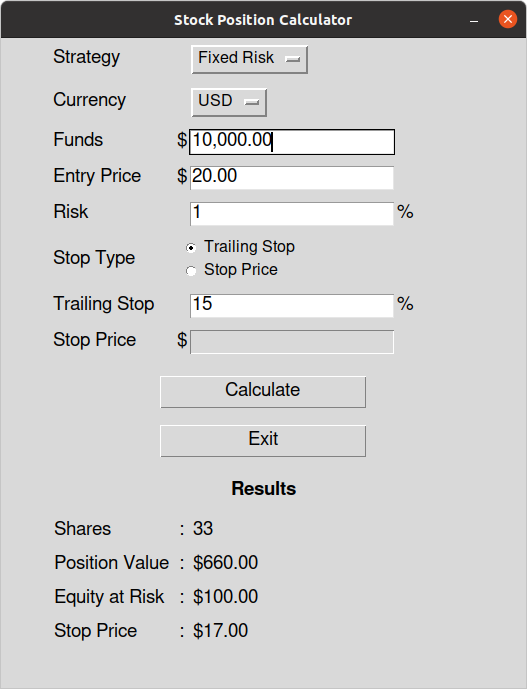
Will calculate the number of shares based on how much you are willing to risk. Example: You have an account size of $10,000 and you would like to buy shares of a stock when the price falls down to $20. You decide on a stop loss of 15% ($17) and you want to risk only 1% ($100) of your account size. The amount of shares you will buy will be 33 ($100 / ($20 - $17)).
1 maintainer

Metadata
1 maintainer
Release files for stock-position-calc 1.1
For a detailed explanation of source distributions (sdists) and built distributions (wheels), please see the package formats documentation.
Source distribution (sdist)
| File | Size | Uploaded | |
|---|---|---|---|
| stock-position-calc-1.1.tar.gz | 8.5 kB | Details |
Release files / stock-position-calc-1.1.tar.gz
| Download URL | stock-position-calc-1.1.tar.gz |
|---|---|
| Size | 8.5 kB |
| Tags | Source |
|
SHA-256 checksum How to use checksums |
7a0bb3e2e422fe411a9eed0eece3c409123992492713fb7d2c26376325ba9281
|
|
BLAKE2b-256 checksum How to use checksums |
edf33ce33ff9066fe43a4d47b7f91d22164fc9e199e34b440ef226fa34b368f4
|
| Upload date | |
|
Uploaded using Trusted Publishing? What is trusted publishing? |
No |
| Uploaded via |
twine/3.3.0 pkginfo/1.7.0 requests/2.25.1 setuptools/49.2.1 requests-toolbelt/0.9.1 tqdm/4.56.2 CPython/3.9.1
|














